
iOS - UIButton(UIEdgeInsets):讓文字與圖片上下垂直居中對齊
編輯:iOS 相關教學
UIEdgeInsets
typedef struct UIEdgeInsets {
    CGFloat top, left, bottom, right; // 各邊的 inset 數值,可為負值以「outset」
} UIEdgeInsets;
在 UIButton 中,有三個對 EdgeInsets 的設定:contentEdgeInsets、titleEdgeInsets、imageEdgeInsets
@property (nonatomic) UIEdgeInsets contentEdgeInsets; // 預設 UIEdgeInsetsZero
@property (nonatomic) UIEdgeInsets titleEdgeInsets;   // 預設 UIEdgeInsetsZero
@property (nonatomic) UIEdgeInsets imageEdgeInsets;   // 預設 UIEdgeInsetsZero
UIEdgeInsetsMake
裡面的四個參數分別表示距上、左、下、右邊界的距離,預設都為零,此時 title/image 位於 button 正中央。
UIKIT_STATIC_INLINE UIEdgeInsets UIEdgeInsetsMake(CGFloat top, CGFloat left, CGFloat bottom, CGFloat right) {
    UIEdgeInsets insets = {top, left, bottom, right};
    return insets;
}
以下範例示範如何讓 button 上的文字與圖片呈上下垂直排列:
self.view.backgroundColor = [UIColor blackColor];

UIButton *button = [UIButton buttonWithType:UIButtonTypeCustom]; // button 類型
button.frame = CGRectMake(100, 100, 90, 90);                     // button 的 frame
button.backgroundColor = [UIColor cyanColor];                    // 背景顏色

// 在 UIButton 中有三個對 EdgeInsets 的設定
[button setImage:[UIImage imageNamed:@"IconHome@2x.png"] forState:UIControlStateNormal]; // 添加 image
// 設定 image 在 button 上的位置(上、左、下、右),這裡可寫負值,如 -5 則向上移動 5 像素
button.imageEdgeInsets = UIEdgeInsetsMake(5, 13, 21, button.titleLabel.bounds.size.width);

[button setTitle:@"首頁" forState:UIControlStateNormal];        // 設定 title
button.titleLabel.font = [UIFont systemFontOfSize:16];          // 字體大小
button.titleLabel.textAlignment = NSTextAlignmentCenter;        // 文字居中
[button setTitleColor:[UIColor whiteColor] forState:UIControlStateNormal];      // 一般狀態白色
[button setTitleColor:[UIColor grayColor] forState:UIControlStateHighlighted];  // 選中狀態灰色
// 設定 title 在 button 上的位置(上、左、下、右)
button.titleEdgeInsets = UIEdgeInsetsMake(71, -button.titleLabel.bounds.size.width - 50, 0, 0);

// 設定 content 會讓 title 與 image 一起變化
// [button setContentEdgeInsets:UIEdgeInsetsMake(70, 0, 0, 0)];

[button addTarget:self action:@selector(tap) forControlEvents:UIControlEventTouchUpInside];
[self.view addSubview:button];

// button 回應的事件
- (void)tap {
    NSLog(@"tap a button");
    UIAlertView *alertView = [[UIAlertView alloc] initWithTitle:@"hello" message:@"willingseal"
                                                       delegate:self cancelButtonTitle:@"ok"
                                              otherButtonTitles:nil];
    [alertView show];
}
效果圖(此處使用的 image 為 64×64):
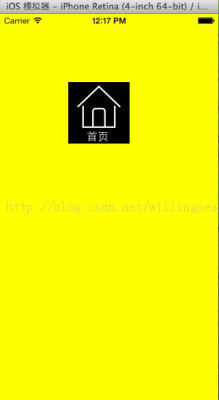
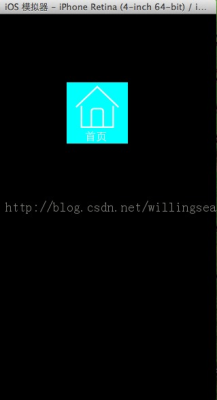
——
其實做法很簡單:只要那個 button 的背景圖片中同時包含圖片與文字就可以了,找個美工幫忙處理一下應該就很逼真了。
- 上一篇文章: 用 Storyboard 預覽 UI 在不同螢幕上的運行效果
- 下一篇文章: iOS列表優化實戰:延遲加載與下拉刷新、上拉加載的原理實現