
iOS音樂播放器實戰:音頻工具類封裝與播放進度精細控制
一、控制器間的數據傳遞
兩個控制器之間傳遞數據,可以有多種思路。直接把單個音樂模型傳過去往往不夠用;把整个數組傳過去又顯得笨重。更好的做法是設置數據源,讓播放控制器的數據源指向列表控制器,這樣任何實現了協議的對象都能勝任,耦合度低。而最優雅的方案,是把整個項目會用到的音頻資源交給一個工具類統一管理,各處直接向它索要數據即可。
二、封裝音頻數據工具類
新建一個工具類來管理音樂數據(音樂模型):
YYMusicTool.h:
#import <Foundation/Foundation.h>
@class YYMusicModel;
@interface YYMusicTool : NSObject
+ (NSArray *)musics; //所有歌曲
+ (YYMusicModel *)playingMusic; //正在播放的歌曲
+ (void)setPlayingMusic:(YYMusicModel *)playingMusic;
+ (YYMusicModel *)nextMusic; //下一首
+ (YYMusicModel *)previousMusic; //上一首
@end
YYMusicTool.m:
#import "YYMusicTool.h"
#import "YYMusicModel.h"
#import "MJExtension.h"
@implementation YYMusicTool
static NSArray *_musics;
static YYMusicModel *_playingMusic;
+(NSArray *)musics
{
if (_musics==nil) {
_musics=[YYMusicModel objectArrayWithFilename:@"Musics.plist"];
}
return _musics;
}
+(void)setPlayingMusic:(YYMusicModel *)playingMusic
{
//傳入為空或不在曲庫中則直接返回;與當前播放相同也直接返回
if (!playingMusic || ![[self musics]containsObject:playingMusic]) return;
if (_playingMusic == playingMusic) return;
_playingMusic=playingMusic;
}
+(YYMusicModel *)playingMusic { return _playingMusic; }
+(YYMusicModel *)nextMusic
{
int nextIndex = 0;
if (_playingMusic) {
int playingIndex = [[self musics] indexOfObject:_playingMusic];
nextIndex = playingIndex+1;
if (nextIndex>=[self musics].count) { nextIndex=0; } //循環到第一首
}
return [self musics][nextIndex];
}
+(YYMusicModel *)previousMusic
{
int previousIndex = 0;
if (_playingMusic) {
int playingIndex = [[self musics] indexOfObject:_playingMusic];
previousIndex = playingIndex-1;
if (previousIndex<0) { previousIndex=[self musics].count-1; } //循環到最後一首
}
return [self musics][previousIndex];
}
@end
三、封裝音樂播放工具類
YYAudioTool.h:
#import <Foundation/Foundation.h>
#import <AVFoundation/AVFoundation.h>
@interface YYAudioTool : NSObject
+(AVAudioPlayer *)playMusic:(NSString *)filename;
+(void)pauseMusic:(NSString *)filename;
+(void)stopMusic:(NSString *)filename;
+(void)playSound:(NSString *)filename;
+(void)disposeSound:(NSString *)filename;
@end
YYAudioTool.m:
#import "YYAudioTool.h"
@implementation YYAudioTool
static NSMutableDictionary *_musicPlayers; //存放所有音樂播放器
static NSMutableDictionary *_soundIDs; //存放所有音效ID
+(NSMutableDictionary *)musicPlayers
{
if (_musicPlayers==nil) { _musicPlayers=[NSMutableDictionary dictionary]; }
return _musicPlayers;
}
+(NSMutableDictionary *)soundIDs
{
if (_soundIDs==nil) { _soundIDs=[NSMutableDictionary dictionary]; }
return _soundIDs;
}
+(AVAudioPlayer *)playMusic:(NSString *)filename
{
if (!filename) return nil;
AVAudioPlayer *player=[self musicPlayers][filename];
if (!player) {
NSURL *url=[[NSBundle mainBundle]URLForResource:filename withExtension:nil];
if (!url) return nil;
player=[[AVAudioPlayer alloc]initWithContentsOfURL:url error:nil];
if (![player prepareToPlay]) return nil;
[self musicPlayers][filename]=player;
}
if (![player isPlaying]) { [player play]; }
return player;
}
+(void)pauseMusic:(NSString *)filename
{
if (!filename) return;
AVAudioPlayer *player=[self musicPlayers][filename];
[player pause]; //player為空等同[nil pause],無需額外判斷
}
+(void)stopMusic:(NSString *)filename
{
if (!filename) return;
AVAudioPlayer *player=[self musicPlayers][filename];
[player stop];
[[self musicPlayers] removeObjectForKey:filename];
}
+(void)playSound:(NSString *)filename
{
if (!filename) return;
SystemSoundID soundID=[[self soundIDs][filename] unsignedIntegerValue];
if (!soundID) {
NSURL *url=[[NSBundle mainBundle]URLForResource:filename withExtension:nil];
if (!url) return;
AudioServicesCreateSystemSoundID((__bridge CFURLRef)(url), &soundID);
[self soundIDs][filename]=@(soundID);
}
AudioServicesPlaySystemSound(soundID);
}
+(void)disposeSound:(NSString *)filename
{
if (!filename) return;
SystemSoundID soundID=[[self soundIDs][filename] unsignedIntegerValue];
if (soundID) {
AudioServicesDisposeSystemSoundID(soundID);
[[self soundIDs]removeObjectForKey:filename];
}
}
@end
四、播放控制器中的處理
YYPlayingViewController.m:
#import "YYPlayingViewController.h"
#import "YYMusicTool.h"
#import "YYMusicModel.h"
#import "YYAudioTool.h"
@implementation YYPlayingViewController
//公共方法:展示播放界面
-(void)show
{
//1.先禁用整個app的點擊
UIWindow *window=[UIApplication sharedApplication].keyWindow;
window.userInteractionEnabled=NO;
//2.添加播放界面,覆蓋整個窗口
self.view.frame=window.bounds;
self.view.hidden=NO;
[window addSubview:self.view];
//3.檢測是否換歌
if (self.playingMusic!=[YYMusicTool playingMusic]) {
[self RresetPlayingMusic];
}
//4.動畫顯示
self.view.y=self.view.height;
[UIView animateWithDuration:0.25 animations:^{
self.view.y=0;
} completion:^(BOOL finished) {
[self starPlayingMusic];
window.userInteractionEnabled=YES;
}];
}
//重置正在播放的音樂
-(void)RresetPlayingMusic
{
self.iconView.image=[UIImage imageNamed:@"play_cover_pic_bg"];
self.songLabel.text=nil;
self.singerLabel.text=nil;
[YYAudioTool stopMusic:self.playingMusic.filename];
}
//開始播放
-(void)starPlayingMusic
{
if (self.playingMusic==[YYMusicTool playingMusic]) return;
self.playingMusic=[YYMusicTool playingMusic];
self.iconView.image=[UIImage imageNamed:self.playingMusic.icon];
self.songLabel.text=self.playingMusic.name;
self.singerLabel.text=self.playingMusic.singer;
[YYAudioTool playMusic:self.playingMusic.filename];
}
//返回按鈕
- (IBAction)exit {
UIWindow *window=[UIApplication sharedApplication].keyWindow;
window.userInteractionEnabled=NO;
[UIView animateWithDuration:0.25 animations:^{
self.view.y=window.height;
} completion:^(BOOL finished) {
window.userInteractionEnabled=YES;
self.view.hidden=YES;
}];
}
@end
關鍵細節:要先讓用戶看到界面上的所有內容,再開始播放歌曲。此外,一般的播放器都需要做重置操作——從一首歌切換到另一首時,應先清除上一首的信息,因此在show動畫顯示之前,要檢測是否換了歌曲,若換了則先做一次重置。
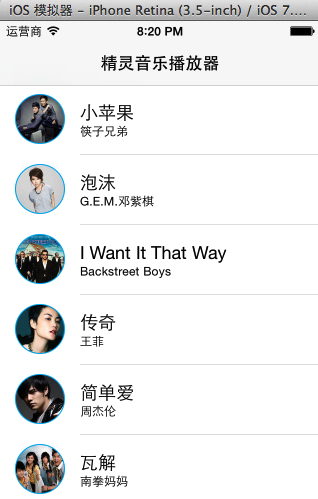
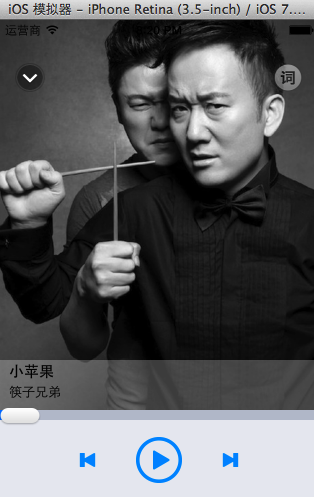
實現效果(能順利切換和播放歌曲):

五、補充:列表控制器
YYMusicsViewController.m 主要實現表格展示與cell點擊:
-(NSInteger)tableView:(UITableView *)tableView numberOfRowsInSection:(NSInteger)section
{
return [YYMusicTool musics].count;
}
-(UITableViewCell *)tableView:(UITableView *)tableView cellForRowAtIndexPath:(NSIndexPath *)indexPath
{
YYMusicCell *cell=[YYMusicCell cellWithTableView:tableView];
cell.music=[YYMusicTool musics][indexPath.row];
return cell;
}
-(void)tableView:(UITableView *)tableView didSelectRowAtIndexPath:(NSIndexPath *)indexPath
{
[tableView deselectRowAtIndexPath:indexPath animated:YES];
[YYMusicTool setPlayingMusic:[YYMusicTool musics][indexPath.row]];
[self.playingViewController show];
}
六、播放進度的細節控制
接下來實現帶進度條與拖動滑塊的完整播放器。
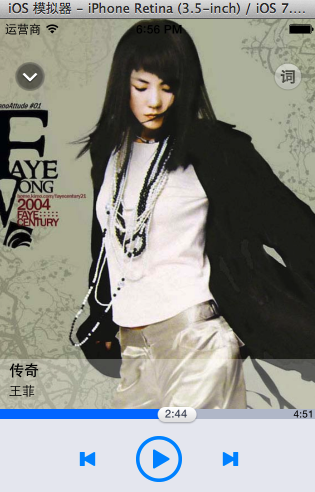
在原有基礎上,需要新增進度條、滑塊、當前播放時長、播放器對象與定時器等屬性,並實現以下關鍵邏輯:
1.把時間轉為時間字符串:
-(NSString *)strWithTime:(NSTimeInterval)time
{
int minute=time / 60;
int second=(int)time % 60;
return [NSString stringWithFormat:@"%d:%d",minute,second];
}
2.定時器控制(添加、移除、更新進度):
-(void)addCurrentTimeTimer
{
[self updateCurrentTime]; //先更新一次,保證及時性
self.CurrentTimeTimer=[NSTimer scheduledTimerWithTimeInterval:1.0 target:self selector:@selector(updateCurrentTime) userInfo:nil repeats:YES];
[[NSRunLoop mainRunLoop]addTimer:self.CurrentTimeTimer forMode:NSRunLoopCommonModes];
}
-(void)removeCurrentTime
{
[self.CurrentTimeTimer invalidate];
self.CurrentTimeTimer=nil; //移除後清空
}
-(void)updateCurrentTime
{
double progress=self.player.currentTime/self.player.duration;
CGFloat sliderMaxX=self.view.width-self.slider.width;
self.slider.x=sliderMaxX*progress;
[self.slider setTitle:[self strWithTime:self.player.currentTime] forState:UIControlStateNormal];
self.progressView.width=self.slider.center.x;
}
定時器處理的注意事項:移除定時器後要清空;看不到界面時停止定時器;開始播放時若與當前歌曲相同,添加定時器後直接返回;重置音樂時停止定時器。
3.點擊與拖動進度條
(1)點擊進度條——先添加單擊手勢識別器並拖線到控制器:
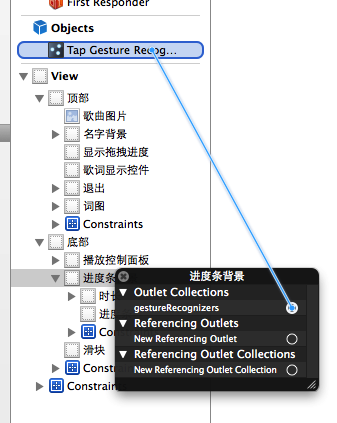
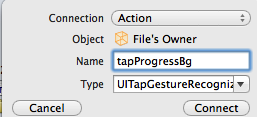
- (IBAction)tapProgressBg:(UITapGestureRecognizer *)sender {
CGPoint point=[sender locationInView:sender.view];
self.player.currentTime=(point.x/sender.view.width)*self.player.duration;
[self updateCurrentTime];
}
(2)拖拽滑塊——添加拖拽手勢並拖線:
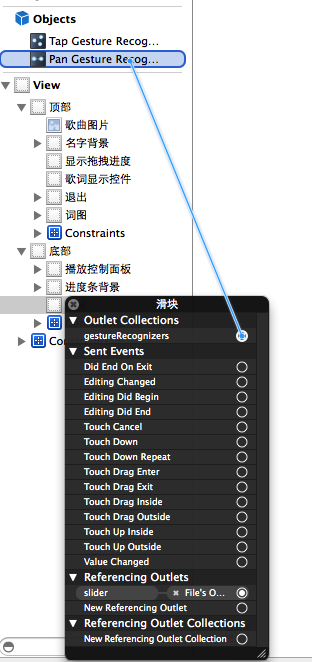

- (IBAction)panSlider:(UIPanGestureRecognizer *)sender {
CGPoint t=[sender translationInView:sender.view];
[sender setTranslation:CGPointZero inView:sender.view];
self.slider.x+=t.x;
self.progressView.width=self.slider.center.x;
CGFloat sliderMaxX=self.view.width-self.slider.width;
double progress=self.slider.x/sliderMaxX;
NSTimeInterval time=self.player.duration*progress;
[self.slider setTitle:[self strWithTime:time] forState:UIControlStateNormal];
//拖動開始時停定時器,結束時設置播放時間並重開定時器
if (sender.state==UIGestureRecognizerStateBegan) {
[self removeCurrentTime];
}else if(sender.state==UIGestureRecognizerStateEnded){
self.player.currentTime=time;
[self addCurrentTimeTimer];
}
}
通過這套封裝,播放器便能實現歌曲切換、進度實時更新,以及點擊或拖動進度條精準定位播放位置等完整功能。