
仿 iOS 彈簧效果的 Android YLListView 元件解析
編輯:iOS 相關教學
項目裡需要一個類似 Day One 首頁那種效果的列表:頂部和底部可以下拉、上拉跟手拉伸,松手後帶彈簧回彈動畫。Day One 目前只有 iOS 端,我在網上翻了一圈開源庫,沒找到完全合適的,最後只能自己動手寫了一個。
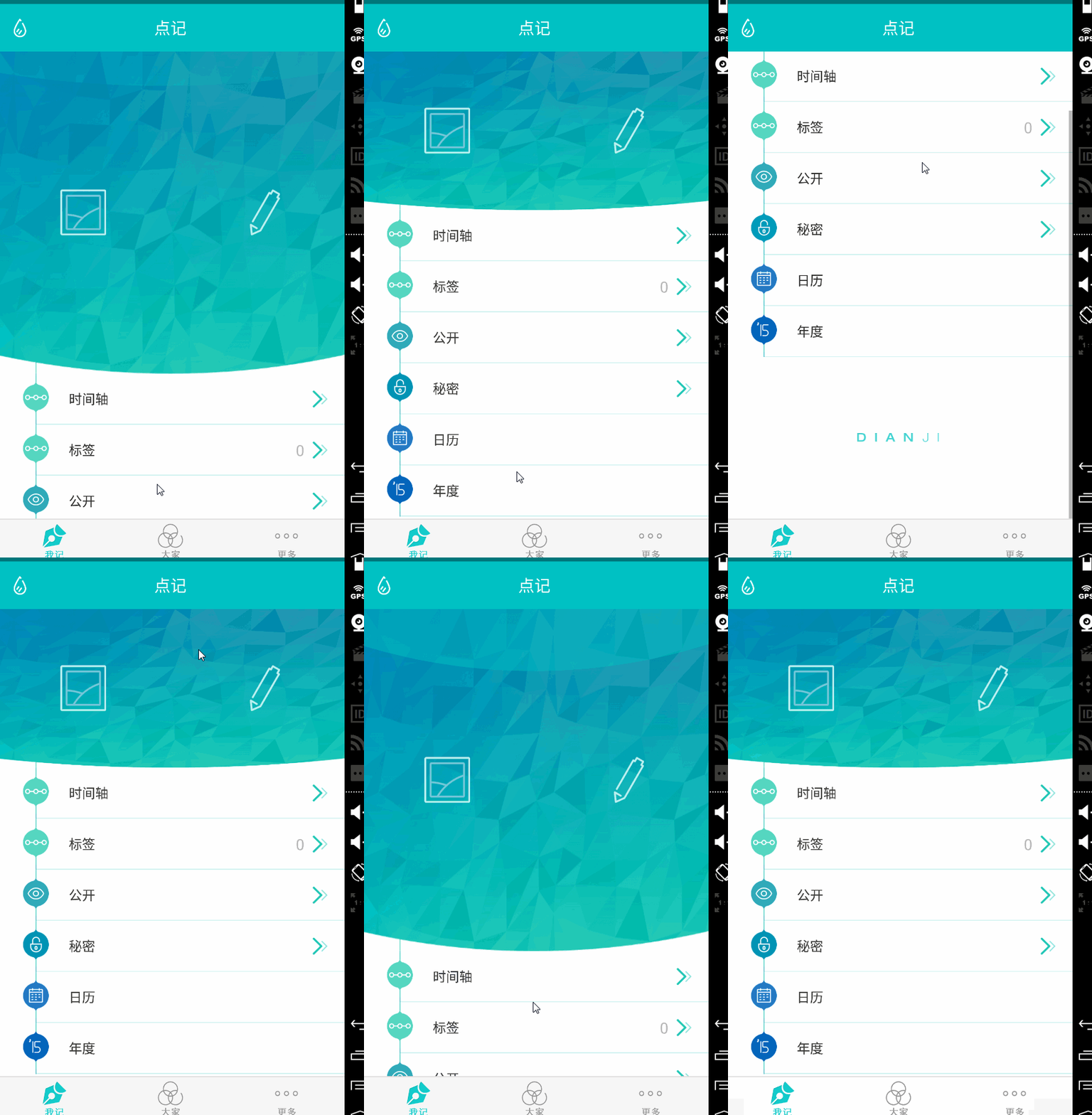
實現思路其實不複雜:本質上就是控制 ListView 頭部和底部的可視高度。用 RecyclerView 當然也能做,只是添加頭尾稍麻煩一些,點擊事件的處理也不如 ListView 直觀,所以最終選擇基於 ListView 實現。
一、依賴與使用方式
compile 'com.a520wcf.yllistview:YLListView:1.0.1'
布局
有一個容易被忽略的細節:android:layout_height 建議寫成 match_parent。如果寫死高度,ListView 每次滑動都可能要重新計算條目高度,會明顯增加 CPU 開銷。
<com.a520wcf.yllistview.YLListView
    android:divider="@android:color/transparent"
    android:id="@+id/listView"
    android:layout_width="match_parent"
    android:layout_height="match_parent" />
代碼
private YLListView listView;

@Override
protected void onCreate(Bundle savedInstanceState) {
    super.onCreate(savedInstanceState);
    setContentView(R.layout.activity_main);

    listView = (YLListView) findViewById(R.id.listView);

    // 不添加也有默認的頭和底
    View topView = View.inflate(this, R.layout.top, null);
    listView.addHeaderView(topView);

    View bottomView = new View(getApplicationContext());
    listView.addFooterView(bottomView);

    // 頂部和底部也可以固定最終高度,不固定則使用布局本身的高度
    listView.setFinalBottomHeight(100);
    listView.setFinalTopHeight(100);

    listView.setAdapter(new DemoAdapter());

    // YLListView 默認帶頭和底,處理點擊事件時位置要減去頭部數量
    listView.setOnItemClickListener(new AdapterView.OnItemClickListener() {
        @Override
        public void onItemClick(AdapterView<?> parent, View view, int position, long id) {
            position = position - listView.getHeaderViewsCount();
        }
    });
}
二、源碼解析
整個庫只有一個類,不需要打包依賴,直接把這個文件複製到項目裡就能用。
package com.a520wcf.yllistview;

import android.content.Context;
import android.util.AttributeSet;
import android.view.MotionEvent;
import android.view.View;
import android.view.ViewTreeObserver.OnGlobalLayoutListener;
import android.view.animation.DecelerateInterpolator;
import android.widget.AbsListView;
import android.widget.ListView;
import android.widget.Scroller;

public class YLListView extends ListView implements AbsListView.OnScrollListener {

    private Scroller mScroller; // 用於回彈滾動
    private float mLastY = -1;
    private int mScrollBack;
    private final static int SCROLLBACK_HEADER = 0;
    private final static int SCROLLBACK_FOOTER = 1;
    private final static int SCROLL_DURATION = 400;   // 回彈耗時
    private final static float OFFSET_RADIO = 1.8f;   // 阻尼係數,拉動越拉越費力
    private int mTotalItemCount;
    private View mHeaderView;   // 頂部視圖
    private View mFooterView;   // 底部視圖
    private int finalTopHeight;
    private int finalBottomHeight;

    public YLListView(Context context) {
        super(context);
        initWithContext(context);
    }

    public YLListView(Context context, AttributeSet attrs) {
        super(context, attrs);
        initWithContext(context);
    }

    public YLListView(Context context, AttributeSet attrs, int defStyle) {
        super(context, attrs, defStyle);
        initWithContext(context);
    }

    private void initWithContext(Context context) {
        mScroller = new Scroller(context, new DecelerateInterpolator());
        super.setOnScrollListener(this);

        this.getViewTreeObserver().addOnGlobalLayoutListener(new OnGlobalLayoutListener() {
            @Override
            public void onGlobalLayout() {
                // 用戶沒有設置頭部時,補一個默認的空視圖
                if (mHeaderView == null) {
                    addHeaderView(new View(getContext()));
                }
                if (mFooterView == null) {
                    addFooterView(new View(getContext()));
                }
                getViewTreeObserver().removeGlobalOnLayoutListener(this);
            }
        });
    }

    @Override
    public boolean onTouchEvent(MotionEvent ev) {
        if (mLastY == -1) {
            mLastY = ev.getRawY();
        }

        switch (ev.getAction()) {
            case MotionEvent.ACTION_DOWN:
                mLastY = ev.getRawY();
                break;

            case MotionEvent.ACTION_MOVE:
                final float deltaY = ev.getRawY() - mLastY;
                mLastY = ev.getRawY();

                // 已滾動到頂部,且繼續下拉(或頂部已被拉開)
                if (getFirstVisiblePosition() == 0
                        && (mHeaderView.getHeight() > finalTopHeight || deltaY > 0)
                        && mHeaderView.getTop() >= 0) {
                    updateHeaderHeight(deltaY / OFFSET_RADIO);
                }
                // 已滾動到底部,且繼續上拉
                else if (getLastVisiblePosition() == mTotalItemCount - 1
                        && (getFootHeight() > finalBottomHeight || deltaY < 0)) {
                    updateFooterHeight(-deltaY / OFFSET_RADIO);
                }
                break;

            default:
                mLastY = -1; // 重置

                // 松手時若拉開幅度超過最終高度,則播放回彈動畫
                if (getFirstVisiblePosition() == 0 && getHeaderHeight() > finalTopHeight) {
                    resetHeaderHeight();
                }
                if (getLastVisiblePosition() == mTotalItemCount - 1 && getFootHeight() > finalBottomHeight) {
                    resetFooterHeight();
                }
                break;
        }

        return super.onTouchEvent(ev);
    }

    /** 底部回彈 */
    private void resetFooterHeight() {
        int bottomHeight = getFootHeight();
        if (bottomHeight > finalBottomHeight) {
            mScrollBack = SCROLLBACK_FOOTER;
            mScroller.startScroll(0, bottomHeight, 0, -bottomHeight + finalBottomHeight,
                    SCROLL_DURATION);
            invalidate();
        }
    }

    /** invalidate() 之後系統會自動回呼 computeScroll */
    @Override
    public void computeScroll() {
        if (mScroller.computeScrollOffset()) {
            if (mScrollBack == SCROLLBACK_HEADER) {
                setHeaderHeight(mScroller.getCurrY());
            } else {
                setFooterViewHeight(mScroller.getCurrY());
            }
            postInvalidate();
        }
        super.computeScroll();
    }

    private void setHeaderHeight(int height) {
        LayoutParams layoutParams = (LayoutParams) mHeaderView.getLayoutParams();
        layoutParams.height = height;
        mHeaderView.setLayoutParams(layoutParams);
    }

    private void setFooterViewHeight(int height) {
        LayoutParams layoutParams = (LayoutParams) mFooterView.getLayoutParams();
        layoutParams.height = height;
        mFooterView.setLayoutParams(layoutParams);
    }

    public int getHeaderHeight() {
        AbsListView.LayoutParams lp = (AbsListView.LayoutParams) mHeaderView.getLayoutParams();
        return lp.height;
    }

    public int getFootHeight() {
        AbsListView.LayoutParams lp = (AbsListView.LayoutParams) mFooterView.getLayoutParams();
        return lp.height;
    }

    /** 頂部回彈 */
    private void resetHeaderHeight() {
        int height = getHeaderHeight();
        if (height == 0) return; // 不可見,無需處理
        mScrollBack = SCROLLBACK_HEADER;
        mScroller.startScroll(0, height, 0, finalTopHeight - height, SCROLL_DURATION);
        invalidate();
    }

    /**
     * 設置頂部最終高度,不設置則默認使用布局自身高度
     */
    public void setFinalTopHeight(int height) {
        this.finalTopHeight = height;
    }

    /**
     * 設置底部最終高度,不設置則默認使用布局自身高度
     */
    public void setFinalBottomHeight(int height) {
        this.finalBottomHeight = height;
    }

    @Override
    public void addHeaderView(View v) {
        mHeaderView = v;
        super.addHeaderView(mHeaderView);

        // 布局完成後確定最終高度並初始化
        mHeaderView.getViewTreeObserver().addOnGlobalLayoutListener(new OnGlobalLayoutListener() {
            @Override
            public void onGlobalLayout() {
                if (finalTopHeight == 0) {
                    finalTopHeight = mHeaderView.getMeasuredHeight();
                }
                setHeaderHeight(finalTopHeight);
                getViewTreeObserver().removeGlobalOnLayoutListener(this);
            }
        });
    }

    @Override
    public void addFooterView(View v) {
        mFooterView = v;
        super.addFooterView(mFooterView);

        mFooterView.getViewTreeObserver().addOnGlobalLayoutListener(new OnGlobalLayoutListener() {
            @Override
            public void onGlobalLayout() {
                if (finalBottomHeight == 0) {
                    finalBottomHeight = mFooterView.getMeasuredHeight();
                }
                setFooterViewHeight(finalBottomHeight);
                getViewTreeObserver().removeGlobalOnLayoutListener(this);
            }
        });
    }

    private OnScrollListener mScrollListener;

    /** 保留外部設置滾動監聽的能力 */
    @Override
    public void setOnScrollListener(OnScrollListener l) {
        mScrollListener = l;
    }

    @Override
    public void onScrollStateChanged(AbsListView view, int scrollState) {
        if (mScrollListener != null) {
            mScrollListener.onScrollStateChanged(view, scrollState);
        }
    }

    @Override
    public void onScroll(AbsListView view, int firstVisibleItem, int visibleItemCount, int totalItemCount) {
        // 記錄總數,供 onTouchEvent 判斷是否到達底部
        mTotalItemCount = totalItemCount;
        if (mScrollListener != null) {
            mScrollListener.onScroll(view, firstVisibleItem, visibleItemCount, totalItemCount);
        }
    }

    private void updateHeaderHeight(float delta) {
        setHeaderHeight((int) (getHeaderHeight() + delta));
        setSelection(0); // 每次都回到頂部,避免跟手時出現跳動
    }

    private void updateFooterHeight(float delta) {
        setFooterViewHeight((int) (getFootHeight() + delta));
    }
}
三、實現要點小結
- 阻尼係數 OFFSET_RADIO:位移量除以 1.8,讓拉伸有「越拉越沉」的手感,這是模擬 iOS 彈簧效果的關鍵。
- Scroller + computeScroll:Android 中做回彈動畫的標準組合,
invalidate()觸發computeScroll()回呼,在裡面逐幀更新高度。 - OnGlobalLayoutListener:在布局完成時確定頭尾的最終高度,同時兼作「用戶沒設置頭尾時的兜底」。
- 自定義 OnScrollListener:內部接管了 setOnScrollListener,必須把回調轉發給外部,否則使用者的監聽會失效。
- 上一篇文章: iOS UI 開發實戰:九宮格坐標推演與字典轉模型的完整重構
- 下一篇文章: iOS 快速接入 SMSSDK 實現手機短信驗證碼登入