
iOS 登錄註冊模塊開發實踐:如何高效交付並避開那些坑
最近和另一位同事負責公司的登錄與用戶中心模塊,開發周期計劃兩周。減去與產品、接口的協調時間,再減去原型圖和接口反覆變動所消耗的心力,能在兩周內基本完成,已經算是個不小的奇跡了。下面總結一下,如何在滿足產品需求的前提下,高效地把登錄註冊模塊做出來。
1. 用繼承消除界面重複
登錄註冊通常有一套獨立設計,但模塊內部存在大量相似元素:相近的背景、相同的導航欄樣式、一致的返回與退出行為、統一的輸入框與按鈕樣式。
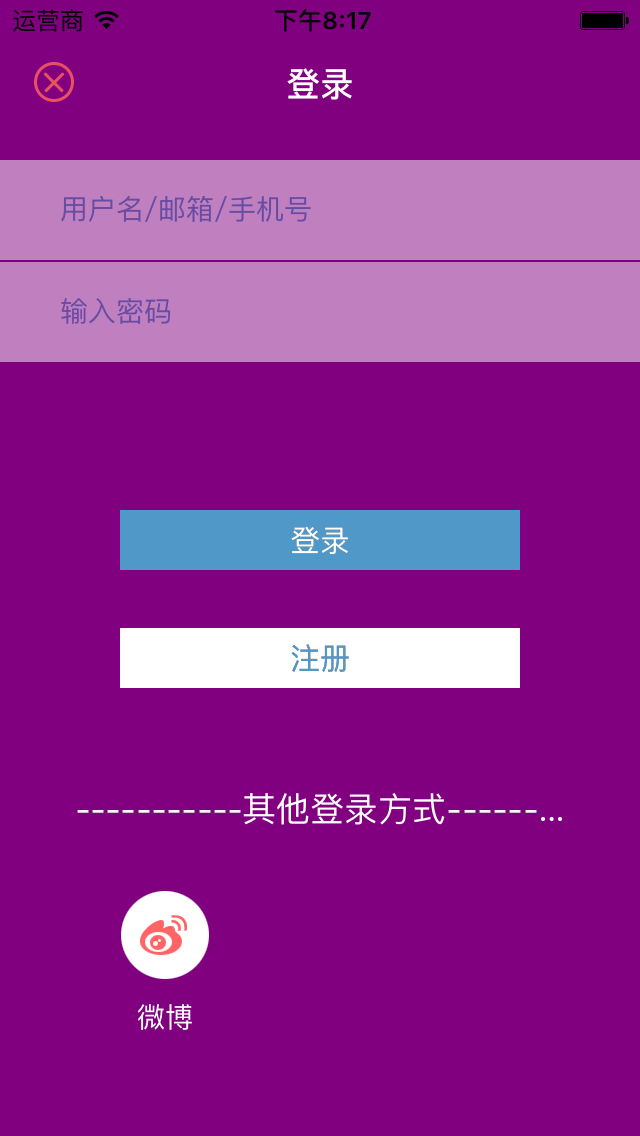
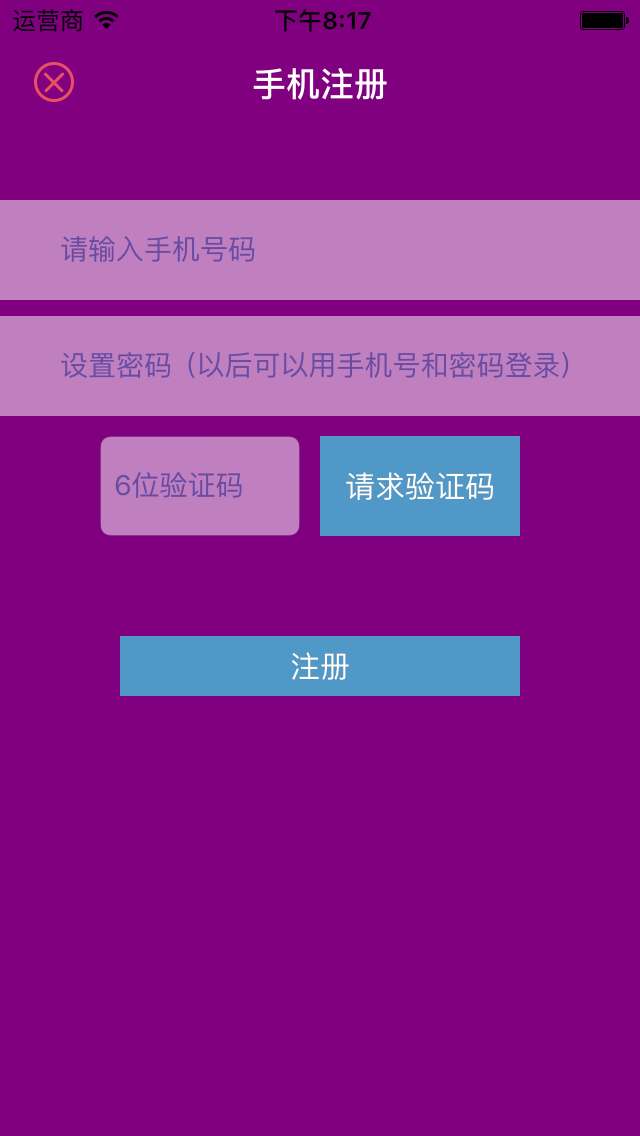
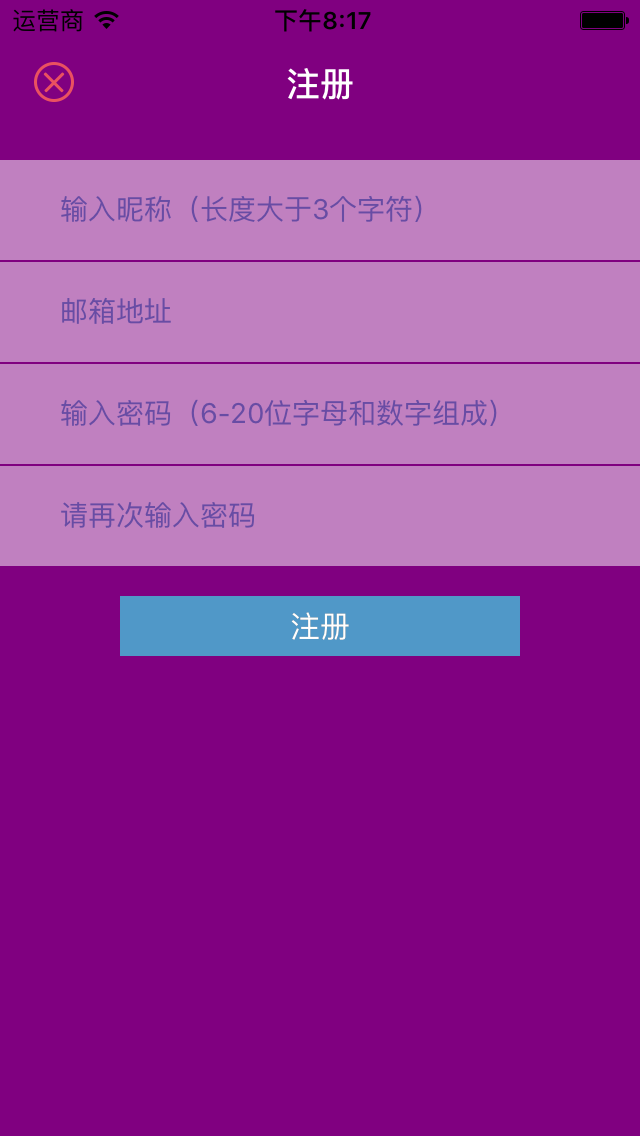
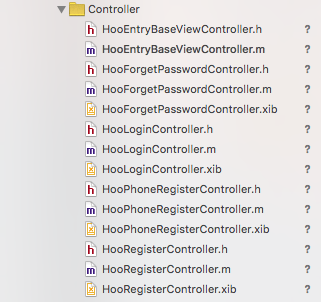
如上圖所示,註冊與登錄頁面有相同的返回按鈕、相同的背景、相同的導航欄,甚至相同的按鈕和輸入框樣式。因此為了加快開發,我們完全可以先定義一個父控制器,把通用行為與樣式集中處理,再通過繼承實現多態,快速完成頁面搭建與基礎功能。下圖是我個人項目《丁丁印記》登錄註冊模塊的目錄結構,其中 HooEntryBaseViewController 就定義了整個模塊的通用行為和樣式:
2. 鍵盤彈出與收起的處理
這是最容易被忽略的一點。我也見過不少 App 因為鍵盤遮擋輸入框而被用戶一怒刪除。具體怎麼實現,取決於產品設計。
單擊空白區域收起鍵盤:
UITapGestureRecognizer *tap = [[UITapGestureRecognizer alloc] initWithTarget:self
                                                                      action:@selector(closeKeyboard:)];
tap.numberOfTapsRequired = 1;
tap.numberOfTouchesRequired = 1;
[self.view addGestureRecognizer:tap];

- (void)closeKeyboard:(id)sender {
    [self.view endEditing:YES];
}
避免鍵盤遮擋,讓表單或按鈕整体上移:
- (void)textViewDidBeginEditing:(UITextField *)textView {
    CGRect frame = textView.frame;
    int offset = frame.origin.y + 120 - (self.view.frame.size.height - 216.0); // 鍵盤高度 216
    NSTimeInterval animationDuration = 0.30f;

    [UIView beginAnimations:@"ResizeForKeyBoard" context:nil];
    [UIView setAnimationDuration:animationDuration];

    float width  = self.view.frame.size.width;
    float height = self.view.frame.size.height;

    if (offset > 0) {
        CGRect rect = CGRectMake(0.0f, -offset, width, height);
        self.view.frame = rect;
    }

    [UIView commitAnimations];
}
3. 接入第三方登錄前,先判斷客戶端是否安裝
這是血的教訓:如果不做判斷,蘋果審核可能直接拒絕。
比如《丁丁印記》接入了 QQ 登錄,程序會先檢查用戶是否安裝了 QQ,未安裝就隱藏登錄圖標:
if (![QQApi isQQInstalled]) {
    self.QQLoginButton.hidden = YES;
    self.QQLoginLabel.hidden  = YES;
}
4. 特殊情景與邊界處理
這常常是個空白地帶:年輕的開發者容易忽略,而產品和 UE 也往往不會主動定義臨界行為。
加載狀態——用戶發起登錄或註冊請求時,要給出友好提示:
#pragma mark - 登錄按鈕點擊
- (IBAction)login:(UIButton *)sender {
    if([self.userNameTextField.text isEmpty] || [self.passwordTextField.text isEmpty]){
        [SVProgressHUD showErrorWithStatus:@"用戶名或密碼不能為空"];
    } else {
        __weak typeof(self) weakSelf = self;
        [[HooUserManager manager] LoginWithUserName:self.userNameTextField.text
                                        andPassword:self.passwordTextField.text
                                              block:^(BmobUser *user, NSError *error) {
            __strong __typeof(weakSelf) strongSelf = weakSelf;
            if (error) {
                [SVProgressHUD showErrorWithStatus:@"登錄失敗"];
            } else if (user) {
                [SVProgressHUD showSuccessWithStatus:@"登錄成功"];
                [strongSelf loginSuccessDismiss];
            }
        }];
    }
}
賬號與密碼的各種錯誤判斷:
NSString *emailStr;
NSString *phoneStr;
NSString *passwordStr = weakSelf.passwordView.inputTextField.text;
emailStr = weakSelf.accountView.inputTextField.text;

if (![NSString validateEmail:emailStr] || !emailStr.length) {
    [weakSelf showErrorTipViewWithMessage:@"郵箱格式錯誤"];
    return;
} else {
    phoneStr = weakSelf.accountView.inputTextField.text;
    if (phoneStr.length < 5) {
        [weakSelf showErrorTipViewWithMessage:@"手機長度錯誤"];
        return;
    }
    if ([weakSelf.accountView.countryCode isEqualToString:@"+86"]) {
        if (![phoneStr isValidateMobileNumber]) {
            [weakSelf showErrorTipViewWithMessage:@"手機號碼格式錯誤"];
            return;
        }
    }
}

if (passwordStr.length < kPasswordMinLength) {
    [weakSelf showErrorTipViewWithMessage:@"密碼長度不能少於6個字符"];
    return;
}
if (passwordStr.length > kPasswordMaxLength) {
    [weakSelf showErrorTipViewWithMessage:@"密碼長度不能超過20個字符"];
    return;
}
5. 找回密碼:驗證碼按鈕的節流處理
這個行為也很容易被產品忽略,需要開發者主動提出並確認:用戶可能連續點擊「發送驗證碼」,既給服務器造成負擔,也會讓用戶收到大量短信。下面這段代碼實現「單擊後倒計時兩分鐘,期間不可點擊」:
- (void)verifedCodeButtonWithTitle:(NSString *)title andNewTitle:(NSString *)newTitle {
    WS(weakSelf);
    __block int timeout = kTimeout;
    dispatch_queue_t queue = dispatch_get_global_queue(DISPATCH_QUEUE_PRIORITY_DEFAULT, 0);
    dispatch_source_t _timer = dispatch_source_create(DISPATCH_SOURCE_TYPE_TIMER, 0, 0, queue);
    dispatch_source_set_timer(_timer, dispatch_walltime(NULL, 0), 1.0 * NSEC_PER_SEC, 0);
    dispatch_source_set_event_handler(_timer, ^{
        if(timeout <= 0){
            dispatch_source_cancel(_timer);
            dispatch_async(dispatch_get_main_queue(), ^{
                [weakSelf setTitle:title forState:UIControlStateNormal];
                weakSelf.userInteractionEnabled = YES;
            });
        } else {
            int seconds = timeout;
            NSString *strTime = [NSString stringWithFormat:@"%.2d", seconds];
            dispatch_async(dispatch_get_main_queue(), ^{
                [UIView beginAnimations:nil context:nil];
                [UIView setAnimationDuration:1];
                [weakSelf setTitle:[NSString stringWithFormat:@"%@(%@)", newTitle, strTime]
                          forState:UIControlStateNormal];
                [UIView commitAnimations];
                weakSelf.userInteractionEnabled = NO;
            });
            timeout--;
        }
    });
    dispatch_resume(_timer);
}
6. 登錄狀態的持久化
通常會有業務層負責登錄數據的持久化,並配合單例使用。但不能只依賴單例記錄狀態——用戶可能退出登錄,因此需要從沙盒判斷關鍵字段(如用戶 ID 或 AccessToken)是否存在。
- (void)saveUserInfoWithData:(NSDictionary *)dict {
    NSString *userID = dict[kUserId];
    NSString *email  = dict[kEmail];
    NSString *mobile = dict[kMobile];

    [HooNSUserDefaultSerialzer setObject:userID forKey:kUserID];
    [HooNSUserDefaultSerialzer setObject:email  forKey:kEmail];
    [HooNSUserDefaultSerialzer setObject:mobile forKey:kMobile];
}
7. 對外提供統一的用戶信息接口
封裝好模塊並對外提供接口。其他頁面往往需要判斷用戶是否登錄,或者需要唯一標識符去請求數據。如果這塊做得很隨意,就會導致各處各自讀取沙盒字段,維護起來一團亂。應該把「獲取用戶信息」這件事收斂到登錄模塊統一出口。
#import <Foundation/Foundation.h>
#import "HooSingleton.h"

@interface HooUserManager : NSObject

@property (nonatomic, strong) NSString *userID;

SingletonH(Manager)

/**
 * 判斷用戶是否已登錄
 *
 * @return 已登錄返回 YES,否則返回 NO
 */
- (BOOL)isUserLogin;

/**
 * 退出登錄
 */
- (void)loginOut;

@end

#import "HooUserManager.h"
#import "HooNSUserDefaultSerialzer.h"

static NSString * const kMobile = @"Mobile";
static NSString * const kEmail  = @"Email";
static NSString * const kUserID = @"UserID";

@implementation HooUserManager

SingletonM(Manager)

#pragma mark - getter and setter

- (NSString *)userID {
    NSString *userID = [HooNSUserDefaultSerialzer objectForKey:kUserID];
    return userID;
}

- (BOOL)isUserLogin {
    NSString *userID = [HooNSUserDefaultSerialzer objectForKey:kUserID];
    if (userID.length) {
        return YES;
    }
    return NO;
}

- (void)loginOut {
    [HooNSUserDefaultSerialzer removeObjectForKey:kMobile];
    [HooNSUserDefaultSerialzer removeObjectForKey:kEmail];
    [HooNSUserDefaultSerialzer removeObjectForKey:kUserID];
}

@end
8. 其他細節
為了更好的用戶體驗,通常還會補充一些功能:明文顯示密碼的切換按鈕、從服務端拉取郵箱格式提示、常見錯誤字符自動糾正,當然還有最重要的——恰到好處的動畫效果。