
封裝一個微信風格聊天工具欄:表情、文字與語音訊息
編輯:iOS 相關教學
聊天工具欄看起來簡單,實際上要處理表情、文字、圖片、語音、拍照等多種輸入模式,還得兼顧鍵盤彈跳與高度變化。本文示範如何把這些能力封裝成一個可重複使用的 ToolView,回呼方式採用 Block。
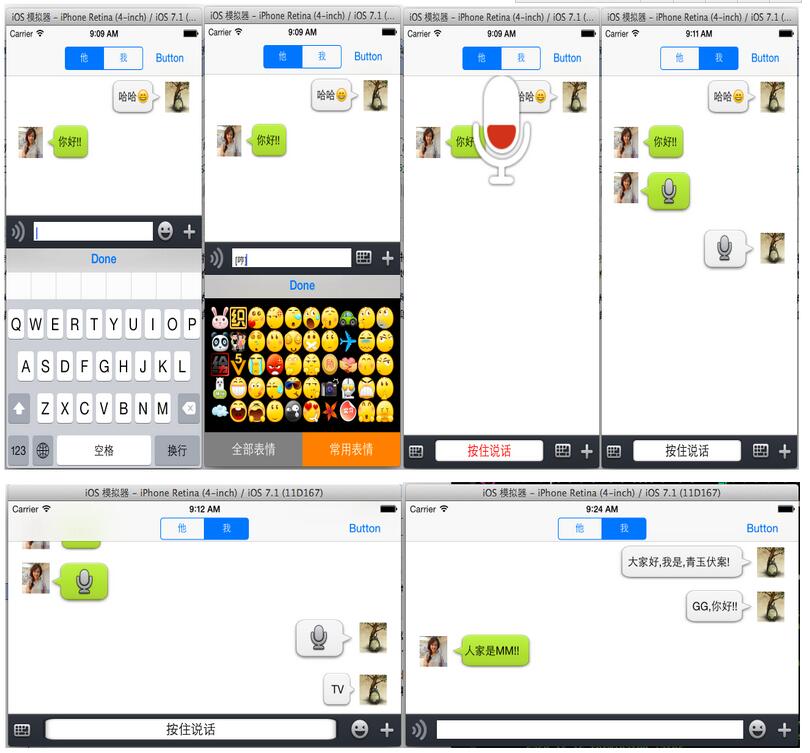
表情鍵盤是先前已封裝好的,可直接沿用。由於工具欄與表情鍵盤都用約束控制尺寸,因此橫屏與大螢幕手機都能正常適配。
一、ToolView 對外提供的介面
回呼方式可選 Block、delegate 或 target-action,本文用 Block。頭檔定義如下:
#import <UIKit/UIKit.h>

// 文字回呼
typedef void (^MyTextBlock)(NSString *myText);
// 錄音音量
typedef void (^AudioVolumeBlock)(CGFloat volume);
// 錄音檔案位置
typedef void (^AudioURLBlock)(NSURL *audioURL);
// 依文字量改變高度
typedef void (^ContentSizeBlock)(CGSize contentSize);
// 取消錄音
typedef void (^CancelRecordBlock)(int flag);

@interface ToolView : UIView <UITextViewDelegate, AVAudioRecorderDelegate>
-(void)setMyTextBlock:(MyTextBlock)block;
-(void)setAudioVolumeBlock:(AudioVolumeBlock)block;
-(void)setAudioURLBlock:(AudioURLBlock)block;
-(void)setContentSizeBlock:(ContentSizeBlock)block;
-(void)setCancelRecordBlock:(CancelRecordBlock)block;
-(void)changeFunctionHeight:(float)height;
@end
二、私有屬性宣告
對外只留介面,內部元件放在 .m 的 class extension 裡:
@interface ToolView()
@property (nonatomic, strong) UIButton *voiceChangeButton;   // 最左側語音切換鈕
@property (nonatomic, strong) UIButton *sendVoiceButton;     // 按住說話
@property (nonatomic, strong) UITextView *sendTextView;      // 文字輸入框
@property (nonatomic, strong) UIButton *changeKeyBoardButton;// 表情鍵盤切換
@property (nonatomic, strong) UIButton *moreButton;          // 更多功能
@property (nonatomic, assign) CGRect endKeyBoardFrame;       // 鍵盤座標轉換用
@property (nonatomic, strong) FunctionView *functionView;    // 表情鍵盤
@property (nonatomic, strong) MoreView *moreView;            // 更多面板
@property (nonatomic, strong) ImageModelClass *imageMode;
@property (nonatomic, strong) HistoryImage *tempImage;
@property (strong, nonatomic) MyTextBlock textBlock;
@property (strong, nonatomic) ContentSizeBlock sizeBlock;
@property (strong, nonatomic) AudioVolumeBlock volumeBlock;
@property (strong, nonatomic) AudioURLBlock urlBlock;
@property (strong, nonatomic) CancelRecordBlock cancelBlock;
@property (strong, nonatomic) AVAudioRecorder *audioRecorder;
@property (strong, nonatomic) NSTimer *timer;
@property (strong, nonatomic) NSURL *audioPlayURL;
@end
三、接收外部 Block
-(void)setMyTextBlock:(MyTextBlock)block        { self.textBlock = block; }
-(void)setAudioVolumeBlock:(AudioVolumeBlock)block { self.volumeBlock = block; }
-(void)setAudioURLBlock:(AudioURLBlock)block    { self.urlBlock = block; }
-(void)setContentSizeBlock:(ContentSizeBlock)block { self.sizeBlock = block; }
-(void)setCancelRecordBlock:(CancelRecordBlock)block { self.cancelBlock = block; }
四、以純程式碼建立子元件
自訂元件用不到 storyboard,所有元件都在程式碼中建立:
-(void)addSubview {
    self.voiceChangeButton = [[UIButton alloc] initWithFrame:CGRectZero];
    [self.voiceChangeButton setImage:[UIImage imageNamed:@"chat_bottom_voice_press.png"] forState:UIControlStateNormal];
    [self.voiceChangeButton addTarget:self action:@selector(tapVoiceChangeButton:) forControlEvents:UIControlEventTouchUpInside];
    [self addSubview:self.voiceChangeButton];

    self.sendVoiceButton = [[UIButton alloc] initWithFrame:CGRectZero];
    [self.sendVoiceButton setBackgroundImage:[UIImage imageNamed:@"chat_bottom_textfield.png"] forState:UIControlStateNormal];
    [self.sendVoiceButton setTitleColor:[UIColor blackColor] forState:UIControlStateNormal];
    [self.sendVoiceButton setTitle:@"按住說話" forState:UIControlStateNormal];
    [self.sendVoiceButton addTarget:self action:@selector(tapSendVoiceButton:) forControlEvents:UIControlEventTouchUpInside];
    self.sendVoiceButton.hidden = YES;
    [self addSubview:self.sendVoiceButton];

    self.sendTextView = [[UITextView alloc] initWithFrame:CGRectZero];
    self.sendTextView.delegate = self;
    [self addSubview:self.sendTextView];

    self.changeKeyBoardButton = [[UIButton alloc] initWithFrame:CGRectZero];
    [self.changeKeyBoardButton setImage:[UIImage imageNamed:@"chat_bottom_smile_nor.png"] forState:UIControlStateNormal];
    [self.changeKeyBoardButton addTarget:self action:@selector(tapChangeKeyBoardButton:) forControlEvents:UIControlEventTouchUpInside];
    [self addSubview:self.changeKeyBoardButton];

    self.moreButton = [[UIButton alloc] initWithFrame:CGRectZero];
    [self.moreButton setImage:[UIImage imageNamed:@"chat_bottom_up_nor.png"] forState:UIControlStateNormal];
    [self.moreButton addTarget:self action:@selector(tapMoreButton:) forControlEvents:UIControlEventTouchUpInside];
    [self addSubview:self.moreButton];

    [self addDone]; // 加上鍵盤 Done 鈕

    // 表情鍵盤
    self.functionView = [[FunctionView alloc] initWithFrame:CGRectMake(0, 0, 320, 216)];
    self.functionView.backgroundColor = [UIColor blackColor];
    self.functionView.plistFileName = @"emoticons";

    __weak __block ToolView *copy_self = self;
    [self.functionView setFunctionBlock:^(UIImage *image, NSString *imageText) {
        NSString *str = [NSString stringWithFormat:@"%@%@", copy_self.sendTextView.text, imageText];
        copy_self.sendTextView.text = str;
        // 把用過的表情存進資料庫
        NSData *imageData = UIImagePNGRepresentation(image);
        [copy_self.imageMode save:imageData ImageText:imageText];
    }];

    // 輕擊切回系統鍵盤
    UITapGestureRecognizer *tapGesture = [[UITapGestureRecognizer alloc] initWithTarget:self action:@selector(tapGesture:)];
    [self.sendTextView addGestureRecognizer:tapGesture];

    // 長按錄音
    ULongPressGestureRecognizer *longPress = [[ULongPressGestureRecognizer alloc] initWithTarget:self action:@selector(sendVoiceButtonLongPress:)];
    longPress.minimumPressDuration = 0.2;
    [self.sendVoiceButton addGestureRecognizer:longPress];

    // 更多面板
    self.moreView = [[MoreView alloc] initWithFrame:CGRectMake(0, 0, 0, 0)];
    self.moreView.backgroundColor = [UIColor blackColor];
    [self.moreView setMoreBlock:^(NSInteger index) {
        NSLog(@"MoreIndex = %d", (int)index);
    }];
}
五、以程式碼加上 Auto Layout 約束
-(void)addConstraint {
    // 語音切換鈕
    self.voiceChangeButton.translatesAutoresizingMaskIntoConstraints = NO;
    [self addConstraints:[NSLayoutConstraint constraintsWithVisualFormat:@"H:|-5-[_voiceChangeButton(30)]"
        options:0 metrics:0 views:NSDictionaryOfVariableBindings(_voiceChangeButton)]];
    [self addConstraints:[NSLayoutConstraint constraintsWithVisualFormat:@"V:|-8-[_voiceChangeButton(30)]"
        options:0 metrics:0 views:NSDictionaryOfVariableBindings(_voiceChangeButton)]];

    // 更多鈕
    self.moreButton.translatesAutoresizingMaskIntoConstraints = NO;
    [self addConstraints:[NSLayoutConstraint constraintsWithVisualFormat:@"H:[_moreButton(30)]-5-|"
        options:0 metrics:0 views:NSDictionaryOfVariableBindings(_moreButton)]];
    [self addConstraints:[NSLayoutConstraint constraintsWithVisualFormat:@"V:|-8-[_moreButton(30)]"
        options:0 metrics:0 views:NSDictionaryOfVariableBindings(_moreButton)]];

    // 表情切換鈕
    self.changeKeyBoardButton.translatesAutoresizingMaskIntoConstraints = NO;
    [self addConstraints:[NSLayoutConstraint constraintsWithVisualFormat:@"H:[_changeKeyBoardButton(33)]-43-|"
        options:0 metrics:0 views:NSDictionaryOfVariableBindings(_changeKeyBoardButton)]];
    [self addConstraints:[NSLayoutConstraint constraintsWithVisualFormat:@"V:|-5-[_changeKeyBoardButton(33)]"
        options:0 metrics:0 views:NSDictionaryOfVariableBindings(_changeKeyBoardButton)]];

    // 文字輸入框
    self.sendTextView.translatesAutoresizingMaskIntoConstraints = NO;
    [self addConstraints:[NSLayoutConstraint constraintsWithVisualFormat:@"H:|-45-[_sendTextView]-80-|"
        options:0 metrics:0 views:NSDictionaryOfVariableBindings(_sendTextView)]];
    [self addConstraints:[NSLayoutConstraint constraintsWithVisualFormat:@"V:|-10-[_sendTextView]-10-|"
        options:0 metrics:0 views:NSDictionaryOfVariableBindings(_sendTextView)]];

    // 按住說話鈕
    self.sendVoiceButton.translatesAutoresizingMaskIntoConstraints = NO;
    [self addConstraints:[NSLayoutConstraint constraintsWithVisualFormat:@"H:|-50-[_sendVoiceButton]-90-|"
        options:0 metrics:0 views:NSDictionaryOfVariableBindings(_sendVoiceButton)]];
    [self addConstraints:[NSLayoutConstraint constraintsWithVisualFormat:@"V:|-6-[_sendVoiceButton]-6-|"
        options:0 metrics:0 views:NSDictionaryOfVariableBindings(_sendVoiceButton)]];
}
六、音訊初始化
-(void)audioInit {
    NSError *err = nil;
    AVAudioSession *audioSession = [AVAudioSession sharedInstance];
    [audioSession setCategory:AVAudioSessionCategoryPlayAndRecord error:&err];
    if (err) { NSLog(@"audioSession: %@ %d %@", [err domain], [err code], [[err userInfo] description]); return; }

    [audioSession setActive:YES error:&err];
    err = nil;
    if (err) { NSLog(@"audioSession: %@ %d %@", [err domain], [err code], [[err userInfo] description]); return; }

    NSMutableDictionary *setAudioDic = [[NSMutableDictionary alloc] init];
    [setAudioDic setValue:@(kAudioFormatMPEG4AAC) forKey:AVFormatIDKey];        // 格式:aac
    [setAudioDic setValue:@(44100) forKey:AVSampleRateKey];                     // 取樣率
    [setAudioDic setValue:@(1) forKey:AVNumberOfChannelsKey];                   // 声道數
    [setAudioDic setValue:@16 forKey:AVLinearPCMBitDepthKey];                   // 位深
    [setAudioDic setValue:@(AVAudioQualityHigh) forKey:AVEncoderAudioQualityKey];// 錄音品質

    NSString *strUrl = [NSSearchPathForDirectoriesInDomains(NSDocumentDirectory, NSUserDomainMask, YES) lastObject];
    NSString *fileName = [NSString stringWithFormat:@"%ld", (long)[[NSDate date] timeIntervalSince1970]];
    NSURL *url = [NSURL fileURLWithPath:[NSString stringWithFormat:@"%@/%@.aac", strUrl, fileName]];
    _audioPlayURL = url;

    NSError *error;
    self.audioRecorder = [[AVAudioRecorder alloc] initWithURL:url settings:setAudioDic error:&error];
    self.audioRecorder.meteringEnabled = YES;   // 開啟音量檢測
    self.audioRecorder.delegate = self;
}
七、為鍵盤加上 Done 鈕
-(void)addDone {
    UIToolbar *toolBar = [[UIToolbar alloc] initWithFrame:CGRectMake(0, 0, 320, 30)];
    UIBarButtonItem *item1 = [[UIBarButtonItem alloc] initWithBarButtonSystemItem:UIBarButtonSystemItemDone target:self action:@selector(tapDone:)];
    UIBarButtonItem *item2 = [[UIBarButtonItem alloc] initWithBarButtonSystemItem:UIBarButtonSystemItemFlexibleSpace target:nil action:nil];
    UIBarButtonItem *item3 = [[UIBarButtonItem alloc] initWithBarButtonSystemItem:UIBarButtonSystemItemFlexibleSpace target:nil action:nil];
    toolBar.items = @[item2, item1, item3];
    self.sendTextView.inputAccessoryView = toolBar;
}
八、回呼方法:長按錄音
這塊是整個工具欄最複雜的部分。做法是給錄音鈕掛長按手勢,依手勢狀態分別處理:按下開始錄音並啟動音量檢測計時器;上滑超過門檻則取消並刪除檔案;放手時若錄音時間太短則提示、足夠則透過 Block 把檔案位置交出去。
-(void)sendVoiceButtonLongPress:(id)sender {
    static int i = 1;
    if (![sender isKindOfClass:[ULongPressGestureRecognizer class]]) return;
    ULongPressGestureRecognizer *longPress = sender;

    // 開始錄音
    if (longPress.state == UIGestureRecognizerStateBegan) {
        i = 1;
        [self.sendVoiceButton setTitleColor:[UIColor redColor] forState:UIControlStateNormal];
        [self audioInit];
        if ([self.audioRecorder prepareToRecord]) {
            [self.audioRecorder record];
            _timer = [NSTimer scheduledTimerWithTimeInterval:0.05 target:self selector:@selector(detectionVoice) userInfo:nil repeats:YES];
        }
    }

    // 上滑取消
    if (longPress.state == UIGestureRecognizerStateChanged) {
        CGPoint piont = [longPress locationInView:self];
        if (piont.y < -20) {
            if (i == 1) {
                [self.sendVoiceButton setBackgroundImage:[UIImage imageNamed:@"chat_bottom_textfield.png"] forState:UIControlStateNormal];
                [self.sendVoiceButton setTitleColor:[UIColor blackColor] forState:UIControlStateNormal];
                [self.audioRecorder deleteRecording];
                [self.audioRecorder stop];
                [_timer invalidate];
                UIAlertView *alter = [[UIAlertView alloc] initWithTitle:@"提示" message:@"錄音取消" delegate:nil cancelButtonTitle:@"取消" otherButtonTitles:nil];
                [alter show];
                self.cancelBlock(1);
                i = 0;
            }
        }
    }

    // 結束
    if (longPress.state == UIGestureRecognizerStateEnded) {
        if (i == 1) {
            [self.sendVoiceButton setBackgroundImage:[UIImage imageNamed:@"chat_bottom_textfield.png"] forState:UIControlStateNormal];
            [self.sendVoiceButton setTitleColor:[UIColor blackColor] forState:UIControlStateNormal];
            double cTime = self.audioRecorder.currentTime;
            if (cTime > 1) {
                self.urlBlock(self.audioPlayURL);   // 太短則不發送
            } else {
                [self.audioRecorder deleteRecording];
                UIAlertView *alter = [[UIAlertView alloc] initWithTitle:@"提示" message:@"錄音時間太短!" delegate:nil cancelButtonTitle:@"取消" otherButtonTitles:nil];
                [alter show];
                self.cancelBlock(1);
            }
            [self.audioRecorder stop];
            [_timer invalidate];
        }
    }
}
九、音量檢測
-(void)detectionVoice {
    [self.audioRecorder updateMeters];  // 更新音量數據
    // 平均值
    [self.audioRecorder averagePowerForChannel:0];
    // 峰值
    [self.audioRecorder peakPowerForChannel:0];
    CGFloat lowPassResults = pow(10, (0.05 * [self.audioRecorder peakPowerForChannel:0]));
    self.volumeBlock(lowPassResults);   // 交給呼叫者更新波形
}
十、其他互動回呼
輕擊輸入框切回系統鍵盤
-(void)tapGesture:(UITapGestureRecognizer *)sender {
    if ([self.sendTextView.inputView isEqual:self.functionView]) {
        self.sendTextView.inputView = nil;
        [self.changeKeyBoardButton setImage:[UIImage imageNamed:@"chat_bottom_smile_nor.png"] forState:UIControlStateNormal];
        [self.sendTextView reloadInputViews];
    }
    if (![self.sendTextView isFirstResponder]) {
        [self.sendTextView becomeFirstResponder];
    }
}
文字變多時通知外部調整高度
-(void)textViewDidChange:(UITextView *)textView {
    CGSize contentSize = self.sendTextView.contentSize;
    self.sizeBlock(contentSize);
}
因為輸入框的約束是加在 ToolView 上,所以要由父視圖改變 ToolView 的高度,輸入框才會跟著長高。
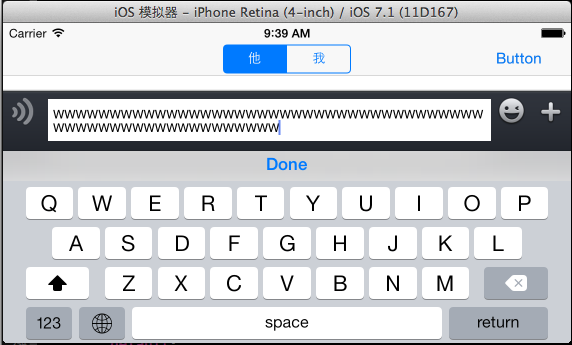
切換語音輸入與文字輸入
-(void)tapVoiceChangeButton:(UIButton *)sender {
    if (self.sendVoiceButton.hidden == YES) {
        self.sendTextView.hidden = YES;
        self.sendVoiceButton.hidden = NO;
        [self.voiceChangeButton setImage:[UIImage imageNamed:@"chat_bottom_keyboard_nor.png"] forState:UIControlStateNormal];
        if ([self.sendTextView isFirstResponder]) { [self.sendTextView resignFirstResponder]; }
    } else {
        self.sendTextView.hidden = NO;
        self.sendVoiceButton.hidden = YES;
        [self.voiceChangeButton setImage:[UIImage imageNamed:@"chat_bottom_voice_press.png"] forState:UIControlStateNormal];
        if (![self.sendTextView isFirstResponder]) { [self.sendTextView becomeFirstResponder]; }
    }
}
按 return 送出文字
- (BOOL)textView:(UITextView *)textView shouldChangeTextInRange:(NSRange)range replacementText:(NSString *)text {
    if ([text isEqualToString:@"\n"]) {
        self.textBlock(self.sendTextView.text);  // 透過 block 交給 Controller
        self.sendTextView.text = @"";
        return NO;
    }
    return YES;
}
切換表情鍵盤
-(void)tapChangeKeyBoardButton:(UIButton *)sender {
    if ([self.sendTextView.inputView isEqual:self.functionView]) {
        self.sendTextView.inputView = nil;
        [self.changeKeyBoardButton setImage:[UIImage imageNamed:@"chat_bottom_smile_nor.png"] forState:UIControlStateNormal];
        [self.sendTextView reloadInputViews];
    } else {
        self.sendTextView.inputView = self.functionView;
        [self.changeKeyBoardButton setImage:[UIImage imageNamed:@"chat_bottom_keyboard_nor.png"] forState:UIControlStateNormal];
        [self.sendTextView reloadInputViews];
    }
    if (![self.sendTextView isFirstResponder]) { [self.sendTextView becomeFirstResponder]; }
    if (self.sendTextView.hidden == YES) {
        self.sendTextView.hidden = NO;
        self.sendVoiceButton.hidden = YES;
        [self.voiceChangeButton setImage:[UIImage imageNamed:@"chat_bottom_voice_press.png"] forState:UIControlStateNormal];
    }
}
接續工作
以上就是 ToolView 的封裝。至於在 Controller 中如何用它組出對話串、如何定義聊天 cell、錄音檔怎麼處理、氣泡怎麼畫,會在後續文章中繼續說明。
另外提醒:範例中的 AVAudioSession 分類設定、`AVAudioSessionCategoryPlayAndRecord` 需要在 Info.plist 補上 NSMicrophoneUsageDescription,否則一請求錄音權限就會 crash。
- 上一篇文章: 用 MMDrawerController 實作 iOS 側拉抽屜效果
- 下一篇文章: iOS 抽屜效果實作:單側與雙側版本程式碼分享