
iOS 視圖切換三種方式:TabBarController、NavigationController 與模態呈現
編輯:iOS 相關教學
iOS 裡的畫面切換主要有三種模式,各自適用不同情境。搞懂它們的管理方式,架構就不容易亂。
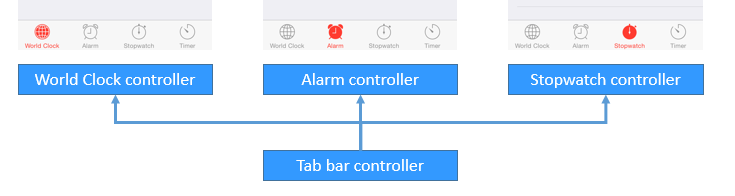
- UITabBarController(分頁控制器):平行管理各畫面
- UINavigationController(導覽控制器):以堆疊方式管理畫面
- 模態視窗(Modal):覆蓋式呈現,適合打斷式操作
一、UITabBarController
- 專為「用頁籤切換畫面」而設計,內含一個 UITabBar 控件。
- 本身不顯示內容,只是個容器控制器。
- 為了降低耦合,各子控制器的標題與圖示由子控制器自己提供。
注意事項
- 它會一次初始化所有子控制器,但預設只載入第一個的視圖。
- 每個視圖控制器都有
tabBarController屬性,可反查所屬的 TabBarController。 - 每個視圖控制器都有
tabBarItem屬性,用來控制頁籤上的顯示資訊。 - tabBarItem 的 image 必須是 png 格式並開啟 alpha 通道,否則無法正常顯示。
- 它通常作為整個 App 的 rootViewController,必須在 window 顯示前建立完成。
實作步驟
- 建立 UITabBarController 物件。
- 建立各頁對應的 viewController。
- 透過
viewControllers屬性一次加入所有子控制器。 - 設為
window.rootViewController後顯示 window。
// a. 建立 tabBar 控制器
UITabBarController *tarbarVC = [[UITabBarController alloc] init];
self.window.rootViewController = tarbarVC;

// b. 建立子控制器
UIViewController *c1 = [[UIViewController alloc] init];
c1.view.backgroundColor = [UIColor greenColor];
c1.tabBarItem.title = @"消息";
c1.tabBarItem.image = [UIImage imageNamed:@"tab_recent_nor"];
c1.tabBarItem.badgeValue = @"123";

UIViewController *c2 = [[UIViewController alloc] init];
c2.view.backgroundColor = [UIColor brownColor];
c2.tabBarItem.title = @"聯系人";
c2.tabBarItem.image = [UIImage imageNamed:@"tab_buddy_nor"];

UIViewController *c3 = [[UIViewController alloc] init];
c3.tabBarItem.title = @"動態";
c3.tabBarItem.image = [UIImage imageNamed:@"tab_qworld_nor"];

UIViewController *c4 = [[UIViewController alloc] init];
c4.tabBarItem.title = @"設置";
c4.tabBarItem.image = [UIImage imageNamed:@"tab_me_nor"];

// c. 加入所有子控制器
tarbarVC.viewControllers = @[c1, c2, c3, c4];

// d. 顯示主視窗
[self.window makeKeyAndVisible];
UITabBarControllerDelegate
// 控制某個頁籤能不能被選中
- (BOOL)tabBarController:(UITabBarController *)tabBarController
 shouldSelectViewController:(UIViewController *)viewController;
切換目前顯示畫面的三種方式:改 selectedIndex、改 selectedViewController,或重新指定 viewControllers。
二、UINavigationController
- 子控制器以堆疊形式儲存,只有堆疊頂端的畫面會顯示。
- 壓疊用 push,彈出用 pop。
- 必須有一個根控制器。
- 子控制器透過
navigationController屬性取得導覽控制器。 - 導覽列由
navigationItem控制。
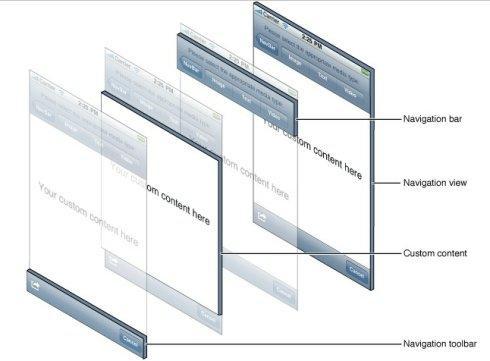
UINavigationItem 屬於 MVC 中的 Model,封裝要顯示在導覽列上的資料:
- title:標題
- titleView:標題視圖
- leftBarButtonItem:左按鈕
- rightBarButtonItem:右按鈕
下一個畫面左側返回按鈕標題的優先順序:
- 導覽列返回按鈕 backBarButtonItem 的標題
- 導覽列 navigationItem 的標題
- 視圖控制器本身的標題
- (void)pushViewController:(UIViewController *)viewController animated:(BOOL)animated; // 壓疊
- (void)popViewControllerAnimated:(BOOL)animated;                                      // 彈出頂端
- (void)popToViewController:(UIViewController *)viewController animated:(BOOL)animated; // 彈到指定控制器
- (void)popToRootViewControllerAnimated:(BOOL)animated;                                 // 彈回根控制器
三、模態視窗
// 從下方彈出,模態期間其他畫面無法操作
- (void)presentViewController:(UIViewController *)viewControllerToPresent
                     animated:(BOOL)flag
                   completion:(void (^)(void))completion;

// 關閉模態視窗(在模態視城中呼叫)
- (void)dismissViewControllerAnimated:(BOOL)flag
                           completion:(void (^)(void))completion;
選擇上的建議:同層級的功能並列用 TabBarController;有明確父子層級與返回路徑用 NavigationController;需要使用者先完成某件事才能繼續(登入、表單、系統分享面板)則用模態呈現。