
iOS 驗證碼倒計時按鈕實作:用 GCD 計時器完成 60 秒冷卻
編輯:iOS 相關教學
註冊、找回密碼這類流程裡,「發送驗證碼」按鈕幾乎是標配。點一下之後按鈕要變成「59S 後重新發送」,倒數歸零再恢復可點擊,這樣既能避免重複送出,也能給使用者明確的回饋。下面用 Objective-C 搭配 GCD 計時器,把這個效果完整做出來。
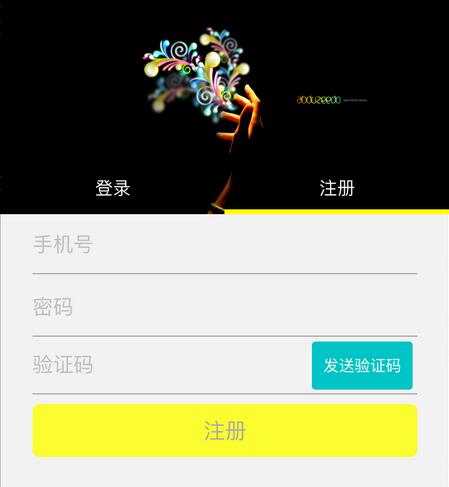
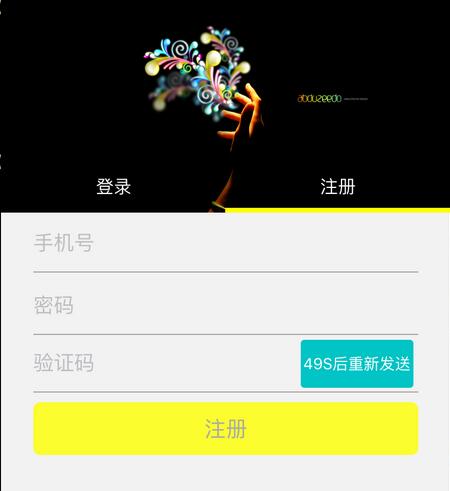
一、建立按鈕並綁定點擊事件
按鈕放在輸入框右側,設定背景色、字體與圓角,最後掛上 UIControlEventTouchUpInside 事件。
// 發送驗證碼按鈕
_sentCodeBtn = [[UIButton alloc] initWithFrame:CGRectMake(kScreenWidth - 27 - 4 - 94, CGRectGetMinY(_registerCodeFD.frame) + 4, 94, 40)];
[_sentCodeBtn setBackgroundColor:colorWithRGBA(0, 191, 191, 0.9)];
[_sentCodeBtn setTitle:@"發送驗證碼" forState:UIControlStateNormal];
[_sentCodeBtn.titleLabel setFont:[UIFont systemFontOfSize:13.0f]];
// 圓角處理
[_sentCodeBtn.layer setCornerRadius:3.0f];
[_sentCodeBtn.layer setShouldRasterize:YES];
[_sentCodeBtn.layer setRasterizationScale:[UIScreen mainScreen].scale];
// 綁定事件
[_sentCodeBtn addTarget:self action:@selector(sentCodeMethod) forControlEvents:UIControlEventTouchUpInside];
[self.view addSubview:_sentCodeBtn];
二、點擊後觸發請求與計時
點擊方法裡做兩件事:啟動倒計時,以及呼叫後端的發送介面。實際專案中建議把「倒計時啟動」放在介面回傳成功之後,避免請求失敗卻仍在倒數。
// 發送驗證碼
-(void)sentCodeMethod {
    NSLog(@"發送驗證碼。。");
    // 啟動計時器
    [self sentPhoneCodeTimeMethod];
    // TODO: 調用發送驗證碼的網路介面
}
三、GCD 計時器實作倒計時
這裡用 dispatch_source_t 建立每秒觸發一次的計時器,倒數期間鎖定使用者互動,歸零後取消計時器並還原按鈕。
-(void)sentPhoneCodeTimeMethod {
    // 倒計時總長 60 秒
    __block NSInteger timeOut = 59;
    dispatch_queue_t queue = dispatch_get_global_queue(DISPATCH_QUEUE_PRIORITY_DEFAULT, 0);
    dispatch_source_t timer = dispatch_source_create(DISPATCH_SOURCE_TYPE_TIMER, 0, 0, queue);
    dispatch_source_set_timer(timer, DISPATCH_TIME_NOW, 1.0 * NSEC_PER_SEC, 0 * NSEC_PER_SEC);
    dispatch_source_set_event_handler(timer, ^{
        if (timeOut <= 0) {
            dispatch_source_cancel(timer);
            // 回到主線程更新 UI
            dispatch_async(dispatch_get_main_queue(), ^{
                [_sentCodeBtn setTitle:@"發送驗證碼" forState:UIControlStateNormal];
                [_sentCodeBtn setUserInteractionEnabled:YES];
            });
        } else {
            NSInteger seconds = timeOut % 60;
            NSString *strTime = [NSString stringWithFormat:@"%.1ld", seconds];
            dispatch_async(dispatch_get_main_queue(), ^{
                [UIView beginAnimations:nil context:nil];
                [UIView setAnimationDuration:1.0];
                [_sentCodeBtn setTitle:[NSString stringWithFormat:@"%@S後重新發送", strTime] forState:UIControlStateNormal];
                [UIView commitAnimations];
                [_sentCodeBtn setUserInteractionEnabled:NO];
            });
            timeOut--;
        }
    });
    dispatch_resume(timer);
}
幾個實務提醒
- UI 更新一定要切回主線程,GCD 計時器預設在背景佇列觸發。
- 計時器記得在
dealloc或離開頁面時取消,否則會殘留並造成記憶體洩漏。 - 若頁面有捲動或切換,建議把倒數狀態與剩餘秒數存成屬性,重新進入時接續倒數,體驗更一致。
- 按鈕的禁用狀態建議同時處理
enabled與透明度,視覺回饋會更清楚。
以上就是完整實作,把計時邏輯抽成獨立方法後,重複使用也很容易。