
UIPageViewController 詳解:圖書翻頁與滾動引導頁的實現
編輯:iOS 相關教學
引言
UIPageViewController 是 iOS 中少見的「自帶過渡動畫」的容器型視圖控制器。它既能拼出 UIScrollView 加 UIPageControl 那樣的橫向滾屏效果,也能做出翻書一樣的紙張卷曲動畫。
這個類從 iOS 5 SDK 開始提供,用於構建分頁式界面;iOS 6 之後加入了滾動式過渡樣式。用戶可以通過手勢在多個頁面之間自由導航。它的應用遠不止引導頁——憤怒的小鳥用它做關卡選擇,各類閱讀類應用用它渲染書頁。
UIPageViewController 的可配置項主要包括:
- 分頁方向:水平或垂直
- 翻頁樣式:書卷翻頁(Page Curl)或滑動翻頁(Scroll)
- 書脊位置:僅書卷樣式有效
- 頁面間距:僅滑動樣式有效,用於定義 inter-page spacing
它更像一個「協調者」:具體每一頁的內容仍由各自的 ViewController 維護,UIPageViewController 只負責切換與動畫。
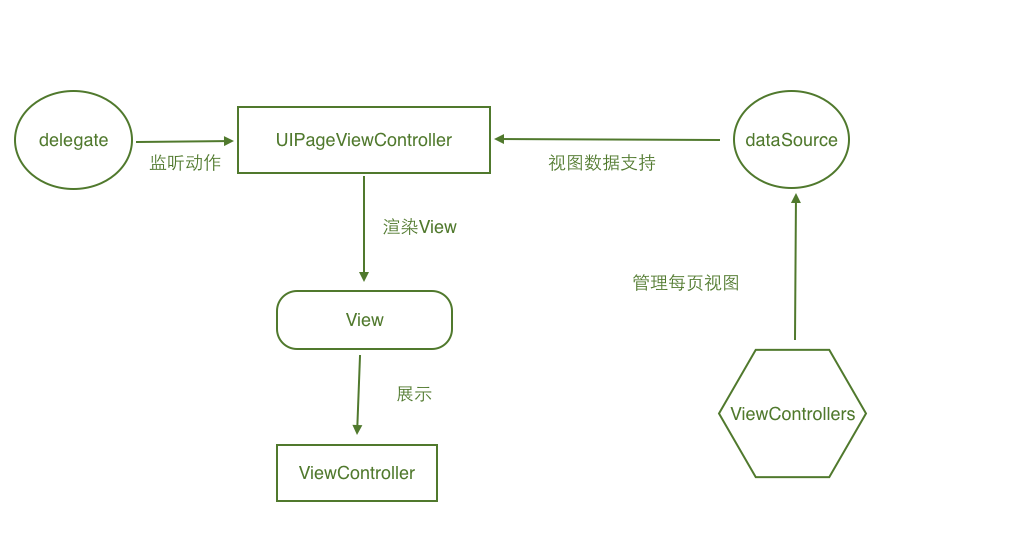
上圖展示了它的協作結構:DataSource 協議提供頁面數據,Delegate 協議回調翻頁與旋轉事件,UIPageViewController 把從数据源拿到的控制器渲染到屏幕上。
動手做一個翻頁示例
單頁控制器 ModelViewController
#import <UIKit/UIKit.h>

@interface ModelViewController : UIViewController
+ (ModelViewController *)creatWithIndex:(int)index;
@property (nonatomic, strong) UILabel *indexLabel;
@end
#import "ModelViewController.h"
@implementation ModelViewController
+ (ModelViewController *)creatWithIndex:(int)index {
ModelViewController *con = [[ModelViewController alloc] init];
con.indexLabel = [[UILabel alloc] initWithFrame:CGRectMake(110, 200, 100, 30)];
con.indexLabel.text = [NSString stringWithFormat:@"第%d頁", index];
[con.view addSubview:con.indexLabel];
return con;
}
- (void)viewDidLoad {
[super viewDidLoad];
self.view.backgroundColor = [UIColor redColor];
}
@end主控制器
#import "ViewController.h"
#import "ModelViewController.h"

@interface ViewController () <UIPageViewControllerDataSource, UIPageViewControllerDelegate>
{
    UIPageViewController *_pageViewControl;
    NSMutableArray *_dataArray;
}
@end

@implementation ViewController

- (void)viewDidLoad {
    [super viewDidLoad];

    _pageViewControl = [[UIPageViewController alloc]
        initWithTransitionStyle:UIPageViewControllerTransitionStyleScroll
            navigationOrientation:UIPageViewControllerNavigationOrientationHorizontal
                          options:@{
                              UIPageViewControllerOptionSpineLocationKey: @0,
                              UIPageViewControllerOptionInterPageSpacingKey: @10
                          }];

    self.view.backgroundColor = [UIColor greenColor];
    _pageViewControl.view.bounds = self.view.bounds;
    _pageViewControl.dataSource = self;
    _pageViewControl.delegate = self;

    ModelViewController *model = [ModelViewController creatWithIndex:1];
    [_pageViewControl setViewControllers:@[model]
                              direction:UIPageViewControllerNavigationDirectionReverse
                               animated:YES
                             completion:nil];
    _pageViewControl.doubleSided = NO;

    _dataArray = [[NSMutableArray alloc] init];
    [_dataArray addObject:model];

    [self.view addSubview:_pageViewControl.view];
}

// 向前翻頁
- (nullable UIViewController *)pageViewController:(UIPageViewController *)pageViewController
                         viewControllerBeforeViewController:(UIViewController *)viewController {
    int index = (int)[_dataArray indexOfObject:viewController];
    if (index == 0) {
        return nil;
    }
    return _dataArray[index - 1];
}

// 向後翻頁
- (nullable UIViewController *)pageViewController:(UIPageViewController *)pageViewController
                          viewControllerAfterViewController:(UIViewController *)viewController {
    int index = (int)[_dataArray indexOfObject:viewController];
    if (index == 9) {
        return nil;
    }
    if (_dataArray.count - 1 >= (index + 1)) {
        return _dataArray[index + 1];
    }
    ModelViewController *model = [ModelViewController creatWithIndex:index + 2];
    [_dataArray addObject:model];
    return model;
}

// 屏幕旋轉時的書脊位置
- (UIPageViewControllerSpineLocation)pageViewController:(UIPageViewController *)pageViewController
        spineLocationForInterfaceOrientation:(UIInterfaceOrientation)orientation {
    return UIPageViewControllerSpineLocationMin;
}

// 分頁點總數與當前高亮項
- (NSInteger)presentationCountForPageViewController:(UIPageViewController *)pageViewController {
    return 10;
}

- (NSInteger)presentationIndexForPageViewController:(UIPageViewController *)pageViewController {
    return 0;
}

@end
核心方法與枚舉解析
初始化方法
- (instancetype)initWithTransitionStyle:(UIPageViewControllerTransitionStyle)style
                   navigationOrientation:(UIPageViewControllerNavigationOrientation)navigationOrientation
                                 options:(nullable NSDictionary<NSString *, id> *)options;

typedef NS_ENUM(NSInteger, UIPageViewControllerTransitionStyle) {
    UIPageViewControllerTransitionStylePageCurl = 0,  // 書本翻頁
    UIPageViewControllerTransitionStyleScroll = 1     // ScrollView 式滑動
};

typedef NS_ENUM(NSInteger, UIPageViewControllerNavigationOrientation) {
    UIPageViewControllerNavigationOrientationHorizontal = 0,  // 水平
    UIPageViewControllerNavigationOrientationVertical   = 1   // 垂直
};
改成 PageCurl 之後,翻頁效果如下:
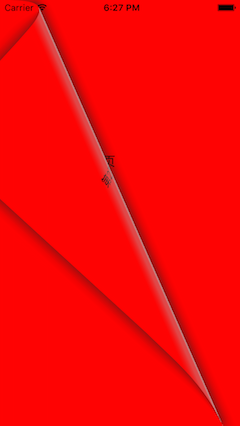
options 字典支持兩個鍵:
// 值為 NSNumber,指定書脊位置
NSString * const UIPageViewControllerOptionSpineLocationKey;
// 值為 NSNumber,指定滑動樣式下的頁面間距
NSString * const UIPageViewControllerOptionInterPageSpacingKey;
常用屬性
@property (nullable, nonatomic, weak) id <UIPageViewControllerDelegate> delegate;
@property (nullable, nonatomic, weak) id <UIPageViewControllerDataSource> dataSource;
@property (nonatomic, readonly) UIPageViewControllerTransitionStyle transitionStyle;
@property (nonatomic, readonly) UIPageViewControllerNavigationOrientation navigationOrientation;
@property (nonatomic, readonly) UIPageViewControllerSpineLocation spineLocation;
@property (nonatomic, getter=isDoubleSided) BOOL doubleSided;

- (void)setViewControllers:(nullable NSArray<UIViewController *> *)viewControllers
                 direction:(UIPageViewControllerNavigationDirection)direction
                  animated:(BOOL)animated
                completion:(void (^ __nullable)(BOOL finished))completion;
書脊位置 spineLocation
typedef NS_ENUM(NSInteger, UIPageViewControllerSpineLocation) {
    UIPageViewControllerSpineLocationNone = 0,  // 滾動樣式下無書脊
    UIPageViewControllerSpineLocationMin  = 1,  // 以左/上為軸,一次顯示一頁
    UIPageViewControllerSpineLocationMid  = 2,  // 以中間為軸,一次顯示兩頁
    UIPageViewControllerSpineLocationMax  = 3   // 以右/下為軸,一次顯示一頁
};
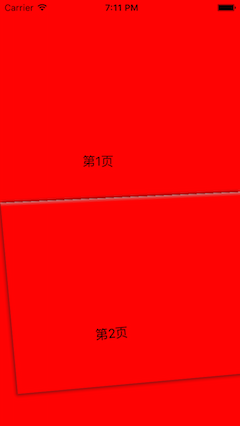
把示例改為豎向 PageCurl、書脊居中、雙面顯示:
- (void)viewDidLoad {
    [super viewDidLoad];

    _pageViewControl = [[UIPageViewController alloc]
        initWithTransitionStyle:UIPageViewControllerTransitionStylePageCurl
            navigationOrientation:UIPageViewControllerNavigationOrientationVertical
                          options:@{
                              UIPageViewControllerOptionSpineLocationKey: @2,
                              UIPageViewControllerOptionInterPageSpacingKey: @10
                          }];

    self.view.backgroundColor = [UIColor greenColor];
    _pageViewControl.view.bounds = self.view.bounds;
    _pageViewControl.dataSource = self;
    _pageViewControl.delegate = self;

    ModelViewController *model  = [ModelViewController creatWithIndex:1];
    ModelViewController *model2 = [ModelViewController creatWithIndex:2];

    [_pageViewControl setViewControllers:@[model, model2]
                              direction:UIPageViewControllerNavigationDirectionReverse
                               animated:YES
                             completion:nil];
    _pageViewControl.doubleSided = YES;

    _dataArray = [[NSMutableArray alloc] init];
    [_dataArray addObject:model];
    [self.view addSubview:_pageViewControl.view];
}

- (UIPageViewControllerSpineLocation)pageViewController:(UIPageViewController *)pageViewController
        spineLocationForInterfaceOrientation:(UIInterfaceOrientation)orientation {
    return UIPageViewControllerSpineLocationMid;
}
兩個協議的方法
UIPageViewControllerDataSource
- (nullable UIViewController *)pageViewController:(UIPageViewController *)pageViewController
                         viewControllerBeforeViewController:(UIViewController *)viewController;

- (nullable UIViewController *)pageViewController:(UIPageViewController *)pageViewController
                          viewControllerAfterViewController:(UIViewController *)viewController;

- (NSInteger)presentationCountForPageViewController:(UIPageViewController *)pageViewController;
- (NSInteger)presentationIndexForPageViewController:(UIPageViewController *)pageViewController;
UIPageViewControllerDelegate
- (void)pageViewController:(UIPageViewController *)pageViewController
    willTransitionToViewControllers:(NSArray<UIViewController *> *)pendingViewControllers;

- (void)pageViewController:(UIPageViewController *)pageViewController
        didFinishAnimating:(BOOL)finished
                   previousViewControllers:(NSArray<UIViewController *> *)previousViewControllers
             transitionCompleted:(BOOL)completed;

- (UIPageViewControllerSpineLocation)pageViewController:(UIPageViewController *)pageViewController
        spineLocationForInterfaceOrientation:(UIInterfaceOrientation)orientation;
實踐要點
示例中的數據源方法返回 nil 就代表「沒有上一頁/下一頁」,這是控制翻頁邊界最直接的手段。需要注意 UIPageViewController 對每個頁面控制器的生命周期管理相當積極,如果需要保持狀態,必須自己用數組或字典緩存已經創建的實例,否則每次翻回來都會重建。此外,doubleSided 只在 PageCurl 且書脊為 Mid 時才有實際意義。