
iOS 實作帶箭頭的彈出視圖(類微信選單效果)
編輯:iOS 相關教學
這次的效果是透過 drawRect: 自繪一個帶箭頭的容器,做出類似微信「+」選單那種從按鈕旁彈出、點擊空白處收起的互動。整體拆成幾個部分:自訂初始化、箭頭繪製、彈出動畫、收起動畫,以及內部的 UITableView。
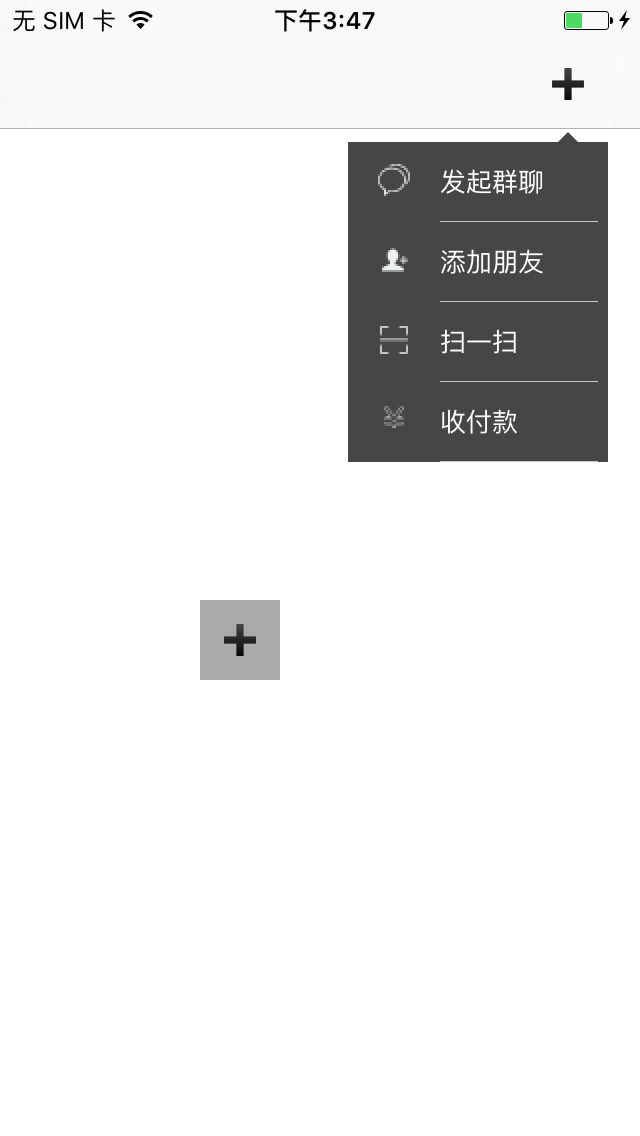
一、繼承 UIView 的標頭宣告
 // 背景容器
@property (nonatomic, strong) UIView * _Nonnull backGoundView;

// 標題資料
@property (nonatomic, strong) NSArray * _Nonnull dataArray;

// 圖示資料
@property (nonatomic, strong) NSArray * _Nonnull images;

// 每一列的高度
@property (nonatomic, strong) NSArray * _Nonnull images;
@property (nonatomic, assign) CGFloat row_height;

// 字級
@property (nonatomic, assign) CGFloat fontSize;

// 文字顏色
@property (nonatomic, assign) UIColor * _Nonnull titleTextColor;

// 代理
@property (nonatomic, assign) id <selectIndexPathDelegate> _Nonnull delegate;

// 初始化方法
- (instancetype _Nonnull)initWithOrigin:(CGPoint)origin Width:(CGFloat)width Height:(CGFloat)height Type:(XTDirectionType)type Color:(UIColor * _Nonnull)color;

- (void)popView;
- (void)dismiss;
二、常用宏定義
 #define ScreenWidth [UIScreen mainScreen].bounds.size.width
#define ScreenHeight [UIScreen mainScreen].bounds.size.height
#define Length 5
#define Length2 15
 @property (nonatomic, assign) CGPoint origin;            // 箭頭位置
@property (nonatomic, assign) CGFloat height;              // 視圖高度
@property (nonatomic, assign) CGFloat width;               // 視圖寬度
@property (nonatomic, assign) XTDirectionType type;       // 箭頭方向類型
@property (nonatomic, strong) UITableView *tableView;      // 內容列表
三、自訂初始化
 - (instancetype)initWithOrigin:(CGPoint)origin Width:(CGFloat)width Height:(CGFloat)height Type:(XTDirectionType)type Color:(UIColor *)color {
    self = [super initWithFrame:CGRectMake(0, 0, ScreenWidth, ScreenHeight)];
    if (self) {
        self.backgroundColor = [UIColor clearColor];
        self.origin = origin;
        self.width = width;
        self.height = height;
        self.type = type;

        self.backGoundView = [[UIView alloc] initWithFrame:CGRectMake(origin.x, origin.y, width, height)];
        self.backGoundView.backgroundColor = color;
        [self addSubview:self.backGoundView];
        [self.backGoundView addSubview:self.tableView];
    }
    return self;
}
四、drawRect 繪製箭頭
 #pragma mark - drawRect

- (void)drawRect:(CGRect)rect {
    // Drawing code
    CGContextRef context = UIGraphicsGetCurrentContext();

    switch (self.type) {
        case XTTypeOfUpLeft:
        case XTTypeOfUpCenter:
        case XTTypeOfUpRight: {
            {
                CGFloat startX = self.origin.x;
                CGFloat startY = self.origin.y;
                CGContextMoveToPoint(context, startX, startY);
                CGContextAddLineToPoint(context, startX + Length, startY + Length);
                CGContextAddLineToPoint(context, startX - Length, startY + Length);
            }
            break;
         }

        case XTTypeOfDownLeft:
        case XTTypeOfDownCenter:
        case XTTypeOfDownRight: {
            {
                CGFloat startX = self.origin.x;
                CGFloat startY = self.origin.y;
                CGContextMoveToPoint(context, startX, startY);
                CGContextAddLineToPoint(context, startX - Length, startY - Length);
                CGContextAddLineToPoint(context, startX + Length, startY - Length);
            }
            break;
         }

        case XTTypeOfLeftUp:
        case XTTypeOfLeftCenter:
        case XTTypeOfLeftDown: {
            {
                CGFloat startX = self.origin.x;
                CGFloat startY = self.origin.y;
                CGContextMoveToPoint(context, startX, startY);
                CGContextAddLineToPoint(context, startX + Length, startY - Length);
                CGContextAddLineToPoint(context, startX + Length, startY + Length);
            }
            break;
         }

        case XTTypeOfRightUp:
        case XTTypeOfRightCenter:
        case XTTypeOfRightDown: {
            {
                CGFloat startX = self.origin.x;
                CGFloat startY = self.origin.y;
                CGContextMoveToPoint(context, startX, startY);
                CGContextAddLineToPoint(context, startX - Length, startY - Length);
                CGContextAddLineToPoint(context, startX - Length, startY + Length);
            }
            break;
         }
    }

    CGContextClosePath(context);
    [self.backGoundView.backgroundColor setFill];
    [self.backgroundColor setStroke];
    CGContextDrawPath(context, kCGPathFillStroke);
}
五、彈出視圖
 #pragma mark - popView

- (void)popView {
    // 先隱藏子視圖,讓內容在展開動畫結束後才出現
    NSArray *results = [self.backGoundView subviews];
    for (UIView *view in results) {
        [view setHidden:YES];
    }

    UIWindow *windowView = [UIApplication sharedApplication].keyWindow;
    [windowView addSubview:self];

    switch (self.type) {
        case XTTypeOfUpLeft: {
            {
                self.backGoundView.frame = CGRectMake(self.origin.x, self.origin.y + Length, 0, 0);
                CGFloat origin_x = self.origin.x - Length2;
                CGFloat origin_y = self.origin.y + Length;
                CGFloat size_width = self.width;
                CGFloat size_height = self.height;
                [self startAnimateView_x:origin_x _y:origin_y origin_width:size_width origin_height:size_height];
            }
            break;
         }

        case XTTypeOfUpCenter: {
            {
                self.backGoundView.frame = CGRectMake(self.origin.x, self.origin.y + Length, 0, 0);
                CGFloat origin_x = self.origin.x - self.width / 2;
                CGFloat origin_y = self.origin.y + Length;
                CGFloat size_width = self.width;
                CGFloat size_height = self.height;
                [self startAnimateView_x:origin_x _y:origin_y origin_width:size_width origin_height:size_height];
            }
            break;
         }

        case XTTypeOfUpRight: {
            {
                self.backGoundView.frame = CGRectMake(self.origin.x, self.origin.y + Length, 0, 0);
                CGFloat origin_x = self.origin.x + Length2;
                CGFloat origin_y = self.origin.y + Length;
                CGFloat size_width = -self.width;
                CGFloat size_height = self.height;
                [self startAnimateView_x:origin_x _y:origin_y origin_width:size_width origin_height:size_height];
            }
            break;
         }

        case XTTypeOfDownLeft: {
            {
                self.backGoundView.frame = CGRectMake(self.origin.x, self.origin.y - Length, 0, 0);
                CGFloat origin_x = self.origin.x - Length2;
                CGFloat origin_y = self.origin.y - Length;
                CGFloat size_width = self.width;
                CGFloat size_height = -self.height;
                [self startAnimateView_x:origin_x _y:origin_y origin_width:size_width origin_height:size_height];
            }
            break;
         }

        case XTTypeOfDownCenter: {
            {
                self.backGoundView.frame = CGRectMake(self.origin.x, self.origin.y - Length, 0, 0);
                CGFloat origin_x = self.origin.x - self.width / 2;
                CGFloat origin_y = self.origin.y - Length;
                CGFloat size_width = self.width;
                CGFloat size_height = -self.height;
                [self startAnimateView_x:origin_x _y:origin_y origin_width:size_width origin_height:size_height];
            }
            break;
         }

        case XTTypeOfDownRight: {
            {
                self.backGoundView.frame = CGRectMake(self.origin.x, self.origin.y - Length, 0, 0);
                CGFloat origin_x = self.origin.x - self.width + Length2;
                CGFloat origin_y = self.origin.y - Length;
                CGFloat size_width = self.width;
                CGFloat size_height = -self.height;
                [self startAnimateView_x:origin_x _y:origin_y origin_width:size_width origin_height:size_height];
            }
            break;
         }

        case XTTypeOfLeftUp: {
            {
                self.backGoundView.frame = CGRectMake(self.origin.x + Length, self.origin.y, 0, 0);
                CGFloat origin_x = self.origin.x + Length;
                CGFloat origin_y = self.origin.y - Length2;
                CGFloat size_width = self.width;
                CGFloat size_height = self.height;
                [self startAnimateView_x:origin_x _y:origin_y origin_width:size_width origin_height:size_height];
            }
            break;
         }

        case XTTypeOfLeftCenter: {
            {
                self.backGoundView.frame = CGRectMake(self.origin.x + Length, self.origin.y, 0, 0);
                CGFloat origin_x = self.origin.x + Length;
                CGFloat origin_y = self.origin.y - self.height / 2;
                CGFloat size_width = self.width;
                CGFloat size_height = self.height;
                [self startAnimateView_x:origin_x _y:origin_y origin_width:size_width origin_height:size_height];
            }
            break;
         }

        case XTTypeOfLeftDown: {
            {
                self.backGoundView.frame = CGRectMake(self.origin.x + Length, self.origin.y, 0, 0);
                CGFloat origin_x = self.origin.x + Length;
                CGFloat origin_y = self.origin.y - self.height + Length2;
                CGFloat size_width = self.width;
               CGFloat size_height = self.height;
                [self startAnimateView_x:origin_x _y:origin_y origin_width:size_width origin_height:size_height];
            }
            break;
         }

        case XTTypeOfRightUp: {
            {
                self.backGoundView.frame = CGRectMake(self.origin.x - Length, self.origin.y, 0, 0);
                CGFloat origin_x = self.origin.x - Length;
                CGFloat origin_y = self.origin.y - Length2;
                CGFloat size_width = -self.width;
                CGFloat size_height = self.height;
                [self startAnimateView_x:origin_x _y:origin_y origin_width:size_width origin_height:size_height];
            }
            break;
         }

        case XTTypeOfRightCenter: {
            {
                self.backGoundView.frame = CGRectMake(self.origin.x - Length, self.origin.y, 0, 0);
                CGFloat origin_x = self.origin.x - Length;
                CGFloat origin_y = self.origin.y - self.height / 2;
                CGFloat size_width = -self.width;
                CGFloat size_height = self.height;
                [self startAnimateView_x:origin_x _y:origin_y origin_width:size_width origin_height:size_height];
            }
            break;
         }

        case XTTypeOfRightDown: {
            {
                self.backGoundView.frame = CGRectMake(self.origin.x - Length, self.origin.y, 0, 0);
                CGFloat origin_x = self.origin.x - Length;
                      CGFloat origin_y = self.origin.y - self.height + Length2;
                CGFloat size_width = -self.width;
                CGFloat size_height = self.height;
                [self startAnimateView_x:origin_x _y:origin_y origin_width:size_width origin_height:size_height];
            }
            break;
         }
    }
}
六、展開動畫
 - (void)startAnimateView_x:(CGFloat)x _y:(CGFloat)y origin_width:(CGFloat)width origin_height:(CGFloat)height {
    [UIView animateWithDuration:0.25 animations:^{
        self.backGoundView.frame = CGRectMake(x, y, width, height);
    } completion:^(BOOL finished) {
        // 展開完成後再把內容顯示出來
        NSArray *results = [self.backGoundView subviews];
        for (UIView *view in results) {
            [view setHidden:NO];
        }
    }];
}
七、點擊空白處收起
 #pragma mark -

- (void)touchesBegan:(NSSet<UITouch *> *)touches withEvent:(UIEvent *)event {
    if (![[touches anyObject].view isEqual:self.backGoundView]) {
        [self dismiss];
    }
}
 #pragma mark -

- (void)dismiss {
    /** 移除 backGroundView 上的所有子視圖 */
    NSArray *results = [self.backGoundView subviews];
    for (UIView *view in results) {
        [view removeFromSuperview];
    }

    [UIView animateWithDuration:0.25 animations:^{
        // self.backGoundView.frame = CGRectMake(self.origin.x, self.origin.y, 0, 0);
    } completion:^(BOOL finished) {
        // [self removeFromSuperview];
    }];
}
八、內部的 UITableView
 #pragma mark -

- (UITableView *)tableView {
    if (!_tableView) {
        _tableView = [[UITableView alloc] initWithFrame:CGRectMake(0, 0, self.backGoundView.frame.size.width - 5, self.backGoundView.frame.size.height) style:UITableViewStylePlain];
        _tableView.dataSource = self;
        _tableView.backgroundColor = [UIColor clearColor];
        _tableView.delegate = self;
    }
    return _tableView;
}

#pragma mark -

- (NSInteger)tableView:(UITableView *)tableView numberOfRowsInSection:(NSInteger)section {
    return self.dataArray.count;
}

#pragma mark -

- (CGFloat)tableView:(UITableView *)tableView heightForRowAtIndexPath:(NSIndexPath *)indexPath {
    if (self.row_height == 0) {
        return 44;
    } else {
        return self.row_height;
    }
}

#pragma mark -

- (UITableViewCell *)tableView:(UITableView *)tableView cellForRowAtIndexPath:(NSIndexPath *)indexPath {
    static NSString *cellIdentifier = @"cellIdentifier2";
    UITableViewCell *cell = [tableView dequeueReusableCellWithIdentifier:cellIdentifier];
    if (!cell) {
        cell = [[UITableViewCell alloc] initWithStyle:UITableViewCellStyleSubtitle reuseIdentifier:cellIdentifier];
    }
    cell.backgroundColor = [UIColor clearColor];
    cell.imageView.image = [UIImage imageNamed:self.images[indexPath.row]];
    cell.textLabel.text = self.dataArray[indexPath.row];
    cell.textLabel.font = [UIFont systemFontOfSize:self.fontSize];
    cell.textLabel.textColor = self.titleTextColor;
    return cell;
}

// 點擊後要回傳給外部,這裡用代理
- (void)tableView:(UITableView *)tableView didSelectRowAtIndexPath:(NSIndexPath *)indexPath {
    if (self.delegate && [self.delegate respondsToSelector:@selector(selectIndexPathRow:)]) {
        [self.delegate selectIndexPathRow:indexPath.row];
    }
}
九、對外宣告的協議
 @protocol selectIndexPathDelegate <NSObject>

- (void)selectIndexPathRow:(NSInteger)index;

@end
十、使用方式
@interface ViewController () <selectIndexPathDelegate>
在按鈕的點擊方法裡這樣寫:
 // 支援多種箭頭方向
/** XTTypeOfUpLeft,       // 上左
XTTypeOfUpCenter,    // 上中
XTTypeOfUpRight,     // 上右
XTTypeOfDownLeft,    // 下左
XTTypeOfDownCenter,  // 下中
XTTypeOfDownRight,   // 下右
XTTypeOfLeftUp,       // 左上
XTTypeOfLeftCenter,  // 左中
XTTypeOfLeftDown,    // 左下
XTTypeOfRightUp,      // 右上
XTTypeOfRightCenter,// 右中
XTTypeOfRightDown,   // 右下 */

CGPoint point = CGPointMake(_customBtn.center.x, _customBtn.frame.origin.y + 64);

XTPopView *view1 = [[XTPopView alloc] initWithOrigin:point Width:130 Height:40 * 4 Type:XTTypeOfUpRight Color:[UIColor colorWithRed:0.2737 green:0.2737 blue:0.2737 alpha:1.0]];
view1.dataArray = @[@"發起群聊", @"添加朋友", @"掃一掃", @"收付款"];
view1.images = @[@"發起群聊", @"添加朋友", @"掃一掃", @"付款"];
view1.fontSize = 13;
view1.row_height = 40;
view1.titleTextColor = [UIColor whiteColor];
view1.delegate = self;
[view1 popView];
想接自己的業務邏輯,只要實作協議方法即可:
 - (void)selectIndexPathRow:(NSInteger)index {
    switch (index) {
        case 0: {
            NSLog(@"Click 0 ......");
        }
            break;
        case 1: {
            NSLog(@"Click 1 ......");
        }
            break;
        case 2: {
            NSLog(@"Click 2 ......");
        }
            break;
        case 3: {
            NSLog(@"Click 3 ......");
        }
            break;
        default:
            break;
    }
}
總結
這個元件最值得參考的地方,是把「箭頭方向」抽成一個列舉,再用 frame 的正負值來控制展開方向,這樣同一套程式碼就能支援十二種彈出方位。若要在正式專案中使用,建議再補上安全區域判斷與點擊外部時的事件攔截,避免在部分機型上出現位置偏移。
以上就是本文的全部內容,希望對大家開發 iOS 能有所幫助。
- 上一篇文章: iOS 實作:取得指定年月的天數
- 下一篇文章: iOS 實作:左右兩個 TableView 連動效果