
iPhone 7 Plus 桌面顯示 iCloud 雲端備份
編輯:iOS 相關教學
若想在 iPhone 7 Plus 桌面直接看到 iCloud Drive,可將其顯示在主螢幕。
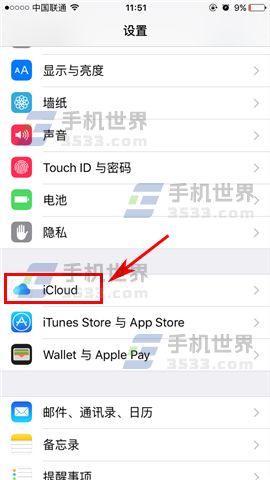
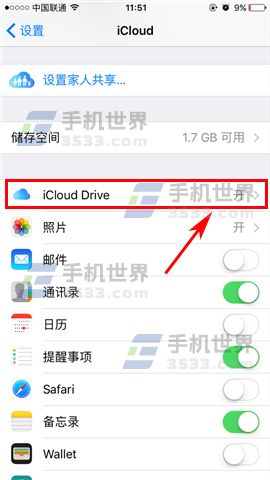
開啟「設定」,點選「iCloud」,再進入「iCloud Drive」。
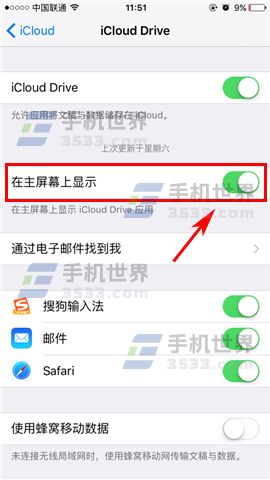
開啟「在主螢幕上顯示」。
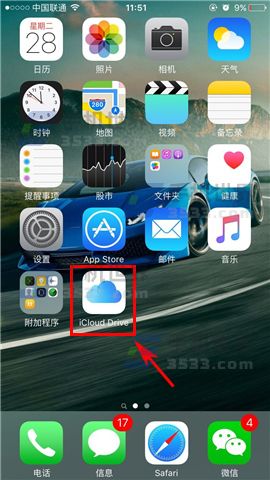
回到桌面後,即可看到 iCloud Drive 圖示。
- 上一篇文章: iPhone 7 數據保護啟用教學
- 下一篇文章: iOS 如何取消 App Store 應用訂閱
若想在 iPhone 7 Plus 桌面直接看到 iCloud Drive,可將其顯示在主螢幕。
開啟「設定」,點選「iCloud」,再進入「iCloud Drive」。
開啟「在主螢幕上顯示」。
回到桌面後,即可看到 iCloud Drive 圖示。