
iOS 定位功能實作:CoreLocation 取得經緯度
編輯:iOS 入門介紹
iOS 定位操作
簡介
iOS 透過 CoreLocation 框架取得使用者目前位置,同時也能追蹤裝置的移動資訊。
實作步驟
1、建立一個簡單的 View-based Application。
2、選擇專案檔,進入 Targets,加入 CoreLocation.framework:
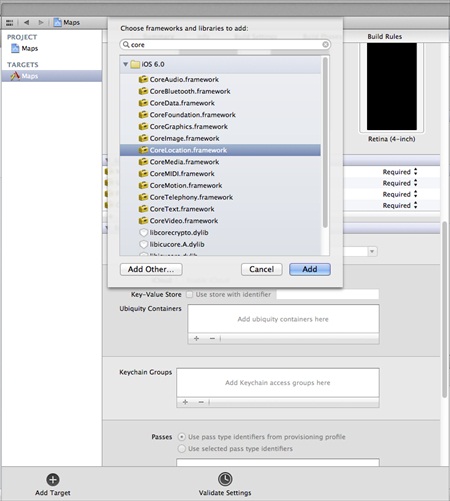
3、在 ViewController.xib 中加入兩個標籤,建立名為 latitudeLabel 與 longitudeLabel 的 IBOutlet。
4、透過「File」→「New」→「File...」選擇 Objective-C class,點擊下一步。
5、將 Subclass of 設為 NSObject,類別命名為 LocationHandler。
6、點擊建立。
7、更新 LocationHandler.h:
#import <Foundation/Foundation.h> #import <CoreLocation/CoreLocation.h> @protocol LocationHandlerDelegate <NSObject> @required -(void) didUpdateToLocation:(CLLocation*)newLocation fromLocation:(CLLocation*)oldLocation; @end @interface LocationHandler : NSObject<CLLocationManagerDelegate> { CLLocationManager *locationManager; } @property(nonatomic,strong) id<LocationHandlerDelegate> delegate; +(id)getSharedInstance; -(void)startUpdating; -(void) stopUpdating; @end
8、更新 LocationHandler.m:
#import "LocationHandler.h" static LocationHandler *DefaultManager = nil; @interface LocationHandler() -(void)initiate; @end @implementation LocationHandler +(id)getSharedInstance{ if (!DefaultManager) { DefaultManager = [[self allocWithZone:NULL]init]; [DefaultManager initiate]; } return DefaultManager; } -(void)initiate{ locationManager = [[CLLocationManager alloc]init]; locationManager.delegate = self; } -(void)startUpdating{ [locationManager startUpdatingLocation]; } -(void) stopUpdating{ [locationManager stopUpdatingLocation]; } -(void)locationManager:(CLLocationManager *)manager didUpdateToLocation: (CLLocation *)newLocation fromLocation:(CLLocation *)oldLocation{ if ([self.delegate respondsToSelector:@selector (didUpdateToLocation:fromLocation:)]) { [self.delegate didUpdateToLocation:oldLocation fromLocation:newLocation]; } } @end
9、更新 ViewController.h:
#import <UIKit/UIKit.h> #import "LocationHandler.h" @interface ViewController : UIViewController<LocationHandlerDelegate> { IBOutlet UILabel *latitudeLabel; IBOutlet UILabel *longitudeLabel; } @end
10、更新 ViewController.m:
#import "ViewController.h" @interface ViewController () @end @implementation ViewController - (void)viewDidLoad { [super viewDidLoad]; [[LocationHandler getSharedInstance]setDelegate:self]; [[LocationHandler getSharedInstance]startUpdating]; } - (void)didReceiveMemoryWarning { [super didReceiveMemoryWarning]; // Dispose of any resources that can be recreated. } -(void)didUpdateToLocation:(CLLocation *)newLocation fromLocation:(CLLocation *)oldLocation{ [latitudeLabel setText:[NSString stringWithFormat: @"Latitude: %f",newLocation.coordinate.latitude]]; [longitudeLabel setText:[NSString stringWithFormat: @"Longitude: %f",newLocation.coordinate.longitude]]; } @end
提醒:正式環境中需在 Info.plist 加入 NSLocationWhenInUseUsageDescription 說明用途,否則系統會直接拒絕定位請求。
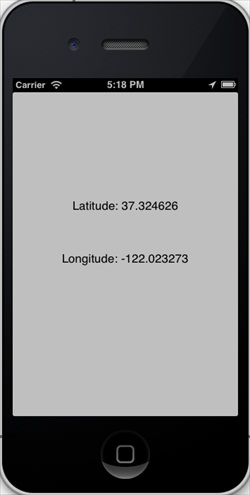
輸出結果
執行程式後:
- 上一篇文章: iOS SQLite 資料庫操作完整教學
- 下一篇文章: iOS 相機管理:呼叫相機拍照並顯示於畫面