
TableView 模擬 QQ 好友列表(一):分組列表與二級數據搭建
編輯:iOS 相關資訊
這個系列要從零做出一個類似 QQ 的好友列表界面。第一步先把骨架搭起來:一個帶分組標題的 table view,以及支撐二級列表的數據結構。
一、創建項目
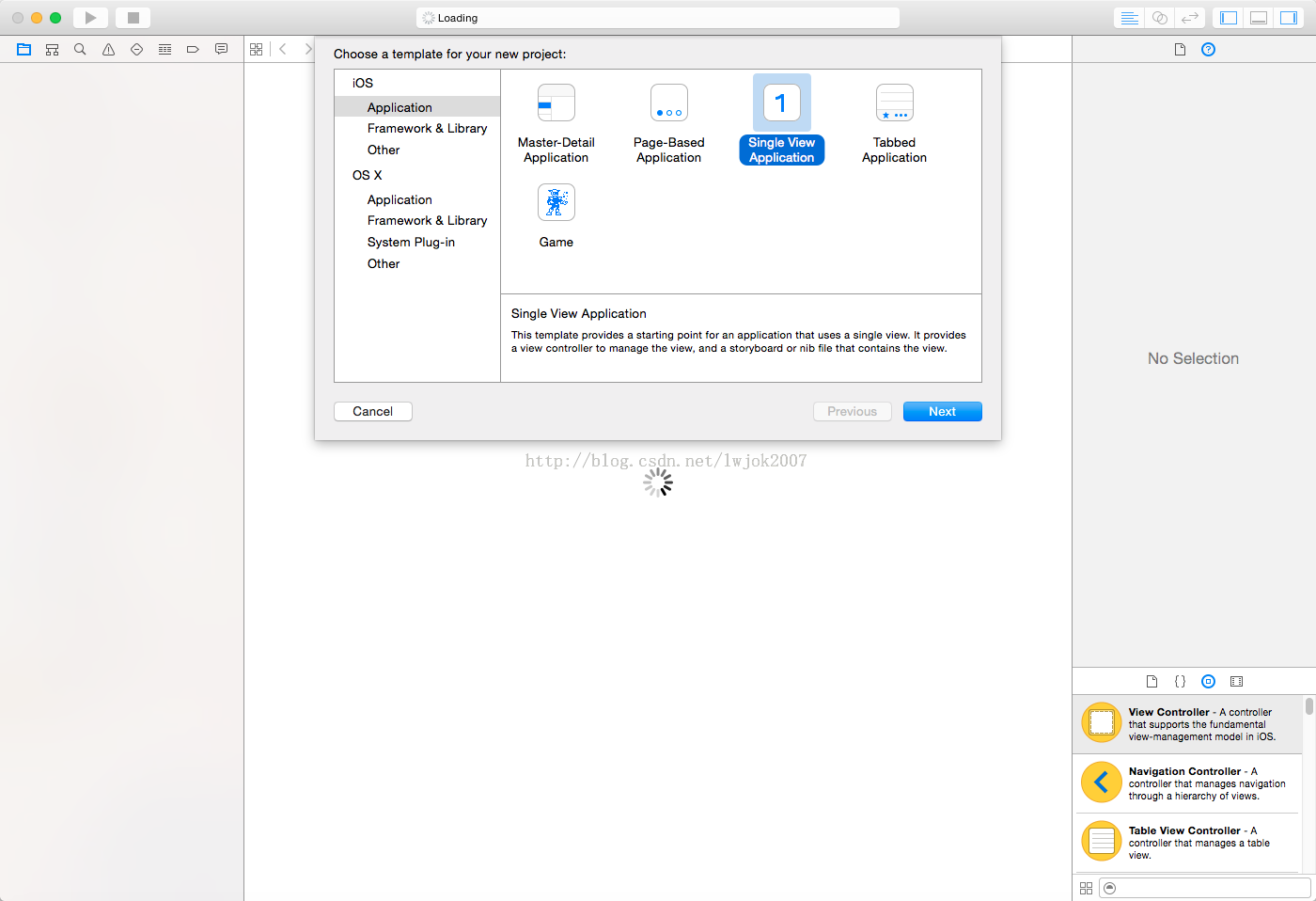

二、聲明屬性並初始化列表
先給 ViewController 添加兩個屬性:
UITableView *tableView;   // 展示列表
NSArray *titleArray;      // 第一層列表需要展示的數據
初始化 table view:
tableView = [[UITableView alloc] initWithFrame:CGRectMake(0, 0, SCREEN_WIDTH, SCREEN_HEIGHT)];
tableView.showsVerticalScrollIndicator = NO;
tableView.separatorStyle = UITableViewCellSeparatorStyleSingleLine;
[self.view addSubview:tableView];
分組名稱的數據源:
titleArray = [[NSArray alloc] initWithObjects:@"朋友", @"親戚", @"同學", @"驢友", @"論壇好友", nil];
讓 ViewController 遵循 table view 的兩個協議:
@interface ViewController () <UITableViewDataSource, UITableViewDelegate>
{
    UITableView *tableView;   // 展示列表
    NSArray *titleArray;      // 第一層列表需要展示的數據
}
@end
三、實現基礎代理方法
#pragma mark -- tableViewDelegate

-(NSInteger)numberOfSectionsInTableView:(UITableView *)tableView
{
    // 返回分組數量
    return titleArray.count;
}

-(NSInteger)tableView:(UITableView *)tableView numberOfRowsInSection:(NSInteger)section
{
    return 0;
}

-(CGFloat)tableView:(UITableView *)tableView heightForHeaderInSection:(NSInteger)section
{
    return 50;
}

-(UIView *)tableView:(UITableView *)tableView viewForHeaderInSection:(NSInteger)section
{
    UIView *view = [[UIView alloc] initWithFrame:CGRectMake(0, 0, SCREEN_WIDTH, 30)];

    UILabel *titleLabel = [[UILabel alloc] initWithFrame:CGRectMake(20, 5, SCREEN_WIDTH, 30)];
    titleLabel.text = [titleArray objectAtIndex:section];
    [view addSubview:titleLabel];

    return view;
}
到這裡,第一層的分組列表就成型了。

四、準備第二層數據
接下來要實現二級列表——比如展開「朋友」分組後,顯示該組下的所有好友。先準備存儲用的容器:
NSArray *friendsArray;        // 好友列表
NSArray *familyArray;         // 親戚列表
NSArray *schoolmateArray;     // 同學列表
NSArray *friendstravelArray;  // 驢友列表
NSArray *xianFriendsArray;    // 西安好友列表
NSArray *strangersArray;      // 陌生人列表

NSDictionary *dataDic;        // 第二層需要展示的數據
填充假數據,並用字典把分組名與對應列表關聯起來:
-(void)initDataSource
{
    titleArray = [[NSArray alloc] initWithObjects:@"朋友", @"親戚", @"同學", @"驢友", @"西安好友", @"陌生人", nil];

    NSDictionary *dic01 = [[NSDictionary alloc] initWithObjectsAndKeys:@"張三豐", @"name", @"男", @"sex", nil];
    NSDictionary *dic02 = [[NSDictionary alloc] initWithObjectsAndKeys:@"鄧超", @"name", @"男", @"sex", nil];
    NSDictionary *dic03 = [[NSDictionary alloc] initWithObjectsAndKeys:@"吳奇隆", @"name", @"男", @"sex", nil];
    friendsArray = [[NSArray alloc] initWithObjects:dic01, dic02, dic03, nil];

    NSDictionary *dic11 = [[NSDictionary alloc] initWithObjectsAndKeys:@"爸爸", @"name", @"男", @"sex", nil];
    NSDictionary *dic12 = [[NSDictionary alloc] initWithObjectsAndKeys:@"弟弟", @"name", @"男", @"sex", nil];
    NSDictionary *dic13 = [[NSDictionary alloc] initWithObjectsAndKeys:@"三哥", @"name", @"男", @"sex", nil];
    NSDictionary *dic14 = [[NSDictionary alloc] initWithObjectsAndKeys:@"大伯", @"name", @"男", @"sex", nil];
    NSDictionary *dic15 = [[NSDictionary alloc] initWithObjectsAndKeys:@"二舅", @"name", @"男", @"sex", nil];
    familyArray = [[NSArray alloc] initWithObjects:dic11, dic12, dic13, dic14, dic15, nil];

    NSDictionary *dic21 = [[NSDictionary alloc] initWithObjectsAndKeys:@"胖子", @"name", @"男", @"sex", nil];
    NSDictionary *dic22 = [[NSDictionary alloc] initWithObjectsAndKeys:@"雄哥", @"name", @"男", @"sex", nil];
    NSDictionary *dic23 = [[NSDictionary alloc] initWithObjectsAndKeys:@"小六子", @"name", @"男", @"sex", nil];
    schoolmateArray = [[NSArray alloc] initWithObjects:dic21, dic22, dic23, nil];

    NSDictionary *dic31 = [[NSDictionary alloc] initWithObjectsAndKeys:@"三炮", @"name", @"男", @"sex", nil];
    NSDictionary *dic32 = [[NSDictionary alloc] initWithObjectsAndKeys:@"鄭海峰", @"name", @"男", @"sex", nil];
    NSDictionary *dic33 = [[NSDictionary alloc] initWithObjectsAndKeys:@"王重陽", @"name", @"男", @"sex", nil];
    NSDictionary *dic34 = [[NSDictionary alloc] initWithObjectsAndKeys:@"丘處機", @"name", @"男", @"sex", nil];
    NSDictionary *dic35 = [[NSDictionary alloc] initWithObjectsAndKeys:@"呂娜", @"name", @"男", @"sex", nil];
    NSDictionary *dic36 = [[NSDictionary alloc] initWithObjectsAndKeys:@"郭金明", @"name", @"男", @"sex", nil];
    friendstravelArray = [[NSArray alloc] initWithObjects:dic31, dic32, dic33, dic34, dic35, dic36, nil];

    NSDictionary *dic41 = [[NSDictionary alloc] initWithObjectsAndKeys:@"李曉峰", @"name", @"男", @"sex", nil];
    NSDictionary *dic42 = [[NSDictionary alloc] initWithObjectsAndKeys:@"王蒙", @"name", @"男", @"sex", nil];
    NSDictionary *dic43 = [[NSDictionary alloc] initWithObjectsAndKeys:@"李建", @"name", @"男", @"sex", nil];
    xianFriendsArray = [[NSArray alloc] initWithObjects:dic41, dic42, dic43, nil];

    NSDictionary *dic51 = [[NSDictionary alloc] initWithObjectsAndKeys:@"胡雪", @"name", @"男", @"sex", nil];
    NSDictionary *dic52 = [[NSDictionary alloc] initWithObjectsAndKeys:@"張小歡", @"name", @"男", @"sex", nil];
    NSDictionary *dic53 = [[NSDictionary alloc] initWithObjectsAndKeys:@"劉麗麗", @"name", @"男", @"sex", nil];
    strangersArray = [[NSArray alloc] initWithObjects:dic51, dic52, dic53, nil];

    dataDic = [[NSDictionary alloc] initWithObjectsAndKeys:
               friendsArray, [titleArray objectAtIndex:0],
               familyArray, [titleArray objectAtIndex:1],
               schoolmateArray, [titleArray objectAtIndex:2],
               friendstravelArray, [titleArray objectAtIndex:3],
               xianFriendsArray, [titleArray objectAtIndex:4],
               strangersArray, [titleArray objectAtIndex:5], nil];
}
這裡用「分組名 → 數組」的字典映射,後續在 cellForRowAtIndexPath: 裡只要拿到 section 對應的名字,就能取出該組的數據,不必寫一堆 if-else 判斷。
五、讓行數據顯示出來
把 numberOfRowsInSection: 改成返回真實行數,並在 cell 裡填值:

-(UITableViewCell *)tableView:(UITableView *)tableView cellForRowAtIndexPath:(NSIndexPath *)indexPath
{
    NSString *str = [titleArray objectAtIndex:indexPath.section];
    NSArray *arr = [dataDic objectForKey:str];

    static NSString *CellIdentifier = @"MainCell";
    UITableViewCell *cell = [tableView dequeueReusableCellWithIdentifier:CellIdentifier];
    cell = nil;
    if (cell == nil) {
        cell = [[UITableViewCell alloc] initWithStyle:UITableViewCellStyleDefault reuseIdentifier:CellIdentifier];
        cell.selectionStyle = UITableViewCellSelectionStyleGray;
    }

    UILabel *userLabel = [[UILabel alloc] initWithFrame:CGRectMake(30, 5, SCREEN_WIDTH, 30)];
    userLabel.text = [[arr objectAtIndex:indexPath.row] valueForKey:@"name"];
    [cell.contentView addSubview:userLabel];

    return cell;
}
目前的效果大致如下:

這一節先到這裡。下一節我們把 cell 換成自定義樣式,讓好友列表的信息豐富起來——頭像、暱稱、簽名都會登場。