
專案收尾怎麼清:用 Python 腳本揪出從未被引用的圖片資源
編輯:iOS 相關資訊
本文由 iOS 開發網站 51ios.net 轉載自裡脊串的開發隨筆,裡脊串的網站是 https://adad184.com/
專案走到尾聲,就到了該掃垃圾的時候。要清的通常有三類:
- 沒用的程式碼(多人維護久了,總會沉積一些無人敢刪的屍體)
- 沒用的檔案(多半是需求變更後被留下的類別檔)
- 沒用的資源(絕大多數是圖片)
前兩項就不談了,都是體力活——流程越規範,花的時間越少。今天重點放在圖片資源上。
實踐
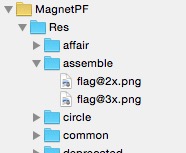
我組織資源的習慣是用 folder references(就是那種藍色的資料夾,不過現在很多朋友已經改用 Images.xcassets 了)。相比 groups,它的優點是:
- 直接調整資源檔與目錄結構即可,不必去動 project 檔。
- 資源檔可以同名。
- 若有多個 target,每個 target 維護各自的根資源資料夾就好。
其他優缺點就不逐一列舉了,有經驗的人自然有體會。
採用 folder references 時,程式碼裡通常會寫上相對路徑:
[self.btnCreate setImage:[UIImage imageNamed:@"Res/circle/nav_create.png"]
                forState:UIControlStateNormal];
那麼要找出「沒被使用的資源」,思路就變得很單純:
- 掃過所有程式碼,收集被引用到的資源路徑。
- 走訪資源資料夾,把兩邊比對,沒出現在第一份清單裡的就是孤兒。
腳本
照上面的邏輯,我用 Python 寫了一個簡單腳本:
#!/usr/bin/python
# -*- coding: utf-8 -*-
import os, sys, re, shutil

if __name__ == '__main__':
    used_map = {}
    resPath = "./MagnetPF/Res/"   # 資源目錄相對路徑
    depDir = "deprecated"         # 未使用檔會被搬到這個目錄
    skipDir = ["message"]         # 要跳過的目錄

    # 第一趟:掃出程式碼中所有被引用的資源
    for root, dirs, files in os.walk("./"):
        for file in files:
            if file.endswith(".m"):
                filepath = os.path.join(root, file)
                f = open(filepath, "r")
                for line in f:
                    match = re.findall(".*?@\"(Res.*?.png)\".*?", line)
                    if match:
                        for image in match:
                            used_map[image] = 1

    skipDir.append(depDir)        # 過期目錄本身也要跳過

    # 第二趟:走訪資源目錄,找出沒被引用的
    for root, dirs, files in os.walk(resPath):
        for file in files:
            orginfile = os.path.join(root, file)
            match = re.findall(".*?(Res.*?.png).*?", orginfile)
            if match:
                # 剔除 @2x / @3x 標記後再比對
                matchfile = match[0].replace("@2x", "").replace("@3x", "")
                print matchfile

                if not used_map.has_key(matchfile):
                    filename = orginfile.split(os.path.sep)[-1]
                    relPath = orginfile.replace(resPath, "")
                    originDir = relPath.split(os.path.sep)[0]
                    tofile = resPath + depDir + "/" + relPath
                    topath = tofile.replace(filename, "")

                    if not originDir in skipDir:
                        if not os.path.exists(topath):
                            os.mkdir(topath)
                        print "from: " + orginfile
                        print " to: " + tofile
                        print ""
                        shutil.move(orginfile, tofile)
腳本策略很防禦:它不是直接刪除,而是把判定為未使用的檔案搬進 deprecated 目錄。跑完之後你可以回頭人工複查一遍,確認無誤再整包刪掉,降低誤刪風險。
這個腳本還沒解決的問題
- 被註解掉的引用會被誤判。若含資源名稱的那行程式碼被註解掉,正則表達式仍會比對成功,檔案就會被保留下來——這是「偏保守」的錯誤,反過來講,程式碼註解本身也該一起清掉。
- 拼接出來的檔名認不出來。像
xx01.png、xx02.png這種用迴圈或字串format拼出的資源,會被判定成未使用而搬走,這是真正危險的一類,務必人工複查。 - 不適用於非 folder references 的工程。用 groups 或 xcassets 管理的專案,路徑形式不同,比對邏輯要改寫;xcassets 的情況建議直接靠 Xcode 的 report navigator 或第三方工具處理。
同樣的思路也能拿來清理多語言檔案——把 .strings 的 key 掃出來,跟程式碼中的 NSLocalizedString 呼叫比對即可。

這段程式是我上週六邊查 Google 邊現學現賣寫出來的,寫得不算漂亮。如果你有更好的方案,歡迎一起討論。