
iOS 圖片倒影效果的兩種實作:自訂 UIView 與 UIImage 分類
編輯:iOS 相關資訊
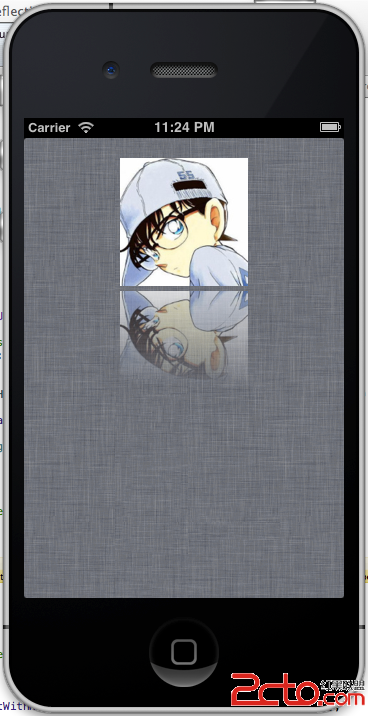
倒影效果在展示圖片、卡片、封面時很常用。做法的核心是:畫出原圖、產生一張灰階漸層當作遮罩、用 CGContextClipToMask 把漸層套上去,最後把結果上下翻轉貼回原位。以下提供兩種封裝方式。
實作一:繼承 UIView 的 CKReflectionImage
用一個 UIView 子類包住要顯示倒影的圖片,重寫它的繪圖方法,再把這個 view 加入畫面即可。
CKReflectionImage.h:
#import <UIKit/UIKit.h>

@interface CKReflectionImage : UIView {
  @private
    UIImage *image_;
    /**
     * Value of gradient start. This value is divided to height of image.
     */
    CGFloat visibleReflectionHeight_;
    /**
     * Padding to top image.
     */
    CGFloat paddingToTopImage_;
}

@property (nonatomic, readwrite, retain) UIImage *image;
@property (nonatomic, readwrite, assign) CGFloat visibleReflectionHeight;
@property (nonatomic, readwrite, assign) CGFloat paddingToTopImage;

@end
CKReflectionImage.m:
#import "CKReflectionImage.h"

@implementation CKReflectionImage

#pragma mark - Properties
@synthesize image = image_;
@synthesize visibleReflectionHeight = visibleReflectionHeight_;
@synthesize paddingToTopImage = paddingToTopImage_;

#pragma mark - Memory management
- (void)dealloc {
    [image_ release];
    image_ = nil;
    visibleReflectionHeight_ = 0.0f;
    paddingToTopImage_ = 0.0f;
    [super dealloc];
}

#pragma mark - Draw methods
/**
 * Draws the receiver's image within the passed-in rectangle.
 *
 * @param rect: The portion of the view's bounds that needs to be updated.
 */
- (void)drawRect:(CGRect)rect {
    [super drawRect:rect];

    if (image_ != nil) {
        CGContextRef context = UIGraphicsGetCurrentContext();
        CGImageRef reflectionImage = NULL;
        CGImageRef gradientImage = NULL;

        // Frame of image
        CGRect frame = [self frame];
        frame.origin.x = 0.0f;
        frame.origin.y = 0.0f;
        frame.size.width  = CGRectGetWidth(frame);
        frame.size.height = image_.size.height * CGRectGetWidth(frame) / image_.size.width;

        // 1. 畫原始圖片
        CGContextSaveGState(context);
        {
            // 直接畫進 context 會呈現顛倒的影像,因此改用 UIGraphics 的方式畫
            // CGContextDrawImage(context, frame, [image_ CGImage]);

            UIGraphicsPushContext(context);
            [image_ drawInRect:frame];
            UIGraphicsPopContext();
        }
        CGContextRestoreGState(context);

        // 2. 產生灰階漸層當遮罩
        CGContextSaveGState(context);
        {
            // 漸層永遠是黑白,遮罩必須在 gray colorspace 中
            CGColorSpaceRef colorSpace = CGColorSpaceCreateDeviceGray();
            CGContextRef gradientContext = CGBitmapContextCreate(NULL,
                                                                CGRectGetWidth(frame),
                                                                CGRectGetHeight(frame),
                                                                8, 0, colorSpace, kCGImageAlphaNone);

            // 起始與結束的灰階值(帶 alpha,即使 bitmap context 不支援 alpha)
            CGFloat colors[] = {0.0f, 1.0f, 1.0f, 1.0f};
            CGGradientRef grayScaleGradient = CGGradientCreateWithColorComponents(colorSpace, colors, NULL, 2);
            CGColorSpaceRelease(colorSpace);

            // 由上往下的漸層向量
            CGPoint gradientStartPoint = CGPointMake(0, (CGRectGetHeight(frame) - visibleReflectionHeight_));
            CGPoint gradientEndPoint   = CGPointMake(0, ((CGRectGetHeight(frame) * 2) - visibleReflectionHeight_));

            CGContextDrawLinearGradient(gradientContext, grayScaleGradient,
                                        gradientStartPoint, gradientEndPoint,
                                        kCGGradientDrawsAfterEndLocation);
            CGGradientRelease(grayScaleGradient);

            gradientImage = CGBitmapContextCreateImage(gradientContext);
            CGContextRelease(gradientContext);
        }
        CGContextRestoreGState(context);

        // 3. 把遮罩套到圖片上
        CGContextSaveGState(context);
        {
            CGColorSpaceRef colorSpace = CGColorSpaceCreateDeviceRGB();
            CGContextRef reflectionContext = CGBitmapContextCreate(NULL,
                                                                  CGRectGetWidth(frame),
                                                                  CGRectGetHeight(frame),
                                                                  8, 0, colorSpace,
                                                                  (kCGBitmapByteOrder32Little | kCGImageAlphaPremultipliedLast));
            CGColorSpaceRelease(colorSpace);

            CGContextSaveGState(context);
            {
                CGContextClipToMask(reflectionContext, frame, gradientImage);
            }
            CGContextRestoreGState(context);

            CGContextSaveGState(reflectionContext);
            {
                UIGraphicsPushContext(reflectionContext);
                [image_ drawInRect:frame];
                UIGraphicsPopContext();
            }
            CGContextRestoreGState(reflectionContext);

            CGImageRelease(gradientImage);
            reflectionImage = CGBitmapContextCreateImage(reflectionContext);
            CGContextRelease(reflectionContext);
        }
        CGContextRestoreGState(context);

        // 4. 翻轉後畫回畫面
        CGContextSaveGState(context);
        {
            // 把 context 平移到高度兩倍處,再加上圖片與倒影間的間距
            CGContextTranslateCTM(context, CGRectGetMinX(frame),
                                  (CGRectGetHeight(frame) * 2) + paddingToTopImage_);
            // 垂直翻轉
            CGContextScaleCTM(context, 1.0f, -1.0f);
            CGContextDrawImage(context, frame, reflectionImage);
            CGImageRelease(reflectionImage);
        }
        CGContextRestoreGState(context);
    }
}

#pragma mark - Setters
- (void)setImage:(UIImage *)image {
    if (image_ != image) {
        [image_ release];
        image_ = [image retain];
    }
    [self setNeedsDisplay];
}

- (void)setVisibleReflectionHeight:(CGFloat)visibleReflectioHeight {
    if (visibleReflectionHeight_ != visibleReflectioHeight) {
        visibleReflectionHeight_ = visibleReflectioHeight;
    }
    [self setNeedsDisplay];
}

- (void)setPaddingToTopImage:(CGFloat)paddingToTopImage {
    if (paddingToTopImage_ != paddingToTopImage) {
        paddingToTopImage_ = paddingToTopImage;
    }
    [self setNeedsDisplay];
}

@end
使用方式:
CKReflectionImage *reflectionImage = [[CKReflectionImage alloc] initWithFrame:CGRectMake(96, 20, 128, 460)];
[reflectionImage setBackgroundColor:[UIColor clearColor]];

// 設定原圖與倒影之間的間距
[reflectionImage setPaddingToTopImage:5.0f];

// 隱藏倒影的 1/4,只顯示 3/4
[reflectionImage setVisibleReflectionHeight:(CGRectGetWidth([reflectionImage frame]) / 4 * 3)];

[reflectionImage setImage:[UIImage imageNamed:@"1.png"]];
[[self view] addSubview:reflectionImage];
實作效果:
實作二:為 UIImage 加上倒影分類
若你只想拿到「帶倒影的圖片」而不想多包一層 view,用分類會更方便。
UIImage+Reflection.h:
#import <UIKit/UIKit.h>

@interface UIImage (Reflection)
- (UIImage *)reflectionWithHeight:(int)height;
- (UIImage *)reflectionWithAlpha:(float)pcnt;
- (UIImage *)reflectionRotatedWithAlpha:(float)pcnt;
@end
UIImage+Reflection.m:
#import "UIImage+Reflection.h"

#ifndef UIImageReflectionMethods
#define UIImageReflectionMethods

CGImageRef CreateGradientImage (int pixelsWide, int pixelsHigh, CGFloat endPoint) {
    CGImageRef theCGImage = NULL;

    // gradient is always black-white and the mask must be in the gray colorspace
    CGColorSpaceRef colorSpace = CGColorSpaceCreateDeviceGray();

    CGContextRef gradientBitmapContext = CGBitmapContextCreate(NULL, pixelsWide, pixelsHigh,
                                                              8, 0, colorSpace, kCGImageAlphaNone);

    // define the start and end grayscale values (with the alpha, even though
    // our bitmap context doesn't support alpha the gradient requires it)
    CGFloat colors[] = {0.0, 1.0, 1, 1.0};

    CGGradientRef grayScaleGradient = CGGradientCreateWithColorComponents(colorSpace, colors, NULL, 2);
    CGColorSpaceRelease(colorSpace);

    // create the start and end points for the gradient vector (straight down)
    CGPoint gradientStartPoint = CGPointZero;
    CGPoint gradientEndPoint   = CGPointMake(0, endPoint);
    if (endPoint < 0) {
        gradientEndPoint = CGPointMake(0, -endPoint);
    }

    CGContextDrawLinearGradient(gradientBitmapContext, grayScaleGradient,
                                gradientStartPoint, gradientEndPoint,
                                kCGGradientDrawsAfterEndLocation);
    CGGradientRelease(grayScaleGradient);

    theCGImage = CGBitmapContextCreateImage(gradientBitmapContext);

    if (endPoint < 0) {
        // 需要旋轉時,先清空再翻轉重畫
        CGContextClearRect(gradientBitmapContext, CGRectMake(0, 0, pixelsWide, pixelsHigh));
        CGContextTranslateCTM(gradientBitmapContext, 0.0, pixelsHigh);
        CGContextScaleCTM(gradientBitmapContext, 1.0, -1.0);
        CGContextDrawImage(gradientBitmapContext, CGRectMake(0, 0, pixelsWide, pixelsHigh), theCGImage);
        CGImageRelease(theCGImage);
        theCGImage = CGBitmapContextCreateImage(gradientBitmapContext);
    }

    CGContextRelease(gradientBitmapContext);
    return theCGImage;
}

static CGContextRef MyCreateBitmapContext (int pixelsWide, int pixelsHigh) {
    CGColorSpaceRef colorSpace = CGColorSpaceCreateDeviceRGB();
    CGContextRef bitmapContext = CGBitmapContextCreate (NULL, pixelsWide, pixelsHigh, 8, 0, colorSpace,
                                                        (kCGBitmapByteOrder32Little | kCGImageAlphaPremultipliedFirst));
    CGColorSpaceRelease(colorSpace);
    return bitmapContext;
}

#endif

@implementation UIImage (Reflection)

- (UIImage *)reflectionRotatedWithAlpha:(float)pcnt {
    int height = self.size.height;
    UIImage *fromImage = self;
    pcnt = 1.0 / pcnt;

    CGContextRef mainViewContentContext = MyCreateBitmapContext(fromImage.size.width, height);

    // 1 pixel 寬的漸層即可,ClipToMask 會自動拉伸
    CGImageRef gradientMaskImage = CreateGradientImage(1, height, -(height * pcnt));

    CGContextClipToMask(mainViewContentContext,
                        CGRectMake(0.0, 0.0, fromImage.size.width, height),
                        gradientMaskImage);
    CGImageRelease(gradientMaskImage);

    // 這個版本不翻轉,保留原方向
    CGContextDrawImage(mainViewContentContext,
                       CGRectMake(0, 0, fromImage.size.width, fromImage.size.height),
                       [fromImage CGImage]);

    CGImageRef reflectionImage = CGBitmapContextCreateImage(mainViewContentContext);
    CGContextRelease(mainViewContentContext);

    UIImage *theImage = [UIImage imageWithCGImage:reflectionImage];
    CGImageRelease(reflectionImage);
    return theImage;
}

- (UIImage *)reflectionWithHeight:(int)height {
    if (height == -1) {
        height = [self size].height;
    }
    if (height == 0) {
        return nil;
    }

    UIImage *fromImage = self;
    CGContextRef mainViewContentContext = MyCreateBitmapContext(fromImage.size.width, fromImage.size.height);

    CGImageRef gradientMaskImage = CreateGradientImage(1, height, height);

    CGContextClipToMask(mainViewContentContext,
                        CGRectMake(0.0, 0.0, fromImage.size.width, height),
                        gradientMaskImage);
    CGImageRelease(gradientMaskImage);

    // 把 context 原點移到要擷取的高度,再翻轉,讓圖片上下顛倒
    CGContextTranslateCTM(mainViewContentContext, 0.0, fromImage.size.height);
    CGContextScaleCTM(mainViewContentContext, 1.0, -1.0);

    CGContextDrawImage(mainViewContentContext,
                       CGRectMake(0, 0, fromImage.size.width, fromImage.size.height),
                       [fromImage CGImage]);

    CGImageRef reflectionImage = CGBitmapContextCreateImage(mainViewContentContext);
    CGContextRelease(mainViewContentContext);

    UIImage *theImage = [UIImage imageWithCGImage:reflectionImage];
    CGImageRelease(reflectionImage);
    return theImage;
}

- (UIImage *)reflectionWithAlpha:(float)pcnt {
    int height = self.size.height;
    UIImage *fromImage = self;
    pcnt = 1.0 / pcnt;

    CGContextRef mainViewContentContext = MyCreateBitmapContext(fromImage.size.width, height);

    CGImageRef gradientMaskImage = CreateGradientImage(1, height, height * pcnt);

    CGContextClipToMask(mainViewContentContext,
                        CGRectMake(0.0, 0.0, fromImage.size.width, height),
                        gradientMaskImage);
    CGImageRelease(gradientMaskImage);

    CGContextTranslateCTM(mainViewContentContext, 0.0, height);
    CGContextScaleCTM(mainViewContentContext, 1.0, -1.0);

    CGContextDrawImage(mainViewContentContext,
                       CGRectMake(0, 0, fromImage.size.width, fromImage.size.height),
                       [fromImage CGImage]);

    CGImageRef reflectionImage = CGBitmapContextCreateImage(mainViewContentContext);
    CGContextRelease(mainViewContentContext);

    UIImage *theImage = [UIImage imageWithCGImage:reflectionImage];
    CGImageRelease(reflectionImage);
    return theImage;
}

@end
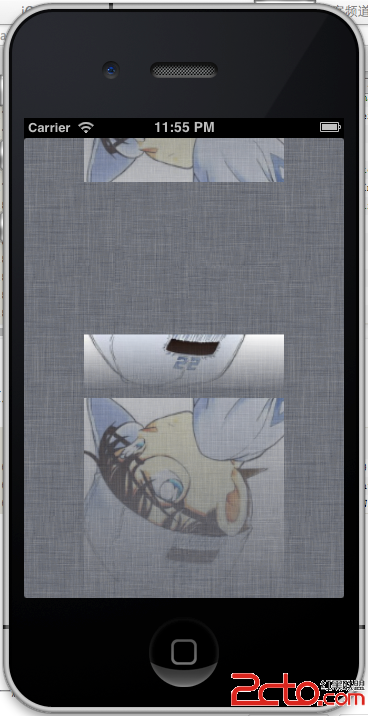
使用非常簡單:
[refView   setImage:[image reflectionWithAlpha:0.5]];
[imageView setImage:[image reflectionWithHeight:50]];
[topRefView setImage:[image reflectionRotatedWithAlpha:0.5]];
效果:
兩種方式怎麼選
需要「即時可調」——例如使用者拖動滑桿改變倒影高度——用 CKReflectionImage,因為它每次 setNeedsDisplay 就重算一次,適合互動場景。只是要一張靜態素材、之後當普通 UIImage 到處貼,用分類更方便,算完就是一張圖,不必多一層 view。
另外要留意效能:drawRect: 內做 bitmap context 建立與遮罩合成並不便宜,若放在 UIScrollView 或 UITableView 的 cell 上,強烈建議先把結果快取起來,不要每次重繪都重算。
- 上一篇文章: UITableView 局部刷新:只更新指定列的作法
- 下一篇文章: iOS 視圖生命週期與視圖控制器的關係