
iOS 控件實作:UIPickerView 選擇器與多欄位資料綁定
編輯:iOS 相關資訊
前言
UIPickerView 是 iOS 中登場率極高的控件,作用近似網頁的 select 下拉選單,但以滾輪形式呈現。它支援單欄與多欄(component)結構,是日期選擇、等級設定、地區聯絡人等場景的標準解法。
使用它需要實作兩個協議:UIPickerViewDataSource 提供「有幾欄、每欄幾筆」,UIPickerViewDelegate 負責「每筆顯示什麼、使用者選了什麼」。
標頭檔
#import <UIKit/UIKit.h>

@interface ZYViewController : UIViewController <UIPickerViewDataSource, UIPickerViewDelegate>

@property (nonatomic, strong) UIPickerView *myPicker;

@end
實作
@implementation ZYViewController

@synthesize myPicker;

- (void)viewDidLoad
{
    [super viewDidLoad];
    self.view.backgroundColor = [UIColor whiteColor];

    self.myPicker = [[UIPickerView alloc] init];
    self.myPicker.dataSource = self;
    self.myPicker.delegate = self;
    self.myPicker.center = self.view.center;
    // 顯示選取列的灰色指示條
    self.myPicker.showsSelectionIndicator = YES;

    [self.view addSubview:self.myPicker];
}

// 欄位數量(component)
- (NSInteger)numberOfComponentsInPickerView:(UIPickerView *)pickerView {
    NSInteger result = 0;
    if ([pickerView isEqual:self.myPicker]) {
        result = 1;
    }
    return result;
}

// 每一欄的列數(row)
- (NSInteger)pickerView:(UIPickerView *)pickerView numberOfRowsInComponent:(NSInteger)component {
    NSInteger result = 0;
    if ([pickerView isEqual:self.myPicker]) {
        result = 10;
    }
    return result;
}

// 每一列的顯示文字
- (NSString *)pickerView:(UIPickerView *)pickerView
               titleForRow:(NSInteger)row
            forComponent:(NSInteger)component {
    NSString *result = nil;
    if ([pickerView isEqual:self.myPicker]) {
        result = [NSString stringWithFormat:@"Row %ld", (long)row + 1];
    }
    return result;
}

// 使用者選取時觸發
- (void)pickerView:(UIPickerView *)pickerView
      didSelectRow:(NSInteger)row
       inComponent:(NSInteger)component {
    NSLog(@"result: You selected Row%ld", (long)row + 1);
}

@end
執行結果
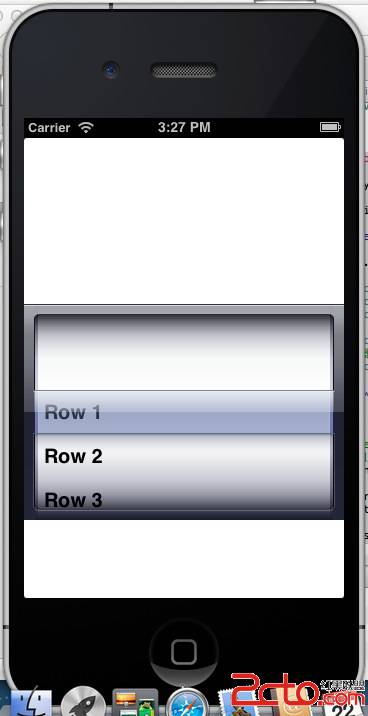
選擇不同列時主控台的輸出:
result: You selected Row1
result: You selected Row2
result: You selected Row4
多欄位與效能建議
要擴充成多欄(例如「縣市 + 區域」),把 numberOfComponentsInPickerView: 的回傳值改大,並在 numberOfRowsInComponent: 與 titleForRow:forComponent: 中依 component 參數回傳不同的資料即可。實務上通常會準備二維陣列或字典來對應各欄的內容。
效能方面,titleForRow:forComponent: 會被高頻呼叫,請避免在其中做正則運算或 I/O。若需要顯示圖片或自訂排版,改用 viewForRow:forComponent:reusingView: 回傳自訂 view,並善用第三個參數重用既有 view,這對資料量大的滾輪尤其重要。
最後提醒,UIPickerView 並不適合當作快速輸入工具。若欄位數超過 20 筆以上,或使用者需要搜尋定位,改搭配 UISearchController 的清單反而更有效率。
- 上一篇文章: iOS 控件實作:UISwitch 開關控件與值變更事件
- 下一篇文章: iOS 狀態列操作全攻略:從網路指示器到自訂狀態列