
iOS 實作:UITabBarController 打造多頁籤切換介面
編輯:iOS 相關資訊
前言
UITabBarController 是最常見的多視圖容器:畫面底部一排頁籤,點一下就在各功能頁之間切換。它管理一個 view controller 陣列,並負責切換與狀態保留。以下示範如何以程式碼組出兩個頁籤,並讓每個頁籤各自擁有獨立的導航欄。
標頭檔
#import <UIKit/UIKit.h>
#import "ZYFirstViewController.h"
#import "ZYSecondViewController.h"

@interface ZYViewController : UIViewController

@property (nonatomic, strong) ZYFirstViewController *firstViewController;
@property (nonatomic, strong) ZYSecondViewController *secondViewController;
@property (nonatomic, strong) UITabBarController *taBarController;
@property (nonatomic, strong) UINavigationController *firstnavigationController;
@property (nonatomic, strong) UINavigationController *secondnavigationController;

@end
組裝 TabBarController
@synthesize firstViewController;
@synthesize secondViewController;
@synthesize taBarController;
@synthesize firstnavigationController;
@synthesize secondnavigationController;

- (void)viewDidLoad
{
    [super viewDidLoad];
    self.title = @"UITabBarControllerTest";

    self.firstViewController = [[ZYFirstViewController alloc] initWithNibName:nil bundle:nil];
    firstnavigationController = [[UINavigationController alloc] initWithRootViewController:firstViewController];

    self.secondViewController = [[ZYSecondViewController alloc] initWithNibName:nil bundle:nil];
    secondnavigationController = [[UINavigationController alloc] initWithRootViewController:secondViewController];

    // 陣列順序即為頁籤由左至右的順序
    NSArray *twoViewControllers = [[NSArray alloc] initWithObjects:firstnavigationController,
                                                           secondnavigationController, nil];
    self.taBarController = [[UITabBarController alloc] init];
    [self.taBarController setViewControllers:twoViewControllers];
    [self.view addSubview:taBarController.view];
}
設定各頁籤的標題與圖示
// ZYFirstViewController.m
- (id)initWithNibName:(NSString *)nibNameOrNil bundle:(NSBundle *)nibBundleOrNil
{
    self = [super initWithNibName:nibNameOrNil bundle:nibBundleOrNil];
    if (self) {
        // TabBarController 不會載入非首屏頁面,因此初始化要放在這裡
        self.title = @"First";                                   // 會自動成為頁籤標題
        self.tabBarItem.image = [UIImage imageNamed:@"first.png"];
        self.view.backgroundColor = [UIColor whiteColor];
    }
    return self;
}
// ZYSecondViewController.m
- (id)initWithNibName:(NSString *)nibNameOrNil bundle:(NSBundle *)nibBundleOrNil
{
    self = [super initWithNibName:nibNameOrNil bundle:nibBundleOrNil];
    if (self) {
        self.title = @"Second";
        self.tabBarItem.image = [UIImage imageNamed:@"second.png"];
        self.view.backgroundColor = [UIColor whiteColor];
    }
    return self;
}
執行結果
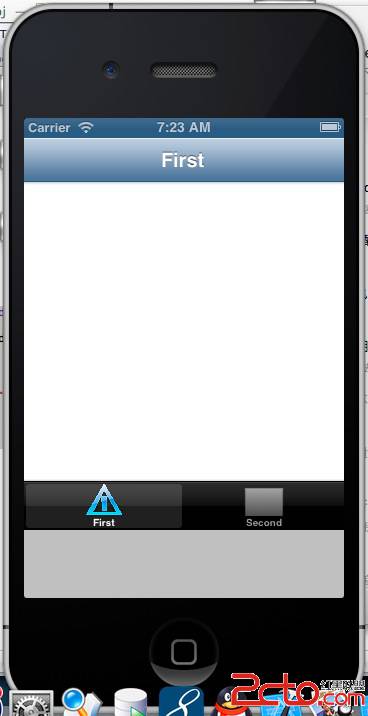
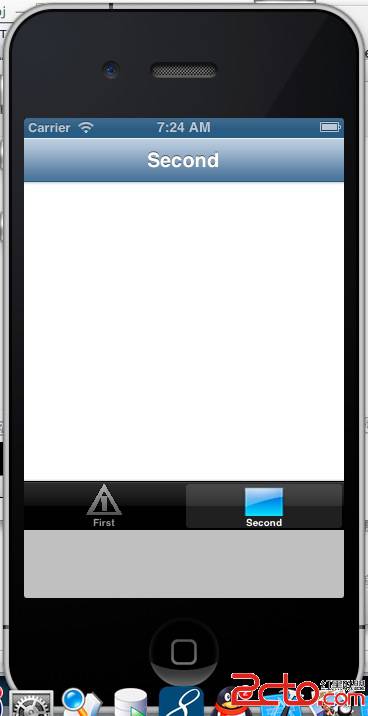
值得注意的地方
把初始化放在 initWithNibName:bundle: 而非 viewDidLoad,是因為 TabBarController 對非目前頁籤的 view controller 只建立實例、不載入 view。若把 tabBarItem.image 的設定寫在 viewDidLoad,第一次切到該頁籤之前,頁籤上是不會有圖示的。
此外,UITabBarController 通常應該作為 App 的根視圖容器,而不是像範例這樣被 addSubview 到另一個 view controller 裡面。範例如此寫是為了聚焦在 API 用法;實際專案中建議在 AppDelegate 或 SceneDelegate 中把 tabBarController 設為 window 的 rootViewController。