
iOS 開發:用 GCD 在主執行緒執行 UI 操作
編輯:iOS 相關資訊
一、前言
GCD 不只是拿來跑背景任務的,它也能反過來確保 UI 操作發生在主執行緒上。這個章節用最簡單的例子打底:dispatch_async 搭配 dispatch_get_main_queue(),把一段 UI 程式碼派送到主佇列執行。
二、Block 寫法
ZYViewController.h
#import <UIKit/UIKit.h>

@interface ZYViewController : UIViewController

@end
ZYViewController.m
- (void)viewDidLoad
{
    [super viewDidLoad];

    // dispatch_queue_t 是一個輕量級佇列物件,App 把要執行的區塊交給它排隊
    dispatch_queue_t mainQueue = dispatch_get_main_queue();

    // 把 Block 異步提交到主佇列,呼叫端不會被阻塞
    dispatch_async(mainQueue, ^(void) {
        [[[UIAlertView alloc] initWithTitle:@"GCD"
                                   message:@"GCD is amazing!"
                                  delegate:nil
                         cancelButtonTitle:@"OK"
                         otherButtonTitles:nil, nil] show];
    });
}
三、C 函式寫法
若需要從 C 環境呼叫,就得用 dispatch_async_f,它接收的是函式指標加上一塊上下文記憶體。
ZYAppDelegate.h
#import <UIKit/UIKit.h>

@class ZYViewController;

@interface ZYAppDelegate : UIResponder <UIApplicationDelegate>

@property (strong, nonatomic) UIWindow *window;
@property (strong, nonatomic) ZYViewController *viewController;

@end
ZYAppDelegate.m
// 用結構體承載要傳給 UI 的資料
typedef struct {
    char *title;
    char *message;
    char *cancelButtonTitle;
} AlertViewData;

@implementation ZYAppDelegate

// 這是真正被佇列呼叫的 C 函式,參數就是我們的上下文指標
void displayAlertView(void *paramContext)
{
    AlertViewData *alertData = (AlertViewData *)paramContext;

    NSString *title = [NSString stringWithUTF8String:alertData->title];
    NSString *message = [NSString stringWithUTF8String:alertData->message];
    NSString *cancelButtonTitle = [NSString stringWithUTF8String:alertData->cancelButtonTitle];

    [[[UIAlertView alloc] initWithTitle:title
                               message:message
                              delegate:nil
                     cancelButtonTitle:cancelButtonTitle
                     otherButtonTitles:nil, nil] show];

    // 用完記得釋放,否則會記憶體洩漏
    free(alertData);
}

- (BOOL)application:(UIApplication *)application
    didFinishLaunchingWithOptions:(NSDictionary *)launchOptions
{
    dispatch_queue_t mainQueue = dispatch_get_main_queue();

    AlertViewData *context = (AlertViewData *)malloc(sizeof(AlertViewData));
    if (context != NULL) {
        context->title = "GCD";
        context->message = "GCD is amazing.";
        context->cancelButtonTitle = "OK";

        dispatch_async_f(mainQueue, (void *)context, displayAlertView);

        NSLog(@"Current thread = %@", [NSThread currentThread]);
        NSLog(@"Main thread = %@", [NSThread mainThread]);
    }

    self.window = [[[UIWindow alloc] initWithFrame:[[UIScreen mainScreen] bounds]] autorelease];
    self.window.backgroundColor = [UIColor whiteColor];

    self.viewController = [[[ZYViewController alloc] initWithNibName:@"ZYViewController"
                                                             bundle:nil] autorelease];
    self.window.rootViewController = self.viewController;
    [self.window makeKeyAndVisible];

    return YES;
}

@end
四、執行結果
螢幕上會彈出一個標題為 GCD 的提示框:
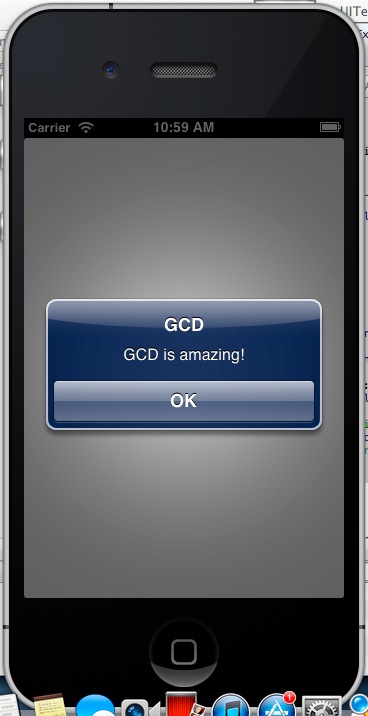
而 console 印出的線程資訊如下:
2013-05-10 10:59:21.871 GCDExcuteUITest[1661:c07] Current thread = <NSThread: 0x7113d00>{name = (null), num = 1}
2013-05-10 10:59:21.872 GCDExcuteUITest[1661:c07] Main thread = <NSThread: 0x7113d00>{name = (null), num = 1}
兩者位址相同、編號都是 1,正好印證了「提交到主佇列的 Block,會在主執行緒上被執行」這件事。
五、為什麼要這樣寫
UIKit 並非執行緒安全,所有碰觸到畫面的操作都必須在主執行緒進行。GCD 的 dispatch_get_main_queue() 就是最可靠、最簡潔的保證方式。
實務上的標準組合是:dispatch_async(全域佇列, ^{ 背景運算 }) 之後,在 Block 內再用 dispatch_async(主佇列, ^{ 更新 UI }) 切回來。另外,範例中的 UIAlertView 已被系統標記為廢棄,新專案請改用 UIAlertController 或 UNUserNotificationCenter 相關 API。
- 上一篇文章: iOS 開發:Block Objects 的用法與三種寫法
- 下一篇文章: iOS 繪圖實作:用 UIImage 把圖片畫進圖形上下文