
DateTools:可能是最好用的 iOS 日期處理庫
DateTools:可能是最好用的 iOS 日期處理庫
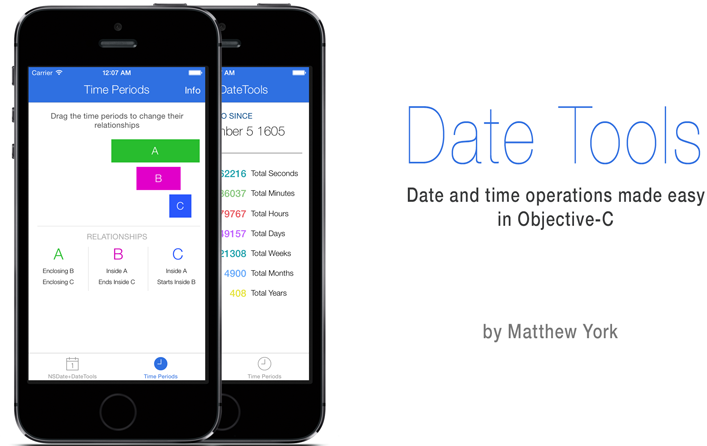
DateTools 致力於提升 Objective-C 中日期與時間操作的效率,靈感來自 DateTime 與 Time Period Library。它支持國際化,也內建中文輸出,這一點相當貼心。安裝方式很簡單,在 Podfile 中加入 pod 'DateTools' 即可。
NSDate 擴展:讓日期更好用
DateTools 讓 NSDate 能輕鬆取出各個組成部分,例如年、月、日。
取「距今多久」的字串
類似 Twitter 的時間顯示,DateTools 提供完整與縮略兩種形式:
NSDate *timeAgoDate = [NSDate dateWithTimeIntervalSinceNow:-4];
NSLog(@"Time Ago: %@", timeAgoDate.timeAgoSinceNow);
NSLog(@"Time Ago: %@", timeAgoDate.shortTimeAgoSinceNow);
// Time Ago: 4 seconds ago
// Time Ago: 4s
// 若開啟國際化且系統語言為簡體中文:
// Time Ago: 4秒鐘前
// Time Ago: 4秒
只要工程支持國際化,DateTools 就會自動本地化以下語言:ar、bg、ca、zh_Hans、zh_Hant、cs、da、nl、en、fi、fr、de、gre、gu、he、hi、hu、is、id、it、ja、ko、lv、ms、nb、pl、pt、ro、ru、sl、es、sv、th、tr、uk、vi、cy、hr。
取日期的某個組成部分
NSDate *date = [NSDate date];
NSInteger year = date.year;
NSInteger month = date.month;
NSLog(@"year: %ld, month: %ld", (long)year, (long)month);
// year: 2015, month: 9
如果不使用公曆,可以指定日曆:
NSInteger day = [date dayWithCalendar:calendar];
想改變預設日曆,改寫 NSDate+DateTools.m 中的 defaultCalendar 方法即可。
日期增減
NSDate *date = [NSDate date];
NSInteger oldYear = date.year;
NSDate *newDate = [date dateByAddingYears:1];
NSInteger newYear = newDate.year;
NSLog(@"oldYear: %ld newYear: %ld", (long)oldYear, (long)newYear);
// oldYear: 2015 newYear: 2016
除了 dateByAddingYears:,還有對應的月、日、時、分、秒版本,以及一組 dateBySubtracting... 方法。
日期比較
返回布爾值的比較方法有四個:isEarlierThan、isEarlierThanOrEqualTo、isLaterThan、isLaterThanOrEqualTo。
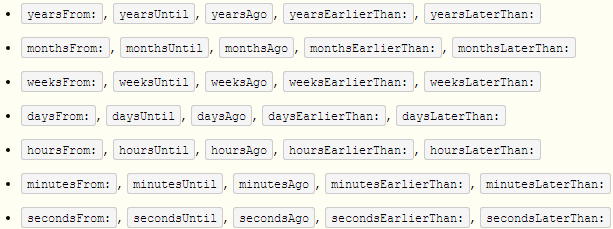
若要具體差值,毫秒級可用系統的 timeIntervalSinceDate: 與 timeIntervalSinceNow;年、月、週、日、時、分、秒的差值則可直接用 DateTools 的擴展:
NSInteger yearsApart = [firstDate yearsFrom:secondDate];
格式化輸出
NSDate *date = [NSDate date];
NSString *dateStr = [date formattedDateWithStyle:NSDateFormatterFullStyle];
// 輸出內容隨系統語言環境而異,例如:2015年9月25日 星期五
NSLog(@"%@", dateStr);
dateStr = [date formattedDateWithFormat:@"YYYY/MM/dd HH:mm:ss"];
NSLog(@"%@", dateStr);
// 2015/09/25 15:19:23
DTTimePeriod:把時間段當一等公民
DateTools 透過 DTTimePeriod 類簡化時間段相關運算。
建立
已知起訖時間:
DTTimePeriod *timePeriod = [[DTTimePeriod alloc] initWithStartDate:startDate endDate:endDate];
已知一端時間與總時長:
// 建立一個從現在開始、為期 5 小時的時間段
DTTimePeriod *timePeriod = [DTTimePeriod timePeriodWithSize:DTTimePeriodSizeHour
                                                     amount:5
                                                  startingAt:[NSDate date]];
查詢資訊
hasStartDate:有起始時間則回 YES。hasEndDate:有結束時間則回 YES。isMoment:起訖時間相同(即一個瞬間)則回 YES。durationIn...:以指定單位回傳時間段長度。
DTTimePeriod *timePeriod = [[DTTimePeriod alloc] initWithStartDate:date
                                                          endDate:[date dateByAddingDays:10]];
NSLog(@"相差 %g 天", [timePeriod durationInDays]);
// 相差 10 天
移動與伸縮
移動時,起訖時間會同步遷移:shiftEarlierWithSize:amount: 整體前移,shiftLaterWithSize:amount: 整體推後。
伸縮則是固定起始點、中間點或結束點中的一個,再改動另一端,從而延長或縮短時間段。
關係判斷
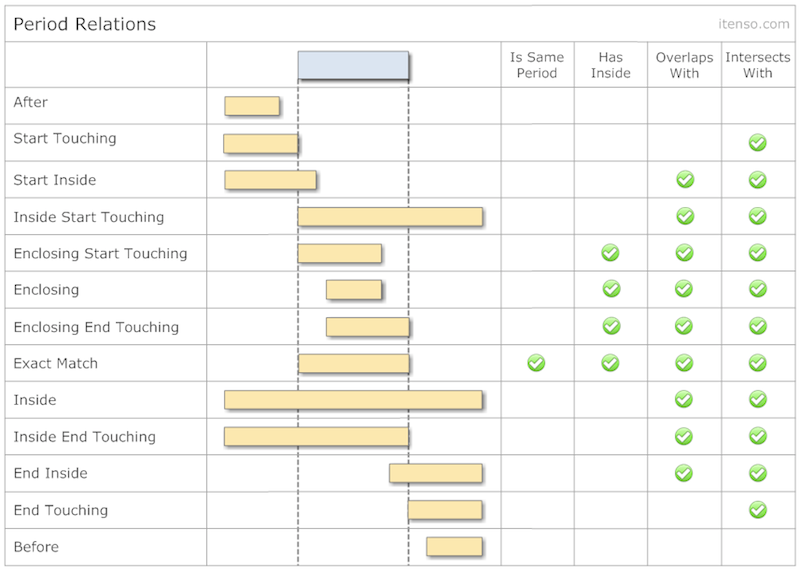
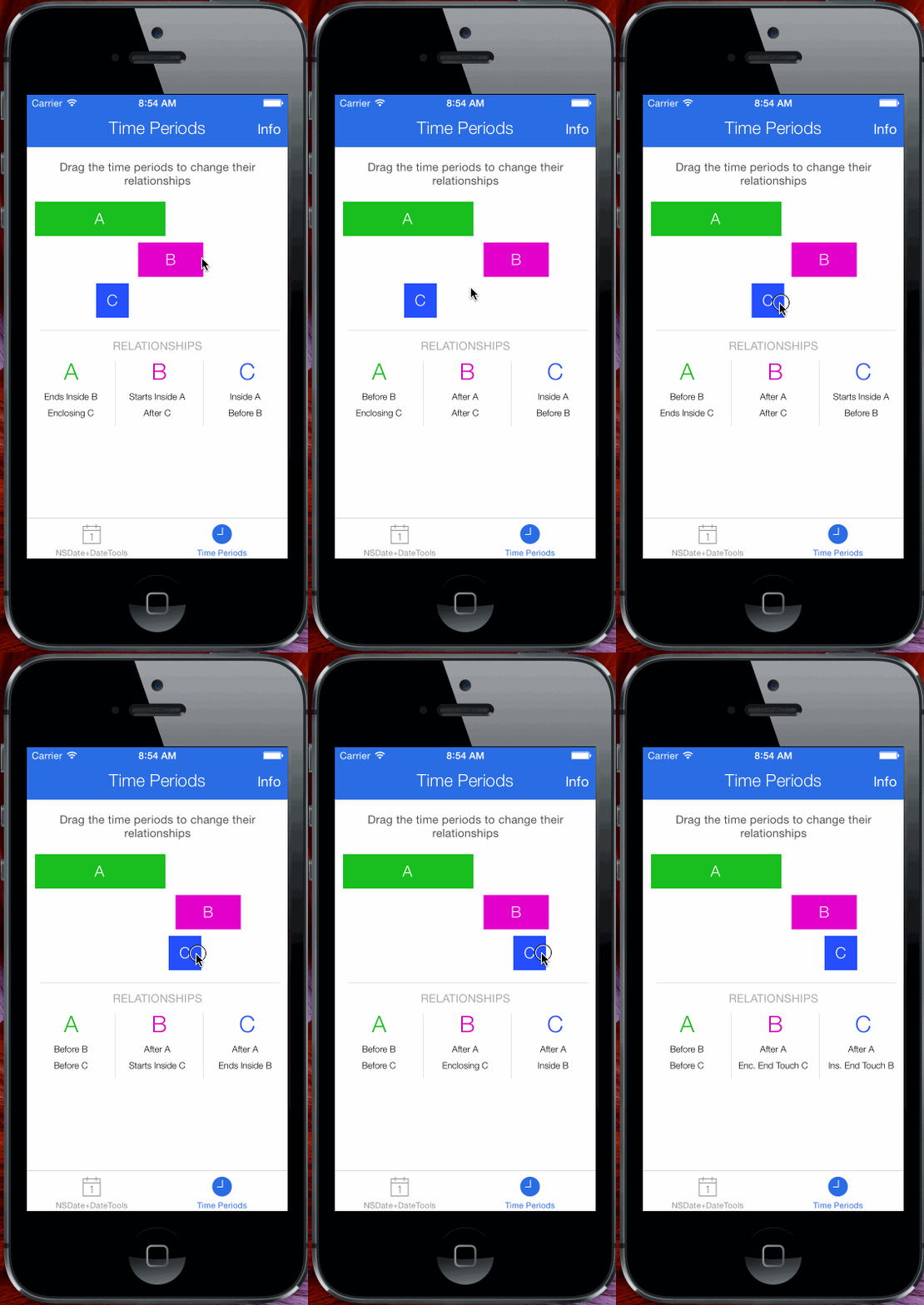
下圖列出了兩個時間段所有可能的關係,判斷方法有:isEqualToPeriod:、isInside:、contains:、overlapsWith:、intersects:。所有可能關係都定義在列舉 DTTimePeriodRelation 中。
時間段集合:Collection 與 Chain
DateTools 提供兩種集合:DTTimePeriodCollection 允許存放彼此有交集的時間段;DTTimePeriodChain 則不允許。兩者的操作方式都很像 NSArray,可以添加、插入、移除 DTTimePeriod,差別只在存放規則。
這兩個集合的價值在於簡化「多個時間段」的邏輯運算。例如同一團隊裡給不同成員安排任務的起訖時間,用 DTTimePeriodCollection 就能直接算出整個團隊任務的總起點與總終點。
DTTimePeriodCollection
規則較寬鬆:預設無序(順序與各時間段的起訖無關),但支援手動排序;並擁有由內部時間段推導出的集合起始與結束時間屬性。它允許存放有交集的時間段。
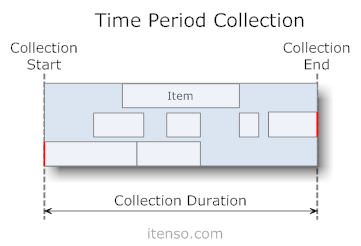
排序可分三類:
- 依起始時間:
sortByStartAscending、sortByStartDescending - 依結束時間:
sortByEndAscending、sortByEndDescending - 依時長:
sortByDurationAscending、sortByDurationDescending
運算方面,可以查詢某個 NSDate 或 DTTimePeriod 與集合的相對關係。例如 periodsIntersectedByDate: 會回傳一個新的 DTTimePeriodCollection,內含所有與該時刻有交集的時間段。
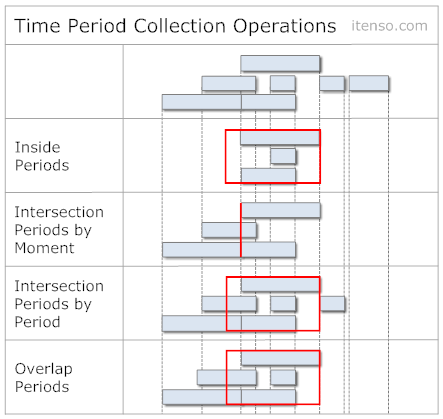
DTTimePeriodChain
規則較嚴格:依起訖時間順序存放,內部時間段不允許有交集,同樣擁有由內部數據推導出的集合起訖時間。這種結構很適合為連續的會議、約會等日程建模。
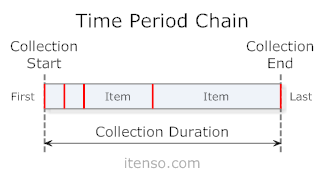
新加入的時間段時長保持不變,起始時間對齊前一段的結束時間,其後的時間段相應後移;插入到中間位置時,後續時間段整體推後;插入到首位時,集合起始時間前移。
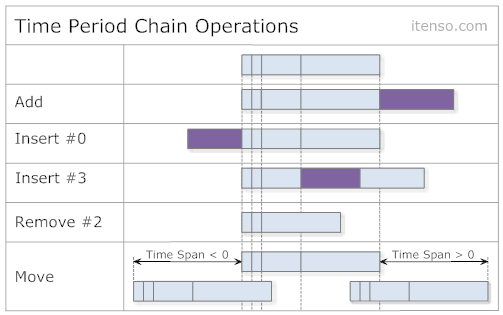
和 Collection 一樣,Chain 也支援相等性比較與整體前後移動,其餘可用方法可參考上圖。
- 上一篇文章: iOS 圖片處理實戰小貼士:存檔、快取、解碼與漸進式加載
- 下一篇文章: 從零到上架:獨立開發首款 App「個人工資計算器」的完整复盘