
iOS 檔案下載的五大實作方案與網路狀態管理
檔案下載幾乎是所有 App 都會碰到的基礎需求,而在 iOS 平台上,從原生 API 到成熟的第三方庫,工程師其實握有不少選擇。本文整理了五種常見的下載實作思路,並附上可直接參考的程式碼,方便你依專案規模與維護成本做出取捨。
五種下載實作方式一覽
(1)使用 NSURLConnection 直接方式
(2)使用 NSURLConnection 代理方式
(3)使用 NSURLSession 直接方式
(4)使用 NSURLSession 代理方式
(5)使用 AFNetworking 方式
直接方式以回呼區塊一次取回完整資料,寫法簡潔;代理方式則能掌握連線的即時狀態,適合需要進度條或大檔案串流寫入的場景。而 NSURLSession 作為 NSURLConnection 的後繼者,在背景傳輸與效能上更具優勢,AFNetworking 則把這些細節封裝得更貼手。
附加功能:網路狀態檢測與活動指示器
(1)使用 AFNetworking 中的 AFNetworkReachabilityManager 來檢查網路情況:
AFNetworkReachabilityStatusReachableViaWiFi:Wi-Fi 網路下
AFNetworkReachabilityStatusReachableViaWWAN:2G/3G/4G 蜂窩行動網路下
AFNetworkReachabilityStatusNotReachable:未連接網路
(2)使用 AFNetworking 中的 AFNetworkActivityIndicatorManager 來啟動網路活動指示器:
#import "AFNetworkActivityIndicatorManager.h" //啟動網路活動指示器;會根據網路互動情況,即時顯示或隱藏網路活動指示器;他透過「通知與訊息機制」來實現 [UIApplication sharedApplication].networkActivityIndicatorVisible 的控制 [AFNetworkActivityIndicatorManager sharedManager].enabled = YES;
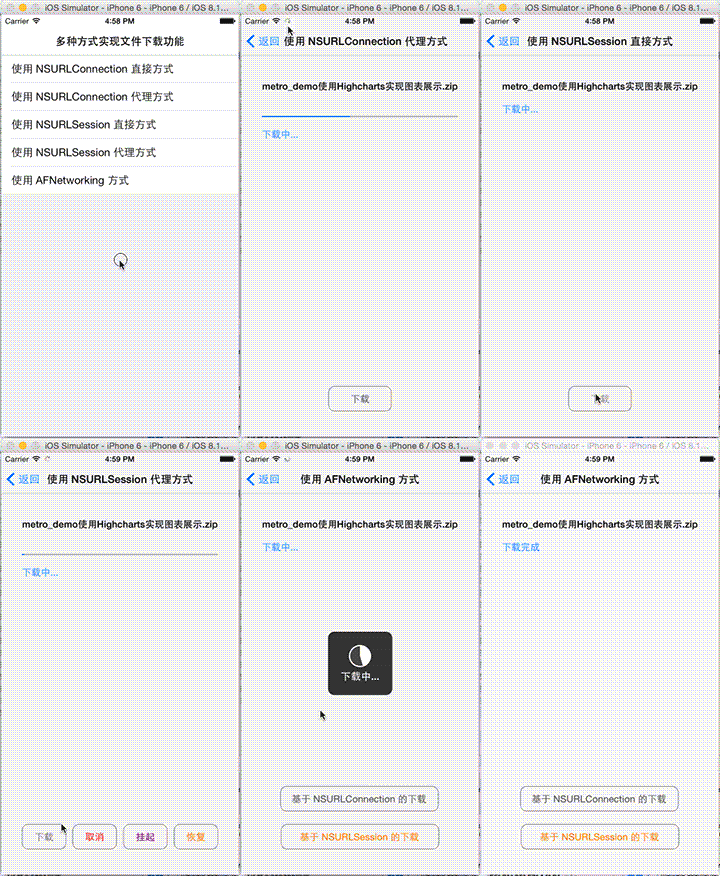
實際執行的效果如下:
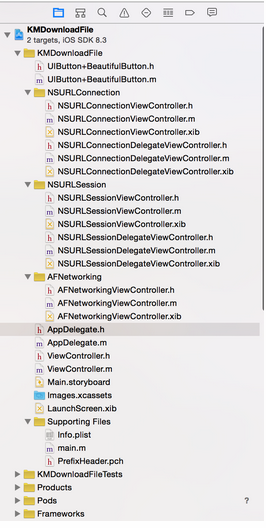
範例程式碼
ViewController.h
#import @interface ViewController : UITableViewController @property (copy, nonatomic) NSArray *arrSampleName; - (instancetype)initWithSampleNameArray:(NSArray *)arrSampleName; @end
ViewController.m
#import "ViewController.h" #import "NSURLConnectionViewController.h" #import "NSURLConnectionDelegateViewController.h" #import "NSURLSessionViewController.h" #import "NSURLSessionDelegateViewController.h" #import "AFNetworkingViewController.h" @interface ViewController () - (void)layoutUI; @end @implementation ViewController - (void)viewDidLoad { [super viewDidLoad]; [self layoutUI]; } - (void)didReceiveMemoryWarning { [super didReceiveMemoryWarning]; // Dispose of any resources that can be recreated. } - (instancetype)initWithSampleNameArray:(NSArray *)arrSampleName { if (self = [super initWithStyle:UITableViewStyleGrouped]) { self.navigationItem.title = @"多種方式實現文件下載功能"; self.navigationItem.backBarButtonItem = [[UIBarButtonItem alloc] initWithTitle:@"返回" style:UIBarButtonItemStylePlain target:nil action:nil]; _arrSampleName = arrSampleName; } return self; } - (void)layoutUI { } #pragma mark - UITableViewController相關方法重寫 - (CGFloat)tableView:(UITableView *)tableView heightForHeaderInSection:(NSInteger)section { return 0.1; } - (NSInteger)numberOfSectionsInTableView:(UITableView *)tableView { return 1; } - (NSInteger)tableView:(UITableView *)tableView numberOfRowsInSection:(NSInteger)section { return [_arrSampleName count]; } - (UITableViewCell *)tableView:(UITableView *)tableView cellForRowAtIndexPath:(NSIndexPath *)indexPath { static NSString *cellIdentifier = @"cell"; UITableViewCell *cell = [tableView dequeueReusableCellWithIdentifier:cellIdentifier]; if (!cell) { cell = [[UITableViewCell alloc] initWithStyle:UITableViewCellStyleDefault reuseIdentifier:cellIdentifier]; } cell.textLabel.text = _arrSampleName[indexPath.row]; return cell; } - (void)tableView:(UITableView *)tableView didSelectRowAtIndexPath:(NSIndexPath *)indexPath { switch (indexPath.row) { case 0: { NSURLConnectionViewController *connectionVC = [NSURLConnectionViewController new]; [self.navigationController pushViewController:connectionVC animated:YES]; break; } case 1: { NSURLConnectionDelegateViewController *connectionDelegateVC = [NSURLConnectionDelegateViewController new]; [self.navigationController pushViewController:connectionDelegateVC animated:YES]; break; } case 2: { NSURLSessionViewController *sessionVC = [NSURLSessionViewController new]; [self.navigationController pushViewController:sessionVC animated:YES]; break; } case 3: { NSURLSessionDelegateViewController *sessionDelegateVC = [NSURLSessionDelegateViewController new]; [self.navigationController pushViewController:sessionDelegateVC animated:YES]; break; } case 4: { AFNetworkingViewController *networkingVC = [AFNetworkingViewController new]; [self.navigationController pushViewController:networkingVC animated:YES]; break; } default: break; } } @end
PrefixHeader.pch
#define kFileURLStr @"https://files.cnblogs.com/files/huangjianwu/metro_demo使用Highcharts實現圖表展示.zip" #define kTitleOfNSURLConnection @"使用 NSURLConnection 直接方式" #define kTitleOfNSURLConnectionDelegate @"使用 NSURLConnection 代理方式" #define kTitleOfNSURLSession @"使用 NSURLSession 直接方式" #define kTitleOfNSURLSessionDelegate @"使用 NSURLSession 代理方式" #define kTitleOfAFNetworking @"使用 AFNetworking 方式" #define kApplication [UIApplication sharedApplication]
UIButton+BeautifulButton.h
#import @interface UIButton (BeautifulButton) /** * 根據按鈕文字顏色,返回對應文字顏色的圓角按鈕 * * @param tintColor 按鈕文字顏色;nil 的話就為深灰色 */ - (void)beautifulButton:(UIColor *)tintColor; @end
UIButton+BeautifulButton.m
#import "UIButton+BeautifulButton.h" @implementation UIButton (BeautifulButton) - (void)beautifulButton:(UIColor *)tintColor { self.tintColor = tintColor ?: [UIColor darkGrayColor]; self.layer.masksToBounds = YES; self.layer.cornerRadius = 10.0; self.layer.borderColor = [UIColor grayColor].CGColor; self.layer.borderWidth = 1.0; } @end
NSURLConnectionViewController.h
#import @interface NSURLConnectionViewController : UIViewController @property (strong, nonatomic) IBOutlet UILabel *lblFileName; @property (strong, nonatomic) IBOutlet UILabel *lblMessage; @property (strong, nonatomic) IBOutlet UIButton *btnDownloadFile; @end
NSURLConnectionViewController.m
#import "NSURLConnectionViewController.h" #import "UIButton+BeautifulButton.h" @interface NSURLConnectionViewController () - (void)layoutUI; - (void)saveDataToDisk:(NSData *)data; @end @implementation NSURLConnectionViewController - (void)viewDidLoad { [super viewDidLoad]; [self layoutUI]; } - (void)didReceiveMemoryWarning { [super didReceiveMemoryWarning]; // Dispose of any resources that can be recreated. } - (void)layoutUI { self.navigationItem.title = kTitleOfNSURLConnection; self.view.backgroundColor = [UIColor colorWithWhite:0.95 alpha:1.000]; [_btnDownloadFile beautifulButton:nil]; } - (void)saveDataToDisk:(NSData *)data { //數據接收完保存文件;注意蘋果官方要求:下載數據只能保存在緩存目錄(/Library/Caches) NSString *savePath = [NSSearchPathForDirectoriesInDomains(NSCachesDirectory, NSUserDomainMask, YES) lastObject]; savePath = [savePath stringByAppendingPathComponent:_lblFileName.text]; [data writeToFile:savePath atomically:YES]; //writeToFile: 方法:如果 savePath 文件存在,他會執行覆蓋 } - (IBAction)downloadFile:(id)sender { _lblMessage.text = @"下載中..."; NSString *fileURLStr = kFileURLStr; //編碼操作;對應的解碼操作是用 stringByRemovingPercentEncoding 方法 fileURLStr = [fileURLStr stringByAddingPercentEscapesUsingEncoding:NSUTF8StringEncoding]; NSURL *fileURL = [NSURL URLWithString:fileURLStr]; //創建請求 NSMutableURLRequest *request = [NSMutableURLRequest requestWithURL:fileURL]; //創建連接;Apple 提供的處理一般請求的兩種方法,他們不需要進行一系列的 NSURLConnectionDataDelegate 委托協議方法操作,簡潔直觀 //方法一:發送一個同步請求;不建議使用,因為當前線程是主線程的話,會造成線程阻塞,一般比較少用 // NSURLResponse *response; // NSError *connectionError; // NSData *data = [NSURLConnection sendSynchronousRequest:request // returningResponse:&response // error:&connectionError]; // if (!connectionError) { // [self saveDataToDisk:data]; // NSLog(@"保存成功"); // // _lblMessage.text = @"下載完成"; // } else { // NSLog(@"下載失敗,錯誤信息:%@", connectionError.localizedDescription); // // _lblMessage.text = @"下載失敗"; // } //方法二:發送一個異步請求 [NSURLConnection sendAsynchronousRequest:request queue:[NSOperationQueue mainQueue] completionHandler:^(NSURLResponse *response, NSData *data, NSError *connectionError) { if (!connectionError) { [self saveDataToDisk:data]; NSLog(@"保存成功"); _lblMessage.text = @"下載完成"; } else { NSLog(@"下載失敗,錯誤信息:%@", connectionError.localizedDescription); _lblMessage.text = @"下載失敗"; } }]; } @end
NSURLConnectionViewController.xib
[?xml version="1.0" encoding="UTF-8" standalone="no"?] [document type="com.apple.InterfaceBuilder3.CocoaTouch.XIB" version="3.0" toolsVersion="6211" systemVersion="14A298i" targetRuntime="iOS.CocoaTouch" propertyAccessControl="none" useAutolayout="YES" useTraitCollections="YES"] [dependencies] [plugIn identifier="com.apple.InterfaceBuilder.IBCocoaTouchPlugin" version="6204"/] [/dependencies] [objects] [placeholder placeholderIdentifier="IBFilesOwner" id="-1" userLabel="File's Owner" customClass="NSURLConnectionViewController"] [connections] [outlet property="btnDownloadFile" destination="mwt-p9-tRE" id="ZVc-6S-ES3"/] [outlet property="lblFileName" destination="dlB-Qn-eOO" id="NdS-9n-7KX"/] [outlet property="lblMessage" destination="qlQ-nM-BXU" id="tRe-SR-AQE"/] [outlet property="view" destination="i5M-Pr-FkT" id="sfx-zR-JGt"/] [/connections] [/placeholder] [placeholder placeholderIdentifier="IBFirstResponder" id="-2" customClass="UIResponder"/] [view clearsContextBeforeDrawing="NO" contentMode="scaleToFill" id="i5M-Pr-FkT"] [rect key="frame" x="0.0" y="0.0" width="600" height="600"/] [autoresizingMask key="autoresizingMask" widthSizable="YES" heightSizable="YES"/] [subviews] [label opaque="NO" userInteractionEnabled="NO" contentMode="left" horizontalHuggingPriority="251" verticalHuggingPriority="251" text="metro_demo使用Highcharts實現圖表展示.zip" lineBreakMode="tailTruncation" baselineAdjustment="alignBaselines" adjustsFontSizeToFit="NO" translatesAutoresizingMaskIntoConstraints="NO" id="dlB-Qn-eOO"] [rect key="frame" x="145" y="104" width="309.5" height="18"/] [fontDescription key="fontDescription" type="boldSystem" pointSize="15"/] [color key="textColor" cocoaTouchSystemColor="darkTextColor"/] [nil key="highlightedColor"/] [/label] [label opaque="NO" userInteractionEnabled="NO" contentMode="left" horizontalHuggingPriority="251" verticalHuggingPriority="251" text="Label" lineBreakMode="tailTruncation" baselineAdjustment="alignBaselines" adjustsFontSizeToFit="NO" translatesAutoresizingMaskIntoConstraints="NO" id="qlQ-nM-BXU"] [rect key="frame" x="145" y="140" width="37.5" height="18"/] [fontDescription key="fontDescription" type="system" pointSize="15"/] [color key="textColor" red="0.0" green="0.50196081399917603" blue="1" alpha="1" colorSpace="calibratedRGB"/] [nil key="highlightedColor"/] [userDefinedRuntimeAttributes] [userDefinedRuntimeAttribute type="string" keyPath="text" value=""/] [/userDefinedRuntimeAttributes] [/label] [/subviews] [color key="backgroundColor" white="1" alpha="1" colorSpace="custom" customColorSpace="calibratedWhite"/] [constraints] [constraint firstAttribute="centerX" secondItem="dlB-Qn-eOO" secondAttribute="centerX" id="gNK-NO-rth"/] [constraint firstItem="dlB-Qn-eOO" firstAttribute="top" secondItem="i5M-Pr-FkT" secondAttribute="top" constant="104" id="hwU-O2-Fed"/] [constraint firstAttribute="centerX" secondItem="mwt-p9-tRE" secondAttribute="centerX" id="teN-3t-8Gc"/] [constraint firstItem="qlQ-nM-BXU" firstAttribute="top" secondItem="i5M-Pr-FkT" secondAttribute="top" constant="140" id="w3g-ej-P18"/] [constraint firstItem="dlB-Qn-eOO" firstAttribute="leading" secondItem="qlQ-nM-BXU" secondAttribute="leading" constant="0.5" id="wMU-pU-z9f"/] [constraint firstAttribute="bottom" secondItem="mwt-p9-tRE" secondAttribute="bottom" constant="40" id="yBq-He-Jv8"/] [/constraints] [/view] [/objects] [/document]
NSURLConnectionDelegateViewController.h
#import @interface NSURLConnectionDelegateViewController : UIViewController @property (strong, nonatomic) NSMutableData *mDataReceive; @property (assign, nonatomic) NSUInteger totalDataLength; @property (strong, nonatomic) IBOutlet UILabel *lblFileName; @property (strong, nonatomic) IBOutlet UIProgressView *progVDownloadFile; @property (strong, nonatomic) IBOutlet UILabel *lblMessage; @property (strong, nonatomic) IBOutlet UIButton *btnDownloadFile; @end
其餘檔案(NSURLConnectionDelegateViewController、NSURLSessionViewController、NSURLSessionDelegateViewController、AFNetworkingViewController 及 AppDelegate 等)的實作,皆沿用相同的下載邏輯與表格選單導航結構,讀者可依上述範例類推,將對應的連線或工作階段物件替換即可。
- 上一篇文章: 非同步請求的取消策略:為什麼純看程式碼不一定懂?
- 下一篇文章: 開源自動佈局與無限輪播器:輕鬆打造高效 iOS 動效