iOS圖片倒影效果的2種實現
編輯:關於IOS
實現一
使用一個繼承自UIView的類來包含要實現倒影效果的圖片,重寫這個UIView子類的繪圖方法,以實現圖片於倒影, 然後把這個View 添加到相應的地方顯示。 代碼: CKReflectionImage.h [cpp] #import <UIKit/UIKit.h> @interface CKReflectionImage : UIView { @private UIImage *image_; /** * Value of gradient start. This value is divided to height of image. */ CGFloat visibleReflectionHeight_; /** * Padding to top image. */ CGFloat paddingToTopImage_; } @property (nonatomic, readwrite, retain) UIImage *image; @property (nonatomic, readwrite, assign) CGFloat visibleReflectionHeight; @property (nonatomic, readwrite, assign) CGFloat paddingToTopImage; @end CKReflectionImage.h [cpp #import "CKReflectionImage.h" @implementation CKReflectionImage #pragma mark - #pragma mark Properties @synthesize image = image_; @synthesize visibleReflectionHeight = visibleReflectionHeight_; @synthesize paddingToTopImage = paddingToTopImage_; #pragma mark - #pragma mark Memory management - (void)dealloc { [image_ release]; image_ = nil; visibleReflectionHeight_ = 0.0f; paddingToTopImage_ = 0.0f; [super dealloc]; } #pragma mark - #pragma mark Draw methods /** * Draws the receiver’s image within the passed-in rectangle. * * @param rect: The portion of the view’s bounds that needs to be updated. */ - (void)drawRect:(CGRect)rect { [super drawRect:rect]; if (image_ != nil) { // Get current context to draw. CGContextRef context = UIGraphicsGetCurrentContext(); // Reflection image references CGImageRef reflectionImage = NULL; CGImageRef gradientImage = NULL; // Frame of image CGRect frame = [self frame]; frame.origin.x = 0.0f; frame.origin.y = 0.0f; frame.size.width = CGRectGetWidth(frame); frame.size.height = image_.size.height * CGRectGetWidth(frame) / image_.size.width; // Draw initial image in context CGContextSaveGState(context); { // Draw image in context, commented but the image show in reverse. // CGContextDrawImage(context, frame, [image_ CGImage]); // Push context to draw image. UIGraphicsPushContext(context); // Draw original image in top [image_ drawInRect:frame]; // Pop to context UIGraphicsPopContext(); } CGContextRestoreGState(context); // Create gradient bitmap CGContextSaveGState(context); { // Gradient is always black-white and the mask must be in the gray colorspace. CGColorSpaceRef colorSpace = CGColorSpaceCreateDeviceGray(); // Create a bitmap context CGContextRef gradientContext = CGBitmapContextCreate(NULL, CGRectGetWidth(frame), CGRectGetHeight(frame), 8, 0, colorSpace, kCGImageAlphaNone); // Define the start and the end grayscale values (with the alpha, even though our // bitmap context doesn't support alpha gradient requieres it). CGFloat colors[] = {0.0f, 1.0f, 1.0f, 1.0f}; // Creates the CGGradient CGGradientRef grayScaleGradient = CGGradientCreateWithColorComponents(colorSpace, colors, NULL, 2); // Release colorSpace reference CGColorSpaceRelease(colorSpace); // Create the start and end points for the gradient vector (straight down). CGPoint gradientStartPoint = CGPointMake(0, (CGRectGetHeight(frame) - visibleReflectionHeight_)); CGPoint gradientEndPoint = CGPointMake(0, ((CGRectGetHeight(frame) * 2) - visibleReflectionHeight_)); // Draw gradient into gradient context. CGContextDrawLinearGradient(gradientContext, grayScaleGradient, gradientStartPoint, gradientEndPoint, kCGGradientDrawsAfterEndLocation); // Release Gradient reference. CGGradientRelease(grayScaleGradient); // Convert the gradient context to image. gradientImage = CGBitmapContextCreateImage(gradientContext); // Release gradient context CGContextRelease(gradientContext); } CGContextRestoreGState(context); // Apply gradient bitmap to new context that contains image. CGContextSaveGState(context); { // Create a RGB color space CGColorSpaceRef colorSpace = CGColorSpaceCreateDeviceRGB(); // Create bitmap context to join image and gradient context. CGContextRef reflectionContext = CGBitmapContextCreate(NULL, CGRectGetWidth(frame), CGRectGetHeight(frame), 8, 0, colorSpace, (kCGBitmapByteOrder32Little | kCGImageAlphaPremultipliedLast)); // Release color space CGColorSpaceRelease(colorSpace); // First clip mask to context CGContextSaveGState(context); { // Clip gradient mask to reflection context. CGContextClipToMask(reflectionContext, frame, gradientImage); } CGContextRestoreGState(context); // Second draw image to context CGContextSaveGState(reflectionContext); { // Push context to draw image. UIGraphicsPushContext(reflectionContext); // Draw original image in top [image_ drawInRect:frame]; // Pop to context UIGraphicsPopContext(); } CGContextRestoreGState(reflectionContext); // Delete gradient image mask CGImageRelease(gradientImage); // Convert reflection context to image. reflectionImage = CGBitmapContextCreateImage(reflectionContext); // Release reflection context CGContextRelease(reflectionContext); } CGContextRestoreGState(context); // Transform matrix and draw reflection bitmap. CGContextSaveGState(context); { // Translate context matrix to height * 2 but next scale and sum 1.0f of image and padding. CGContextTranslateCTM(context, CGRectGetMinX(frame), (CGRectGetHeight(frame) * 2) + paddingToTopImage_); // Flip vertical image in context. CGContextScaleCTM(context, 1.0f, -1.0f); // Draw reflection image in context. CGContextDrawImage(context, frame, reflectionImage); // Release reflectio image. CGImageRelease(reflectionImage); } CGContextRestoreGState(context); } } /** * Set current image to another image. * * @param image: Another image to set. */ - (void)setImage:(UIImage *)image { if (image_ != image) { [image_ release]; image_ = [image retain]; } [self setNeedsDisplay]; } /** * Set current visibleReflectioHeight_ value to another. * * @param gradientStart: Another value to visible reflectio height variable. */ - (void)setVisibleReflectionHeight:(CGFloat)visibleReflectioHeight { if (visibleReflectionHeight_ != visibleReflectioHeight) { visibleReflectionHeight_ = visibleReflectioHeight; } [self setNeedsDisplay]; } /** * Set current paddingToTopImage variable to another value. * * @param paddingToTopImage: Another value to padding to top image. */ - (void)setPaddingToTopImage:(CGFloat)paddingToTopImage { if (paddingToTopImage_ != paddingToTopImage) { paddingToTopImage_ = paddingToTopImage; } [self setNeedsDisplay]; } @end 使用: [cpp] www.2cto.com CKReflectionImage *reflectionImage = [[CKReflectionImage alloc] initWithFrame:CGRectMake(96, 20, 128, 460)]; [reflectionImage setBackgroundColor:[UIColor clearColor]]; //set the padding of top image and its reflected image [reflectionImage setPaddingToTopImage:5.0f]; // Hide 1/4 parts of image. show 3/4 [reflectionImage setVisibleReflectionHeight:(CGRectGetWidth([reflectionImage frame]) / 4 * 3)]; [reflectionImage setImage:[UIImage imageNamed:@"1.png"]]; [[self view] addSubview:reflectionImage]; 實現效果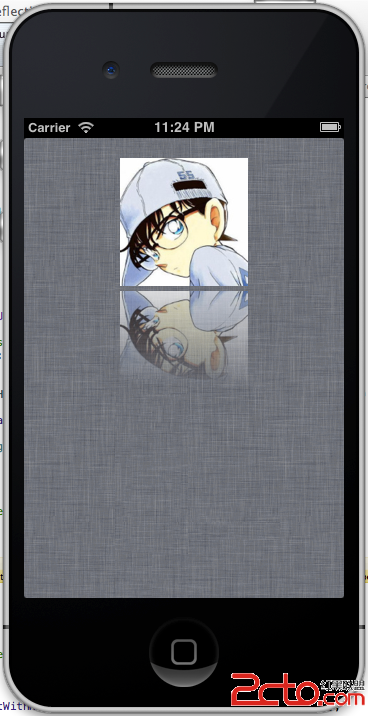 實現二
為UIImage添加一個關於倒影的category,以實現返回這個圖片,
[cpp]
#import <UIKit/UIKit.h>
@interface UIImage (Reflection)
- (UIImage *)reflectionWithHeight:(int)height;
- (UIImage *)reflectionWithAlpha:(float)pcnt;
- (UIImage *)reflectionRotatedWithAlpha:(float)pcnt;
@end
UIImage+Reflection.h
[cpp]
#import "UIImage+Reflection.h"
#ifndef UIImageReflectionMethods
#define UIImageReflectionMethods
CGImageRef CreateGradientImage (int pixelsWide, int pixelsHigh, CGFloat endPoint) {
CGImageRef theCGImage = NULL;
// gradient is always black-white and the mask must be in the gray colorspace
CGColorSpaceRef colorSpace = CGColorSpaceCreateDeviceGray();
// create the bitmap context
CGContextRef gradientBitmapContext = CGBitmapContextCreate(NULL, pixelsWide, pixelsHigh, 8, 0, colorSpace, kCGImageAlphaNone);
// define the start and end grayscale values (with the alpha, even though
// our bitmap context doesn't support alpha the gradient requires it)
CGFloat colors[] = {0.0, 1.0, 1, 1.0};
// create the CGGradient and then release the gray color space
CGGradientRef grayScaleGradient = CGGradientCreateWithColorComponents(colorSpace, colors, NULL, 2);
CGColorSpaceRelease(colorSpace);
// create the start and end points for the gradient vector (straight down)
CGPoint gradientStartPoint = CGPointZero;
CGPoint gradientEndPoint = CGPointMake(0, endPoint);
if (endPoint < 0) {
gradientEndPoint = CGPointMake(0, -endPoint);
}
// draw the gradient into the gray bitmap context
CGContextDrawLinearGradient(gradientBitmapContext, grayScaleGradient, gradientStartPoint, gradientEndPoint, kCGGradientDrawsAfterEndLocation);
CGGradientRelease(grayScaleGradient);
// convert the context into a CGImageRef and release the context
theCGImage = CGBitmapContextCreateImage(gradientBitmapContext);
if (endPoint < 0) {
// rotate
CGContextClearRect(gradientBitmapContext, CGRectMake(0, 0, pixelsWide, pixelsHigh));
CGContextTranslateCTM(gradientBitmapContext, 0.0, pixelsHigh);
CGContextScaleCTM(gradientBitmapContext, 1.0, -1.0);
CGContextDrawImage(gradientBitmapContext, CGRectMake(0, 0, pixelsWide, pixelsHigh), theCGImage);
CGImageRelease(theCGImage);
theCGImage = CGBitmapContextCreateImage(gradientBitmapContext);
}
CGContextRelease(gradientBitmapContext);
// return the imageref containing the gradient
return theCGImage;
}
static CGContextRef MyCreateBitmapContext (int pixelsWide, int pixelsHigh) {
CGColorSpaceRef colorSpace = CGColorSpaceCreateDeviceRGB();
// create the bitmap context
CGContextRef bitmapContext = CGBitmapContextCreate (NULL, pixelsWide, pixelsHigh, 8, 0, colorSpace, (kCGBitmapByteOrder32Little | kCGImageAlphaPremultipliedFirst));
CGColorSpaceRelease(colorSpace);
return bitmapContext;
}
#endif
@implementation UIImage (Reflection)
- (UIImage *)reflectionRotatedWithAlpha:(float)pcnt {
int height = self.size.height;
UIImage * fromImage = self;
pcnt = 1.0 / pcnt;
// create a bitmap graphics context the size of the image
CGContextRef mainViewContentContext = MyCreateBitmapContext(fromImage.size.width, height);
// create a 2 bit CGImage containing a gradient that will be used for masking the
// main view content to create the 'fade' of the reflection. The CGImageCreateWithMask
// function will stretch the bitmap image as required, so we can create a 1 pixel wide gradient
CGImageRef gradientMaskImage = CreateGradientImage(1, height, -(height * pcnt));
// create an image by masking the bitmap of the mainView content with the gradient view
// then release the pre-masked content bitmap and the gradient bitmap
CGContextClipToMask(mainViewContentContext, CGRectMake(0.0, 0.0, fromImage.size.width, height), gradientMaskImage);
CGImageRelease(gradientMaskImage);
// In order to grab the part of the image that we want to render, we move the context origin to the
// height of the image that we want to capture, then we flip the context so that the image draws upside down.
// CGContextTranslateCTM(mainViewContentContext, 0.0, height);
// CGContextScaleCTM(mainViewContentContext, 1.0, -1.0);
// draw the image into the bitmap context
CGContextDrawImage(mainViewContentContext, CGRectMake(0, 0, fromImage.size.width, fromImage.size.height), [fromImage CGImage]);
// create CGImageRef of the main view bitmap content, and then release that bitmap context
CGImageRef reflectionImage = CGBitmapContextCreateImage(mainViewContentContext);
CGContextRelease(mainViewContentContext);
// convert the finished reflection image to a UIImage
UIImage * theImage = [UIImage imageWithCGImage:reflectionImage];
// image is retained by the property setting above, so we can release the original
CGImageRelease(reflectionImage);
return theImage;
}
- (UIImage *)reflectionWithHeight:(int)height {
if (height == -1) {
height = [self size].height;
}
if (height == 0)
return nil;
UIImage * fromImage = self;
// create a bitmap graphics context the size of the image
CGContextRef mainViewContentContext = MyCreateBitmapContext(fromImage.size.width, fromImage.size.height);
// create a 2 bit CGImage containing a gradient that will be used for masking the
// main view content to create the 'fade' of the reflection. The CGImageCreateWithMask
// function will stretch the bitmap image as required, so we can create a 1 pixel wide gradient
CGImageRef gradientMaskImage = CreateGradientImage(1, height, height);
// create an image by masking the bitmap of the mainView content with the gradient view
// then release the pre-masked content bitmap and the gradient bitmap
CGContextClipToMask(mainViewContentContext, CGRectMake(0.0, 0.0, fromImage.size.width, height), gradientMaskImage);
CGImageRelease(gradientMaskImage);
// In order to grab the part of the image that we want to render, we move the context origin to the
// height of the image that we want to capture, then we flip the context so that the image draws upside down.
CGContextTranslateCTM(mainViewContentContext, 0.0, fromImage.size.height);
CGContextScaleCTM(mainViewContentContext, 1.0, -1.0);
// draw the image into the bitmap context
CGContextDrawImage(mainViewContentContext, CGRectMake(0, 0, fromImage.size.width, fromImage.size.height), [fromImage CGImage]);
// create CGImageRef of the main view bitmap content, and then release that bitmap context
CGImageRef reflectionImage = CGBitmapContextCreateImage(mainViewContentContext);
CGContextRelease(mainViewContentContext);
// convert the finished reflection image to a UIImage
UIImage * theImage = [UIImage imageWithCGImage:reflectionImage];
// image is retained by the property setting above, so we can release the original
CGImageRelease(reflectionImage);
return theImage;
}
- (UIImage *)reflectionWithAlpha:(float)pcnt {
int height = self.size.height;
UIImage * fromImage = self;
pcnt = 1.0 / pcnt;
// create a bitmap graphics context the size of the image
CGContextRef mainViewContentContext = MyCreateBitmapContext(fromImage.size.width, height);
// create a 2 bit CGImage containing a gradient that will be used for masking the
// main view content to create the 'fade' of the reflection. The CGImageCreateWithMask
// function will stretch the bitmap image as required, so we can create a 1 pixel wide gradient
CGImageRef gradientMaskImage = CreateGradientImage(1, height, height * pcnt);
// create an image by masking the bitmap of the mainView content with the gradient view
// then release the pre-masked content bitmap and the gradient bitmap
CGContextClipToMask(mainViewContentContext, CGRectMake(0.0, 0.0, fromImage.size.width, height), gradientMaskImage);
CGImageRelease(gradientMaskImage);
// In order to grab the part of the image that we want to render, we move the context origin to the
// height of the image that we want to capture, then we flip the context so that the image draws upside down.
CGContextTranslateCTM(mainViewContentContext, 0.0, height);
CGContextScaleCTM(mainViewContentContext, 1.0, -1.0);
// draw the image into the bitmap context
CGContextDrawImage(mainViewContentContext, CGRectMake(0, 0, fromImage.size.width, fromImage.size.height), [fromImage CGImage]);
// create CGImageRef of the main view bitmap content, and then release that bitmap context
CGImageRef reflectionImage = CGBitmapContextCreateImage(mainViewContentContext);
CGContextRelease(mainViewContentContext);
// convert the finished reflection image to a UIImage
UIImage * theImage = [UIImage imageWithCGImage:reflectionImage];
// image is retained by the property setting above, so we can release the original
CGImageRelease(reflectionImage);
return theImage;
}
@end
使用非常簡單:
[cpp]
[refView setImage:[image reflectionWithAlpha:0.5]];
[imageView setImage:[image reflectionWithHeight:50]];
[topRefView setImage:[image reflectionRotatedWithAlpha:0.5]];
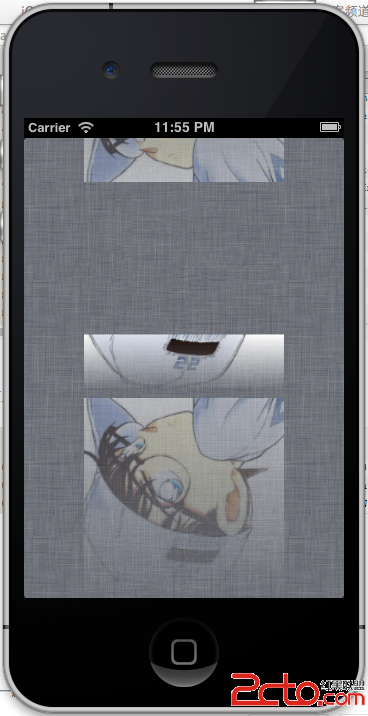
效果
實現二
為UIImage添加一個關於倒影的category,以實現返回這個圖片,
[cpp]
#import <UIKit/UIKit.h>
@interface UIImage (Reflection)
- (UIImage *)reflectionWithHeight:(int)height;
- (UIImage *)reflectionWithAlpha:(float)pcnt;
- (UIImage *)reflectionRotatedWithAlpha:(float)pcnt;
@end
UIImage+Reflection.h
[cpp]
#import "UIImage+Reflection.h"
#ifndef UIImageReflectionMethods
#define UIImageReflectionMethods
CGImageRef CreateGradientImage (int pixelsWide, int pixelsHigh, CGFloat endPoint) {
CGImageRef theCGImage = NULL;
// gradient is always black-white and the mask must be in the gray colorspace
CGColorSpaceRef colorSpace = CGColorSpaceCreateDeviceGray();
// create the bitmap context
CGContextRef gradientBitmapContext = CGBitmapContextCreate(NULL, pixelsWide, pixelsHigh, 8, 0, colorSpace, kCGImageAlphaNone);
// define the start and end grayscale values (with the alpha, even though
// our bitmap context doesn't support alpha the gradient requires it)
CGFloat colors[] = {0.0, 1.0, 1, 1.0};
// create the CGGradient and then release the gray color space
CGGradientRef grayScaleGradient = CGGradientCreateWithColorComponents(colorSpace, colors, NULL, 2);
CGColorSpaceRelease(colorSpace);
// create the start and end points for the gradient vector (straight down)
CGPoint gradientStartPoint = CGPointZero;
CGPoint gradientEndPoint = CGPointMake(0, endPoint);
if (endPoint < 0) {
gradientEndPoint = CGPointMake(0, -endPoint);
}
// draw the gradient into the gray bitmap context
CGContextDrawLinearGradient(gradientBitmapContext, grayScaleGradient, gradientStartPoint, gradientEndPoint, kCGGradientDrawsAfterEndLocation);
CGGradientRelease(grayScaleGradient);
// convert the context into a CGImageRef and release the context
theCGImage = CGBitmapContextCreateImage(gradientBitmapContext);
if (endPoint < 0) {
// rotate
CGContextClearRect(gradientBitmapContext, CGRectMake(0, 0, pixelsWide, pixelsHigh));
CGContextTranslateCTM(gradientBitmapContext, 0.0, pixelsHigh);
CGContextScaleCTM(gradientBitmapContext, 1.0, -1.0);
CGContextDrawImage(gradientBitmapContext, CGRectMake(0, 0, pixelsWide, pixelsHigh), theCGImage);
CGImageRelease(theCGImage);
theCGImage = CGBitmapContextCreateImage(gradientBitmapContext);
}
CGContextRelease(gradientBitmapContext);
// return the imageref containing the gradient
return theCGImage;
}
static CGContextRef MyCreateBitmapContext (int pixelsWide, int pixelsHigh) {
CGColorSpaceRef colorSpace = CGColorSpaceCreateDeviceRGB();
// create the bitmap context
CGContextRef bitmapContext = CGBitmapContextCreate (NULL, pixelsWide, pixelsHigh, 8, 0, colorSpace, (kCGBitmapByteOrder32Little | kCGImageAlphaPremultipliedFirst));
CGColorSpaceRelease(colorSpace);
return bitmapContext;
}
#endif
@implementation UIImage (Reflection)
- (UIImage *)reflectionRotatedWithAlpha:(float)pcnt {
int height = self.size.height;
UIImage * fromImage = self;
pcnt = 1.0 / pcnt;
// create a bitmap graphics context the size of the image
CGContextRef mainViewContentContext = MyCreateBitmapContext(fromImage.size.width, height);
// create a 2 bit CGImage containing a gradient that will be used for masking the
// main view content to create the 'fade' of the reflection. The CGImageCreateWithMask
// function will stretch the bitmap image as required, so we can create a 1 pixel wide gradient
CGImageRef gradientMaskImage = CreateGradientImage(1, height, -(height * pcnt));
// create an image by masking the bitmap of the mainView content with the gradient view
// then release the pre-masked content bitmap and the gradient bitmap
CGContextClipToMask(mainViewContentContext, CGRectMake(0.0, 0.0, fromImage.size.width, height), gradientMaskImage);
CGImageRelease(gradientMaskImage);
// In order to grab the part of the image that we want to render, we move the context origin to the
// height of the image that we want to capture, then we flip the context so that the image draws upside down.
// CGContextTranslateCTM(mainViewContentContext, 0.0, height);
// CGContextScaleCTM(mainViewContentContext, 1.0, -1.0);
// draw the image into the bitmap context
CGContextDrawImage(mainViewContentContext, CGRectMake(0, 0, fromImage.size.width, fromImage.size.height), [fromImage CGImage]);
// create CGImageRef of the main view bitmap content, and then release that bitmap context
CGImageRef reflectionImage = CGBitmapContextCreateImage(mainViewContentContext);
CGContextRelease(mainViewContentContext);
// convert the finished reflection image to a UIImage
UIImage * theImage = [UIImage imageWithCGImage:reflectionImage];
// image is retained by the property setting above, so we can release the original
CGImageRelease(reflectionImage);
return theImage;
}
- (UIImage *)reflectionWithHeight:(int)height {
if (height == -1) {
height = [self size].height;
}
if (height == 0)
return nil;
UIImage * fromImage = self;
// create a bitmap graphics context the size of the image
CGContextRef mainViewContentContext = MyCreateBitmapContext(fromImage.size.width, fromImage.size.height);
// create a 2 bit CGImage containing a gradient that will be used for masking the
// main view content to create the 'fade' of the reflection. The CGImageCreateWithMask
// function will stretch the bitmap image as required, so we can create a 1 pixel wide gradient
CGImageRef gradientMaskImage = CreateGradientImage(1, height, height);
// create an image by masking the bitmap of the mainView content with the gradient view
// then release the pre-masked content bitmap and the gradient bitmap
CGContextClipToMask(mainViewContentContext, CGRectMake(0.0, 0.0, fromImage.size.width, height), gradientMaskImage);
CGImageRelease(gradientMaskImage);
// In order to grab the part of the image that we want to render, we move the context origin to the
// height of the image that we want to capture, then we flip the context so that the image draws upside down.
CGContextTranslateCTM(mainViewContentContext, 0.0, fromImage.size.height);
CGContextScaleCTM(mainViewContentContext, 1.0, -1.0);
// draw the image into the bitmap context
CGContextDrawImage(mainViewContentContext, CGRectMake(0, 0, fromImage.size.width, fromImage.size.height), [fromImage CGImage]);
// create CGImageRef of the main view bitmap content, and then release that bitmap context
CGImageRef reflectionImage = CGBitmapContextCreateImage(mainViewContentContext);
CGContextRelease(mainViewContentContext);
// convert the finished reflection image to a UIImage
UIImage * theImage = [UIImage imageWithCGImage:reflectionImage];
// image is retained by the property setting above, so we can release the original
CGImageRelease(reflectionImage);
return theImage;
}
- (UIImage *)reflectionWithAlpha:(float)pcnt {
int height = self.size.height;
UIImage * fromImage = self;
pcnt = 1.0 / pcnt;
// create a bitmap graphics context the size of the image
CGContextRef mainViewContentContext = MyCreateBitmapContext(fromImage.size.width, height);
// create a 2 bit CGImage containing a gradient that will be used for masking the
// main view content to create the 'fade' of the reflection. The CGImageCreateWithMask
// function will stretch the bitmap image as required, so we can create a 1 pixel wide gradient
CGImageRef gradientMaskImage = CreateGradientImage(1, height, height * pcnt);
// create an image by masking the bitmap of the mainView content with the gradient view
// then release the pre-masked content bitmap and the gradient bitmap
CGContextClipToMask(mainViewContentContext, CGRectMake(0.0, 0.0, fromImage.size.width, height), gradientMaskImage);
CGImageRelease(gradientMaskImage);
// In order to grab the part of the image that we want to render, we move the context origin to the
// height of the image that we want to capture, then we flip the context so that the image draws upside down.
CGContextTranslateCTM(mainViewContentContext, 0.0, height);
CGContextScaleCTM(mainViewContentContext, 1.0, -1.0);
// draw the image into the bitmap context
CGContextDrawImage(mainViewContentContext, CGRectMake(0, 0, fromImage.size.width, fromImage.size.height), [fromImage CGImage]);
// create CGImageRef of the main view bitmap content, and then release that bitmap context
CGImageRef reflectionImage = CGBitmapContextCreateImage(mainViewContentContext);
CGContextRelease(mainViewContentContext);
// convert the finished reflection image to a UIImage
UIImage * theImage = [UIImage imageWithCGImage:reflectionImage];
// image is retained by the property setting above, so we can release the original
CGImageRelease(reflectionImage);
return theImage;
}
@end
使用非常簡單:
[cpp]
[refView setImage:[image reflectionWithAlpha:0.5]];
[imageView setImage:[image reflectionWithHeight:50]];
[topRefView setImage:[image reflectionRotatedWithAlpha:0.5]];
效果

相關文章
+