
iOS 使用 ProgressView 仿滴滴打車圓形計時進度條
編輯:iOS 開發綜合
本文實作一個類似微信中滴滴打車的圓形計時進度條(ProgressView),效果如下圖。
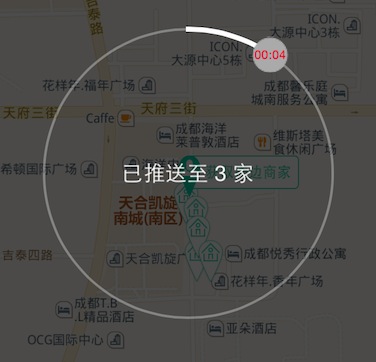
整體設計分為三層:CCProgressThumb(沿圓周旋轉的小圓點,內含時間標籤)、CCProgress(CAShapeLayer 繪製的進度圓弧),以及對外的 CCProgressView 容器,透過 block 回呼動畫的開始、進行與結束三個階段。
// CCProgressView.h
typedef void (^block_progress_start)();               // 動畫開始
typedef void (^block_progress_animing)(NSTimeInterval); // 動畫進行
typedef void (^block_progress_stop)();               // 動畫結束

@interface CCProgressView : UIView
@property (nonatomic, strong) UILabel *centerLabel;   // 中心 Label
@property (nonatomic, copy) block_progress_start start;
@property (nonatomic, copy) block_progress_animing animing;
@property (nonatomic, copy) block_progress_stop stop;
- (void)setAnimationTime:(NSTimeInterval)animationTime;
- (void)startAnimation;
- (void)stopAnimation;
@end
核心的進度圓弧與旋轉圓點實作如下:
// CCProgress(CAShapeLayer)
- (CGPathRef)bezierPathWithArcCenter {
    CGFloat centerX = CGRectGetWidth(self.frame) / 2.0;
    CGFloat centerY = CGRectGetHeight(self.frame) / 2.0;
    return [UIBezierPath bezierPathWithArcCenter:CGPointMake(centerX, centerY)
                                          radius:centerX
                                      startAngle:(- M_PI / 2)
                                        endAngle:(3 * M_PI / 2)
                                       clockwise:YES].CGPath;
}

- (void)startAnimation {
    CABasicAnimation *pathAnimation = [CABasicAnimation animationWithKeyPath:@"strokeEnd"];
    pathAnimation.duration = kAnimTimeInterval;
    pathAnimation.fromValue = @(self.initialProgress);
    pathAnimation.toValue = @(self.percent);
    pathAnimation.removedOnCompletion = YES;
    [self.progress addAnimation:pathAnimation forKey:nil];
    [self.thumb startAnimation];
    self.thumb.timeLabel.text = [self stringFromTimeInterval:_elapsedTime shorTime:YES];
}

// 時間格式轉換
- (NSString *)stringFromTimeInterval:(NSTimeInterval)interval shorTime:(BOOL)shortTime {
    NSInteger ti = (NSInteger)interval;
    NSInteger seconds = ti % 60;
    NSInteger minutes = (ti / 60) % 60;
    NSInteger hours = (ti / 3600);
    if (shortTime) {
        return [NSString stringWithFormat:@"%02ld:%02ld", (long)hours, (long)seconds];
    }
    return [NSString stringWithFormat:@"%02ld:%02ld:%02ld", (long)hours, (long)minutes, (long)seconds];
}
容器的計時器驅動與對外回呼:
// CCProgressView.m
- (void)startAnimation {
    if (!_timer) {
        _timer = [NSTimer timerWithTimeInterval:kAnimTimeInterval target:self selector:@selector(doTimerSchedule) userInfo:nil repeats:YES];
        [[NSRunLoop currentRunLoop] addTimer:_timer forMode:NSRunLoopCommonModes];
    }
    self.progressLayer.elapsedTime = 0;
    if (_start) _start();
}

- (void)doTimerSchedule {
    self.progressLayer.elapsedTime = self.progressLayer.elapsedTime + kAnimTimeInterval;
    if (_animing) _animing(self.progressLayer.elapsedTime);
    if (self.progressLayer.elapsedTime >= _animationTime) {
        [self stopAnimation];
    }
}

- (void)stopAnimation {
    if (_stop) _stop();
    if (_timer) {
        [_timer invalidate];
        _timer = nil;
    }
    [_progressLayer stopAnimation];
}
使用範例:
_progressView = [[CCProgressView alloc] initWithFrame:CGRectMake((APP_WIDTH - 240) / 2.0f, (APP_HEIGHT - 240) / 2.0f, 240, 240)];
[_progressView setAnimationTime:60];
_progressView.start = ^() { NSLog(@"開始"); };
_progressView.animing = ^(NSTimeInterval currentTime) { NSLog(@"進行中"); };
__block id weakSelf = self;
_progressView.stop = ^() {
    NSLog(@"結束");
    [weakSelf dismiss];
};
[self addSubview:_progressView];
[_progressView startAnimation];
透過 CAShapeLayer 的 strokeEnd 動畫繪製進度圓弧,搭配沿圓周移動的 THUMB 小圓點與中心時間標籤,即可呈現流暢的圓形計時效果,適合用於倒數、進度提示等情境。
- 上一篇文章: iOS 實現二維碼掃描功能(精簡版)
- 下一篇文章: 多尺寸 iPhone 全屏背景下的按鈕定位方案