
iOS 開發第三方語音服務整合:微信語音 SDK 實作
編輯:iOS 開發綜合
微信開放平臺(https://pr.weixin.qq.com/ )提供了微信語音與圖像能力,整合相當簡單。下載官方 Demo 後會附帶文件,依流程操作即可。需要注意的是,由於 SDK 只提供了真機版的 .a 文件,因此只能以真機執行,否則會報錯。
以下先介紹帶 UI 介面的 SDK。
1. 安裝 SDK 並引入相關包
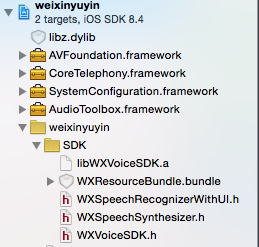
2. 設定 Build Settings
C++ Standard Library 設為 libstdc++ 或 Compiler Default;Compile Sources As 設為 Objective-C++,或把使用 SDK 的文件副檔名改為 .mm(否則會報錯)。

3. 加入程式碼
#import "CustomNewViewControl.h"
#import "WXSpeechRecognizerWithUI.h"

@interface CustomNewViewControl () <WXVoiceWithUIDelegate> {
    WXSpeechRecognizerWithUI *_wxssui;
    __weak IBOutlet UILabel *label;
}
@property (weak, nonatomic) IBOutlet UIButton *button;
@end

@implementation CustomNewViewControl
- (void)viewDidLoad {
    [super viewDidLoad];
    _wxssui = [[WXSpeechRecognizerWithUI alloc] initWithDelegate:self andUserKey:@"你的授權Key"];
}
- (IBAction)buttonPressed:(UIButton *)sender {
    label.text = @"";
    [_wxssui showAndStart];
}
// WXVoiceWithUIDelegate 代理
- (void)voiceInputResultArray:(NSArray *)array {
    WXVoiceResult *result = [array objectAtIndex:0];
    [label setText:result.text];
}
@end
無 UI 介面的 SDK 用法大同小異,但需注意:微信語音開放平臺免費提供語音識別服務,你可自由定制 UI,但必須在語音採集識別的視窗上正確、完整地標註「Powered by 微信智慧語音」或「語音技術由微信智慧提供」字樣。

#import "ViewController.h"
#import "WXVoiceSDK.h"

@interface ViewController () <WXVoiceDelegate>
@property (weak, nonatomic) IBOutlet UILabel *label;
@property (weak, nonatomic) IBOutlet UIButton *button;
@end

@implementation ViewController
- (void)viewDidLoad {
    [super viewDidLoad];
    WXVoiceSDK *speechRecognizer = [WXVoiceSDK sharedWXVoice];
    speechRecognizer.silTime = 3.0f;   // 可選設定
    speechRecognizer.delegate = self;  // 必選設定
    [speechRecognizer setUserKey:@"你的授權Key"];
}

#pragma mark - WXVoiceDelegate
- (void)voiceInputResultArray:(NSArray *)array {
    if (array && array.count > 0) {
        WXVoiceResult *result = [array objectAtIndex:0];
        _label.text = result.text;
    } else {
        _label.text = @"";
    }
}
- (void)voiceInputMakeError:(NSInteger)errorCode {
    _label.text = [NSString stringWithFormat:@"錯誤:%ld", (long)errorCode];
}
- (IBAction)buttonPressed:(UIButton *)sender {
    sender.selected = !sender.selected;
    if (sender.selected) {
        _label.text = @"錄音中...";
        [[WXVoiceSDK sharedWXVoice] startOnce];
        [_button setTitle:@"完成" forState:UIControlStateNormal];
    } else {
        [[WXVoiceSDK sharedWXVoice] finish];
        [_button setTitle:@"錄音" forState:UIControlStateNormal];
    }
}
- (IBAction)cancelButtonPressed:(UIButton *)sender {
    [[WXVoiceSDK sharedWXVoice] cancel];
    [_button setTitle:@"錄音" forState:UIControlStateNormal];
}
@end
以上就是 iOS 整合微信語音 SDK 的完整介紹,透過帶 UI 與無 UI 兩種版本,開發者可依需求彈性導入語音識別能力。
- 上一篇文章: iOS 筆記:二維碼的生成與掃描實作
- 下一篇文章: iOS NavigationController 右滑返回手勢詳解