
iOS UIButton 的 UIEdgeInsets:讓文字與圖片垂直居中對齊
編輯:iOS 開發綜合
在 iOS 開發中,經常需要讓 UIButton 上的圖片與文字呈上下垂直排列並居中對齊。這時就要善用 UIEdgeInsets 相關的三個屬性。本文詳細說明它們的作用與實作。
一、UIEdgeInsets 結構
UIEdgeInsets 用來描述「內縮」的距離,包含上、左、下、右四個方向的數值,正值表示向內縮,負值則表示向外擴:
typedef struct UIEdgeInsets {
    CGFloat top, left, bottom, right;
    // 每條邊的內縮量,正值為 inset,負值則為 outset
} UIEdgeInsets;
二、UIButton 的三個 EdgeInsets 屬性
@property(nonatomic) UIEdgeInsets contentEdgeInsets; // 內容(圖片+文字整體)的內縮,默認 UIEdgeInsetsZero
@property(nonatomic) UIEdgeInsets titleEdgeInsets;   // 文字的內縮,默認 UIEdgeInsetsZero
@property(nonatomic) UIEdgeInsets imageEdgeInsets;   // 圖片的內縮,默認 UIEdgeInsetsZero
透過 UIEdgeInsetsMake(top, left, bottom, right) 可以便捷地構造一個 UIEdgeInsets,四個參數分別代表距上、左、下、右邊界的距離,默認皆為零,此時 title 與 image 位於 button 正中央。
三、完整示例:圖片在上、文字在下且居中
self.view.backgroundColor = [UIColor blackColor];

UIButton *button = [UIButton buttonWithType:UIButtonTypeCustom];
button.frame = CGRectMake(100, 100, 90, 90);
button.backgroundColor = [UIColor cyanColor];

// 設置圖片
[button setImage:[UIImage imageNamed:@"IconHome@2x.png"] forState:UIControlStateNormal];
// 圖片位置(上、左、下、右),這裡把圖片往上推,右側留出文字寬度
button.imageEdgeInsets = UIEdgeInsetsMake(5, 13, 21, button.titleLabel.bounds.size.width);

// 設置文字
[button setTitle:@"首頁" forState:UIControlStateNormal];
button.titleLabel.font = [UIFont systemFontOfSize:16];
button.titleLabel.textAlignment = NSTextAlignmentCenter;
[button setTitleColor:[UIColor whiteColor] forState:UIControlStateNormal];
[button setTitleColor:[UIColor grayColor] forState:UIControlStateHighlighted];
// 文字位置:把文字往下推,左側留出相應空間以實現居中
button.titleEdgeInsets = UIEdgeInsetsMake(71, -button.titleLabel.bounds.size.width - 50, 0, 0);

[button addTarget:self action:@selector(tap) forControlEvents:UIControlEventTouchUpInside];
[self.view addSubview:button];

// 對應的事件
- (void)tap {
    NSLog(@"tap a button");
}
關鍵在於:透過調整 imageEdgeInsets 把圖片往上移、調整 titleEdgeInsets 把文字往下移,就能讓兩者上下排列並整體居中。數值可正可負,需要反覆微調以達到最佳視覺效果。
下圖為示例使用的圖片(64×64):
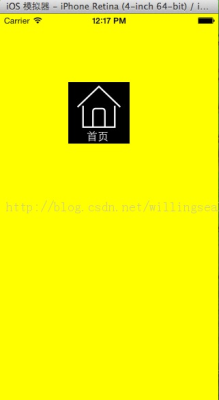
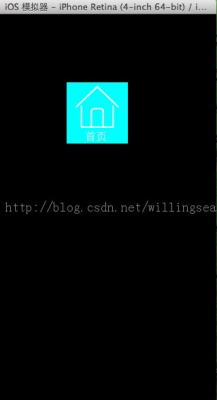
如果對齊實在難以調到完美,另一個思路是:直接準備一張同時包含圖片與文字的整張背景圖,交給設計師處理,往往能達到最逼真的效果。
以上就是關於 iOS 中利用 UIButton 的 UIEdgeInsets 實現「圖片與文字上下垂直居中對齊」的完整分享,希望對大家有所幫助。
- 上一篇文章: iOS 客戶端接入微信支付的完整實踐
- 下一篇文章: 基於 UIControl 自定義實現 iOS 點贊按鈕