
iOS 自定義布局封裝實戰:用代理模式打造可配置的瀑布流
編輯:iOS 開發綜合
一、為什麼要封裝
幾個原因,講起來很樸實:
- 常用的控件或類,封裝成獨立元件對外提供,各處都能重複使用,省下大量重複勞動。
- 好的封裝應該不依賴外部的其他類。這意味著別人要用時,直接把檔案拖進專案就能跑,不必再手忙腳亂地補依賴。
- 封裝自定義布局這種「行為可變」的元件,幾乎一定會用到代理(Delegate)設計模式——因為布局規則本來就該由使用者決定,而不是寫死在元件裡。
二、代理設計模式拆解
參與者與職責
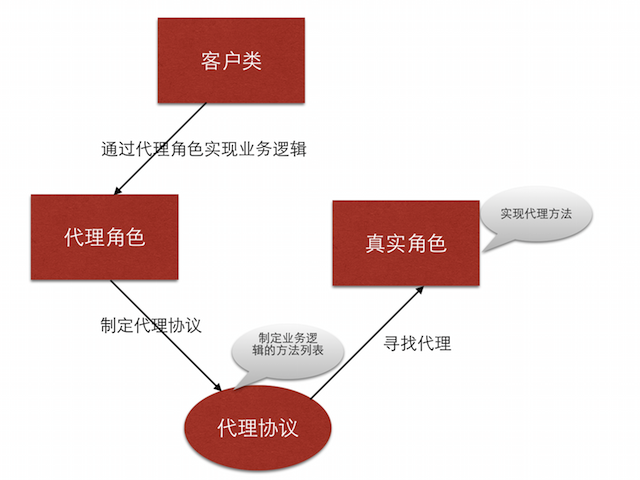
客戶類(通常就是 delegate 的持有者):把業務邏輯委託出去,自己只負責在對的時機發問。
真實角色:把客戶類需要的業務邏輯抽象成一份方法清單,也就是代理協議。
代理協議的角色是:
- 定義需要實現的業務邏輯有哪些。
- 提供一組方法清單,並區分「必須實作」與「選擇性實作」。
- 它就是代理物件必須遵守的一套規則。
代理角色:
- 要當代理,得先宣告遵守該協議,並實作所有
@required方法。 - 代理角色可以在呼叫協議方法的過程中穿插自己的額外邏輯。
文字描述總是抽象,一張圖勝過一堆形容詞:
三、自定義布局的封裝思路
先釐清業務邏輯:

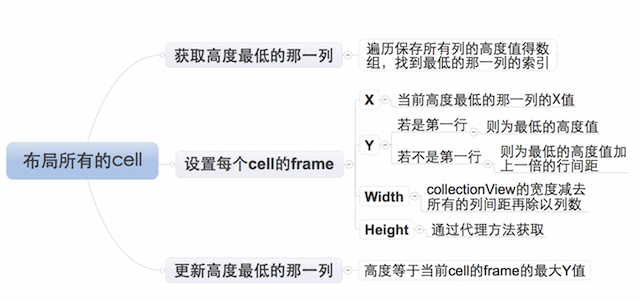
而「每一個 cell 該怎麼擺」這段邏輯最複雜,附上一張思維導圖:
介面該怎麼設計?
核心原則:封裝提供的介面,要按客戶類的業務需求來定。具體拆成幾條:
- 透過可選代理方法取得的屬性,必須給一個合理預設值——這樣使用者什麼都不實作也能跑起來。
- 沒有預設值、而且一定要有的屬性,就透過必須實作的方法來索取。
- 可選介面包括:列數、列間距、行間距、內邊距。
- 必選介面:每個元素的高度。寬度不用問,用總寬扣掉內邊距與列間距再除以列數就算得出來。
四、封裝步驟
步驟 1:定義代理協議,暴露介面
@class LYPWaterFlowLayout;

@protocol LYPWaterFlowLayoutDelegate <NSObject>

// 必須實作
/** 取得瀑布流每個元素的高度 */
- (CGFloat)waterFlowLayout:(LYPWaterFlowLayout *)waterFlowLayout
        heightForItemAtIndex:(NSInteger)index
                    itemWith:(CGFloat)itemWith;

// 選擇性實作
@optional
/** 列數 */
- (NSInteger)columnCountInWaterFlowLayout:(LYPWaterFlowLayout *)waterFlowLayout;
/** 列間距 */
- (CGFloat)columnMarginInWaterFlowLayout:(LYPWaterFlowLayout *)waterFlowLayout;
/** 行間距 */
- (CGFloat)rowMarginInWaterFlowLayout:(LYPWaterFlowLayout *)waterFlowLayout;
/** 內邊距 */
- (UIEdgeInsets)edgeInsetsInWaterFlowLayout:(LYPWaterFlowLayout *)waterFlowLayout;

@end
步驟 2:宣告代理屬性
@interface LYPWaterFlowLayout : UICollectionViewLayout

/** 代理 */
@property (nonatomic, weak) id<LYPWaterFlowLayoutDelegate> delegate;

@end
這裡用 weak 而非 strong,是為了避免循環引用——控制器持有布局物件,布局物件又不該反過來把控制器留著。
步驟 3:為可選屬性準備預設值
/** 預設列數 */
static const NSInteger LYPDefaultColumnCount = 3;
/** 預設列間距 */
static const CGFloat LYPDefaultColumnMargin = 10;
/** 預設行間距 */
static const CGFloat LYPDefaultRowMargin = 10;
/** 預設內邊距 */
static const UIEdgeInsets LYPDefaultEdgeInsets = {10, 10, 10, 10};
步驟 4:撰寫屬性的取值邏輯——代理有給就用代理的,沒給就退回預設
- (NSInteger)columnCount {
    // 判斷代理是否實作了取得列數的選擇性方法
    if ([self.delegate respondsToSelector:@selector(columnCountInWaterFlowLayout:)]) {
        // 有實作:採用代理設定的值
        return [self.delegate columnCountInWaterFlowLayout:self];
    } else {
        // 未實作:退回預設值
        return LYPDefaultColumnCount;
    }
}
其餘三個屬性(列間距、行間距、內邊距)的 getter 幾乎一模一樣,只是換掉 selector 與預設常數,此處不再重複貼。這正是用 respondsToSelector: 把「可選」這件事落地的標準寫法。
步驟 5:準備布局所需的成員屬性
/** 所有 cell 的布局屬性 */
@property (nonatomic, strong) NSMutableArray *attrsArray;
/** 每一列目前的累積高度 */
@property (nonatomic, strong) NSMutableArray *columnHeights;
步驟 6:懶加載初始化
- (NSMutableArray *)attrsArray {
    if (_attrsArray == nil) {
        _attrsArray = [NSMutableArray array];
    }
    return _attrsArray;
}

- (NSMutableArray *)columnHeights {
    if (_columnHeights == nil) {
        _columnHeights = [NSMutableArray array];
    }
    return _columnHeights;
}
步驟 7:在 prepareLayout 中統一計算
prepareLayout 是 UICollectionViewLayout 的關鍵回呼——它會在每次布局前被呼叫一次,適合把所有 frame 一次算完並快取起來,避免滾動時反覆計算。
- (void)prepareLayout {
    [super prepareLayout];

    // 清除上次計算的所有列高
    [self.columnHeights removeAllObjects];

    // 設定所有列的初始高度為內邊距頂部
    for (NSInteger i = 0; i < self.columnCount; i++) {
        self.columnHeights[i] = @(self.edgeInsets.top);
    }

    // 清除上次的所有布局屬性
    [self.attrsArray removeAllObjects];

    // 逐一建立每個 cell 的布局屬性
    NSInteger count = [self.collectionView numberOfItemsInSection:0];
    for (NSInteger i = 0; i < count; i++) {
        NSIndexPath *indexPath = [NSIndexPath indexPathForItem:i inSection:0];
        UICollectionViewLayoutAttributes *attrs = [self layoutAttributesForItemAtIndexPath:indexPath];
        [self.attrsArray addObject:attrs];
    }
}
步驟 8:回傳整批布局屬性
- (nullable NSArray<UICollectionViewLayoutAttributes *> *)layoutAttributesForElementsInRect:(CGRect)rect {
    return self.attrsArray;
}
步驟 9:核心——計算單一 cell 的 frame
- (nullable UICollectionViewLayoutAttributes *)layoutAttributesForItemAtIndexPath:(nonnull NSIndexPath *)indexPath {
    UICollectionViewLayoutAttributes *attrs = [UICollectionViewLayoutAttributes layoutAttributesForCellWithIndexPath:indexPath];

    // 先確定尺寸
    CGFloat collectionViewWidth = self.collectionView.frame.size.width;
    CGFloat width = (collectionViewWidth
                     - self.edgeInsets.left
                     - self.edgeInsets.right
                     - (self.columnCount - 1) * self.columnMargin) / self.columnCount;
    // 高度由代理決定
    CGFloat height = [self.delegate waterFlowLayout:self heightForItemAtIndex:indexPath.item itemWith:width];

    // 找出目前最矮的那一列
    NSInteger destColumn = 0;
    CGFloat minColumnHeight = [self.columnHeights[0] doubleValue];
    for (NSInteger i = 1; i < self.columnCount; i++) {
        CGFloat columnHeight = [self.columnHeights[i] doubleValue];
        if (minColumnHeight > columnHeight) {
            minColumnHeight = columnHeight;
            destColumn = i;
        }
    }

    // 計算座標
    CGFloat x = self.edgeInsets.left + destColumn * (width + self.columnMargin);
    CGFloat y = minColumnHeight;
    if (y != self.edgeInsets.top) {   // 不是第一行才需要加行間距
        y += self.rowMargin;
    }

    attrs.frame = CGRectMake(x, y, width, height);

    // 更新該列的累積高度
    self.columnHeights[destColumn] = @(CGRectGetMaxY(attrs.frame));

    return attrs;
}
這段就是瀑布流的靈魂:每次把新元素放進當前最矮的那一列,放下後更新該列高度,下一個元素自然就會去找新的最矮列。這個「貪婪」策略保證了各列高度差始終最小,視覺上最整齊。
步驟 10:設定可滾動範圍
- (CGSize)collectionViewContentSize {
    CGFloat maxColumnHeight = [self.columnHeights[0] doubleValue];
    for (NSInteger i = 1; i < self.columnCount; i++) {
        CGFloat columnHeight = [self.columnHeights[i] doubleValue];
        if (maxColumnHeight < columnHeight) {
            maxColumnHeight = columnHeight;
        }
    }
    // 高度取最高那一列,再留一個行間距作為底部餘裕
    return CGSizeMake(0, maxColumnHeight + self.rowMargin);
}
小結
整套封裝下來,對外的介面只有一個 delegate 屬性和一個協議。使用者要做的僅僅是實作「回傳高度」這個必選方法,其餘全部有合理預設值;想微調時再按需實作可選方法即可。把變化點交給使用者、把不變的計算邏輯留給自己,這是自定義布局封裝最值得記住的思路。