
iOS 地理位置定位實戰:CoreLocation 獲取經緯度、地址解析與距離計算
iOS 自帶的定位服務能覆蓋絕大多數位置相關需求:取當前經緯度、把座標反查成地址、把地址正查成座標、計算兩點距離。本文以 CoreLocation 為主線,把這幾件事逐一跑通。
一、三種定位方式的精度差異
- GPS:精度最高,但首次定位較慢且室內效果差。
- 蜂窩基站三角定位:在基站密集的城市區域相當可用。
- WiFi:依賴運營商/服務商的數據庫比對,是三種中最不精確的,但速度最快、功耗最低。
系統會依當前條件自動在三者間切換,開發者通常只需關注「要多精」而不是「用哪一種」。
二、引入必要的庫
需要在工程中添加兩個 framework:CoreLocation(定位)與 MapKit(地圖展示)。
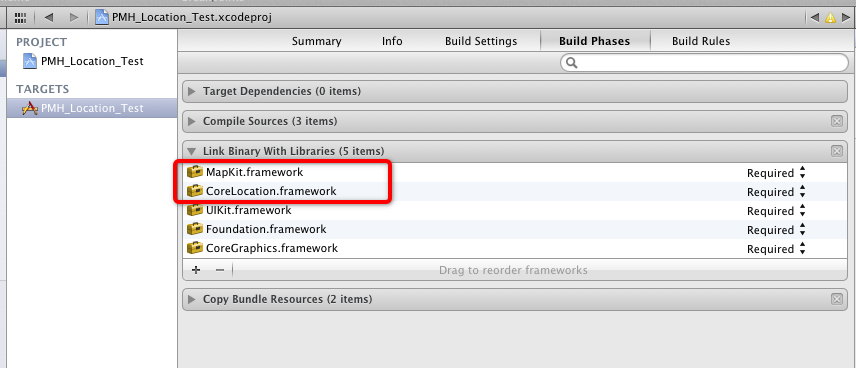
CoreLocation 中最核心的類是 CLLocationManager,它負責定位管理:啟動/停止更新、設置精度、回報座標與移動狀態。
三、iOS 8 之後的變化(重要)
從 iOS 8 開始,Core Location 引入了三個關鍵改動:
- 授權概念細分為
Always與WhenInUse兩種。前者允許 App 在後台持續定位,後者僅在前台使用時定位。同時必須在 Info.plist 中補上對應的用途說明字段(NSLocationAlwaysUsageDescription或NSLocationWhenInUseUsageDescription),否則請求授權時會直接崩潰。 - 新增 Visit Monitoring。這類特性特別適合旅行類 App——當用戶到達或離開某個區域時,系統會回報事件,且幾乎不增加額外功耗。
- 引入室內定位,新增
CLFloor,在支持的場所中可以直接拿到樓層信息。
四、獲取當前經緯度
先導入頭文件,聲明 manager 並遵循協議:
#import <CoreLocation/CoreLocation.h>

@interface ViewController () <CLLocationManagerDelegate>
{
    CLLocationManager *_locationManager;
}
@end
- (void)startLocating
{
    if ([CLLocationManager locationServicesEnabled]) {
        _locationManager = [[CLLocationManager alloc] init];
        _locationManager.delegate = self;

        // 定位精度:Best 最精確但最耗電
        [_locationManager setDesiredAccuracy:kCLLocationAccuracyBest];

        // 移動超過 100 米才回報新位置,可有效降低功耗
        _locationManager.distanceFilter = 100.0f;

        // iOS 8 及以上需要主動請求授權
        if ([[[UIDevice currentDevice] systemVersion] floatValue] > 8.0) {
            [_locationManager requestAlwaysAuthorization];
            [_locationManager requestWhenInUseAuthorization];
        }

        // 開始實時定位
        [_locationManager startUpdatingLocation];
    }
}
拿到位置的正規回調是下面這個:
- (void)locationManager:(CLLocationManager *)manager
    didUpdateLocations:(NSArray<CLLocation *> *)locations
{
    CLLocation *location = [locations lastObject];
    NSLog(@"Longitude = %f", location.coordinate.longitude);
    NSLog(@"Latitude  = %f", location.coordinate.latitude);

    // 用完就停,省電
    [_locationManager stopUpdatingLocation];
}
原始文章裡用的是 didChangeAuthorizationStatus:,這個方法只在授權狀態變化時觸發,並非拿座標的正確時機。實際開發請以 didUpdateLocations: 為準。
五、把座標反查成地址(逆地理編碼)
在上面的回調中追加:
- (void)locationManager:(CLLocationManager *)manager
    didUpdateLocations:(NSArray<CLLocation *> *)locations
{
    CLLocation *location = [locations lastObject];
    NSLog(@"Longitude = %f", location.coordinate.longitude);
    NSLog(@"Latitude  = %f", location.coordinate.latitude);
    [_locationManager stopUpdatingLocation];

    CLGeocoder *geoCoder = [[CLGeocoder alloc] init];
    [geoCoder reverseGeocodeLocation:location completionHandler:^(NSArray *placemarks, NSError *error) {
        for (CLPlacemark *placemark in placemarks) {
            NSDictionary *address = [placemark addressDictionary];
            NSLog(@"%@", [address objectForKey:@"Country"]);      // 國家
            NSLog(@"%@", [address objectForKey:@"State"]);        // 城市
            NSLog(@"%@", [address objectForKey:@"SubLocality"]);  // 區 / 縣
            NSLog(@"%@", [address objectForKey:@"Street"]);       // 街道
        }
    }];
}
CLPlacemark 除了 addressDictionary,還提供了 name、locality、administrativeArea、postalCode、country 等結構化屬性,比直接取字典更清晰,也更便於國際化。此外 addressDictionary 的鍵在不同語言環境下可能不同,跨語言場景建議用結構化屬性。
六、把地址正查成經緯度(地理編碼)
- (void)getLongitudeAndLatitudeWithCity:(NSString *)city
{
    // city 支持中文
    CLGeocoder *myGeocoder = [[CLGeocoder alloc] init];
    [myGeocoder geocodeAddressString:city completionHandler:^(NSArray *placemarks, NSError *error) {
        if ([placemarks count] > 0 && error == nil) {
            NSLog(@"Found %lu placemark(s).", (unsigned long)[placemarks count]);
            CLPlacemark *firstPlacemark = [placemarks objectAtIndex:0];
            NSLog(@"Longitude = %f", firstPlacemark.location.coordinate.longitude);
            NSLog(@"Latitude  = %f", firstPlacemark.location.coordinate.latitude);
        }
        else if ([placemarks count] == 0 && error == nil) {
            NSLog(@"Found no placemarks.");
        }
        else if (error != nil) {
            NSLog(@"An error occurred = %@", error);
        }
    }];
}
三個分支都要處理:查到了、沒查到、出錯了。實務中「沒查到」往往比「出錯」更常見(地址寫得太模糊),值得給用戶明確提示。
七、計算兩點間的距離
- (double)distanceByLongitude:(double)longitude1
                     latitude:(double)latitude1
                    longitude:(double)longitude2
                     latitude:(double)latitude2
{
    CLLocation *curLocation   = [[CLLocation alloc] initWithLatitude:latitude1  longitude:longitude1];
    CLLocation *otherLocation = [[CLLocation alloc] initWithLatitude:latitude2  longitude:longitude2];
    // 返回值單位為米
    return [curLocation distanceFromLocation:otherLocation];
}
先用地名查座標,再算距離。以北京(116.405285, 39.904989)與上海(121.472644, 31.231706)為例:
double distance = [self distanceByLongitude:116.405285
                                   latitude:39.904989
                                  longitude:121.472644
                                   latitude:31.231706];
NSLog(@"distance = %f", distance);
輸出:
distance = 1066449.749194
約 1066 公里,與直線距離的實際值基本吻合。需要说明的是,distanceFromLocation: 返回的是沿地球表面的大圓距離(直線),並非行車或步行里程,後者需要接入地圖服務商的路徑規劃 API。
八、實戰中必須注意的幾件事
- Info.plist 的用途說明是硬性要求。缺字段會直接崩潰,且文案要寫清「為什麼需要位置」,否則容易被用戶拒絕甚至被審核打回。
- 用完就停。只在需要的頁面調用
startUpdatingLocation,離開時stopUpdatingLocation。持續定位是耗電大戶。 - 合理設置 desiredAccuracy 與 distanceFilter。導航類場景才需要
kCLLocationAccuracyBest;打車、天氣、附近推薦用kCLLocationAccuracyHundredMeters甚至更低就夠了。 - 處理授權被拒的情況。用戶拒絕後
locationServicesEnabled可能仍返回 YES,需額外判斷authorizationStatus並引導用戶去系統設置開啟。 - 模擬器可以自定義位置。Xcode 的 Debug → Simulate Location 支持自定義 GPX 文件,能存檔各種移動軌跡場景,不必真拿手機跑。