
iOS 開發中 AFNetworking 常用 HTTP 操作方式彙總
AFNetworking 長期是 iOS 上最受歡迎的網絡庫之一,它把 NSURLSession 這套偏底層的 API 包裝成了幾個語義清晰的類。本文按「集成 → GET/POST → 上傳下載 → 進度與批量 → 可達性檢測」的順序,把日常最常用的調用方式整理成速查手冊。
一、集成到工程
從官方倉庫下載最新版本:https://github.com/AFNetworking/AFNetworking。解壓後可以看到一個 AFNetworking 子文件夾,裡面全是 .h 與 .m 文件。
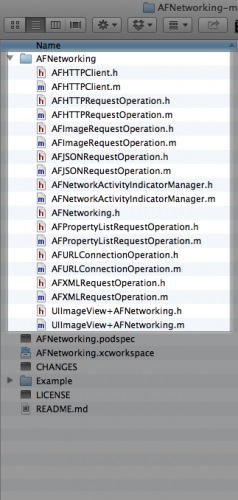
把這個文件夾拖進 Xcode 工程:
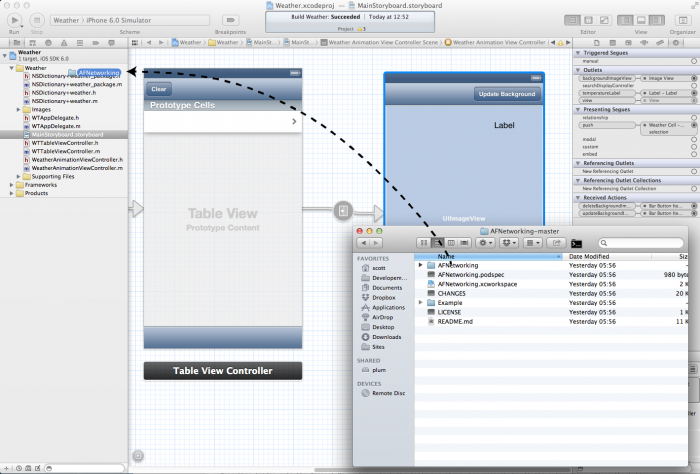
彈出添加文件選項時,記得勾選 Copy items into destination group's folder (if needed) 與 Create groups for any added folders。若把這些頭文件加入 precompiled header(.pch),框架就會自動對工程內所有源文件可見,省去到處寫 import 的麻煩。
二、GET 請求
AFHTTPRequestOperationManager *manager = [AFHTTPRequestOperationManager manager];
[manager GET:@"https://example.com/resources.json"
  parameters:nil
     success:^(AFHTTPRequestOperation *operation, id responseObject) {
         NSLog(@"JSON: %@", responseObject);
     }
     failure:^(AFHTTPRequestOperation *operation, NSError *error) {
         NSLog(@"Error: %@", error);
     }];
三、POST 請求
AFHTTPRequestOperationManager *manager = [AFHTTPRequestOperationManager manager];
NSDictionary *parameters = @{@"foo": @"bar"};
[manager POST:@"https://example.com/resources.json"
   parameters:parameters
      success:^(AFHTTPRequestOperation *operation, id responseObject) {
          NSLog(@"JSON: %@", responseObject);
      }
      failure:^(AFHTTPRequestOperation *operation, NSError *error) {
          NSLog(@"Error: %@", error);
      }];
四、POST 上傳文件(multipart/form-data)
AFHTTPRequestOperationManager *manager = [AFHTTPRequestOperationManager manager];
NSDictionary *parameters = @{@"foo": @"bar"};
NSURL *filePath = [NSURL fileURLWithPath:@"file://path/to/image.png"];

[manager POST:@"https://example.com/resources.json"
   parameters:parameters
constructingBodyWithBlock:^(id<AFMultipartFormData> formData) {
    [formData appendPartWithFileURL:filePath name:@"image" error:nil];
}
      success:^(AFHTTPRequestOperation *operation, id responseObject) {
          NSLog(@"Success: %@", responseObject);
      }
      failure:^(AFHTTPRequestOperation *operation, NSError *error) {
          NSLog(@"Error: %@", error);
      }];
五、創建下載任務
NSURLSessionConfiguration *configuration = [NSURLSessionConfiguration defaultSessionConfiguration];
AFURLSessionManager *manager = [[AFURLSessionManager alloc] initWithSessionConfiguration:configuration];

NSURL *URL = [NSURL URLWithString:@"https://example.com/download.zip"];
NSURLRequest *request = [NSURLRequest requestWithURL:URL];

NSURLSessionDownloadTask *downloadTask =
[manager downloadTaskWithRequest:request
                        progress:nil
                     destination:^NSURL *(NSURL *targetPath, NSURLResponse *response) {
    NSURL *documentsDirectoryURL = [[NSFileManager defaultManager]
                                    URLForDirectory:NSDocumentDirectory
                                           inDomain:NSUserDomainMask
                                  appropriateForURL:nil
                                             create:NO
                                              error:nil];
    return [documentsDirectoryURL URLByAppendingPathComponent:[response suggestedFilename]];
}
               completionHandler:^(NSURLResponse *response, NSURL *filePath, NSError *error) {
    NSLog(@"File downloaded to: %@", filePath);
}];
[downloadTask resume];
注意最後一定要調用 resume——task 創建後默認是掛起狀態,忘了 resume 是最常見的「代碼沒錯但什麼都沒發生」的原因。destination 返回的是最終落盤路徑,這裡用 suggestedFilename 沿用服務端文件名。
六、創建上傳任務
NSURLSessionConfiguration *configuration = [NSURLSessionConfiguration defaultSessionConfiguration];
AFURLSessionManager *manager = [[AFURLSessionManager alloc] initWithSessionConfiguration:configuration];

NSURL *URL = [NSURL URLWithString:@"https://example.com/upload"];
NSURLRequest *request = [NSURLRequest requestWithURL:URL];
NSURL *filePath = [NSURL fileURLWithPath:@"file://path/to/image.png"];

NSURLSessionUploadTask *uploadTask =
[manager uploadTaskWithRequest:request
                      fromFile:filePath
                      progress:nil
             completionHandler:^(NSURLResponse *response, id responseObject, NSError *error) {
    if (error) {
        NSLog(@"Error: %@", error);
    } else {
        NSLog(@"Success: %@ %@", response, responseObject);
    }
}];
[uploadTask resume];
七、上傳並監聽進度
NSMutableURLRequest *request =
[[AFHTTPRequestSerializer serializer] multipartFormRequestWithMethod:@"POST"
                                                           URLString:@"https://example.com/upload"
                                                          parameters:nil
                                           constructingBodyWithBlock:^(id<AFMultipartFormData> formData) {
    [formData appendPartWithFileURL:[NSURL fileURLWithPath:@"file://path/to/image.jpg"]
                               name:@"file"
                           fileName:@"filename.jpg"
                           mimeType:@"image/jpeg"
                              error:nil];
}
                                                               error:nil];

AFURLSessionManager *manager =
[[AFURLSessionManager alloc] initWithSessionConfiguration:[NSURLSessionConfiguration defaultSessionConfiguration]];
NSProgress *progress = nil;

NSURLSessionUploadTask *uploadTask =
[manager uploadTaskWithStreamedRequest:request
                              progress:&progress
                     completionHandler:^(NSURLResponse *response, id responseObject, NSError *error) {
    if (error) {
        NSLog(@"Error: %@", error);
    } else {
        NSLog(@"%@ %@", response, responseObject);
    }
}];
[uploadTask resume];

// 之後可通過 KVO 觀察 progress 的 fractionCompleted 來更新進度條
// [progress addObserver:self forKeyPath:@"fractionCompleted" options:NSKeyValueObservingOptionNew context:nil];
NSProgress 是蘋果統一的進度抽象,支持 KVO 觀察,用它比手寫 delegate 進度回調更乾淨。
八、上傳純數據(data)
NSURLSessionConfiguration *configuration = [NSURLSessionConfiguration defaultSessionConfiguration];
AFURLSessionManager *manager = [[AFURLSessionManager alloc] initWithSessionConfiguration:configuration];

NSURL *URL = [NSURL URLWithString:@"https://example.com/upload"];
NSURLRequest *request = [NSURLRequest requestWithURL:URL];

NSURLSessionDataTask *dataTask =
[manager dataTaskWithRequest:request
           completionHandler:^(NSURLResponse *response, id responseObject, NSError *error) {
    if (error) {
        NSLog(@"Error: %@", error);
    } else {
        NSLog(@"%@ %@", response, responseObject);
    }
}];
[dataTask resume];
九、獲取網絡狀態
[[AFNetworkReachabilityManager sharedManager] setReachabilityStatusChangeBlock:^(AFNetworkReachabilityStatus status) {
    NSLog(@"Reachability: %@", AFStringFromNetworkReachabilityStatus(status));
}];
// 記得啟動監聽
[[AFNetworkReachabilityManager sharedManager] startMonitoring];
十、HTTP Manager 級別的可達性監控
斷網時主動掛起請求隊列,是個很實用的技巧:
NSURL *baseURL = [NSURL URLWithString:@"https://example.com/"];
AFHTTPRequestOperationManager *manager =
    [[AFHTTPRequestOperationManager alloc] initWithBaseURL:baseURL];

NSOperationQueue *operationQueue = manager.operationQueue;
[manager.reachabilityManager setReachabilityStatusChangeBlock:^(AFNetworkReachabilityStatus status) {
    switch (status) {
        case AFNetworkReachabilityStatusReachableViaWWAN:
        case AFNetworkReachabilityStatusReachableViaWiFi:
            [operationQueue setSuspended:NO];
            break;
        case AFNetworkReachabilityStatusNotReachable:
        default:
            [operationQueue setSuspended:YES];
            break;
    }
}];

[manager.reachabilityManager startMonitoring];
十一、AFHTTPRequestOperation 的原生寫法
NSURL *URL = [NSURL URLWithString:@"https://example.com/resources/123.json"];
NSURLRequest *request = [NSURLRequest requestWithURL:URL];
AFHTTPRequestOperation *op = [[AFHTTPRequestOperation alloc] initWithRequest:request];
op.responseSerializer = [AFJSONResponseSerializer serializer];
[op setCompletionBlockWithSuccess:^(AFHTTPRequestOperation *operation, id responseObject) {
    NSLog(@"JSON: %@", responseObject);
} failure:^(AFHTTPRequestOperation *operation, NSError *error) {
    NSLog(@"Error: %@", error);
}];
[[NSOperationQueue mainQueue] addOperation:op];
十二、批量操作(Batch of Operations)
NSMutableArray *mutableOperations = [NSMutableArray array];

for (NSURL *fileURL in filesToUpload) {
    NSURLRequest *request =
    [[AFHTTPRequestSerializer serializer] multipartFormRequestWithMethod:@"POST"
                                                               URLString:@"https://example.com/upload"
                                                              parameters:nil
                                               constructingBodyWithBlock:^(id<AFMultipartFormData> formData) {
        [formData appendPartWithFileURL:fileURL name:@"images[]" error:nil];
    }];

    AFHTTPRequestOperation *operation = [[AFHTTPRequestOperation alloc] initWithRequest:request];
    [mutableOperations addObject:operation];
}

NSArray *operations = [AFURLConnectionOperation batchOfRequestOperations:mutableOperations
                                                        progressBlock:^(NSUInteger numberOfFinishedOperations,
                                                                        NSUInteger totalNumberOfOperations) {
    NSLog(@"%lu of %lu complete",
          (unsigned long)numberOfFinishedOperations,
          (unsigned long)totalNumberOfOperations);
} completionBlock:^(NSArray *operations) {
    NSLog(@"All operations in batch complete");
}];

[[NSOperationQueue mainQueue] addOperations:operations waitUntilFinished:NO];
十三、請求序列化:三種參數編碼方式
request serializer 負責把 URL 與參數字典組裝成真正的請求,差異主要在參數放哪裡、以什麼格式編碼。
NSString *URLString = @"https://example.com";
NSDictionary *parameters = @{@"foo": @"bar", @"baz": @[@1, @2, @3]};

// 1. Query String 編碼(GET)
[[AFHTTPRequestSerializer serializer] requestWithMethod:@"GET"
                                              URLString:URLString
                                             parameters:parameters
                                                  error:nil];
// 結果:GET https://example.com?foo=bar&baz[]=1&baz[]=2&baz[]=3

// 2. URL Form 編碼(表單)
[[AFHTTPRequestSerializer serializer] requestWithMethod:@"POST"
                                              URLString:URLString
                                             parameters:parameters];
// 結果:
// POST https://example.com/
// Content-Type: application/x-www-form-urlencoded
// foo=bar&baz[]=1&baz[]=2&baz[]=3

// 3. JSON 編碼
[[AFJSONRequestSerializer serializer] requestWithMethod:@"POST"
                                              URLString:URLString
                                             parameters:parameters];
// 結果:
// POST https://example.com/
// Content-Type: application/json
// {"foo": "bar", "baz": [1,2,3]}
十四、選型建議
AFNetworking 3.x 之後移除了 AFHTTPRequestOperationManager 系列,統一改用 AFURLSessionManager 與 NSURLSession 的 task 體系(dataTask / uploadTask / downloadTask)。上面第二、三、十一、十二節的 API 屬於 2.x 時代的寫法,維護老項目時會遇到;新項目請直接採用 AFURLSessionManager,或者考慮蘋果官方的 URLSession 封裝(如 Alamofire)。理解這套「serializer 負責編碼、manager 負責調度、task 負責執行」的三層分工,換到任何一個網絡庫都能快速上手。