
從 UIKit 坐標系出發,徹底搞懂 UIScrollView 的滾動原理
UIScrollView 是 iOS 裡被使用得最多、卻也最容易被當成黑盒的控件。本文換一個角度:先講清 UIKit 坐標系與 bounds / frame 的關係,再用三十來行代碼手寫一個簡易滾動視圖。理解之後,回頭看 UIScrollView 的屬性與代理方法會豁然開朗。
提前說明:真正的 UIScrollView 要複雜得多——反彈效果、動量衰減、雙向縮放、一整套代理方法,這些本文不涉及,我們只抓最核心的那根筋。
一、UIKit 坐標系怎麼運作
UIKit 中每個 view 都定義了自己的坐標系:x 軸向右,y 軸向下。
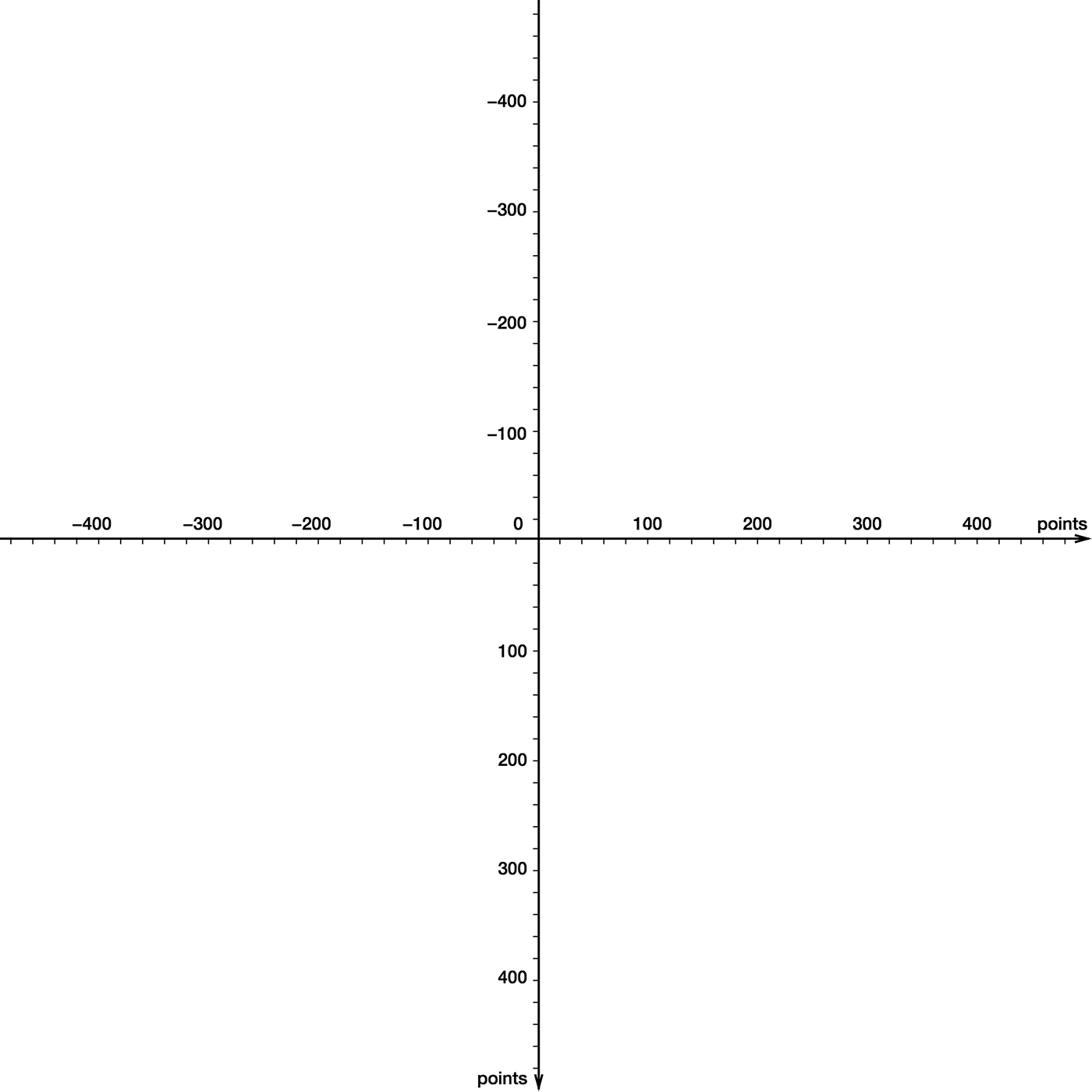
值得注意的是,這個邏輯坐標系並不關心自己「多大」。它在四周無限延伸,沒有邊界。我們往裡放四個不同顏色的子 view:
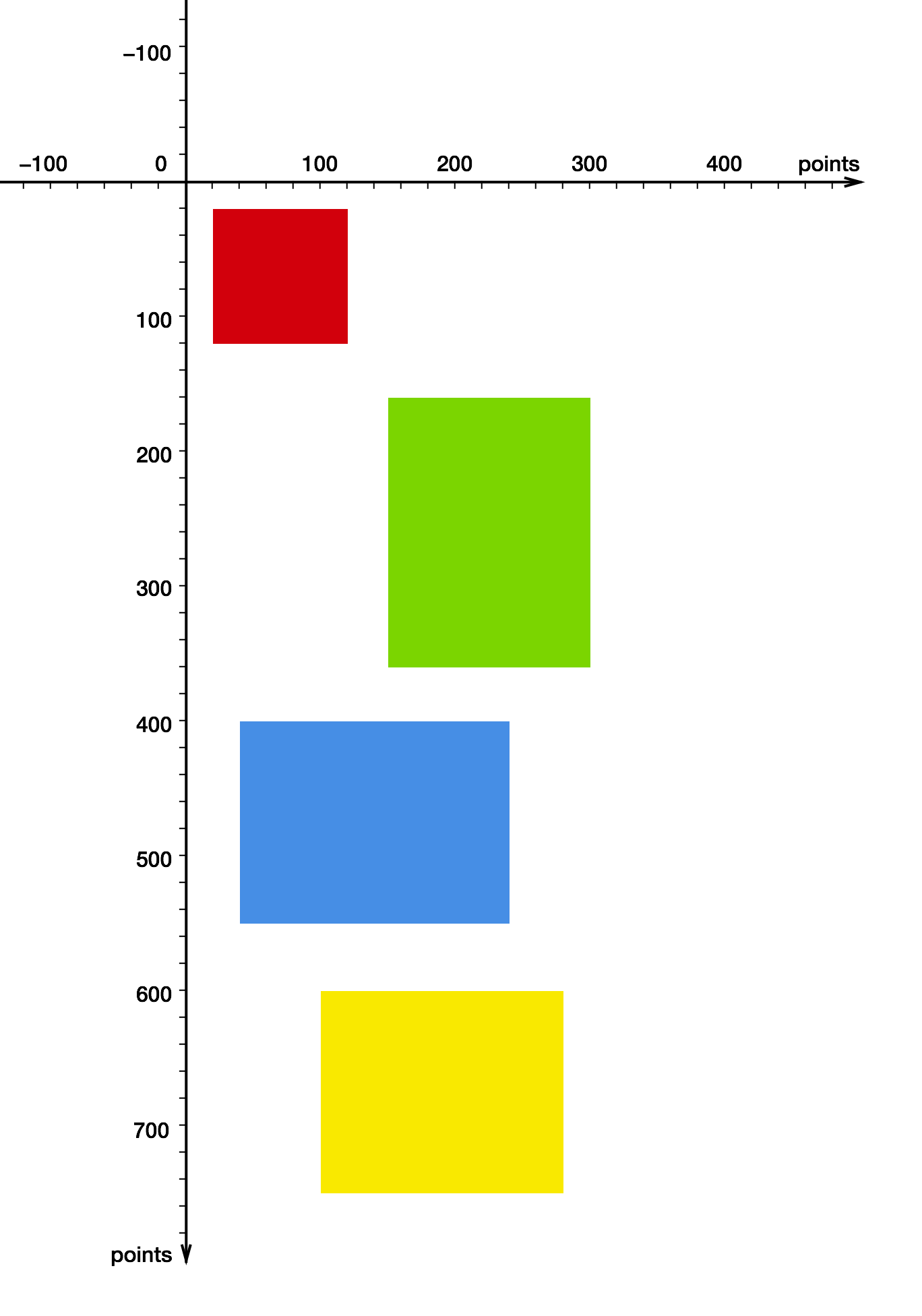
UIView *redView = [[UIView alloc] initWithFrame:CGRectMake(20, 20, 100, 100)];
redView.backgroundColor = [UIColor colorWithRed:0.815 green:0.007 blue:0.105 alpha:1];

UIView *greenView = [[UIView alloc] initWithFrame:CGRectMake(150, 160, 150, 200)];
greenView.backgroundColor = [UIColor colorWithRed:0.494 green:0.827 blue:0.129 alpha:1];

UIView *blueView = [[UIView alloc] initWithFrame:CGRectMake(40, 400, 200, 150)];
blueView.backgroundColor = [UIColor colorWithRed:0.29 green:0.564 blue:0.886 alpha:1];

UIView *yellowView = [[UIView alloc] initWithFrame:CGRectMake(100, 600, 180, 150)];
yellowView.backgroundColor = [UIColor colorWithRed:0.972 green:0.905 blue:0.109 alpha:1];

[mainView addSubview:redView];
[mainView addSubview:greenView];
[mainView addSubview:blueView];
[mainView addSubview:yellowView];
二、bounds:一個觀察窗口
Apple 對 bounds 的描述是:
bounds 矩形描述了該視圖在其自身坐標系中的位置和大小。
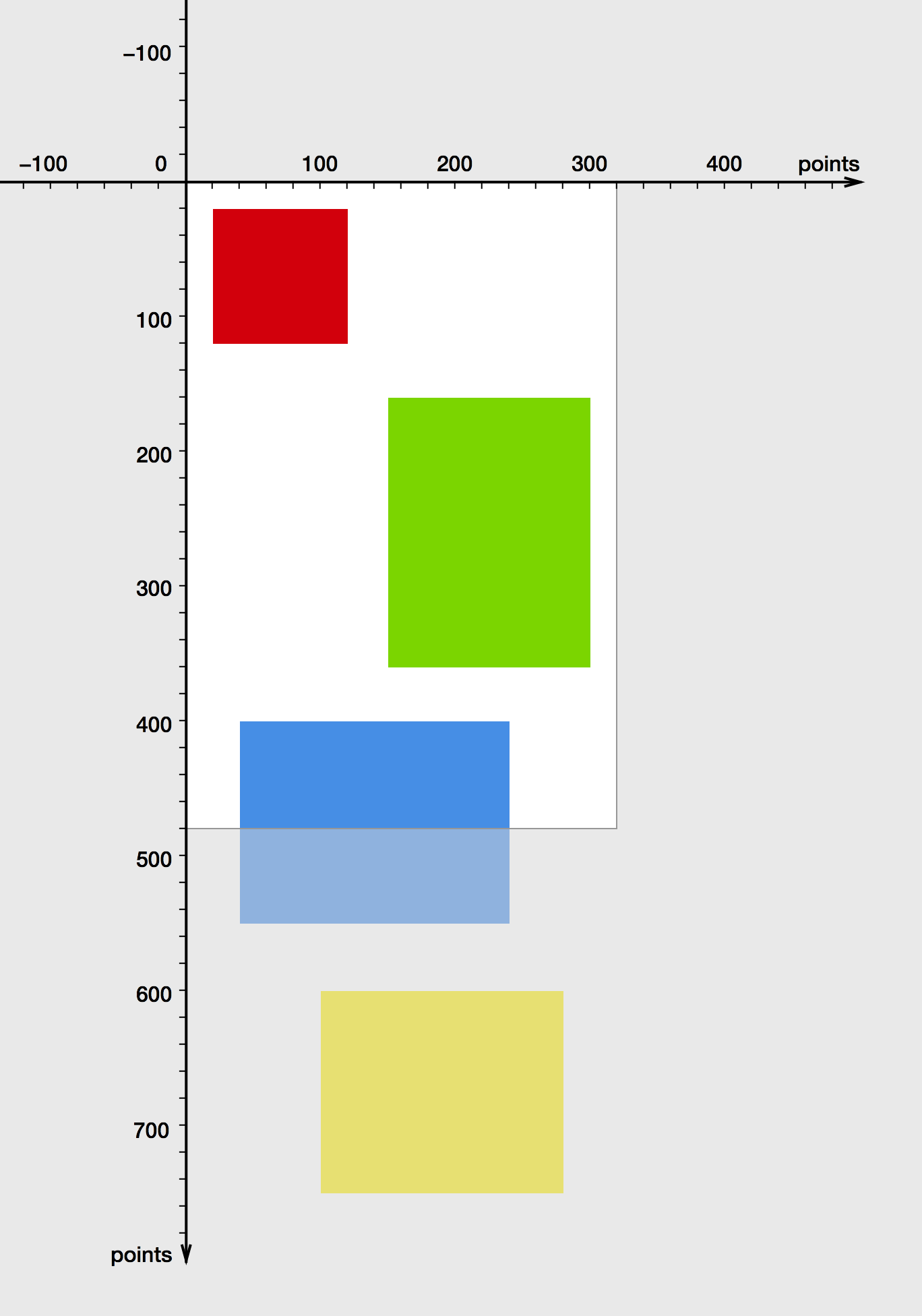
可以把一個 view 想成開在坐標平面上的「一扇窗」,bounds 就是這扇窗的位置與大小。
假設 mainView 寬 320、高 480、原點在 (0, 0),那麼它只能呈現整個坐標平面的一小部分。落在窗口之外的內容並沒有消失,只是被裁剪掉了。
三、frame:相對於父視圖的位置
現在我們試著改一下 bounds 的原點:
CGRect bounds = mainView.bounds;
bounds.origin = CGPointMake(0, 100);
mainView.bounds = bounds;
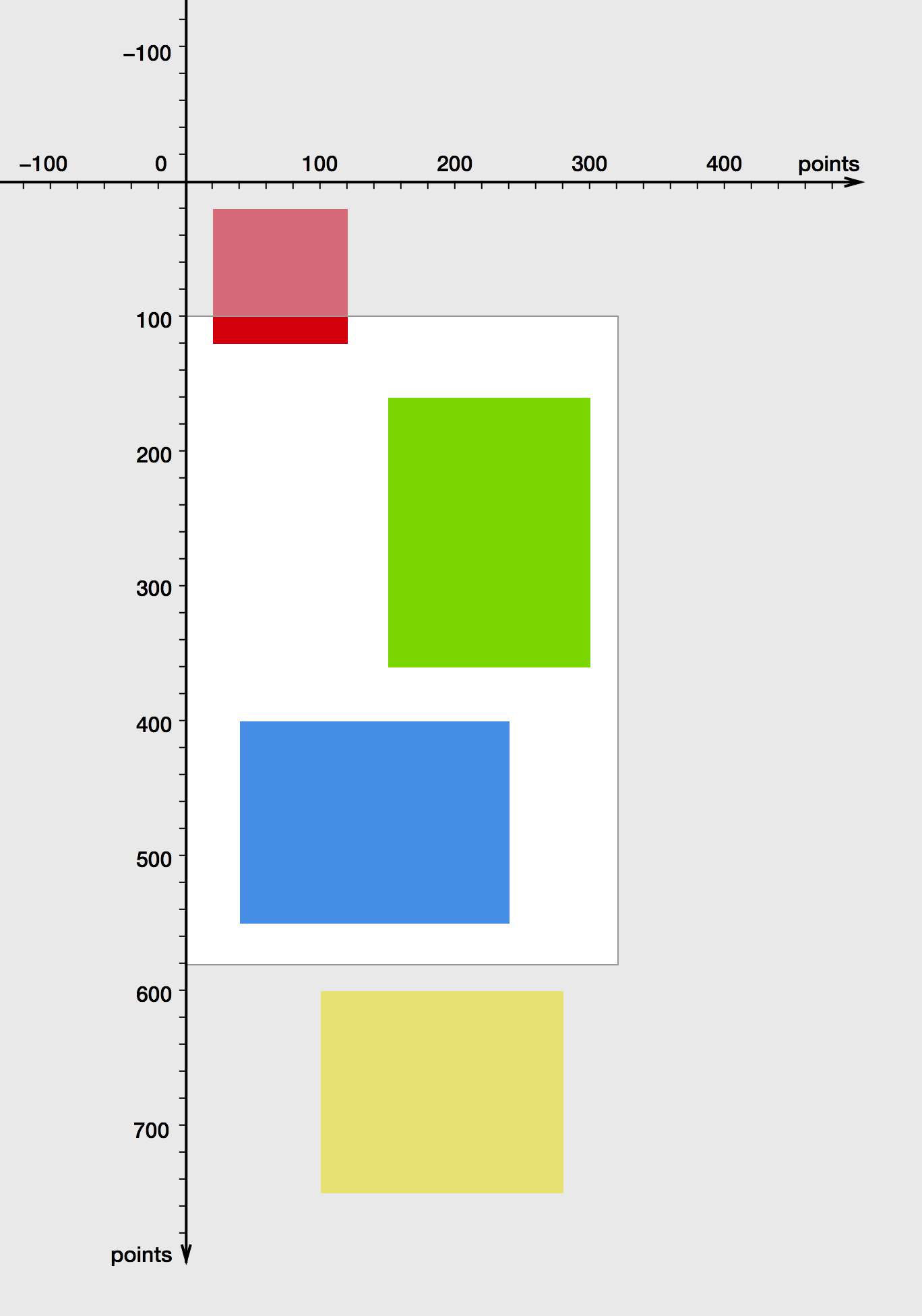
改動 bounds 原點,等價於在平面上「平移這扇窗」。
看起來像是 view 自己往下移動了 100 像素——在它自身的坐標系裡確實如此。但它真正位於屏幕上的位置(準確地說是相對於父視圖的位置)並沒有變,因為那是由 frame 決定的,而 frame 我們根本沒動:
frame 矩形定義了這個 view 在其父視圖坐標系中的位置和大小。
換個比喻:整個坐標平面是一塊可以上下拖動的透明幕布,view 是我們觀察幕布的窗口。改 bounds 就是拖幕布,幕布下方的內容就進入視野了。
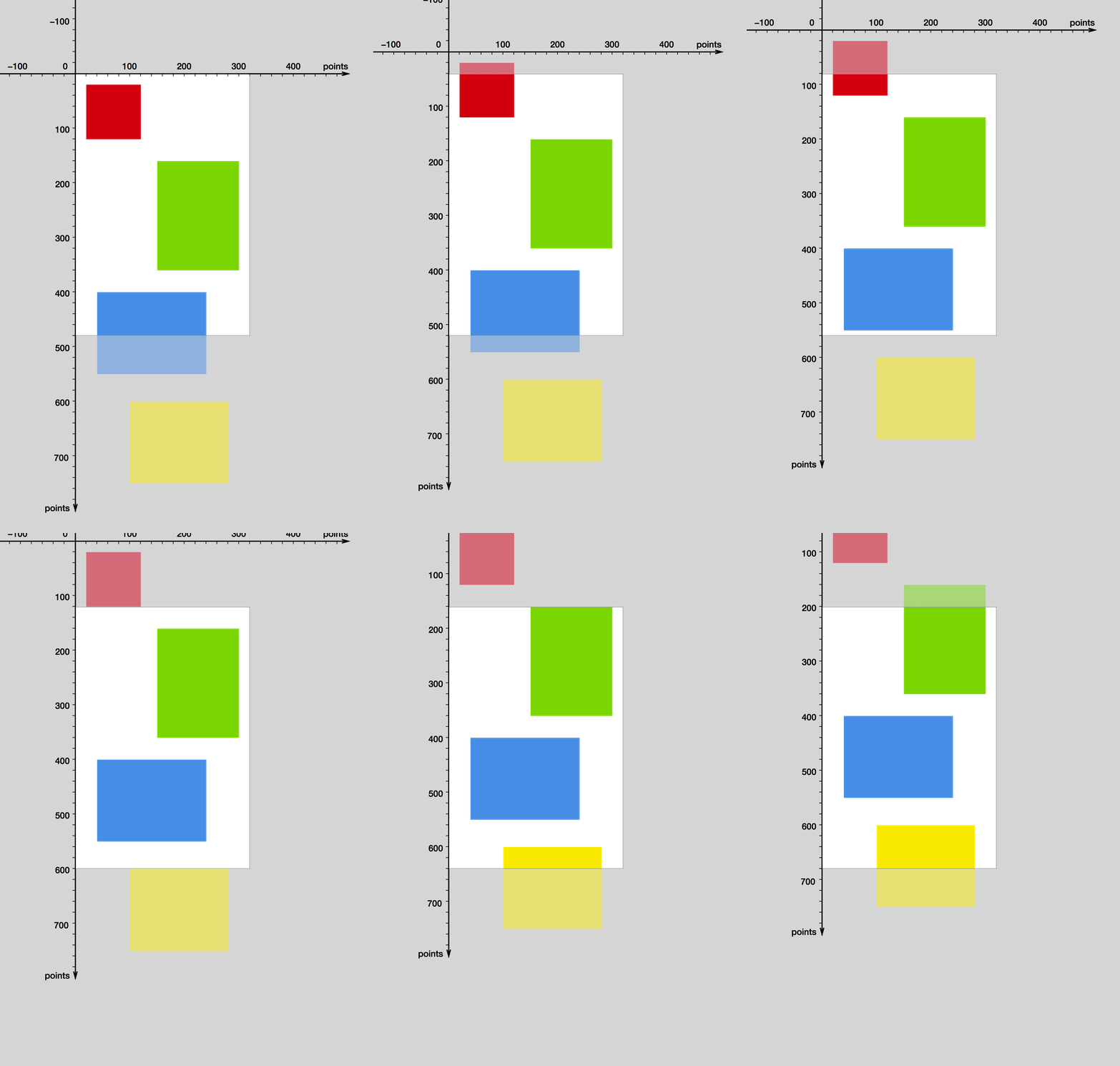
反過來說,改 bounds 原點也等同於把坐標系整體向上拖動。由於 frame 沒變,view 相對於父視圖的位置自然也不變。
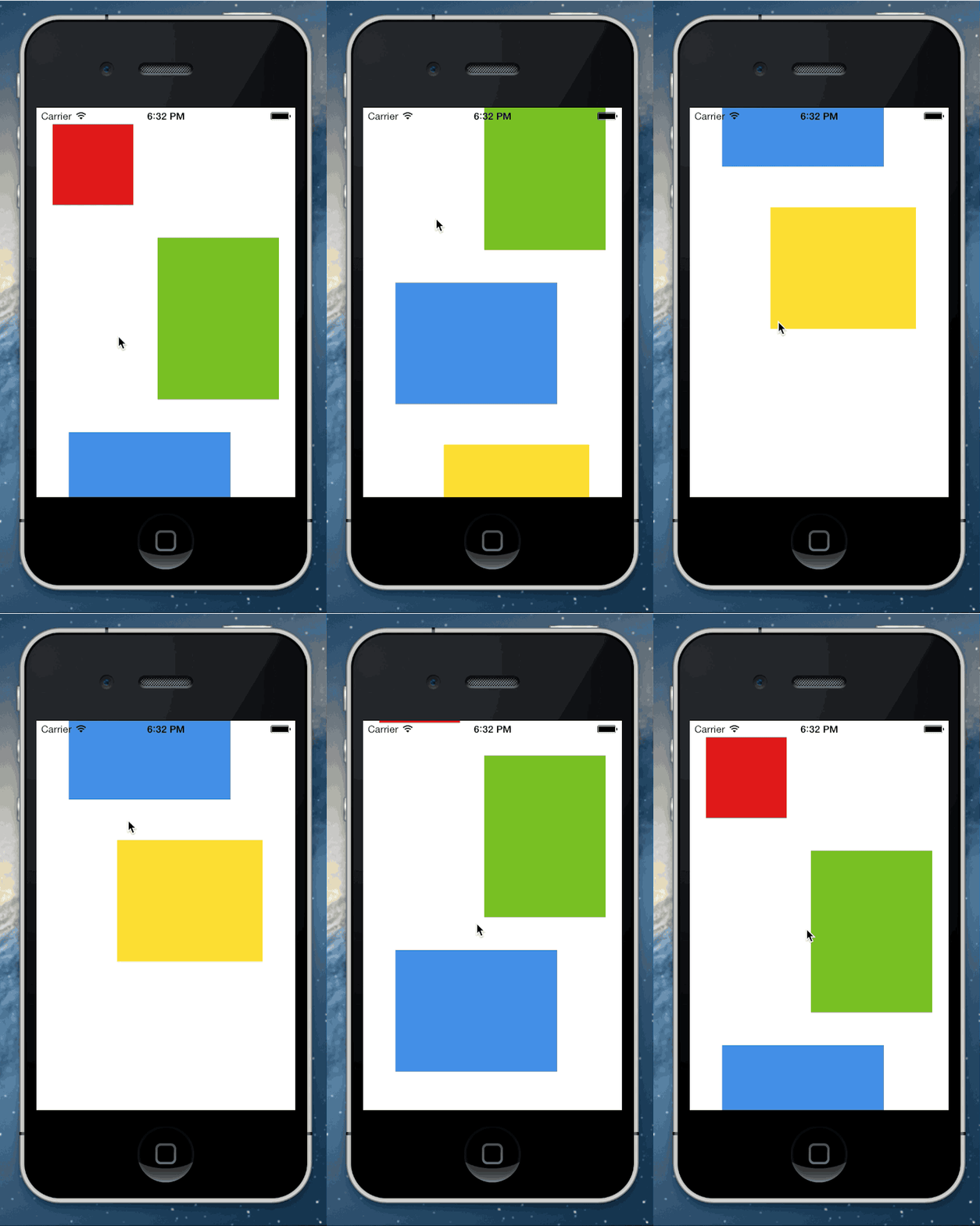
這正是 UIScrollView 滾動時真正發生的事。從用戶視角看,他以為是裡面的子 view 在移動;實際上這些子 view 的 frame 從頭到尾都沒變過,變的只有 scrollView 自己的 bounds.origin。
四、動手打造一個簡易 UIScrollView
知道了這層原理,實現滾動就變得很trivial:不需要動子視圖坐標,只要改自己的 bounds。用一個手勢識別器捕捉拖動,再按位移量去調整 bounds 原點。
// CustomScrollView.h
@import UIKit;

@interface CustomScrollView : UIView

@property (nonatomic) CGSize contentSize;   // 可滾動範圍,需由外部設置

@end
// CustomScrollView.m
#import "CustomScrollView.h"

@implementation CustomScrollView

- (id)initWithFrame:(CGRect)frame
{
    self = [super initWithFrame:frame];
    if (self == nil) {
        return nil;
    }
    UIPanGestureRecognizer *gestureRecognizer =
        [[UIPanGestureRecognizer alloc] initWithTarget:self action:@selector(handlePanGesture:)];
    [self addGestureRecognizer:gestureRecognizer];
    return self;
}

- (void)handlePanGesture:(UIPanGestureRecognizer *)gestureRecognizer
{
    CGPoint translation = [gestureRecognizer translationInView:self];
    CGRect bounds = self.bounds;

    // 平移 bounds,但同時夾住數值,不允許越過 contentSize 所定義的範圍
    CGFloat newBoundsOriginX = bounds.origin.x - translation.x;
    CGFloat minBoundsOriginX = 0.0;
    CGFloat maxBoundsOriginX = self.contentSize.width - bounds.size.width;
    bounds.origin.x = fmax(minBoundsOriginX, fmin(newBoundsOriginX, maxBoundsOriginX));

    CGFloat newBoundsOriginY = bounds.origin.y - translation.y;
    CGFloat minBoundsOriginY = 0.0;
    CGFloat maxBoundsOriginY = self.contentSize.height - bounds.size.height;
    bounds.origin.y = fmax(minBoundsOriginY, fmin(newBoundsOriginY, maxBoundsOriginY));

    self.bounds = bounds;
    [gestureRecognizer setTranslation:CGPointZero inView:self];
}

@end
注意 translation 要取負號:手指往下滑,內容應該往下走,也就是窗口要往坐標系上方移動,bounds.origin.y 因此減小。另外 fmax / fmin 的嵌套夾值,是為了防止把內容拖出邊界——這一步也正是 UIScrollView 裡 bounces 為 NO 時的行為。
和真正的 UIScrollView 一樣,我們的類也有 contentSize,必須由外部賦值來告知可滾動區域大小。
效果:
五、UIScrollView 常用屬性速查
- (void)viewDidLoad
{
    [super viewDidLoad];

    self.scrollView = [[UIScrollView alloc] initWithFrame:CGRectMake(0, 64, 320, 568 - 64)];
    self.scrollView.delegate = self;
    self.scrollView.backgroundColor = [UIColor redColor];
    [self.view addSubview:_scrollView];

    /**
     *  contentOffset              目前滾動到的位置
     *  contentSize                可滾動範圍大小(最核心的屬性)
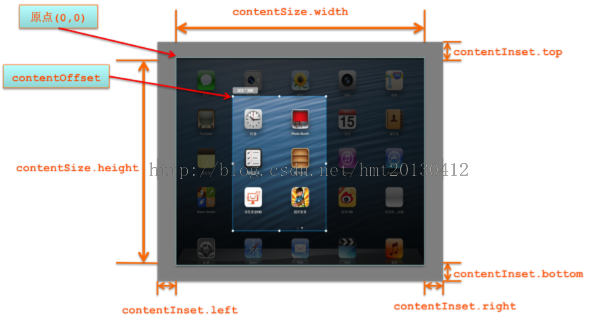
     *  contentInset               內容相對於 scrollView 的內邊距
     *  directionalLockEnabled     是否鎖定單一方向滾動
     *  bounces                    撞到邊界是否反彈
     *  alwaysBounceVertical       垂直方向是否總是可以反彈(即使內容不夠長)
     *  alwaysBounceHorizontal     水平方向是否總是可以反彈
     *  pagingEnabled              是否整頁翻動
     *  scrollEnabled              是否允許滾動
     *  showsHorizontalScrollIndicator  是否顯示水平滾動條
     *  showsVerticalScrollIndicator    是否顯示垂直滾動條
     *  scrollIndicatorInsets      滾動條位置
     *  indicatorStyle             滾動條樣式
     *  decelerationRate           減速衰減速率
     *  tracking                   是否正在被手指跟蹤
     *  dragging                   是否正在被拖拽
     *  decelerating               是否正在減速
     *  delaysContentTouches      是否延後分發 touch 事件
     *  canCancelContentTouches    是否允許取消 touch
     *  minimumZoomScale           縮放最小比例
     *  maximumZoomScale           縮放最大比例
     *  zoomScale                  當前縮放比例
     *  bouncesZoom                縮放時是否允許反彈
     *  zooming                    尺寸是否正在變化
     *  zoomBouncing               是否正在進行縮放反彈
     *  scrollsToTop               點擊狀態欄是否滾動到頂部
     */

    // 讓滾動條閃一下,起到「提示用戶這裡可以滑」的作用
    [self.scrollView flashScrollIndicators];

    // 帶動畫地偏移
    [self.scrollView setContentOffset:CGPointMake(320, 0) animated:YES];
}
六、UIScrollViewDelegate 常用回調
// 只要滾動了就會觸發,調用頻率最高
- (void)scrollViewDidScroll:(UIScrollView *)scrollView;

// 開始拖拽。一次有效滑動只會觸發一次
- (void)scrollViewWillBeginDragging:(UIScrollView *)scrollView;

// 手指離開屏幕的瞬間觸發。decelerate 表示離手後是否還會繼續往前滑一段
- (void)scrollViewDidEndDragging:(UIScrollView *)scrollView willDecelerate:(BOOL)decelerate;

// 即將進入減速階段
- (void)scrollViewWillBeginDecelerating:(UIScrollView *)scrollView;

// 減速結束、滾動即將停止
- (void)scrollViewDidEndDecelerating:(UIScrollView *)scrollView;

// 由代碼(如 setContentOffset:animated:YES)觸發的滾動動畫結束時調用;
// 若沒有動畫則不會調用
- (void)scrollViewDidEndScrollingAnimation:(UIScrollView *)scrollView;

// 指定需要縮放的子視圖,返回值必須是 scrollView 的 subview
- (UIView *)viewForZoomingInScrollView:(UIScrollView *)scrollView;

// 即將開始縮放
- (void)scrollViewWillBeginZooming:(UIScrollView *)scrollView withView:(UIView *)view;

// 縮放結束,且比例已回到 min / max 區間內
- (void)scrollViewDidEndZooming:(UIScrollView *)scrollView withView:(UIView *)view atScale:(CGFloat)scale;

// 返回 NO 可關閉「點狀態欄自動滾到頂部」的默認行為
- (BOOL)scrollViewShouldScrollToTop:(UIScrollView *)scrollView;

// 已經滾動到頂部
- (void)scrollViewDidScrollToTop:(UIScrollView *)scrollView;
七、把知識串起來
回頭看那些屬性,幾乎每一個都能對應到「操縱那扇觀察窗」:contentSize 決定幕布多大,contentOffset 就是當前 bounds.origin 的便捷讀寫口,bounces 決定撞邊時要不要放開夾值,pagingEnabled 則是滾動停止時自動對齊到 page 整數倍。理解了 bounds 與 frame 的分工,UIScrollView 就不再是黑盒,而 UITableView、UICollectionView 這些以它為父類的控件,本質上也都在做同一件事。
- 上一篇文章: iOS 實作:點擊文字按鈕後原地變為轉圈加載動畫
- 下一篇文章: Objective-C 手寫無限循環輪播器(支持橫向與縱向)