
iOS UIActionSheet 操作表單:屬性、方法與代理回呼整理
編輯:iOS 開發綜合
操作表單(Action Sheet)就是從螢幕底部滑出的那條選項列,常用來提供「拍攝/從相簿選取」這類二選一以上的操作。
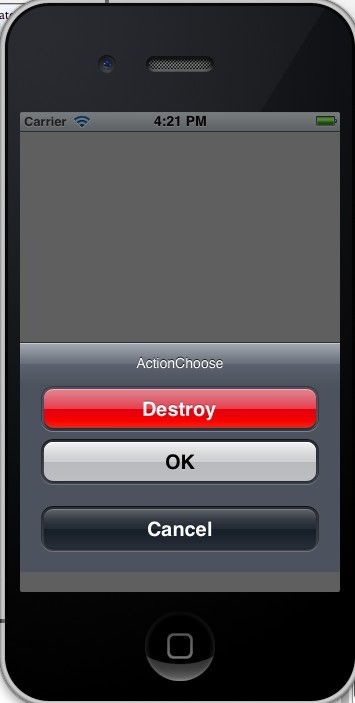
基本建立與顯示
UIActionSheet *mySheet = [[UIActionSheet alloc] initWithTitle:@"ActionChoose"
                                                    delegate:self
                                           cancelButtonTitle:@"Cancel"
                                      destructiveButtonTitle:@"Destroy"
                                           otherButtonTitles:@"OK", nil];

[mySheet showInView:self.view];
按下按鈕後的行為在代理方法中處理,記得讓該類別遵循 UIActionSheetDelegate。
- (void)actionSheetCancel:(UIActionSheet *)actionSheet {
    // 使用者按下取消
}

- (void)actionSheet:(UIActionSheet *)actionSheet clickedButtonAtIndex:(NSInteger)buttonIndex {
    // 按下某個按鈕時(表單尚未收合)
}

- (void)actionSheet:(UIActionSheet *)actionSheet willDismissWithButtonIndex:(NSInteger)buttonIndex {
    // 表單即將收合
}

- (void)actionSheet:(UIActionSheet *)actionSheet didDismissWithButtonIndex:(NSInteger)buttonIndex {
    // 表單已收合,動畫結束後
}
destructiveButtonTitle 對應的是「破壞性操作」按鈕,會以紅色高亮提醒使用者,例如永久刪除一則訊息。指定之後可以再透過 destructiveButtonIndex 對齊正確的索引:
mySheet.destructiveButtonIndex = 1;
外觀風格共有三種:
UIActionSheetStyleDefault          // 預設:灰底白字
UIActionSheetStyleBlackTranslucent // 半透明黑底白字
UIActionSheetStyleBlackOpaque      // 不透明黑底白字
mySheet.actionSheetStyle = UIActionSheetStyleBlackOpaque;
常用屬性與方法
顯示方式會依所在容器而有所不同:
[mySheet showInView:self];            // 在指定視圖內顯示
[mySheet showFromToolBar:toolbar];    // 對齊工具列
[mySheet showFromTabBar:tabbar];      // 對齊標籤列

// 其他彈出(呈現樣式會隨風格而異)
- (void)showFromToolbar:(UIToolbar *)view;
- (void)showFromTabBar:(UITabBar *)view;
- (void)showFromBarButtonItem:(UIBarButtonItem *)item animated:(BOOL)animated;
- (void)showFromRect:(CGRect)rect inView:(UIView *)view animated:(BOOL)animated;
- (void)showInView:(UIView *)view;
以程式碼主動收合表單:
- (void)dismissWithClickedButtonIndex:(NSInteger)buttonIndex animated:(BOOL)animated;

[mySheet dismissWithClickedButtonIndex:1 animated:YES];
標題、風格與按鈕相關:
@property (nonatomic, copy) NSString *title;                       // 標題
@property (nonatomic) UIActionSheetStyle actionSheetStyle;         // 風格

- (NSInteger)addButtonWithTitle:(NSString *)title;                 // 動態加按鈕,回傳索引
- (NSString *)buttonTitleAtIndex:(NSInteger)buttonIndex;           // 取得按鈕標題
@property (nonatomic, readonly) NSInteger numberOfButtons;         // 按鈕數量
@property (nonatomic) NSInteger cancelButtonIndex;                 // 取消按鈕索引
@property (nonatomic) NSInteger destructiveButtonIndex;            // 破壞性按鈕索引
@property (nonatomic, readonly, getter=isVisible) BOOL visible;    // 目前是否可見
代理方法一覽
- (void)willPresentActionSheet:(UIActionSheet *)actionSheet;   // 即將彈出
- (void)didPresentActionSheet:(UIActionSheet *)actionSheet;    // 已經彈出

- (void)actionSheet:(UIActionSheet *)actionSheet
clickedButtonAtIndex:(NSInteger)buttonIndex;                  // 按下按鈕

- (void)actionSheet:(UIActionSheet *)actionSheet
willDismissWithButtonIndex:(NSInteger)buttonIndex;            // 即將收合
- (void)actionSheet:(UIActionSheet *)actionSheet
 didDismissWithButtonIndex:(NSInteger)buttonIndex;            // 已經收合

- (void)actionSheetCancel:(UIActionSheet *)actionSheet;        // 按下取消
需要留意的是,UIActionSheet 已被蘋果標記為不建議使用,新專案若要在 iPhone 上呈現這類底部選單,請改用 UIAlertController 的 .actionSheet 樣式;在 iPad 上呈現時則必須設定 popover 的錨點來源,否則會出現版面配置警告。