
iOS 圖片加水印怎麼做:一個類方法搞定文字浮水印
編輯:iOS 開發綜合
直接在圖片上疊一段文字,是相當常見的需求,例如加上自己的名字或品牌標語。做法不複雜,關鍵是先把繪圖上下文開起來,畫完再取回一張新圖。
為 UIImage 寫一個類方法
新建一個 UIImage 的分類,在標頭檔宣告:
+ (UIImage *)imageWithimage:(UIImage *)image content:(NSString *)content frame:(CGRect)frame;
實作內容如下:
 + (UIImage *)imageWithimage:(UIImage *)image content:(NSString *)content frame:(CGRect)frame {
     // 以原圖尺寸開啟繪圖上下文
     UIGraphicsBeginImageContextWithOptions(image.size, NO, 0);
     // 先把原圖畫上去
     [image drawAtPoint:CGPointZero];
     // 再疊上文字
     NSString *str = content;
     NSDictionary *dictionary = @{
         NSForegroundColorAttributeName: [UIColor blackColor],
         NSFontAttributeName: [UIFont systemFontOfSize:20]
     };
     [str drawInRect:frame withAttributes:dictionary];
     // 從目前上下文取出合成後的圖片
     UIImage *imageNew = UIGraphicsGetImageFromCurrentImageContext();
     UIGraphicsEndImageContext();
     return imageNew;
 }
要留意的是,drawInRect:withAttributes: 是 iOS 7.0 之後才有的 API。如果你的專案還需要向下相容,記得先做版本判斷:
 double device = [[UIDevice currentDevice].systemVersion doubleValue];
 if (device >= 7.0f) {
     // 走新的繪製方式
 }
在頁面中使用
引入標頭檔,建立 imageView 並把處理好的圖片放上去即可:
 // 傳入原圖、要疊上去的文字,以及文字顯示的範圍
 UIImage *image = [UIImage imageWithimage:[UIImage imageNamed:@"3"]
                                  content:@"伊利丹"
                                    frame:CGRectMake(20, 500, 100, 100)];
 UIImageView *imageView = [[UIImageView alloc] initWithFrame:CGRectMake(0, 0, kScreenWidth, kScreenHeight)];
 imageView.image = image;
 [self.view addSubview:imageView];
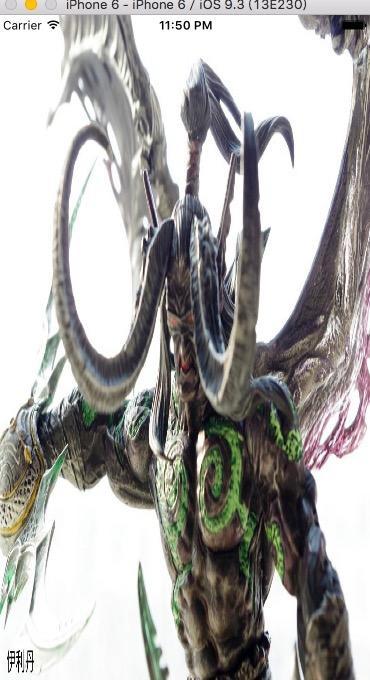
成果如上圖。想調整文字大小或顏色,直接改方法裡的字典就好;如果希望更彈性,也可以把屬性字典拉出來當成參數傳入。
結語
這就是 iOS 為圖片加上文字浮水印的完整流程。核心只有「開上下文、畫原圖、畫文字、取新圖」四步,掌握之後要延伸成多行文字、加上半透明底色或貼上小圖示,都只是同一套思路的變化而已。