
iOS 相簿多選圖片與刪除功能的完整實作
編輯:iOS 開發綜合
先看成果
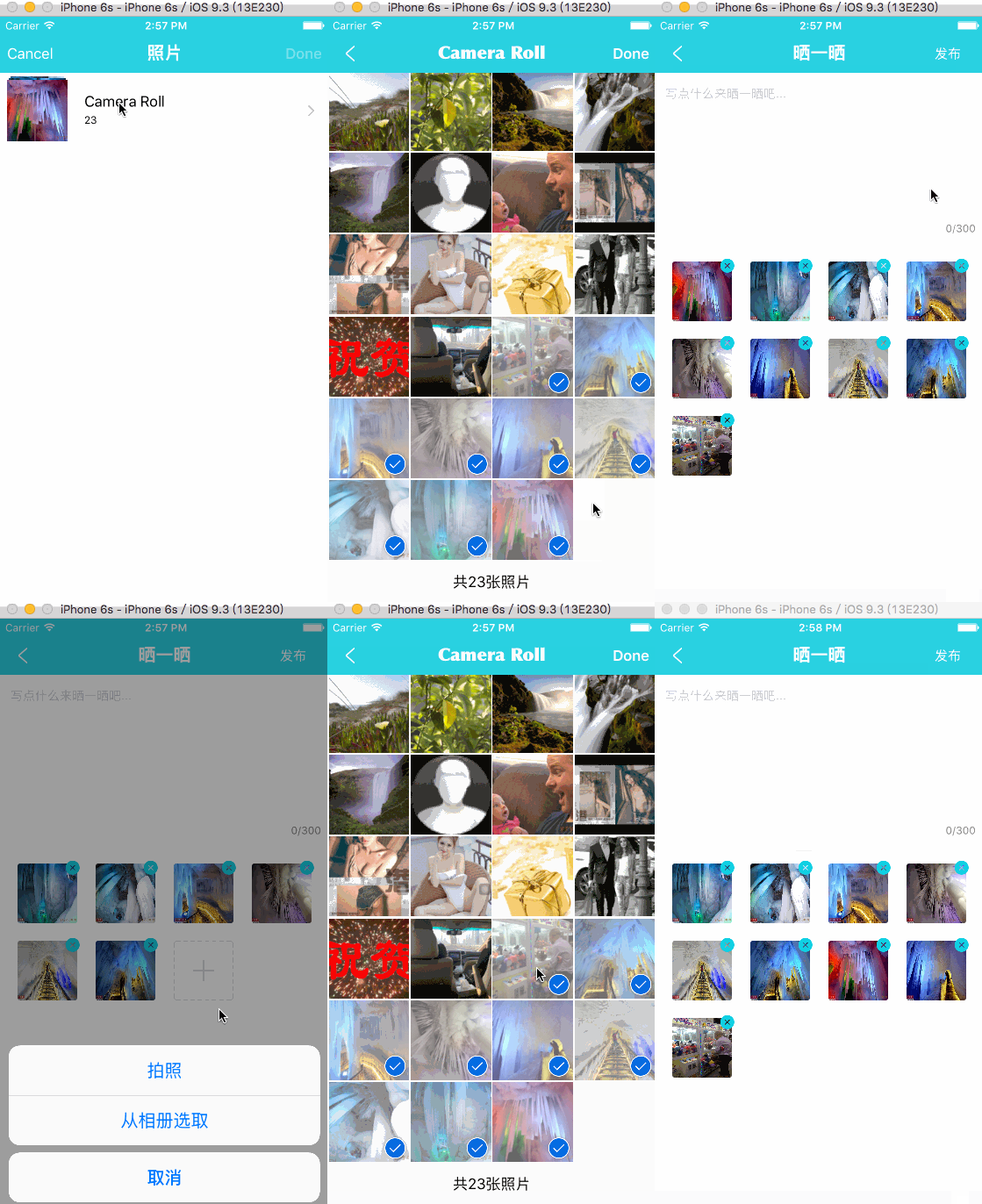
需求與難點
這次要做的不是單純「選幾張圖」,而是一個可持續編輯的選圖流程。第三方元件選用 QBImagePickerController,但真正需要花心思的地方在元件之外:
- 拍照與相簿選圖兩條來源如何統一收斂到同一份資料?
- 刪除照片後再新增,相簿的已選狀態如何保持一致?
- 所有變更其實都只是在操作同一個 model 陣列,介面只是它的投影。
- 上傳前必須做圖片壓縮,避免流量與記憶體爆掉。
主控制器:RRZShowEditViewController
#import "RRZShowEditViewController.h"
#import "RRZSendShowTextCell.h"
#import "RRZSendShowImageCell.h"
#import "QBImagePickerController.h"
#import "ShowEditItem.h"

static NSString *sendShowTextCellID  = @"SendShowTextCellID";
static NSString *sendShowImageCellID = @"SendShowImageCellID";

@interface RRZShowEditViewController () <
    UITableViewDataSource, UITableViewDelegate,
    UINavigationControllerDelegate, UIImagePickerControllerDelegate,
    UIScrollViewDelegate, UIActionSheetDelegate, QBImagePickerControllerDelegate>

@property (strong, nonatomic) UITableView *myTableView;
@property (strong, nonatomic) ShowEditItem *showEditItem;   // 資料模型
@property (strong, nonatomic) NSString *valueStr;
@property (weak, nonatomic)   NumberofwordsTextView *textView;
@property (strong, nonatomic) QBImagePickerController *imagePickerController;
@end

@implementation RRZShowEditViewController

- (ShowEditItem *)showEditItem {
    if (!_showEditItem) {
        _showEditItem = [[ShowEditItem alloc] init];
        _showEditItem.selectedImages   = @[].mutableCopy;
        _showEditItem.selectedAssetURLs = @[].mutableCopy;
    }
    return _showEditItem;
}

- (QBImagePickerController *)imagePickerController {
    if (!_imagePickerController) {
        _imagePickerController = [[QBImagePickerController alloc] init];
        _imagePickerController.filterType = QBImagePickerControllerFilterTypePhotos;
        _imagePickerController.delegate = self;
        _imagePickerController.allowsMultipleSelection = YES;
        _imagePickerController.maximumNumberOfSelection = 9;
    }
    // 每次打開都同步一次已選狀態,這是多選體驗的關鍵
    [_imagePickerController.selectedAssetURLs removeAllObjects];
    [_imagePickerController.selectedAssetURLs addObjectsFromArray:self.showEditItem.selectedAssetURLs];
    return _imagePickerController;
}

- (void)viewDidLoad {
    [super viewDidLoad];
    self.title = @"曬一曬";
    [self setupTabelView];
    [self setupNavItem];
}

- (void)setupNavItem {
    UIBarButtonItem *rightItem = [UIBarButtonItem itemWithTitle:@"發布" highTitle:nil
        target:self action:@selector(sendClick)
        norColor:NavItemColor highColor:RGB_COLOR(200, 200, 200)];
    self.navigationItem.rightBarButtonItem = rightItem;
}

#pragma mark - 圖片壓縮
- (NSData *)resetSizeOfImageData:(UIImage *)source_image maxSize:(NSInteger)maxSize {
    // 1. 先按比例縮小解析度,超過 1024 的邊才處理
    CGSize newSize = CGSizeMake(source_image.size.width, source_image.size.height);
    CGFloat tempHeight = newSize.height / 1024;
    CGFloat tempWidth  = newSize.width  / 1024;
    if (tempWidth > 1.0 && tempWidth > tempHeight) {
        newSize = CGSizeMake(source_image.size.width / tempWidth,
                             source_image.size.height / tempWidth);
    } else if (tempHeight > 1.0 && tempWidth < tempHeight) {
        newSize = CGSizeMake(source_image.size.width / tempHeight,
                             source_image.size.height / tempHeight);
    }
    UIGraphicsBeginImageContext(newSize);
    [source_image drawInRect:CGRectMake(0, 0, newSize.width, newSize.height)];
    UIImage *newImage = UIGraphicsGetImageFromCurrentImageContext();
    UIGraphicsEndImageContext();

    // 2. 再控制檔案大小
    NSData *imageData;
    if (UIImagePNGRepresentation(newImage)) {
        imageData = UIImagePNGRepresentation(newImage);
    } else {
        imageData = UIImageJPEGRepresentation(newImage, 0.5);
    }
    NSUInteger sizeOriginKB = [imageData length] / 1024;
    if (sizeOriginKB > maxSize) {
        return UIImageJPEGRepresentation(newImage, 0.50);
    }
    return imageData;
}

#pragma mark - 發布
- (void)sendClick {
    [self.view endEditing:YES];
    [HUDController showProgressLabel:@""];
    NSString *textStr = [self.textView.text
        stringByTrimmingCharactersInSet:[NSCharacterSet whitespaceCharacterSet]];
    if (textStr.length > 0 || self.showEditItem.selectedImages.count > 0) {
        NSMutableArray *tempImages = [[NSMutableArray alloc] init];
        for (int i = 0; i < self.showEditItem.selectedImages.count; i++) {
            UIImage *tempImage = self.showEditItem.selectedImages[i];
            NSData *imgData = [self resetSizeOfImageData:tempImage maxSize:150];
            tempImage = [UIImage imageWithData:imgData];
            [tempImages addObject:tempImage];
        }
        [[RRZNetworkController sharedController]
            sendShowInfoByRemark:self.textView.text myfiles:tempImages
            success:^(NSDictionary *data) {
                if ([data[@"code"] isEqualToString:@"success"]) {
                    [HUDController hideHUDWithText:@"發表成功"];
                    if (_sendSuccessBlock) _sendSuccessBlock();
                    [self.navigationController popViewControllerAnimated:YES];
                } else {
                    [HUDController hideHUD];
                    NSString *message = data[@"message"];
                    if (message.length > 30) message = @"上傳失敗";
                    UIAlertView *alertView = [[UIAlertView alloc] initWithTitle:nil
                        message:message delegate:nil
                        cancelButtonTitle:@"確認" otherButtonTitles:nil, nil];
                    [alertView show];
                }
            }
            failure:^(NSDictionary *error) {
                [HUDController hideHUDWithText:NetworkError];
            }];
    } else {
        [HUDController hideHUDWithText:@"文字或圖片不能為空"];
    }
}

#pragma mark - TableView
- (void)setupTabelView {
    _myTableView = ({
        UITableView *tableView = [[UITableView alloc] initWithFrame:self.view.bounds
                                                           style:UITableViewStylePlain];
        tableView.backgroundColor = [UIColor clearColor];
        tableView.dataSource = self;
        tableView.delegate = self;
        tableView.separatorStyle = UITableViewCellSeparatorStyleNone;
        [tableView registerClass:[RRZSendShowTextCell class]
          forCellReuseIdentifier:sendShowTextCellID];
        [tableView registerClass:[RRZSendShowImageCell class]
          forCellReuseIdentifier:sendShowImageCellID];
        [self.view addSubview:tableView];
        [tableView mas_makeConstraints:^(MASConstraintMaker *make) {
            make.edges.equalTo(self.view);
        }];
        tableView;
    });
}

- (NSInteger)tableView:(UITableView *)tableView numberOfRowsInSection:(NSInteger)section {
    return 2;
}

- (UITableViewCell *)tableView:(UITableView *)tableView cellForRowAtIndexPath:(NSIndexPath *)indexPath {
    if (indexPath.row == 0) {
        RRZSendShowTextCell *cell = [tableView dequeueReusableCellWithIdentifier:sendShowTextCellID];
        self.textView = cell.numberTextView;
        return cell;
    }
    RRZSendShowImageCell *cell = [tableView dequeueReusableCellWithIdentifier:sendShowImageCellID];
    cell.item = self.showEditItem;
    __weak typeof(self) weakSelf = self;
    cell.addPicturesBlock = ^() {
        [weakSelf showActionForPhoto];
    };
    cell.deleteImageBlock = ^(ShowEditItem *item) {
        weakSelf.showEditItem = item;
        [weakSelf.myTableView reloadData];
    };
    return cell;
}

- (CGFloat)tableView:(UITableView *)tableView heightForRowAtIndexPath:(NSIndexPath *)indexPath {
    return (indexPath.row == 0) ? 200 : 300;
}

#pragma mark - 來源選擇
- (void)showActionForPhoto {
    UIActionSheet *actionSheet = [[UIActionSheet alloc] initWithTitle:nil delegate:self
        cancelButtonTitle:@"取消" destructiveButtonTitle:nil
        otherButtonTitles:@"拍照", @"從相冊選取", nil];
    [actionSheet showInView:self.view];
}

- (void)actionSheet:(UIActionSheet *)actionSheet clickedButtonAtIndex:(NSInteger)buttonIndex {
    if (buttonIndex == 0) {
        if (![UIImagePickerController isSourceTypeAvailable:UIImagePickerControllerSourceTypeCamera]) {
            UIAlertView *alert = [[UIAlertView alloc] initWithTitle:nil
                message:@"該設備不支持拍照" delegate:self
                cancelButtonTitle:@"確定" otherButtonTitles:NULL];
            [alert show];
        } else {
            UIImagePickerController *picker = [[UIImagePickerController alloc] init];
            picker.delegate = self;
            picker.allowsEditing = NO;
            picker.sourceType = UIImagePickerControllerSourceTypeCamera;
            [self presentViewController:picker animated:YES completion:nil];
        }
    } else if (buttonIndex == 1) {
        if (![UIImagePickerController isSourceTypeAvailable:UIImagePickerControllerSourceTypePhotoLibrary]) {
            UIAlertView *alert = [[UIAlertView alloc] initWithTitle:nil
                message:@"該設備不支持從相冊選取文件" delegate:self
                cancelButtonTitle:@"確定" otherButtonTitles:NULL];
            [alert show];
        } else {
            UINavigationController *nav = [[BaseNavigationController alloc]
                initWithRootViewController:self.imagePickerController];
            [self presentViewController:nav animated:YES completion:NULL];
        }
    }
}

#pragma mark - 拍照回調
- (void)imagePickerController:(UIImagePickerController *)picker
didFinishPickingMediaWithInfo:(NSDictionary *)info {
    UIImage *pickerImage = [info objectForKey:UIImagePickerControllerOriginalImage];
    [self.showEditItem.selectedImages addObject:pickerImage];
    ALAssetsLibrary *assetsLibrary = [[ALAssetsLibrary alloc] init];
    [assetsLibrary writeImageToSavedPhotosAlbum:[pickerImage CGImage]
        orientation:(ALAssetOrientation)pickerImage.imageOrientation
        completionBlock:^(NSURL *assetURL, NSError *error) {
            [self.showEditItem.selectedAssetURLs addObject:assetURL];
            [self.myTableView reloadRowsAtIndexPaths:
                @[[NSIndexPath indexPathForRow:1 inSection:0]]
                withRowAnimation:UITableViewRowAnimationFade];
        }];
    [picker dismissViewControllerAnimated:YES completion:^{}];
}

- (void)imagePickerControllerDidCancel:(UIImagePickerController *)picker {
    [picker dismissViewControllerAnimated:YES completion:nil];
}

#pragma mark - 相簿回調
- (void)qb_imagePickerController:(QBImagePickerController *)imagePickerController
                   didSelectAssets:(NSArray *)assets {
    [self.showEditItem.selectedImages removeAllObjects];
    NSMutableArray *selectedAssetURLs = [NSMutableArray new];
    [imagePickerController.selectedAssetURLs enumerateObjectsUsingBlock:^(id obj, NSUInteger idx, BOOL *stop) {
        [selectedAssetURLs addObject:obj];
    }];
    self.showEditItem.selectedAssetURLs = selectedAssetURLs;
    for (int i = 0; i < assets.count; i++) {
        ALAsset *asset = assets[i];
        UIImage *tempImg = [UIImage imageWithCGImage:asset.defaultRepresentation.fullScreenImage];
        [self.showEditItem.selectedImages addObject:tempImg];
    }
    @weakify(self);
    dispatch_async(dispatch_get_global_queue(DISPATCH_QUEUE_PRIORITY_DEFAULT, 0), ^{
        self.showEditItem.selectedAssetURLs = selectedAssetURLs;
        dispatch_async(dispatch_get_main_queue(), ^{
            @strongify(self);
            [self.myTableView reloadRowsAtIndexPaths:
                @[[NSIndexPath indexPathForRow:1 inSection:0]]
                withRowAnimation:UITableViewRowAnimationFade];
        });
    });
    [self dismissViewControllerAnimated:YES completion:nil];
}

- (void)qb_imagePickerControllerDidCancel:(QBImagePickerController *)imagePickerController {
    [self dismissViewControllerAnimated:YES completion:nil];
}

// 捲動時收起鍵盤
- (void)scrollViewWillBeginDragging:(UIScrollView *)scrollView {
    if (scrollView == self.myTableView) [self.view endEditing:YES];
}

- (void)dealloc {
    _myTableView.delegate = nil;
    _myTableView.dataSource = nil;
}
@end
文字輸入 Cell
// RRZSendShowTextCell.h
#import <UIKit/UIKit.h>
#import "NumberofwordsTextView.h"

@interface RRZSendShowTextCell : UITableViewCell
@property (weak, nonatomic) NumberofwordsTextView *numberTextView;
@end
// RRZSendShowTextCell.m
#define kTweetContentCell_ContentFont [UIFont systemFontOfSize:16]
#import "RRZSendShowTextCell.h"

@implementation RRZSendShowTextCell

- (id)initWithStyle:(UITableViewCellStyle)style reuseIdentifier:(NSString *)reuseIdentifier {
    self = [super initWithStyle:style reuseIdentifier:reuseIdentifier];
    if (self) {
        NumberofwordsTextView *numberTextView = [[NumberofwordsTextView alloc] init];
        numberTextView.frame = CGRectMake(7, 7, SCREEN_WIDTH - 7 * 2, 180);
        numberTextView.wordsMaxNumer = 300;
        numberTextView.placeHolder = @"寫點什麼來曬一曬吧...";
        numberTextView.textFont = [UIFont systemFontOfSize:14];
        [self addSubview:numberTextView];
        self.numberTextView = numberTextView;
    }
    return self;
}
@end
圖片 Cell:多選與刪除的核心
這個 cell 內部放一個 UICollectionView,item 數量等於已選圖片數再加一格「新增」按鈕(上限 9 張)。
// RRZSendShowImageCell.h
#import <UIKit/UIKit.h>
#import "ShowEditItem.h"

@interface RRZSendShowImageCell : UITableViewCell
@property (copy, nonatomic) void (^addPicturesBlock)();
@property (copy, nonatomic) void (^deleteImageBlock)(ShowEditItem *toDelete);
@property (nonatomic, strong) ShowEditItem *item;
@end
// RRZSendShowImageCell.m
#define kShowImageCCell_Width floorf((SCREEN_WIDTH - 15 * 2 - 10 * 3) / 4)
#import "RRZSendShowImageCell.h"
#import "RRZShowEditImageCell.h"
#import "UICustomCollectionView.h"

static NSString *cellID = @"RRZShowImageCCellID";

@interface RRZSendShowImageCell () <UICollectionViewDelegate, UICollectionViewDataSource>
@property (strong, nonatomic) UICustomCollectionView *mediaView;
@property (strong, nonatomic) NSMutableDictionary *imageViewsDict;
@property (strong, nonatomic) NSArray *imgs;
@property (weak, nonatomic)   UIButton *deleteBtn;
@end

@implementation RRZSendShowImageCell

- (instancetype)initWithStyle:(UITableViewCellStyle)style reuseIdentifier:(NSString *)reuseIdentifier {
    if (self = [super initWithStyle:style reuseIdentifier:reuseIdentifier]) {
        self.height = 300;
        [self setupCollectionView];
        self.selectionStyle = UITableViewCellSelectionStyleNone;
        UILabel *label = [[UILabel alloc] initWithFrame:CGRectMake(10, 0, SCREEN_WIDTH - 20, 1)];
        label.backgroundColor = RGB_COLOR(240, 240, 240);
        [self.contentView addSubview:label];
    }
    return self;
}

- (void)setupCollectionView {
    UICollectionViewFlowLayout *layout = [[UICollectionViewFlowLayout alloc] init];
    layout.itemSize = CGSizeMake(kShowImageCCell_Width, kShowImageCCell_Width);
    self.mediaView = [[UICustomCollectionView alloc]
        initWithFrame:CGRectMake(15, 10, SCREEN_WIDTH - 2 * 15, 280)
        collectionViewLayout:layout];
    self.mediaView.scrollEnabled = NO;
    [self.mediaView setBackgroundColor:[UIColor clearColor]];
    [self.mediaView registerNib:[UINib nibWithNibName:NSStringFromClass([RRZShowEditImageCell class])
                                              bundle:nil]
          forCellWithReuseIdentifier:cellID];
    self.mediaView.dataSource = self;
    self.mediaView.delegate = self;
    [self.contentView addSubview:self.mediaView];
}

- (void)setItem:(ShowEditItem *)item {
    _item = item;
    [self.mediaView reloadData];
}

// 已選 N 張時顯示 N + 1 格;滿 9 張就不再多給新增格
- (NSInteger)collectionView:(UICollectionView *)collectionView
     numberOfItemsInSection:(NSInteger)section {
    NSInteger num = self.item.selectedImages.count;
    return num < 9 ? num + 1 : num;
}

- (UICollectionViewCell *)collectionView:(UICollectionView *)collectionView
                   cellForItemAtIndexPath:(NSIndexPath *)indexPath {
    RRZShowEditImageCell *cell = [collectionView dequeueReusableCellWithReuseIdentifier:cellID
                                                                          forIndexPath:indexPath];
    cell.img = (indexPath.row < self.item.selectedImages.count)
        ? self.item.selectedImages[indexPath.row] : nil;
    cell.deleteBtn.tag = indexPath.row;
    [cell.deleteBtn addTarget:self action:@selector(deleteBtnClick:)
             forControlEvents:UIControlEventTouchUpInside];
    self.deleteBtn = cell.deleteBtn;
    return cell;
}

- (void)collectionView:(UICollectionView *)collectionView
didSelectItemAtIndexPath:(NSIndexPath *)indexPath {
    if (indexPath.row == self.item.selectedAssetURLs.count
        || indexPath.row == self.item.selectedImages.count) {
        if (_addPicturesBlock) _addPicturesBlock();
    }
}

- (void)deleteBtnClick:(UIButton *)btn {
    NSInteger index = btn.tag;
    [self.item.selectedImages removeObjectAtIndex:index];
    [self.item.selectedAssetURLs removeObjectAtIndex:index];
    if (_deleteImageBlock) _deleteImageBlock(_item);
}
@end
另外 RRZShowEditImageCell 只是一個自訂的 UICollectionViewCell,NumberofwordsTextView 則是帶字數統計的 textView,兩者就不在此貼出。
設計上的兩個關鍵點
1. 資料單一來源。不論拍照、相簿、刪除,最終都只改動 ShowEditItem 裡的兩個陣列(selectedImages 與 selectedAssetURLs),UI 一律透過 reload 反映狀態。這樣就不會出現「畫面有、資料沒有」的幽靈照片。
2. 回寫相簿已選狀態。每次建立 imagePickerController 時,都把 model 中的 selectedAssetURLs 灌回去。少了這一步,使用者第二次打開相簿時會發現先前選的照片都沒被勾選。
總結
多選相簿看起來是 UI 題,實際上八成的複雜度都在狀態管理與邊界條件:九張上限、拍照寫入相簿後的 assetURL 回填、刪除後索引位移、壓縮參數的取捨。把這些想清楚,程式碼自然就乾淨了。有疑問歡迎留言交流。
- 上一篇文章: 用 Runtime 修改 UITextField 佔位文字顏色
- 下一篇文章: iOS 取得系統相簿照片的範例程式碼