
UITableView 拖動排序:從 UI 到資料模型同步
編輯:iOS 開發綜合
UITableView 的拖動排序,本質上是編輯模式下的 moveRow 行為,但也需要同步更新資料來源。

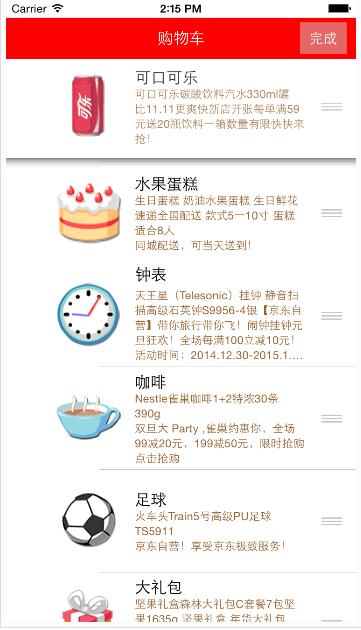
步驟
- 將 tableView.editing 設為 YES。
- 實作 editingStyleForRowAtIndexPath 並回傳 UITableViewCellEditingStyleNone。
- 實作 moveRowAtIndexPath:toIndexPath:。
- 在代理方法中更新 mutable array。
[_tableView setEditing:flag animated:YES];- (UITableViewCellEditingStyle)tableView:(UITableView *)tableView editingStyleForRowAtIndexPath:(NSIndexPath *)indexPath {
return UITableViewCellEditingStyleNone;
}- (void)tableView:(UITableView *)tableView moveRowAtIndexPath:(NSIndexPath *)sourceIndexPath toIndexPath:(NSIndexPath *)destinationIndexPath {
Goods *goods = _goodsAry[sourceIndexPath.row];
[_goodsAry removeObject:goods];
[_goodsAry insertObject:goods atIndex:destinationIndexPath.row];
}這樣畫面排序與資料模型才會一致。
- 上一篇文章: iOS 與 Android 哪個平台更適合開發者變現?
- 下一篇文章: iOS 10 適配指南:工程設定、權限與字體檢查