
緩存體積即時顯示與一鍵清除的 UITableView 實作
編輯:iOS 開發綜合
緩存不知不覺就會吃掉大量空間。使用者要的不是一個隱形的清理機制,而是「讓我看得見現在佔了多少、按一下就乾淨」。
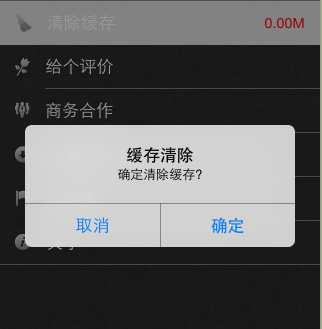
我們把場景定成這樣:在表視圖的「清除緩存」那一列放一個 UILabel 顯示當前大小,點擊該列彈出確認框,按確定就清空。
計算緩存大小
#pragma mark - 計算緩存大小
- (NSString *)getCacheSize {
    // 定義變量存儲總的緩存大小
    long long sumSize = 0;

    // 01. 獲取當前緩存路徑
    NSString *cacheFilePath = [NSHomeDirectory() stringByAppendingPathComponent:@"Library/Caches"];

    // 02. 創建文件管理對象
    NSFileManager *filemanager = [NSFileManager defaultManager];

    // 獲取當前緩存路徑下的所有子路徑
    NSArray *subPaths = [filemanager subpathsOfDirectoryAtPath:cacheFilePath error:nil];

    // 遍歷所有子文件
    for (NSString *subPath in subPaths) {
        // 1. 拼接完整路徑
        NSString *filePath = [cacheFilePath stringByAppendingFormat:@"/%@", subPath];
        // 2. 計算文件的大小
        long long fileSize = [[filemanager attributesOfItemAtPath:filePath error:nil] fileSize];
        // 3. 累加
        sumSize += fileSize;
    }

    float size_m = sumSize / (1000 * 1000);
    return [NSString stringWithFormat:@"%.2fM", size_m];
}
點擊提示與清除
#pragma mark - 清除緩存提示(UITableViewDelegate)
- (void)tableView:(UITableView *)tableView didSelectRowAtIndexPath:(NSIndexPath *)indexPath {
    if (indexPath.row == 0) {
        UIAlertView *alertView = [[UIAlertView alloc] initWithTitle:@"緩存清除"
                                                            message:@"確定清除緩存?"
                                                           delegate:self
                                                  cancelButtonTitle:@"取消"
                                                  otherButtonTitles:@"確定", nil];
        [alertView show];
    }
}

#pragma mark - UIAlertViewDelegate
- (void)alertView:(UIAlertView *)alertView clickedButtonAtIndex:(NSInteger)buttonIndex {
    // 判斷點擊的是確認鍵
    if (buttonIndex == 1) {
        NSFileManager *fileManager = [NSFileManager defaultManager];
        NSString *cacheFilePath = [NSHomeDirectory() stringByAppendingPathComponent:@"Library/Caches"];
        [fileManager removeItemAtPath:cacheFilePath error:nil];

        // 只刷新第一行
        NSIndexPath *indexPath = [NSIndexPath indexPathForItem:0 inSection:0];
        [_tableView reloadRowsAtIndexPaths:@[indexPath] withRowAnimation:UITableViewRowAnimationFade];

        // 或整體刷新,與上一行擇一即可
        // [_tableView reloadData];
    }
}
讓數字保持即時
使用者可能從別的頁面瀏覽了大量內容才回到這裡,因此不管返回路徑是什麼,都該重新量一次:
- (void)viewWillAppear:(BOOL)animated {
    [super viewWillAppear:YES];
    [_tableView reloadData];
}
三個該改的地方
第一,整目錄遍歷會卡住主線程。檔案一多,getCacheSize 執行時間會长到影響滾動流暢度,應丟到背景佇列計算再回主線程更新 label。
第二,直接刪整個 Library/Caches 太粗暴。那裡面可能還有系統或其他 SDK 的暫存檔,比較穩妥的做法是只清你自家建立的快取子目錄。
第三,UIAlertView 在 iOS 9 起已被標記棄用,新專案請改用 UIAlertController。
- 上一篇文章: iOS 10 與 Xcode 8 升級適配完整清單
- 下一篇文章: 取得 Caches 目錄容量並清空:iOS 緩存管理的兩個基本動作