
用 CALayer 做三點跳動的載入動畫
編輯:iOS 開發綜合
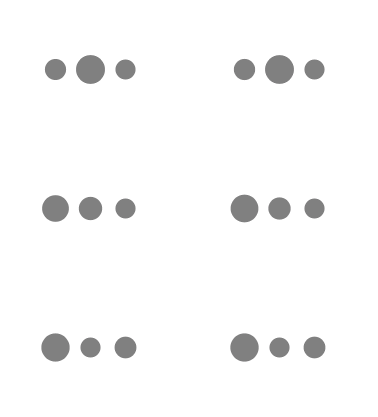
載入動畫不必依賴第三方庫,幾個 CAShapeLayer 加上動畫組的時間差,就能做出那種「三個點輪流跳」的效果。
對外介面:一個分類,兩行呼叫
把顯示與隱藏做成 UIViewController 的分類,呼叫端只需:
[self showLoadingInView:self.view];
標頭檔:
#import <UIKit/UIKit.h>
#import "GQCircleLoadView.h"

@interface UIViewController (GQCircleLoad)
- (void)showLoadingInView:(UIView *)view;
- (void)hideLoad;
@property (nonatomic, strong) GQCircleLoadView *loadingView;
@end
分類無法直接加 stored property,這裡用關聯物件(Associated Object)繞過限制:
#import "UIViewController+GQCircleLoad.h"
#import <objc/runtime.h>

@implementation UIViewController (GQCircleLoad)

- (GQCircleLoadView *)loadingView {
    return objc_getAssociatedObject(self, @"loadingView");
}

- (void)setLoadingView:(GQCircleLoadView *)loadingView {
    objc_setAssociatedObject(self, @"loadingView", loadingView, OBJC_ASSOCIATION_RETAIN_NONATOMIC);
}

- (void)showLoadingInView:(UIView *)view {
    if (self.loadingView == nil) {
        self.loadingView = [[GQCircleLoadView alloc] init];
    }
    if (view) {
        [view addSubview:self.loadingView];
        self.loadingView.frame = view.bounds;
    } else {
        UIWindow *appKeyWindow = [UIApplication sharedApplication].keyWindow;
        [appKeyWindow addSubview:self.loadingView];
        self.loadingView.frame = appKeyWindow.bounds;
    }
}

- (void)hideLoad {
    [self.loadingView removeFromSuperview];
}
@end
動畫本體
三個圓用 UIBezierPath 畫成 CAShapeLayer,每個點跑一組「放大再縮回」的 CAAnimationGroup,並在 animationDidStart: 裡排下一個點的延遲啟動,時間差就出來了。
#import "GQCircleLoadView.h"

#define WINDOW_width  [[UIScreen mainScreen] bounds].size.width
#define WINDOW_height [[UIScreen mainScreen] bounds].size.height

static NSInteger circleCount = 3;
static CGFloat cornerRadius  = 10;
static CGFloat magin         = 15;

@interface GQCircleLoadView () <CAAnimationDelegate>
@property (nonatomic, strong) NSMutableArray *layerArr;
@end

@implementation GQCircleLoadView

- (instancetype)initWithFrame:(CGRect)frame {
    if (self = [super initWithFrame:frame]) {
        self.backgroundColor = [UIColor clearColor];
    }
    return self;
}

// 畫圓
- (void)drawCircles {
    for (NSInteger i = 0; i < circleCount; ++i) {
        CGFloat x = (WINDOW_width - (cornerRadius * 2) * circleCount - magin * (circleCount - 1)) / 2.0
                    + i * (cornerRadius * 2 + magin) + cornerRadius;
        CGRect rect = CGRectMake(-cornerRadius, -cornerRadius, 2 * cornerRadius, 2 * cornerRadius);
        UIBezierPath *beizPath = [UIBezierPath bezierPathWithRoundedRect:rect cornerRadius:cornerRadius];
        CAShapeLayer *layer = [CAShapeLayer layer];
        layer.path = beizPath.CGPath;
        layer.fillColor = [UIColor grayColor].CGColor;
        layer.position = CGPointMake(x, self.frame.size.height * 0.5);
        [self.layer addSublayer:layer];
        [self.layerArr addObject:layer];
    }
    [self drawAnimation:self.layerArr[0]];

    // 旋轉(可打開試試效果)
    // CABasicAnimation *rotationAnimation = [CABasicAnimation animationWithKeyPath:@"transform.rotation.y"];
    // rotationAnimation.toValue = [NSNumber numberWithFloat:-M_PI * 2.0];
    // rotationAnimation.duration = 1;
    // rotationAnimation.cumulative = YES;
    // rotationAnimation.repeatCount = MAXFLOAT;
    // [self.layer addAnimation:rotationAnimation forKey:@"rotationAnimation"];
}

// 動畫實現
- (void)drawAnimation:(CALayer *)layer {
    CABasicAnimation *scaleUp = [CABasicAnimation animationWithKeyPath:@"transform.scale"];
    scaleUp.fromValue = @1;
    scaleUp.toValue = @1.5;
    scaleUp.duration = 0.25;
    scaleUp.timingFunction = [CAMediaTimingFunction functionWithName:kCAMediaTimingFunctionEaseOut];

    CABasicAnimation *scaleDown = [CABasicAnimation animationWithKeyPath:@"transform.scale"];
    scaleDown.beginTime = scaleUp.duration;
    scaleDown.fromValue = @1.5;
    scaleDown.toValue = @1;
    scaleDown.duration = 0.25;
    scaleDown.timingFunction = [CAMediaTimingFunction functionWithName:kCAMediaTimingFunctionEaseOut];

    CAAnimationGroup *group = [[CAAnimationGroup alloc] init];
    group.animations = @[scaleUp, scaleDown];
    group.repeatCount = 0;
    group.duration = scaleUp.duration + scaleDown.duration;
    group.delegate = self;
    [layer addAnimation:group forKey:@"groupAnimation"];
}

#pragma mark - CAAnimationDelegate
- (void)animationDidStart:(CAAnimation *)anim {
    if ([anim isKindOfClass:CAAnimationGroup.class]) {
        CAAnimationGroup *animation = (CAAnimationGroup *)anim;
        [self.layerArr enumerateObjectsUsingBlock:^(CAShapeLayer *obj, NSUInteger idx, BOOL * _Nonnull stop) {
            CAAnimationGroup *a0 = (CAAnimationGroup *)[obj animationForKey:@"groupAnimation"];
            if (a0 && a0 == animation) {
                CAShapeLayer *nextlayer = self.layerArr[(idx + 1) >= self.layerArr.count ? 0 : (idx + 1)];
                [self performSelector:@selector(drawAnimation:) withObject:nextlayer afterDelay:0.25];
                *stop = YES;
            }
        }];
    }
}

- (void)drawRect:(CGRect)rect {
    [super drawRect:rect];
    [self drawCircles];
}

- (NSMutableArray *)layerArr {
    if (_layerArr == nil) {
        _layerArr = [[NSMutableArray alloc] init];
    }
    return _layerArr;
}
@end
這套寫法的巧思
三個圓各自跑同樣的動畫,但透過 animationDidStart: 攔下動畫開始的瞬間、延遲 0.25 秒才啟動下一個點,就形成了依序跳躍的錯落感。索引處的 (idx + 1) >= count ? 0 : (idx + 1) 是個環形輪轉,讓最後一個點跳完會接回第一個,形成無縫循環。
想延伸的話,把註解掉的旋轉動畫打開,再換成 pull-to-refresh 的位移,就是 QQ 郵箱那種下拉刷新效果。
- 上一篇文章: Xcode 8 控制台中文亂碼?兩種根治方式
- 下一篇文章: iOS 10 與 Xcode 8 升級適配完整清單