
iOS 9 之後 http 全面被攔:ATS 是什麼、怎麼放行
編輯:iOS 開發綜合
用 Xcode 7.0 以上版本編譯時,專案預設繼承了 iOS 9 的一項新特性,把所有 http 連線直接禁掉。若你手上的 API 還沒有 https 版本,那就悲劇了。
查官方文件的 App Transport Security 段落,大意是:
App Transport Security (ATS) enforces best practices in the secure connections between an app and its back end. ATS prevents accidental disclosure, provides secure default behavior, and is easy to adopt; it is also on by default in iOS 9 and OS X v10.11. You should adopt ATS as soon as possible, regardless of whether you're creating a new app or updating an existing one. If you're developing a new app, you should use HTTPS exclusively. If you have an existing app, you should use HTTPS as much as you can right now, and create a plan for migrating the rest of your app as soon as possible. In addition, your communication through higher-level APIs needs to be encrypted using TLS version 1.2 with forward secrecy. If you try to make a connection that doesn't follow this requirement, an error is thrown. If your app needs to make a request to an insecure domain, you have to specify this domain in your app's Info.plist file.
翻成白話:ATS 要求 App 與後端之間的連線必須加密,且須採用 TLS 1.2 並具備前向保密。不符合就直接拋錯。而文件也留了一扇門——在 Info.plist 中指定例外網域,就能繼續使用 http。
臨時放行的設定步驟
1. 在專案左側找到 Info.plist(可用 Filter 搜尋)。
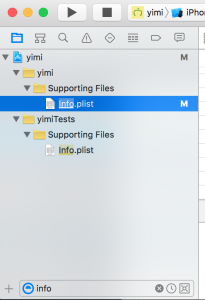
2. 右側點 Add Row,新增 NSAppTransportSecurity,型別選 Dictionary;再在其中加入子項 NSAllowsArbitraryLoads,型別 Boolean,值設為 YES。
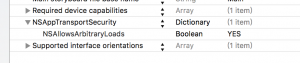
存檔後,一般的 http 連線就能恢復運作。
這是一個有條件的解法
NSAllowsArbitraryLoads 等於對整包 App 開了後門,而 App Store 的審核從 iOS 10 之後會針對這個鍵去問你「為什麼需要」。若只是少數幾個網域沒有 https,比較好的做法是改用 NSExceptionDomains,只對那些特定網域開例外,把口子收到最小。長遠來看,把後端搬上 https 才是正解。