
大檔案多執行緒斷點續傳下載的完整實作拆解
編輯:iOS 開發綜合
下載幾百 MB 的檔案時,單線程下載不但慢,一旦網路中斷就得從頭再來。本文實作的是多線程 + 斷點續傳:把一個大檔切成數段,開多條連線同時抓,各段寫進同一個檔案的對應位置,中斷後可從既有進度續傳。因為牽涉的類別較多,下面把完整程式碼列出來。
核心思路
下載開始前,先在沙盒建立一個與遠端檔案等大的空檔(要抓 100MB,就先配置 100MB 的檔案),接著把總長度均分成數段,每條執行緒透過 HTTP Range 請求只抓自己那一段,再用 NSFileHandle 定位到該段起始偏移寫入。
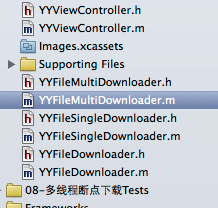
整體用到的類別如下:
一、呼叫端
#import "YYViewController.h"
#import "YYFileMultiDownloader.h"

@interface YYViewController ()
@property (nonatomic, strong) YYFileMultiDownloader *fileMultiDownloader;
@end

@implementation YYViewController

- (YYFileMultiDownloader *)fileMultiDownloader {
    if (!_fileMultiDownloader) {
        _fileMultiDownloader = [[YYFileMultiDownloader alloc] init];

        // 遠端檔案網址
        _fileMultiDownloader.url = @"https://192.168.1.200:8080/MJServer/resources/jre.zip";

        // 存檔位置
        NSString *caches = [NSSearchPathForDirectoriesInDomains(NSCachesDirectory,
                                                                NSUserDomainMask, YES) lastObject];
        _fileMultiDownloader.destPath = [caches stringByAppendingPathComponent:@"jre.zip"];
    }
    return _fileMultiDownloader;
}

- (void)touchesBegan:(NSSet *)touches withEvent:(UIEvent *)event {
    [self.fileMultiDownloader start];
}

@end
二、下載器抽象基類
不論單線程還是多線程,對外提供的介面是一致的:url、destPath、下載狀態、進度回呼,以及 start/pause 兩個動作。抽出基類的好處是呼叫端不必知道自己拿到的是哪一種實作。
#import <Foundation/Foundation.h>

@interface YYFileDownloader : NSObject {
    BOOL _downloading;
}

/** 遠端檔案網址 */
@property (nonatomic, copy) NSString *url;

/** 存檔路徑 */
@property (nonatomic, copy) NSString *destPath;

/** 是否正在下載(只有下載器內部知道) */
@property (nonatomic, readonly, getter = isDownloading) BOOL downloading;

/** 進度回呼 */
@property (nonatomic, copy) void (^progressHandler)(double progress);

/** 開始(或續傳) */
- (void)start;

/** 暫停 */
- (void)pause;

@end
三、單段下載器
這是最關鍵的一層:它只負責抓 begin 到 end 這段範圍。斷點續傳的祕密就在請求標頭的 Range——每次啟動時,起始位置是 begin + 已下載長度,所以暫停後再 start 會自動接上,不必重抓。
#import "YYFileSingleDownloader.h"

@interface YYFileSingleDownloader () <NSURLConnectionDataDelegate>
@property (nonatomic, strong) NSURLConnection *conn;
@property (nonatomic, strong) NSFileHandle *writeHandle;
@property (nonatomic, assign) long long currentLength;   // 本段已下載長度
@end

@implementation YYFileSingleDownloader

- (NSFileHandle *)writeHandle {
    if (!_writeHandle) {
        _writeHandle = [NSFileHandle fileHandleForWritingAtPath:self.destPath];
    }
    return _writeHandle;
}

- (void)start {
    NSURL *url = [NSURL URLWithString:self.url];
    NSMutableURLRequest *request = [NSMutableURLRequest requestWithURL:url];

    // 關鍵:用 Range 標頭宣告「我只要這一段」,並從已下載量續接
    NSString *value = [NSString stringWithFormat:@"bytes=%lld-%lld",
                       self.begin + self.currentLength, self.end];
    [request setValue:value forHTTPHeaderField:@"Range"];

    self.conn = [NSURLConnection connectionWithRequest:request delegate:self];
    _downloading = YES;
}

- (void)pause {
    [self.conn cancel];
    self.conn = nil;
    _downloading = NO;
}

#pragma mark - NSURLConnectionDataDelegate

// 1. 收到回應(連上伺服器)
- (void)connection:(NSURLConnection *)connection
didReceiveResponse:(NSURLResponse *)response {
}

// 2. 收到資料(可能被呼叫多次,每次只有一部分)
- (void)connection:(NSURLConnection *)connection
    didReceiveData:(NSData *)data {
    // 移到本段該寫入的位置
    [self.writeHandle seekToFileOffset:self.begin + self.currentLength];
    [self.writeHandle writeData:data];

    self.currentLength += data.length;

    double progress = (double)self.currentLength / (self.end - self.begin);
    if (self.progressHandler) {
        self.progressHandler(progress);
    }
}

// 3. 本段下載完畢
- (void)connectionDidFinishLoading:(NSURLConnection *)connection {
    self.currentLength = 0;
    [self.writeHandle closeFile];
    self.writeHandle = nil;
}

// 4. 失敗(逾時、斷網等)
- (void)connection:(NSURLConnection *)connection
  didFailWithError:(NSError *)error {
}

@end
單段類別的頭檔很單純,只多兩個用來界定範圍的屬性:
#import "YYFileDownloader.h"

@interface YYFileSingleDownloader : YYFileDownloader
@property (nonatomic, assign) long long begin;   // 起始位置
@property (nonatomic, assign) long long end;     // 結束位置
@end
四、多線程下載器
它負責「切段」與「派工」:先用 HEAD 請求取得檔案總長度,均分成 N 段建立 N 個單段下載器,然後先配置好等大的檔案,最後一次啟動全部子下載器。
#import "YYFileMultiDownloader.h"
#import "YYFileSingleDownloader.h"

#define YYMaxDownloadCount 4

@interface YYFileMultiDownloader ()
@property (nonatomic, strong) NSMutableArray *singleDownloaders;
@property (nonatomic, assign) long long totalLength;
@end

@implementation YYFileMultiDownloader

// 用 HEAD 請求取得檔案大小(不傳 body,省頻寬)
- (void)getFilesize {
    NSMutableURLRequest *request =
        [NSMutableURLRequest requestWithURL:[NSURL URLWithString:self.url]];
    request.HTTPMethod = @"HEAD";

    NSURLResponse *response = nil;
    // 注意:實務上應改為非同步請求,避免阻塞主線程
    [NSURLConnection sendSynchronousRequest:request
                          returningResponse:&response
                                      error:nil];
    self.totalLength = response.expectedContentLength;
}

- (NSMutableArray *)singleDownloaders {
    if (!_singleDownloaders) {
        _singleDownloaders = [NSMutableArray array];
        [self getFilesize];

        // 每段的長度(除不盡時向上取整,最後一段自然會短一些)
        long long size = 0;
        if (self.totalLength % YYMaxDownloadCount == 0) {
            size = self.totalLength / YYMaxDownloadCount;
        } else {
            size = self.totalLength / YYMaxDownloadCount + 1;
        }

        // 建立 N 個子下載器
        for (int i = 0; i < YYMaxDownloadCount; i++) {
            YYFileSingleDownloader *singleDownloader = [[YYFileSingleDownloader alloc] init];
            singleDownloader.url = self.url;
            singleDownloader.destPath = self.destPath;
            singleDownloader.begin = i * size;
            singleDownloader.end = singleDownloader.begin + size - 1;
            singleDownloader.progressHandler = ^(double progress) {
                NSLog(@"%d --- %f", i, progress);
            };
            [_singleDownloaders addObject:singleDownloader];
        }

        // 先建一個空檔,再把長度撐到與伺服器檔案相同
        // 這樣各段才能用 seekToFileOffset: 直接定位寫入
        [[NSFileManager defaultManager] createFileAtPath:self.destPath
                                               contents:nil
                                             attributes:nil];
        NSFileHandle *handle = [NSFileHandle fileHandleForWritingAtPath:self.destPath];
        [handle truncateFileAtOffset:self.totalLength];
    }
    return _singleDownloaders;
}

- (void)start {
    [self.singleDownloaders makeObjectsPerformSelector:@selector(start)];
    _downloading = YES;
}

- (void)pause {
    [self.singleDownloaders makeObjectsPerformSelector:@selector(pause)];
    _downloading = NO;
}

@end
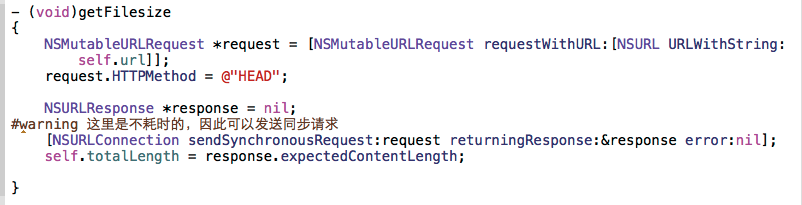
至於「怎麼知道要下載的檔案有多大」,就是靠回應標頭裡的 Content-Length:
幾個實作時會遇到的細節
- 伺服器必須支援 Range。回應狀態碼應為 206 Partial Content,並帶有 Content-Range 標頭;若回的是 200,代表伺服器忽略 Range 直接給整份檔案,此時寫入會錯位,必須先檢查狀態碼再決定是否寫入。
- 最後一段的 end 要夾住。用「向上取整」切段時,最後一段的 end 可能超出檔案長度,實務上應寫成
MIN(begin + size - 1, totalLength - 1)。 - HEAD 請求不要用同步寫法。範例中保留同步寫法只是為了程式碼簡潔,正式專案請改用 NSURLSession 的非同步 API,並把「取得大小」當成下載流程的第一步串接下去。
- 進度要加權。各段回報的是「本段百分比」,對外顯示總進度時應換算成
(已完成段長度總和 + 當前段已完成量) / totalLength。 - NSURLConnection 已被標記為不建議使用。新專案建議以 NSURLSession +
NSURLSessionDownloadTask重寫這層,並搭配背景 session,App 被切到背景時仍能續傳,省下不少自行處理斷點的工作。
總結一下:多線程下載的本質是「先配置等大檔案,再用 Range 分段寫入」,斷點續傳則是「把已下載量計入 Range 起始位置」。兩件事都靠 HTTP Range 與檔案偏移這兩個機制支撐,理解之後換成任何下載 API 都能套用。
- 上一篇文章: Touch ID 指紋識別實作:API 用法與錯誤碼對照
- 下一篇文章: iOS 音樂播放器完整實作:播放控制、滾動歌詞與單元測試