
iOS 百度地圖 SDK 快速上手:地圖、定位與 POI 檢索
編輯:iOS 開發綜合
百度地圖 iOS SDK 提供地圖展示、定位、POI 檢索、路徑規劃、離線地圖等多種 LBS 能力。本文將以基礎地圖、定位與 POI 檢索為主,說明快速接入流程。
一、環境配置
可以透過 CocoaPods 自動整合,也可以手動加入 framework。配置時需要特別注意以下幾點:
如果需要在 iOS 9 以上調起百度地圖 App,必須在 Info.plist 中加入 LSApplicationQueriesSchemes。
<key>LSApplicationQueriesSchemes</key>
<array>
    <string>baidumap</string>
</array>
若使用定位功能,需要加入定位用途說明,例如:
<key>NSLocationWhenInUseUsageDescription</key>
<string>需要取得您的位置以提供地圖服務</string>
此外,Info.plist 中應設定 Bundle display name,且值不可為空。
二、初始化地圖引擎
在 AppDelegate 中建立並啟動 BMKMapManager,並填入已申請的授權 Key。
#import <BaiduMapAPI_Base/BMKMapManager.h>

- (BOOL)application:(UIApplication *)application didFinishLaunchingWithOptions:(NSDictionary *)launchOptions {
    BMKMapManager *manager = [[BMKMapManager alloc] init];
    BOOL success = [manager start:@"your_api_key" generalDelegate:nil];

    if (!success) {
        NSLog(@"百度地圖初始化失敗");
    }

    return YES;
}
三、顯示基礎地圖
建立 BMKMapView,設定代理並加入畫面即可顯示地圖。
#import <BaiduMapAPI_Map/BMKMapView.h>

self.mapView = [[BMKMapView alloc] initWithFrame:self.view.bounds];
self.mapView.delegate = self;
self.mapView.mapType = BMKMapTypeStandard;
self.mapView.trafficEnabled = YES;
self.mapView.zoomLevel = 18;
[self.view addSubview:self.mapView];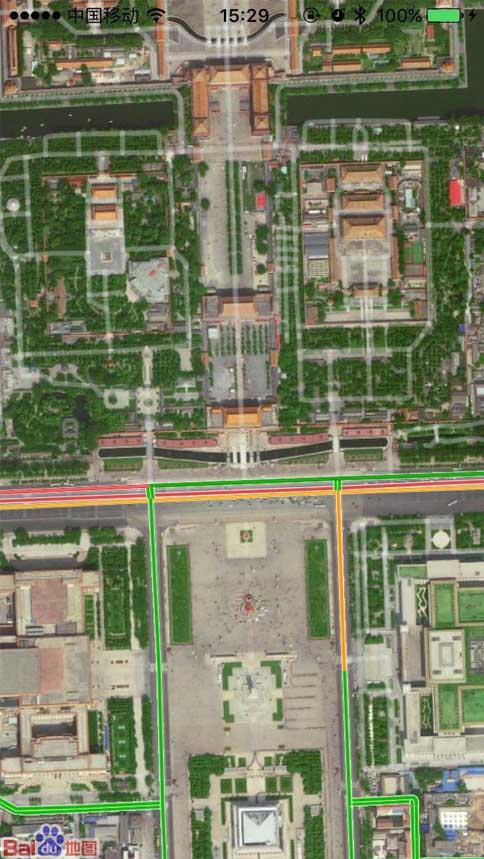
四、定位
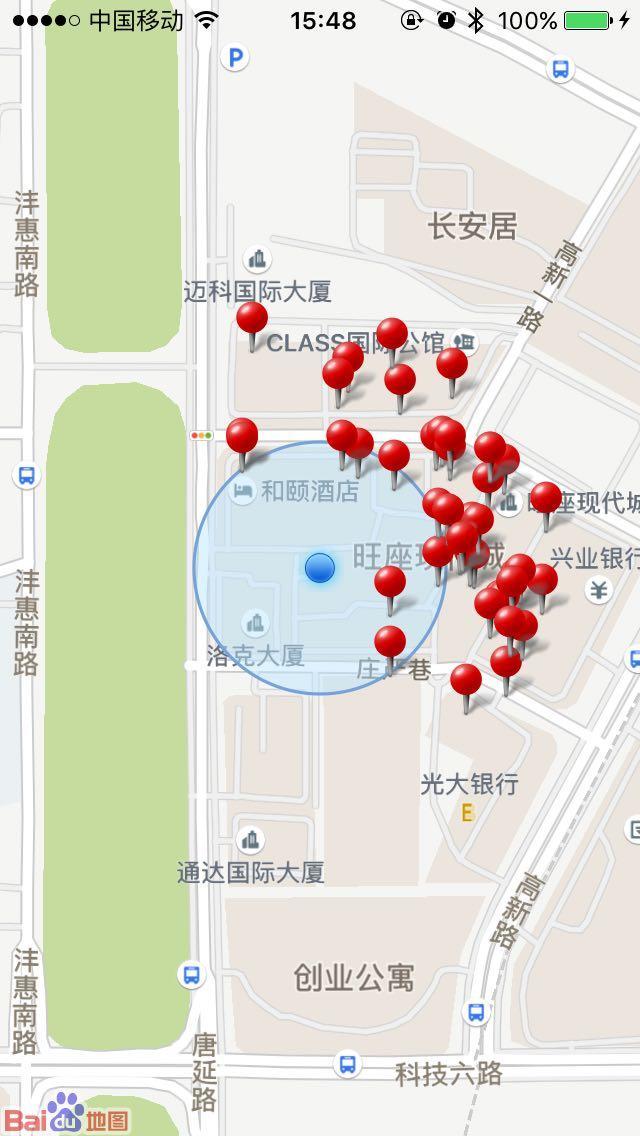
定位功能需要建立 BMKLocationService,並在位置更新後更新地圖中心。
#import <BaiduMapAPI_Location/BMKLocationService.h>

self.service = [[BMKLocationService alloc] init];
self.service.delegate = self;
[self.service startUserLocationService];

- (void)didUpdateBMKUserLocation:(BMKUserLocation *)userLocation {
    self.mapView.showsUserLocation = YES;
    [self.mapView updateLocationData:userLocation];
    self.mapView.centerCoordinate = userLocation.location.coordinate;
}
五、POI 周邊檢索
POI 檢索常用於搜尋附近餐廳、商店或其他地點。以下示例以使用者當前位置為中心,搜尋半徑內的關鍵字。
#import <BaiduMapAPI_Search/BMKPoiSearch.h>

self.poiSearch = [[BMKPoiSearch alloc] init];
self.poiSearch.delegate = self;

BMKNearbySearchOption *option = [[BMKNearbySearchOption alloc] init];
option.pageIndex = 0;
option.pageCapacity = 20;
option.radius = 500;
option.location = userLocation.location.coordinate;
option.keyword = @"餐廳";

[self.poiSearch poiSearchNearBy:option];

- (void)onGetPoiResult:(BMKPoiSearch *)searcher
                result:(BMKPoiResult *)poiResult
             errorCode:(BMKSearchErrorCode)errorCode {
    if (errorCode == BMK_SEARCH_NO_ERROR) {
        for (BMKPoiInfo *info in poiResult.poiInfoList) {
            NSLog(@"名稱:%@,地址:%@", info.name, info.address);
        }
    }
}
若需要在地圖上顯示標注,可以建立 BMKPointAnnotation,設定座標與標題後加入地圖。
BMKPointAnnotation *annotation = [[BMKPointAnnotation alloc] init];
annotation.coordinate = info.pt;
annotation.title = info.name;
annotation.subtitle = info.address;
[self.mapView addAnnotation:annotation];
百度地圖 SDK 的功能相當完整,本文僅整理最常見的地圖、定位與檢索流程。實際開發時,建議搭配官方文件查閱更多進階能力。