
iOS 手勢識別完整指南:拖動、縮放、旋轉、點擊與自定義手勢
在 iOS 應用中,手勢操作是提升使用者體驗的重要方式。透過拖動、縮放、旋轉、點擊等互動,使用者可以更直覺地操作畫面內容。本文將系統整理常見手勢的使用方式,並補充手勢衝突、依賴與自定義手勢的實作思路。
一、UIGestureRecognizer 家族
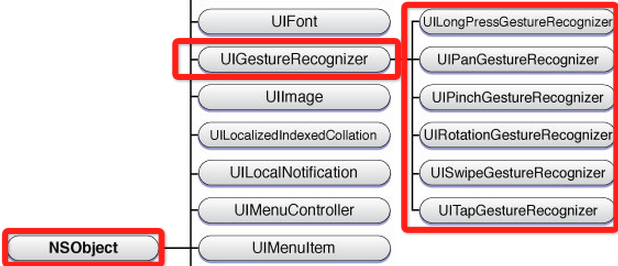
從 iOS 3.2 開始,系統提供了 UIGestureRecognizer 類別,用於統一處理常見手勢。它本身是抽象類別,實際開發時通常會使用它的子類。
- UITapGestureRecognizer:點擊手勢。
- UIPinchGestureRecognizer:雙指縮放手勢。
- UIRotationGestureRecognizer:旋轉手勢。
- UISwipeGestureRecognizer:快速滑動手勢。
- UIPanGestureRecognizer:拖動或慢速移動手勢。
- UILongPressGestureRecognizer:長按手勢。
二、使用手勢的兩個步驟
使用手勢的過程可以概括為兩個步驟:
第一,建立手勢物件,並在初始化時指定回呼方法。當手勢開始、改變或結束時,回呼方法會被觸發。
第二,將手勢加入需要監聽的 View。一個手勢只能綁定一個 View,但同一個 View 可以加入多個手勢。
建議在真機上測試手勢效果,因為模擬器對多點觸控的模擬有限,容易讓人誤以為手勢失效。
三、拖動、縮放與旋轉
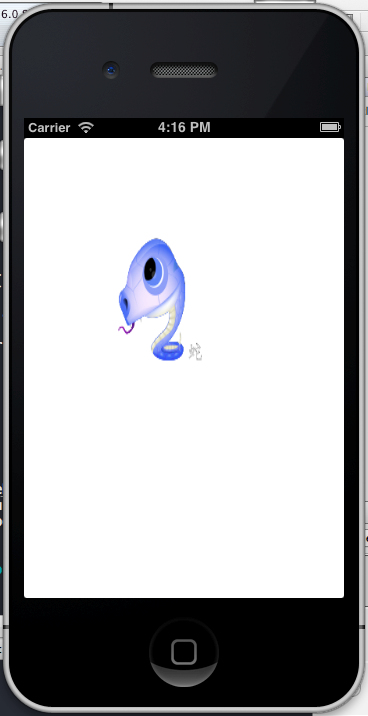
以下以一個 UIImageView 為例,展示如何加入拖動、縮放與旋轉手勢。
UIImageView *snakeImageView = [[UIImageView alloc] initWithImage:[UIImage imageNamed:@"snake.png"]];
snakeImageView.frame = CGRectMake(50, 50, 100, 160);

UIPanGestureRecognizer *panGestureRecognizer = [[UIPanGestureRecognizer alloc] initWithTarget:self action:@selector(handlePan:)];
[snakeImageView addGestureRecognizer:panGestureRecognizer];

[self.view addSubview:snakeImageView];

- (void)handlePan:(UIPanGestureRecognizer *)recognizer {
    CGPoint translation = [recognizer translationInView:self.view];
    recognizer.view.center = CGPointMake(recognizer.view.center.x + translation.x,
                                         recognizer.view.center.y + translation.y);
    [recognizer setTranslation:CGPointZero inView:self.view];
}
縮放手勢通常搭配 CGAffineTransformScale 使用,旋轉手勢則搭配 CGAffineTransformRotate。
- (void)handlePinch:(UIPinchGestureRecognizer *)recognizer {
    recognizer.view.transform = CGAffineTransformScale(recognizer.view.transform,
                                                        recognizer.scale,
                                                        recognizer.scale);
    recognizer.scale = 1;
}

- (void)handleRotate:(UIRotationGestureRecognizer *)recognizer {
    recognizer.view.transform = CGAffineTransformRotate(recognizer.view.transform,
                                                         recognizer.rotation);
    recognizer.rotation = 0;
}
四、多個視圖共用同一套手勢邏輯
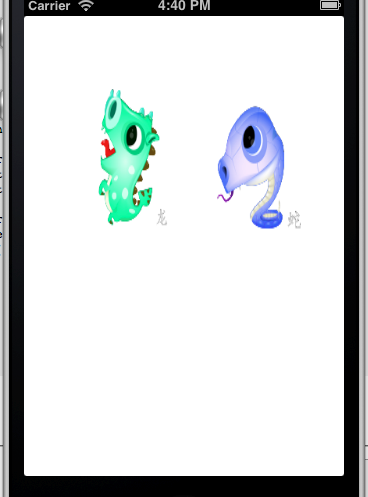
如果需要讓多個 View 都支援拖動、縮放與旋轉,可以遍歷子視圖,為每個 View 分別建立手勢物件。
for (UIView *view in self.view.subviews) {
    UIPanGestureRecognizer *pan = [[UIPanGestureRecognizer alloc] initWithTarget:self action:@selector(handlePan:)];
    UIPinchGestureRecognizer *pinch = [[UIPinchGestureRecognizer alloc] initWithTarget:self action:@selector(handlePinch:)];
    UIRotationGestureRecognizer *rotate = [[UIRotationGestureRecognizer alloc] initWithTarget:self action:@selector(handleRotate:)];

    [view addGestureRecognizer:pan];
    [view addGestureRecognizer:pinch];
    [view addGestureRecognizer:rotate];
    view.userInteractionEnabled = YES;
}
五、拖動手勢加入慣性滑行
如果希望拖動結束後畫面物件能依速度繼續滑行一段距離,可以在手勢結束時取得速度向量,再透過動畫移動到最終位置。
if (recognizer.state == UIGestureRecognizerStateEnded) {
    CGPoint velocity = [recognizer velocityInView:self.view];
    CGFloat magnitude = sqrtf(velocity.x * velocity.x + velocity.y * velocity.y);
    CGFloat slideFactor = magnitude / 200 * 0.1;

    CGPoint finalPoint = CGPointMake(recognizer.view.center.x + velocity.x * slideFactor,
                                     recognizer.view.center.y + velocity.y * slideFactor);

    finalPoint.x = MIN(MAX(finalPoint.x, 0), self.view.bounds.size.width);
    finalPoint.y = MIN(MAX(finalPoint.y, 0), self.view.bounds.size.height);

    [UIView animateWithDuration:slideFactor * 2
                          delay:0
                        options:UIViewAnimationOptionCurveEaseOut
                     animations:^{
                         recognizer.view.center = finalPoint;
                     } completion:nil];
}
六、手勢衝突、依賴與自定義手勢
不同手勢之間可能會互相干擾。例如點擊手勢與拖動手勢同時存在時,輕微拖動也可能觸發點擊。此時可以使用依賴關係,讓點擊手勢等待拖動手勢失敗後才觸發。
[tapRecognizer requireGestureRecognizerToFail:panGestureRecognizer];如果需要同時觸發多個手勢,可以讓控制器遵循 UIGestureRecognizerDelegate 協議,並實作以下方法:
- (BOOL)gestureRecognizer:(UIGestureRecognizer *)gestureRecognizer
shouldRecognizeSimultaneouslyWithGestureRecognizer:(UIGestureRecognizer *)otherGestureRecognizer {
    return YES;
}
自定義手勢則可繼承 UIGestureRecognizer,並重寫 touchesBegan:withEvent:、touchesMoved:withEvent:、touchesEnded:withEvent:、touchesCancelled:withEvent: 等方法。當自定義條件滿足時,將手勢狀態設為 UIGestureRecognizerStateEnded,即可觸發回呼。