
iOS 星星評分打分控件實作教學
編輯:iOS 開發綜合
下載地址:https://github.com/littleSunZheng/StarGradeView
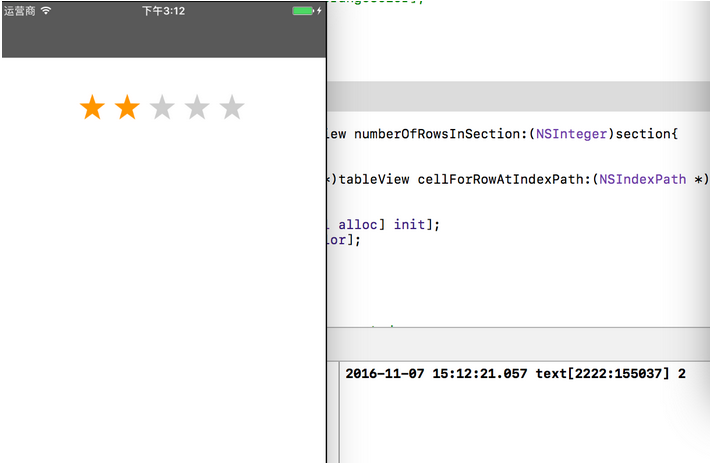
緣起:專案中往往會涉及使用者的評分回饋,在我的「E中醫」專案裡就用到好幾處。對此我參考了美團與滴滴的評分圖來設計。
評分視圖可分為「展示」與「打分」兩種:
(1)多數情況下,「評分功能」講求的是簡潔易用。那種能精準顯示百分比(分數)的星星反而不好操作,這類設計多用於「展示評分」而非讓使用者點擊——因為使用者想給「9.8 分」時,手指是無法精準點到的;但在展示時,卻能依資料完美呈現。其原理是準備兩張圖:一張是五顆灰色星星,一張是五顆金色星星,把 imageView 的顯示模式設定好(多餘的部分不顯示),再按比例調整上層金色星星 imageView 的寬度,星星比例自然就顯示出來了。
(2)使用者操作的打分星星視圖:我這裡實作的就是打分版本,原理很單純,只要觀察其他 App 的操作方式,就能聯想到手勢的應用。
上原始碼:
// // StarGradeView.h // EcmCustomer // // Created by 鄭鵬 on 2016/11/4. // Copyright © 2016年 張進. All rights reserved. // #import <UIKit/UIKit.h> @protocol StarGradeViewDelegate <NSObject> - (void)didSelectedIndex:(NSString *)index; @end @interface StarGradeView : UIView @property (nonatomic, assign) id <StarGradeViewDelegate> delegate; // 視圖frame 和 想有幾個星星(取決於設計 5個常用 或者10個 ) - (instancetype)initWithFrame:(CGRect)frame withtNumberOfPart:(NSInteger)num; @end // // StarGradeView.m // EcmCustomer // // Created by 鄭鵬 on 2016/11/4. // Copyright © 2016年 張進. All rights reserved. // #import "StarGradeView.h" @interface StarGradeView(){ UIView *_btnView;//放星星的背景view UIView *_shouView;//放星星的背景view CGFloat _height;//星星的高 NSInteger _btnNum;//按鈕的數量 NSInteger _index;//第幾個 } @end @implementation StarGradeView - (instancetype)initWithFrame:(CGRect)frame withtNumberOfPart:(NSInteger)num{ self = [super initWithFrame:frame]; _height = frame.size.height; _btnNum = num; CGFloat selfW = frame.size.width; CGFloat starW = frame.size.height; _btnView = [[UIView alloc] initWithFrame:CGRectMake((selfW - starW*num)/2 , 0, starW*num, starW)]; for (int i = 0; i< num; i++) { UIButton *starBtn = [UIButton buttonWithType:UIButtonTypeCustom]; starBtn.frame = CGRectMake(starW * i, 0, starW, starW); [starBtn setImage:[UIImage imageNamed:@"star_off"] forState:UIControlStateNormal]; [starBtn setImage:[UIImage imageNamed:@"star_on"] forState:UIControlStateSelected]; starBtn.tag = 1991+i; [starBtn setAdjustsImageWhenHighlighted:NO]; [_btnView addSubview:starBtn]; } _shouView = [[UIView alloc] initWithFrame:CGRectMake(0 , 0, starW*num, starW)]; [_btnView addSubview:_shouView]; [self addSubview:_btnView]; return self; } //滑動需要的。 - (void)touchesBegan:(NSSet<UITouch *> *)touches withEvent:(UIEvent *)event{ CGPoint point = [self getTouchPoint:touches]; int j = (int)(point.x/_height); _index = j; for (NSInteger i = 0; i < _btnNum; i++) { if (i<=j) { UIButton *btn = [_btnView viewWithTag:i+1991]; btn.selected = YES; }else{ UIButton *btn = [_btnView viewWithTag:i+1991]; btn.selected = NO; } } } //滑動需要的。 - (void)touchesMoved:(NSSet<UITouch *> *)touches withEvent:(UIEvent *)event{ CGPoint point = [self getTouchPoint:touches]; int j = (int)(point.x/_height); _index = j; for (NSInteger i = 0; i < _btnNum; i++) { if (i<=j) { UIButton *btn = [_btnView viewWithTag:i+1991]; btn.selected = YES; }else{ UIButton *btn = [_btnView viewWithTag:i+1991]; btn.selected = NO; } } } //滑動需要的。 - (void)touchesEnded:(NSSet<UITouch *> *)touches withEvent:(UIEvent *)event{ if ([self.delegate respondsToSelector:@selector(didSelectedIndex:)]) { [self.delegate didSelectedIndex:[NSString stringWithFormat:@"%ld",_index+1]]; } } //取到 手勢 在屏幕上點的 位置point - (CGPoint)getTouchPoint:(NSSet<UITouch *>*)touches{ UITouch *touch = [touches anyObject]; CGPoint point = [touch locationInView:_shouView]; return point; } //如果點擊的范圍在 按鈕的區域 - (BOOL)pointInBtn:(UIButton *)btn WithPoint:(CGPoint)point{ if (CGRectContainsPoint(btn.frame, point)) { return YES; }else{ return NO; } return nil; } /* // Only override drawRect: if you perform custom drawing. // An empty implementation adversely affects performance during animation. - (void)drawRect:(CGRect)rect { // Drawing code } */ @end
使用時:
StarGradeView *view = [[StarGradeView alloc] initWithFrame:CGRectMake(0, 100, 375, 40) withtNumberOfPart:5]; view.delegate = self; [self.view addSubview:view]; //並實現代理方法 - (void)didSelectedIndex:(NSString *)index{ NSLog(@"%@",index); }
備註:切圖時請注意,只要一顆星星,且要求為正方形,星星圖片要留有邊距。看程式碼就能明白為何要這樣切——一是美觀,二是便於計算。
以上便是本次為大家整理的 iOS 星星評分打分功能,希望對你有所幫助。若有任何疑問歡迎留言,我會盡快回覆。在此也感謝大家對本站的支持!
- 上一篇文章: iOS 六種手勢辨識的實作範例
- 下一篇文章: iOS 撥打電話的三種常見寫法