
iOS 微信登入完整實作:從 App 註冊到取得使用者資料
本文以最新版微信 SDK 為例,走完整個 OAuth 2.0 授權登入的流程。範例專案:https://github.com/zhonggaorong/weixinLoginDemo
一、前置準備
1. 在微信開放平台註冊開發者帳號,拥有一个已審核通過的行動應用,取得 AppID 與 AppSecret,並申請「微信登入」且通過審核後,才能開始接入。
2. 下載最新的 SDK。
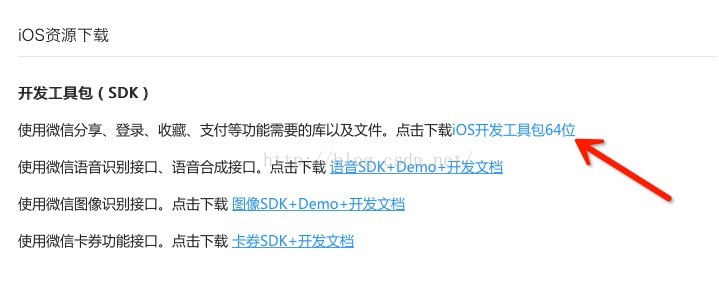
SDK 內容如下:
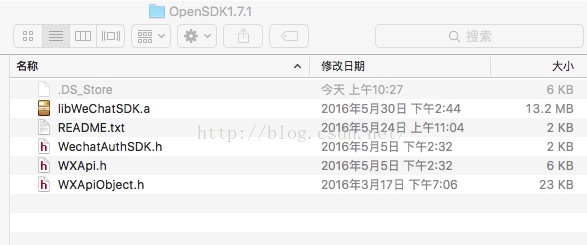
結構解析(由上而下):
1. 靜態庫,直接拖進專案。
2. readme 檔。
3. 授權 SDK。
4. 登入方法所在的類別。
5. 一些常用的物件類別。
二、幾個必須知道的限制
1. 目前微信登入只提供原生方式,使用者必須安裝微信客戶端才能配合使用。
2. Android 端建議總是顯示微信登入按鈕,未安裝時引導使用者下載。
3. iOS 端則不同:基於 App Store 審核指南的相關規定,建議先用 SDK 的 isWXAppInstalled 判斷是否已安裝微信,未安裝就把登入按鈕隱藏,只提供其他登入方式(手機號註冊、訪客登入等)。少了這個判斷,審核被退回的機率不低。
三、授權流程
1. 第三方發起微信授權登入請求,使用者同意後,微信會拉起 App 並帶回一個臨時票據 code。
2. 用 code 搭配 AppID 與 AppSecret,呼叫 API 換取 access_token。
3. 用 access_token 呼叫介面,取得使用者基本資料。
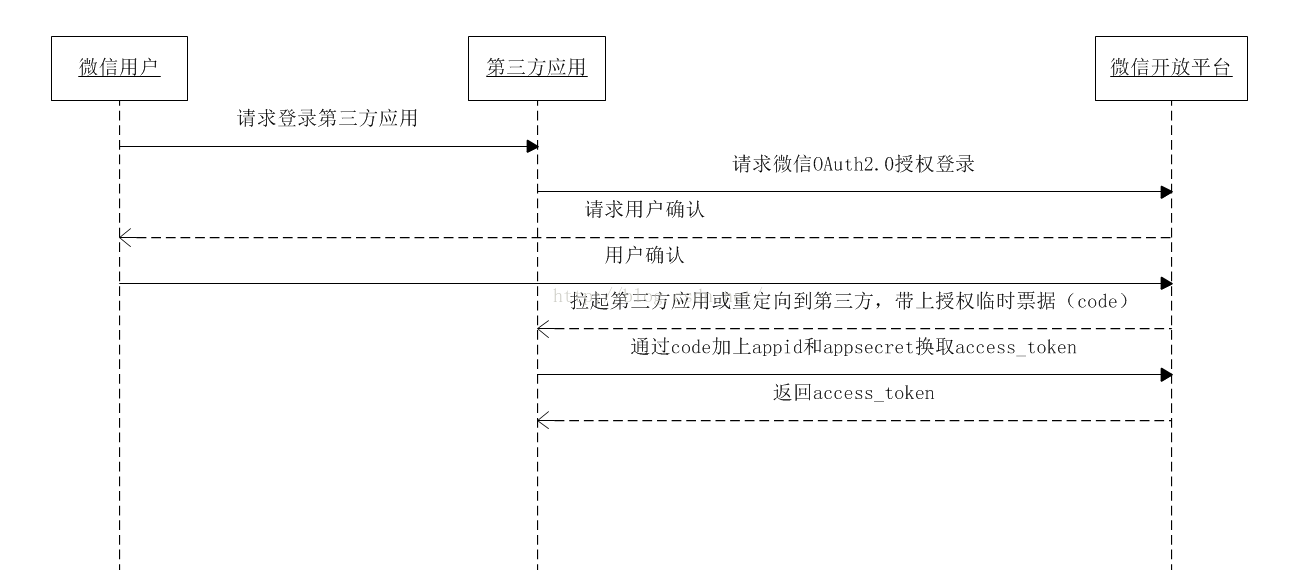
四、工程配置
1. 建立新專案。
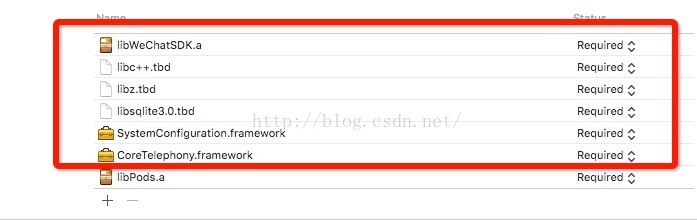
2. 把 SDK 中的 .h 檔與靜態庫全部拖進專案。
3. 加入依賴庫:
4. 設定 URL Types,把 AppID 填進去(target → Info → URL Types):
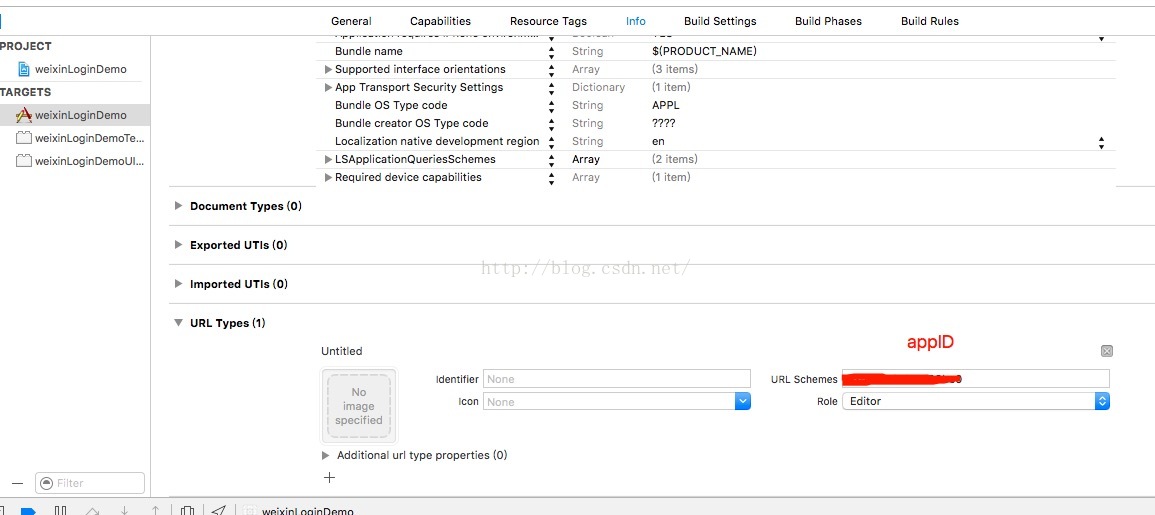
5. 加入白名單。若執行時出現這則錯誤:
-canOpenURL: failed for URL: "weixin://app/wx5efead4057f98bc0/"
- error: "This app is not allowed to query for scheme weixin"
代表還沒為 iOS 9 加入白名單。在 Info.plist 中補上 LSApplicationQueriesSchemes:

其中 LSApplicationQueriesSchemes 負責微信白名單,而 App Transport Security 相關設定則決定是否允許 http 請求。
五、AppDelegate:註冊與回調
#import "WXApi.h"

// 微信開發者 ID
#define URL_APPID @"app id"

@implementation AppDelegate

- (BOOL)application:(UIApplication *)application didFinishLaunchingWithOptions:(NSDictionary *)launchOptions {
    // 向微信註冊應用
    [WXApi registerApp:URL_APPID withDescription:@"wechat"];
    return YES;
}

// 處理微信透過 URL 啟動 App 時傳回的資料
- (BOOL)application:(UIApplication *)app openURL:(NSURL *)url options:(NSDictionary<NSString *,id> *)options {
    return [WXApi handleOpenURL:url delegate:self];
}

// 微信回調:不論登入或分享,成功與否都走這裡
- (void)onResp:(BaseResp *)resp {
    NSLog(@"resp %d", resp.errCode);
    /* enum WXErrCode {
        WXSuccess = 0,            成功
        WXErrCodeCommon = -1,     普通錯誤
        WXErrCodeUserCancel = -2, 使用者取消
        WXErrCodeSentFail = -3,   發送失敗
        WXErrCodeAuthDeny = -4,   授權失敗
        WXErrCodeUnsupport = -5   微信不支援
       }; */

    if ([resp isKindOfClass:[SendAuthResp class]]) {
        if (resp.errCode == 0) {
            // 成功:把 code 透過 delegate 往外傳
            if ([_wxDelegate respondsToSelector:@selector(loginSuccessByCode:)]) {
                SendAuthResp *authResp = (SendAuthResp *)resp;
                [_wxDelegate loginSuccessByCode:authResp.code];
            }
        } else {
            NSLog(@"error %@", resp.errStr);
            UIAlertView *alert = [[UIAlertView alloc] initWithTitle:@"登錄失敗"
                                                           message:[NSString stringWithFormat:@"reason : %@", resp.errStr]
                                                          delegate:self
                                                 cancelButtonTitle:@"取消"
                                                 otherButtonTitles:@"確定", nil];
            [alert show];
        }
    }
}

@end
六、登入頁:發起授權與換取使用者資料
#import "WXApi.h"
#import "AFNetworking.h"

#define URL_APPID  @"appid"
#define URL_SECRET @"app secret"

@interface ViewController () <WXDelegate> {
    AppDelegate *appdelegate;
}
@end

@implementation ViewController

#pragma mark - 發起微信登入

- (IBAction)weixinLoginAction:(id)sender {
    if ([WXApi isWXAppInstalled]) {
        SendAuthReq *req = [[SendAuthReq alloc] init];
        req.scope  = @"snsapi_userinfo";
        req.openID = URL_APPID;
        req.state  = @"1245";

        appdelegate = [UIApplication sharedApplication].delegate;
        appdelegate.wxDelegate = self;

        [WXApi sendReq:req];
    } else {
        // 未安裝微信:隱藏登入按鈕,改提供其他登入方式
    }
}

#pragma mark - 用 code 換 access_token

- (void)loginSuccessByCode:(NSString *)code {
    NSLog(@"code %@", code);
    __weak typeof(self) weakSelf = self;

    AFHTTPSessionManager *manager = [AFHTTPSessionManager manager];
    manager.requestSerializer  = [AFJSONRequestSerializer serializer];
    manager.responseSerializer = [AFHTTPResponseSerializer serializer];
    manager.responseSerializer.acceptableContentTypes =
        [NSSet setWithObjects:@"text/html", @"application/json", @"text/json", @"text/plain", nil];

    [manager GET:[NSString stringWithFormat:
        @"https://api.weixin.qq.com/sns/oauth2/access_token?appid=%@&secret=%@&code=%@&grant_type=authorization_code",
        URL_APPID, URL_SECRET, code]
      parameters:nil
        progress:^(NSProgress * _Nonnull downloadProgress) {}
         success:^(NSURLSessionDataTask * _Nonnull task, id _Nullable responseObject) {
        NSDictionary *dic = [NSJSONSerialization JSONObjectWithData:responseObject
                                                            options:NSJSONReadingMutableContainers
                                                              error:nil];
        NSLog(@"dic %@", dic);
        /* 回傳欄位:
           access_token  介面呼叫憑證
           expires_in    憑證有效期限(秒)
           refresh_token 用於刷新 access_token
           openid        授權使用者唯一標識
           scope         授權範圍,以逗號分隔
           unionid       僅當該應用已取得 userinfo 授權時才會出現 */
        NSString *accessToken = [dic valueForKey:@"access_token"];
        NSString *openID      = [dic valueForKey:@"openid"];
        [weakSelf requestUserInfoByToken:accessToken andOpenid:openID];
    }
         failure:^(NSURLSessionDataTask * _Nullable task, NSError * _Nonnull error) {
        NSLog(@"error %@", error.localizedFailureReason);
    }];
}

#pragma mark - 取得使用者資料

- (void)requestUserInfoByToken:(NSString *)token andOpenid:(NSString *)openID {
    AFHTTPSessionManager *manager = [AFHTTPSessionManager manager];
    manager.requestSerializer  = [AFJSONRequestSerializer serializer];
    manager.responseSerializer = [AFHTTPResponseSerializer serializer];

    [manager GET:[NSString stringWithFormat:
        @"https://api.weixin.qq.com/sns/userinfo?access_token=%@&openid=%@", token, openID]
      parameters:nil
        progress:^(NSProgress * _Nonnull downloadProgress) {}
         success:^(NSURLSessionDataTask * _Nonnull task, id _Nullable responseObject) {
        NSDictionary *dic = (NSDictionary *)[NSJSONSerialization JSONObjectWithData:responseObject
                                                                            options:NSJSONReadingMutableContainers
                                                                              error:nil];
        NSLog(@"dic ==== %@", dic);
    }
         failure:^(NSURLSessionDataTask * _Nullable task, NSError * _Nonnull error) {
        NSLog(@"error %ld", (long)error.code);
    }];
}

@end
兩個實務提醒:第一,AppSecret 絕對不能寫死在客戶端。上面為了示範把 secret 放在 App 裡,正式環境應該由自己的伺服器代為向微信換取 token,App 只跟自己的後端溝通——否則一旦有人反編譯你的 ipa,等於把帳號鑰匙直接送出去。第二,access_token 有時效,需要時應搭配 refresh_token 刷新,別假設它能永久使用。
以上就是本文的全部內容,希望能對大家有所幫助。
- 上一篇文章: iOS 指紋識別(Touch ID)常見問題大整理
- 下一篇文章: iOS 銀行卡號識別:OpenCV 整合思路與常見連結錯誤解法