
iOS 掃碼踩坑記:相簿中的條碼與二維碼該怎麼讀
編輯:iOS 開發綜合
本文的目標很明確:解決「從手機相簿中讀取條形碼與二維碼」這個經常被忽略的問題。
一、相機即時掃碼
網路上關於 iOS 掃碼的資料很多,主流做法都是基於系統自帶的 AVFoundation,這部分不展開。這裡要特別提醒的是掃描區域的設定:rectOfInterest 使用 0~1 的比例值,而且 X 與 Y 的位置要對調,width 與 height 也要對調。
// 建立輸出流
AVCaptureMetadataOutput *output = [[AVCaptureMetadataOutput alloc] init];
// 設定識別區域:按比例 0~1,注意 X/Y 與 width/height 需對調
output.rectOfInterest = CGRectMake(Y / ScreenHeight, X / ScreenWidth, height / ScreenHeight, width / ScreenWidth);
二、用 CIDetector 讀相簿(僅支援二維碼)
需要先實現 UIImagePickerControllerDelegate 與 UINavigationControllerDelegate 兩個代理:
-(void)imagePickerController:(UIImagePickerController *)picker didFinishPickingMediaWithInfo:(NSDictionary *)info {
    CIDetector *detector = [CIDetector detectorOfType:CIDetectorTypeQRCode context:nil options:@{CIDetectorAccuracy: CIDetectorAccuracyLow}];
    [picker dismissViewControllerAnimated:YES completion:^{}];

    UIImage *pickImage = info[UIImagePickerControllerOriginalImage];
    NSArray *features = [detector featuresInImage:[CIImage imageWithData:UIImagePNGRepresentation(pickImage)]];
    if (features.count >= 1) {
        CIQRCodeFeature *feature = features[0];
        NSString *scannedResult = feature.messageString;
        [self getScanDataString:scannedResult];
    } else {
        [self getScanDataString:@"未識別圖片中的二維碼"];
    }
}
三、實測下來的三個問題
用 CIDetector 讀相簿,螢幕截圖的辨識率還算可以,但相機實拍的照片成功率明顯偏低;更關鍵的是,它完全不支援條形碼。這兩點在需要支援商品條碼的場景下是致命傷。
四、改用 ZBarSDK
如果既要二維碼又要條形碼,ZBarSDK 是更穩妥的選擇。以下示範手動匯入(未使用 CocoaPods 管理的工程)。
步驟一,在工程中建立 Frameworks 資料夾,把 ZBarSDK 拖進去:

步驟二,加入必要的相依函式庫:
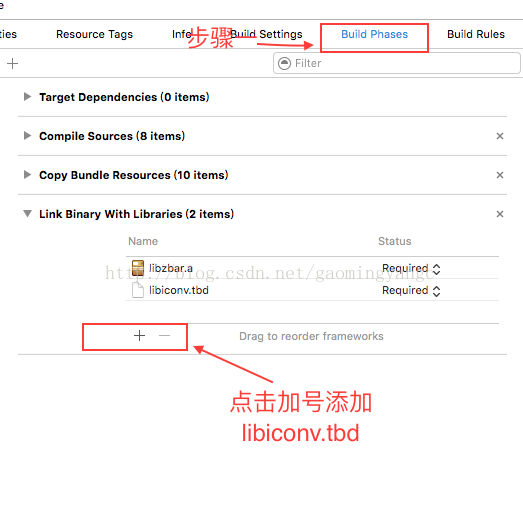
步驟三,匯入頭文件並呼叫對應 API:
#import "ZBarSDK.h"

/**
 * 從相簿取得二維碼圖片
 */
- (void)getQRcodeImage {
    ZBarReaderController *imagePicker = [ZBarReaderController new];
    imagePicker.showsHelpOnFail = NO;   // 不顯示讀取失敗的說明頁
    imagePicker.sourceType = UIImagePickerControllerSourceTypePhotoLibrary;
    imagePicker.delegate = self;
    imagePicker.allowsEditing = YES;
    [self presentViewController:imagePicker animated:YES completion:nil];
}

/**
 * 選圖回調
 */
-(void)imagePickerController:(UIImagePickerController *)picker didFinishPickingMediaWithInfo:(NSDictionary *)info {
    id<NSFastEnumeration> results = [info objectForKey:ZBarReaderControllerResults];
    ZBarSymbol *symbol = nil;
    for (symbol in results) {
        break;
    }
    [picker dismissViewControllerAnimated:YES completion:^{
        NSString *QRCodeString = symbol.data;
        [self getScanDataString:QRCodeString];
    }];
}

/**
 * 讀取失敗回調
 */
-(void)readerControllerDidFailToRead:(ZBarReaderController *)reader withRetry:(BOOL)retry {
    if (retry) {
        // retry == YES 代表選到的圖片裡沒有條碼
        [self dismissViewControllerAnimated:YES completion:^{
            [self getScanDataString:@"未發現二維碼/條碼"];
        }];
    }
}
換成 ZBarSDK 之後,相簿中的條形碼與二維碼都能穩定讀出,實測比 CIDetector 可靠不少。
最後提醒一個常見疏漏:無論走相機還是相簿,都要在 Info.plist 中補上 NSPhotoLibraryUsageDescription 與 NSCameraUsageDescription,否則 iOS 10 之後會直接崩潰。
- 上一篇文章: iOS Cache 設計詳解與簡單示例
- 下一篇文章: iOS 時間顯示優化:剛剛、幾分鐘前、幾小時前、昨天、前天