
修改 UITextField 佔位文字顏色的三種做法與選型建議
編輯:iOS 開發綜合
UITextField 沒有直接暴露修改 placeholder 顏色的屬性,系統默認的淺灰色在很多設計稿面前都不夠用。想換色只能繞一下,實踐中常見的有三種路子。
默認效果偏淡:

需要加深或換成其他顏色:
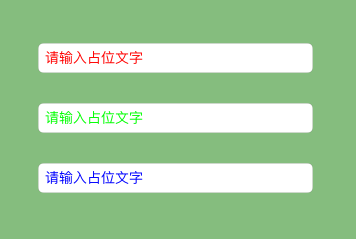
方法一:attributedPlaceholder
系統提供了帶屬性的字符串入口,直接構造一個 NSAttributedString 掛上去即可,這是最正規的做法。
CGFloat viewWidth = self.view.bounds.size.width; CGFloat textFieldX = 50; CGFloat textFieldH = 30; CGFloat padding = 30; UITextField *textField = [[UITextField alloc] init]; textField.frame = CGRectMake(textFieldX, 100, viewWidth - 2 * textFieldX, textFieldH); textField.borderStyle = UITextBorderStyleRoundedRect; // 邊框類型 textField.font = [UIFont systemFontOfSize:14]; NSAttributedString *attrString = [[NSAttributedString alloc] initWithString:@"請輸入占位文字" attributes: @{NSForegroundColorAttributeName:[UIColor redColor], NSFontAttributeName:textField.font }]; textField.attributedPlaceholder = attrString; [self.view addSubview:textField];
方法二:KVC 直接改私有 label
UITextField 內部有一個 _placeholderLabel,用 KVC 一路點進去改它的 textColor,一行代碼搞定。
UITextField *textField1 = [[UITextField alloc] init]; textField1.frame = CGRectMake(textFieldX, CGRectGetMaxY(textField.frame) + padding, viewWidth - 2 * textFieldX, textFieldH); textField1.borderStyle = UITextBorderStyleRoundedRect; textField1.placeholder = @"請輸入占位文字"; textField1.font = [UIFont systemFontOfSize:14]; // "通過KVC修改占位文字的顏色" [textField1 setValue:[UIColor greenColor] forKeyPath:@"_placeholderLabel.textColor"]; [self.view addSubview:textField1];
這種方式寫起來最省事,但依賴私有實現,系統升級時存在風險,謹慎用於長期維護的項目。
方法三:重寫 drawPlaceholderInRect:
最穩妥也最可控的做法,需要三步:自定義一個類繼承 UITextField、重寫 drawPlaceholderInRect:、在方法裡自行繪製 placeholder。
// 重寫此方法 -(void)drawPlaceholderInRect:(CGRect)rect { // 計算占位文字的 Size CGSize placeholderSize = [self.placeholder sizeWithAttributes: @{NSFontAttributeName : self.font}]; [self.placeholder drawInRect:CGRectMake(0, (rect.size.height - placeholderSize.height)/2, rect.size.width, rect.size.height) withAttributes: @{NSForegroundColorAttributeName : [UIColor blueColor], NSFontAttributeName : self.font}]; }
怎麼選
1. 純代碼創建 UITextField,追求快速落地,用 KVC 最省事;
2. 通過 XIB 或 Storyboard 創建,封裝一個自定義 UITextField 更合適,IB 裡直接把 class 換掉就行;
3. 也可以把兩者結合:在重寫的繪製方法裡,配合 KVC 一起處理屬性。
如果偏向穩健,優先考慮方法一與方法三,避免踩到私有 API 的坑。
- 上一篇文章: iOS 圖片壓縮示例代碼:質量壓縮與尺寸壓縮的取捨
- 下一篇文章: 基於 UITableViewController 快速搭建新聞列表頁