
iPhone 開發入門:本地通知(Local Notification)怎麼用
本地通知(Local Notification)解決的是「基於時間」的提醒需求。最典型的場景就是待辦清單、日曆類小工具:約定一個時間點,到點由系統跳出提醒,App 甚至不需要在前景執行。
另一個常被忽略的用法與背景執行有關。iOS 只給 App 在背景中非常有限的執行時間,但如果在這段時間內從伺服器拉到了新訊息——例如發現有可用的版本更新——就可以改用本地通知把結果推給使用者,不必依賴遠端推送。
本地通知的三類屬性
本地通知的載體是 UILocalNotification 物件,需要設定的內容大致可以歸成三類:
觸發時間(scheduled time):決定 iOS 在什麼日期與時刻送出這則通知,也可以搭配重複規則。
通知樣貌(notification type):包含警示文字、動作按鈕標題、App 圖示上的數字徽章(badge),以及要播放的提示音。
自訂資料:通知可以附帶一個 dictionary,用來攜帶你自己的上下文資訊,方便 App 被喚起時判斷接下來要做什麼。
數量上則有硬性限制:iOS 只保留最近排程的 64 則本地通知,超出部分會被系統直接忽略,因此排程時最好自行管理、適時清理。
最小可用範例:十秒後提醒
先寫一個最簡單的定時提醒。App 啟動後立刻排一則通知,設定十秒後觸發:
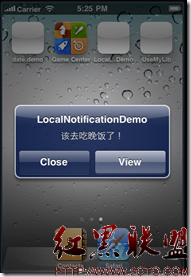
跑起來之後按 Home 鍵把 App 退到背景,稍待一會兒就會看到上圖的提醒。要注意的是:如果 App 一直留在前景,這則通知不會出現——這是本地通知的既定行為,並非程式寫錯。
UILocalNotification *notification = [[UILocalNotification alloc] init];
if (notification != nil) {
    NSLog(@">> support local notification");
    NSDate *now = [NSDate new];
    notification.fireDate = [now addTimeInterval:10];
    notification.timeZone = [NSTimeZone defaultTimeZone];
    notification.alertBody = @"該去吃晚飯了!";
    [[UIApplication sharedApplication] scheduleLocalNotification:notification];
}
需要更完整的屬性說明(提示音、使用者自訂資料等),可參考官方文件《Scheduling, Registering, and Handling Notifications》。
進階設定:徽章、重複、聲音與取消
實務上比較常見的做法是搭配一個 UISwitch:打開就排程通知,關掉就把對應的那則取消。這裡用 userInfo 存下 switch 的 tag,取消時再依 tag 找回該通知,是相當實用的小技巧。
先處理圖示上的數字徽章,在啟動時歸零:
- (BOOL)application:(UIApplication *)application
didFinishLaunchingWithOptions:(NSDictionary *)launchOptions {
    application.applicationIconBadgeNumber = 0;
    [self.window addSubview:viewController.view];
    [self.window makeKeyAndVisible];
    return YES;
}
接著是排程與取消的完整邏輯:
#pragma mark -
#pragma mark onChageValue

-(IBAction)onChangeValue:(id)sender
{
    UISwitch *switch1 = (UISwitch *)sender;
    if (switch1.on) {
        UILocalNotification *notification = [[UILocalNotification alloc] init];
        NSDate *now1 = [NSDate date];
        notification.timeZone = [NSTimeZone defaultTimeZone];
        notification.repeatInterval = NSDayCalendarUnit;   // 每日重複
        notification.applicationIconBadgeNumber = 1;
        notification.alertAction = NSLocalizedString(@"顯示", nil);

        switch (switch1.tag) {
            case 0:
                notification.fireDate = [now1 dateByAddingTimeInterval:10];
                notification.alertBody = self.myLable1.text;
                break;
            case 1:
                notification.fireDate = [now1 dateByAddingTimeInterval:20];
                notification.alertBody = self.myLable2.text;
                break;
            case 2:
                notification.fireDate = [now1 dateByAddingTimeInterval:30];
                notification.alertBody = self.myLable3.text;
                break;
            default:
                break;
        }

        [notification setSoundName:UILocalNotificationDefaultSoundName];

        NSDictionary *dict = [NSDictionary dictionaryWithObjectsAndKeys:
                              [NSString stringWithFormat:@"%d", switch1.tag], @"key1", nil];
        [notification setUserInfo:dict];

        [[UIApplication sharedApplication] scheduleLocalNotification:notification];
    }
    else {
        // 關閉時,找出 userInfo 中 key1 對應 tag 的那一則並取消
        NSArray *myArray = [[UIApplication sharedApplication] scheduledLocalNotifications];
        for (int i = 0; i < [myArray count]; i++) {
            UILocalNotification *myUILocalNotification = [myArray objectAtIndex:i];
            if ([[[myUILocalNotification userInfo] objectForKey:@"key1"] intValue]
                    == switch1.tag) {
                [[UIApplication sharedApplication]
                    cancelLocalNotification:myUILocalNotification];
            }
        }
    }
}
這段程式示範的四個能力可以各自獨立使用:repeatInterval 做週期性提醒、applicationIconBadgeNumber 改變圖示數字、setSoundName: 指定提示音、userInfo 攜帶自訂識別碼。最後一項尤其重要,因為 iOS 並未提供「依識別碼取消」的 API,只能靠遍歷 scheduledLocalNotifications 自行比對。
摘自 Evolution
- 上一篇文章: iOS 自繪立體餅圖:CLMView 工具類完整解析
- 下一篇文章: 與 NSUserDefaults 共舞:兩個容易忽略的坑