
模擬 iPhone 通訊錄的 UITableView 完整範例
編輯:iOS 開發綜合
這個範例示範如何用 UITableView 做出類似 iPhone 通訊錄的分組列表,包含字母索引、區塊標題、可刪除列、選取提示與右側 disclosure 箭頭。
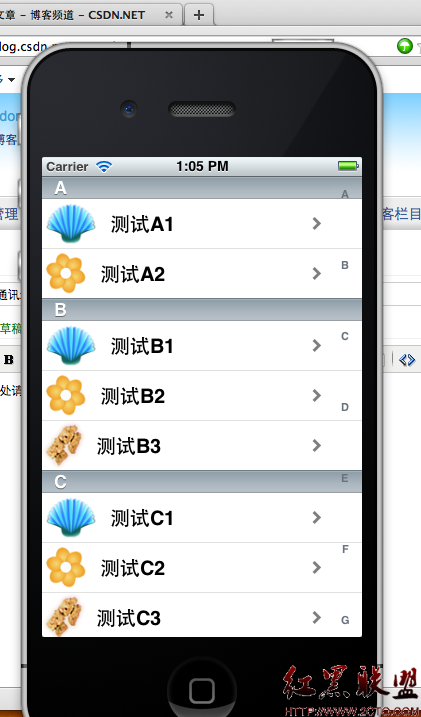
資料層面可用 NSDictionary 或 NSMutableDictionary,以 A、B、C 等字母作為 key,每個 key 對應一組名單。numberOfSectionsInTableView: 回傳分組數量,titleForHeaderInSection: 回傳區塊標題,numberOfRowsInSection: 回傳各分組列數。
sectionIndexTitlesForTableView: 則提供右側索引列,讓使用者可以快速跳到指定字母。cellForRowAtIndexPath: 負責建立或重用 UITableViewCell,並設定文字、圖片與 accessory 樣式。
若要支援刪除,可實作 canEditRowAtIndexPath: 與 commitEditingStyle:forRowAtIndexPath:。若要處理選取,可在 willSelectRowAtIndexPath: 或 didSelectRowAtIndexPath: 中顯示提示或跳轉頁面。這個範例的重點在於理解 UITableView 的 delegate 與 data source 分工。
- 上一篇文章: iPhone 定位基礎:Core Location 使用要點
- 下一篇文章: iPhone SDK:讀取本地文字檔案內容