
基於iOS實現音樂震動條效果
編輯:IOS開發綜合
一、簡單分析
音樂震動條不需要與用戶交互。我們可以使用復制層來操作。添加震動條。添加動畫。
復制層說明
//創建復制層
-(void)createRepl{
 //復制層
 CAReplicatorLayer * repL = [CAReplicatorLayer layer];
 repL.frame = self.contentV.bounds;
 //復制6份
 repL.instanceCount = 6;
 //形變,每一個形變都是相對於上一個復制出來的子層開始的
 repL.instanceTransform = CATransform3DMakeTranslation(45, 0, 0);
 //動畫延時執行
 repL.instanceDelay = 0.5;
 ///要設置復制層的顏色 原始層的顏色要設為白色.
 repL.instanceColor = [UIColor redColor].CGColor;
 [self.contentV.layer addSublayer:repL];

 self.repL = repL;
}
二、代碼
//
// ViewController.m
// 03_UIView75_音樂震動條
//
// Created by 杞文明 on 17/7/21.
// Copyright © 2017年 杞文明. All rights reserved.
//

#import "ViewController.h"

@interface ViewController ()
@property (weak, nonatomic) IBOutlet UIView *contentV;
@property (weak,nonatomic) CAReplicatorLayer * repL;
@property (weak,nonatomic) CALayer * layer;
@end

@implementation ViewController

- (void)viewDidLoad {
 [super viewDidLoad];

 //1.創建復制層次
 [self createRepl];

 //2.添加音量震動條
 [self addVoiceBar];

 //3.添加動畫
 [self addAnimation];
}


//創建復制層
-(void)createRepl{
 //復制層
 CAReplicatorLayer * repL = [CAReplicatorLayer layer];
 repL.frame = self.contentV.bounds;
 //復制6份
 repL.instanceCount = 6;
 //形變,每一個形變都是相對於上一個復制出來的子層開始的
 repL.instanceTransform = CATransform3DMakeTranslation(45, 0, 0);
 //動畫延時執行
 repL.instanceDelay = 0.5;
 ///要設置復制層的顏色 原始層的顏色要設為白色.
 repL.instanceColor = [UIColor redColor].CGColor;
 [self.contentV.layer addSublayer:repL];

 self.repL = repL;
}

//添加音量震動條
-(void)addVoiceBar{
 CALayer * layer = [CALayer layer];
 layer.frame = CGRectMake(0, self.contentV.bounds.size.height-150, 30, 150);
 layer.backgroundColor = [UIColor whiteColor].CGColor;

 layer.position = CGPointMake(0, self.contentV.bounds.size.height);
 layer.anchorPoint = CGPointMake(0, 1);

 [self.repL addSublayer:layer];
 self.layer = layer;
}

//添加動畫
-(void)addAnimation{
 //添加動畫 對y方向縮放
 CABasicAnimation * anim = [CABasicAnimation animation];
 //設置屬性
 anim.keyPath = @"transform.scale.y";
 anim.toValue = @0;
 anim.repeatCount = MAXFLOAT;
 anim.autoreverses = YES;
 anim.duration = 0.5;
 [self.layer addAnimation:anim forKey:nil];
}

@end
三、圖示
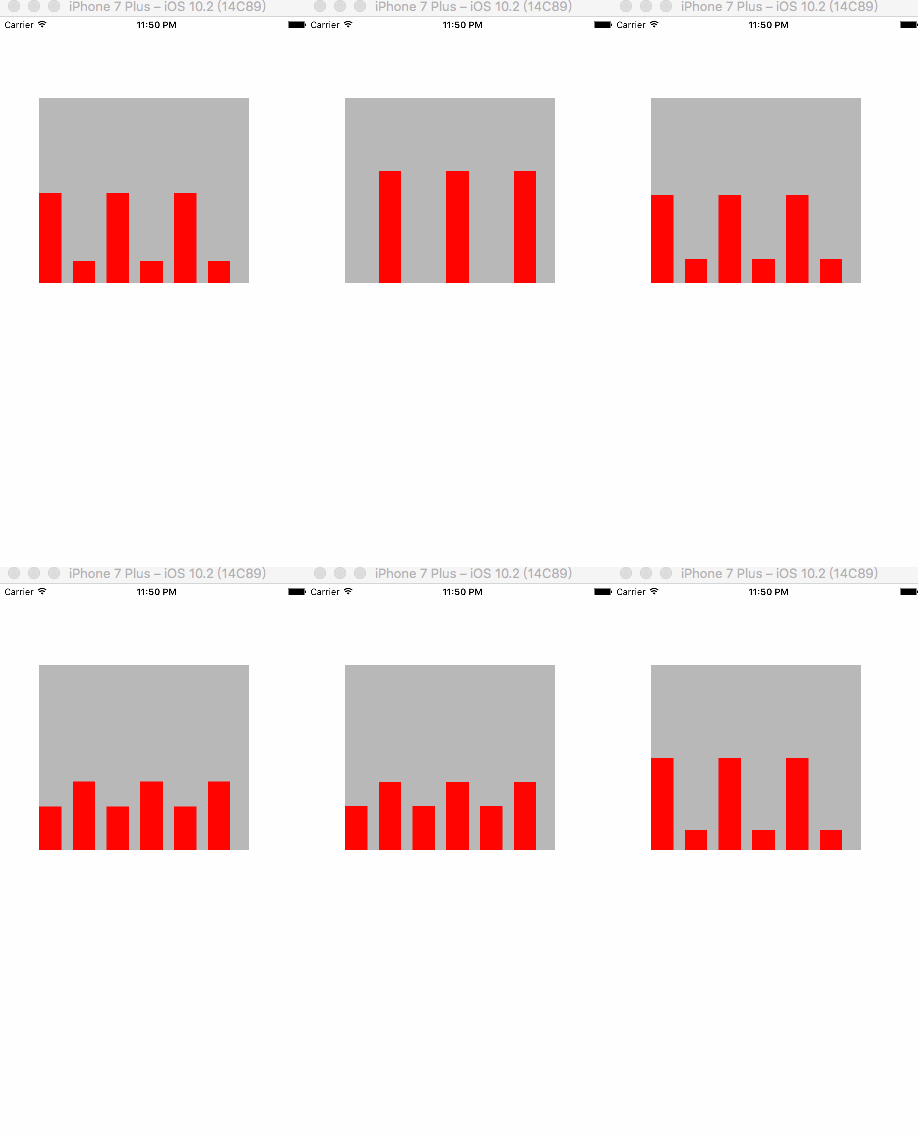
以上就是本文的全部內容,希望對大家的學習有所幫助,也希望大家多多支持本站。
相關文章
+