ios實現app強制更新功能
編輯:IOS開發綜合
最近因項目需求,需要用到強制更新功能,網上搜了一下,挺多的,但是把網上的代碼拷貝以後,發現一個bug,就是進app,彈出框顯示,點擊現在升級,跳轉到AppStore下載裡面,但是我不下載,又切回到app裡面,發現彈出框就不跳了,其實也簡單,就是appdelegate裡面有個代理方法,就是當app從後台切到前台走的方法,將強制更新方法在這裡面在調用一下就行了~~~話不多說,上代碼!!!用的話直接粘貼復制~
效果圖:
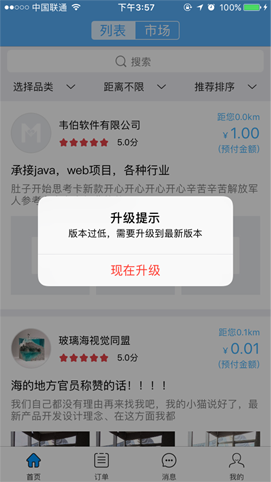
在appdelegate裡面寫下面代碼
  //提示版本更新
 [self VersonUpdate];
#pragma mark ------提示用戶版本更新------

-(void)VersonUpdate{

  //定義app地址
  NSString *urld = [NSString  stringWithFormat:@"http://itunes.apple.com/lookup?id=%d",1178114725];

  NSURL *url = [NSURL URLWithString:urld];

  NSMutableURLRequest *request = [NSMutableURLRequest requestWithURL:url cachePolicy:NSURLRequestReloadIgnoringCacheData timeoutInterval:10];

  [request setHTTPMethod:@"POST"];

  NSURLSession *session = [NSURLSession sharedSession];

  NSURLSessionDataTask *task = [session dataTaskWithURL:url completionHandler:^(NSData * _Nullable data, NSURLResponse * _Nullable response, NSError * _Nullable error) {

    NSLog(@"%@",response);

    NSMutableDictionary *receiveStatusDic = [[NSMutableDictionary alloc]init];

    if (data) {

      NSDictionary *receiveDic = [NSJSONSerialization JSONObjectWithData:data options:NSJSONReadingMutableLeaves error:nil];
      if ([[receiveDic valueForKey:@"resultCount"] intValue] > 0) {

        [receiveStatusDic setObject:@"1" forKey:@"status"];

        [receiveStatusDic setObject:[[[receiveDic valueForKey:@"results"] objectAtIndex:0] valueForKey:@"version"]  forKey:@"version"];

        [self performSelectorOnMainThread:@selector(receiveData:) withObject:receiveStatusDic waitUntilDone:NO];


      }else{

        [receiveStatusDic setValue:@"1" forKey:@"status"];


      }
    }else{


      [receiveStatusDic setValue:@"-1" forKey:@"status"];
    }


  }];

  [task resume];

}
-(void)receiveData:(id)sender
{
  //獲取APP自身版本號
  NSString *localVersion = [[[NSBundle mainBundle]infoDictionary]objectForKey:@"CFBundleShortVersionString"];

  NSArray *localArray = [localVersion componentsSeparatedByString:@"."];//1.0
  NSArray *versionArray = [sender[@"version"] componentsSeparatedByString:@"."];//3 2.1.1


//  if ((versionArray.count == 2) && (localArray.count == versionArray.count)) {

    if ([localArray[0] intValue] < [versionArray[0] intValue]) {

      [self updateVersion];

    }else if ([localArray[0] intValue] == [versionArray[0] intValue]){
      if ([localArray[1] intValue] < [versionArray[1] intValue]) {
        [self updateVersion];

      }else if ([localArray[1] intValue] == [versionArray[1] intValue]){
        if ([localArray[2] intValue] < [versionArray[2] intValue]) {

          [self updateVersion];

        }
      }
    }
//  }

}

-(void)updateVersion{

  NSString *msg = [NSString stringWithFormat:@"版本過低,需要升級到最新版本"];
  UIAlertController *alertController = [UIAlertController alertControllerWithTitle:@"升級提示" message:msg preferredStyle:UIAlertControllerStyleAlert];
  UIAlertAction *otherAction = [UIAlertAction actionWithTitle:@"現在升級" style:UIAlertActionStyleDestructive handler:^(UIAlertAction*action) {

    NSURL *url = [NSURL URLWithString:[NSString stringWithFormat:@"https://itunes.apple.com/cn/app/m-help/id1178114725?mt=8"]];
    [[UIApplication sharedApplication]openURL:url];
  }];
  [alertController addAction:otherAction];
  [self.window.rootViewController presentViewController:alertController animated:YES completion:nil];

}
//當app從後台切到前台時調用的方法
- (void)applicationDidBecomeActive:(UIApplication * )application
{
  [self VersonUpdate];
}
以上就是本文的全部內容,希望對大家的學習有所幫助,也希望大家多多支持本站。
- 上一頁:進修iOS全局賽馬燈
- 下一頁:iOS中關於Cookie驗證登錄狀態


相關文章
+