
iOS之Https自簽名證書認證及數據請求的封裝原理
摘要: 在WWDC 2016開發者大會上,蘋果宣布了一個最後期限:到2017年1月1日 App Store中的所有應用都必須啟用 App Transport Security安全功能。App Transport Security(ATS)是蘋果在IOS 9中引入的一項隱私保護功能,屏蔽明文HTTP資源加載,連接必須經過更安全的HTTPS。蘋果目前允許開發者暫時關閉ATS,可以繼續使用HTTP連接,但到年底所有官方商店的應用都必須強制性使用ATS。
項目中使用的框架是A.networking 3.0及以上版本,由於ATS的原因,IOS只允許使用Https開頭的鏈接,在2016年12月30日以前蘋果允許繞開ATS,如下圖所示:

但是從2017年1月1日開始將不再接受使用http加載資源的應用,因此本篇文章主要講解如何使用AFN進行自簽名證書的通過認證(注:對於使用CA機構認證的證書不需要進行認證,直接使用Https開頭的鏈接進行數據訪問和加載頁面即可)項目已經上傳至GitHub(需要參考源碼的話請點擊鏈接):HttpsSignatureCertificate_jb51.rar
1,建立一個根類 此處命名為A.netPackegeAFN
1> .h文件 ,創建所需要的Get 與 Post 方法
#import <Foundation/Foundation.h>


typedef enum{

  AKNetWorkGET ,  /**< GET請求 */
  AKNetWorkPOST = 1 /**< POST請求 */
}AKNetWorkType;
typedef void (^HttpSuccess)(id json);
typedef void (^HttpErro)(NSError* error);
@interface AKNetPackegeAFN : NSObject

+(instancetype)shareHttpManager;

/*
 *
 netWorkType:請求方式 GET 或 POST
 signature:是否使用簽名證書,是的話直接寫入證書名字,否的話填nil
 api:請求的URL接口
 parameters:請求參數
 sucess:請求成功時的返回值
 fail:請求失敗時的返回值
 *
 */

- (void)netWorkType:(AKNetWorkType)netWorkType Signature:(NSString *)signature API:(NSString *)api Parameters:(NSDictionary *)parameters Success:(HttpSuccess)sucess Fail:(HttpErro)fail;

@end
2> .m文件,導入頭文件AFNetworking.h 新建Manager 屬性並實現shareHttpManager類方法
#import "AKNetPackegeAFN.h"
#import "AFNetworking.h"

@interface AKNetPackegeAFN()

@property (nonatomic,strong) AFHTTPSessionManager *manager;

@end

@implementation AKNetPackegeAFN


+(instancetype)shareHttpManager{
  static dispatch_once_t onece = 0;
  static AKNetPackegeAFN *httpManager = nil;
  dispatch_once(&onece, ^(void){
    httpManager = [[self alloc]init];
  });
  return httpManager;
}
2,Get 與Post 方法的實現
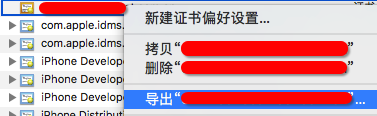
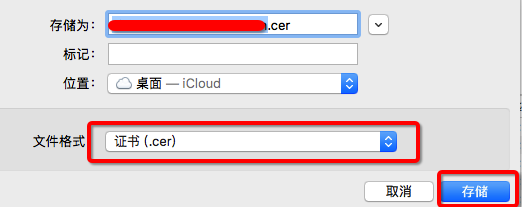
使用時將後台所給的證書轉換為 .cer格式 拖入項目根目錄中,在方法中進行綁定即可例如後台給的證書名為:Kuture.crt 收到證書後雙擊進行安裝,然後打開鑰匙串,將名為Kuture的證書右擊導出,選擇後綴為.cer 然後確定即可 如下圖所示:
 -->
-->  -->
-->
 -->
--> 
GET 與 POST 實現方法的封裝
- (void)netWorkType:(AKNetWorkType)netWorkType Signature:(NSString *)signature API:(NSString *)api Parameters:(NSDictionary *)parameters Success:(HttpSuccess)sucess Fail:(HttpErro)fail{

  //開啟證書驗證模式
  AFSecurityPolicy *securityPolicy = [AFSecurityPolicy policyWithPinningMode:AFSSLPinningModeCertificate];

  //是否允許使用自簽名證書
  signature == nil ? (void)(securityPolicy.alloWinvalidCertificates = NO):(securityPolicy.alloWinvalidCertificates = YES);

  //是否需要驗證域名
  securityPolicy.validatesDomainName = NO;

  _manager = [[AFHTTPSessionManager alloc]initWithBaseURL:[NSURL URLWithString:api]];
  _manager.responseSerializer = [AFJSONResponseSerializer serializer];
  _manager.securityPolicy = securityPolicy;
  _manager.responseSerializer.acceptableContentTypes = [NSSet setWithObjects:@"application/json",@"application/XmlRss/ target=_blank class=infotextkey>Xml",@"text/XmlRss/ target=_blank class=infotextkey>Xml",@"text/json",@"text/plain",@"text/JavaScript",@"text/html", nil];

  if (signature != nil){

    __weak typeof(self) weakSelf = self;
    [_manager setSessionDidReceiveAuthenticationChallengeBlock:^NSURLSessionAuthChallengeDisposition(NSURLSession *session, NSURLAuthenticationChallenge *challenge, NSURLCredential *__autoreleasing *_credential) {

      //獲取服務器的 trust object
      SecTrustRef serverTrust = [[challenge protectionSpace] serverTrust];

      //導入自簽名證書
      NSString *cerPath = [[NSBundle mainBundle] pathForResource:@"你的證書名字" ofType:@"cer"];
      NSData *cerData = [NSData dataWithContentsOfFile:cerPath];

      if (!cerData) {

        NSLog(@"==== .cer file is nil ====");

        return 0;
      }

      NSArray *cerArray = @[cerData];
      weakSelf.manager.securityPolicy.pinnedCertificates = cerArray;
      SecCertificateRef caRef = SecCertificateCreateWithData(NULL, (__bridge CFDataRef)cerData);
      NSCAssert(caRef != nil, @"caRef is nil");

      NSArray *caArray = @[(__bridge id)(caRef)];
      NSCAssert(caArray != nil, @"caArray is nil");

      //將讀取到的證書設置為serverTrust的根證書
      OSStatus status = SecTrustSetAnchorCertificates(serverTrust, (__bridge CFArrayRef)caArray);
      SecTrustSetAnchorCertificatesOnly(serverTrust, NO);
      NSCAssert(errSecSuccess == status, @"SectrustSetAnchorCertificates failed");

      //選擇質詢認證的處理方式
      NSURLSessionAuthChallengeDisposition disposition = NSURLSessionAuthChallengePerformDefaultHandling;
      __autoreleasing NSURLCredential *credential = nil;

      //NSURLAuthenTicationMethodServerTrust質詢認證方式
      if ([challenge.protectionSpace.authenticationMethod isEqualToString:NSURLAuthenticationMethodServerTrust]) {
        //基於客戶端的安全策略來決定是否信任該服務器,不信任則不響應質詢
        if ([weakSelf.manager.securityPolicy evaLuateServerTrust:challenge.protectionSpace.serverTrust forDomain:challenge.protectionSpace.host]) {

          //創建質詢證書
          credential = [NSURLCredential credentialForTrust:challenge.protectionSpace.serverTrust];

          //確認質詢方式
          if (credential) {
            disposition = NSURLSessionAuthChallengeUseCredential;

          } else {

            disposition = NSURLSessionAuthChallengePerformDefaultHandling;
          }

        } else {

          //取消挑戰
          disposition = NSURLSessionAuthChallengeCancelAuthenticationChallenge;
        }

      } else {

        disposition = NSURLSessionAuthChallengePerformDefaultHandling;
      }

      return disposition;
    }];
  }

  if (netWorkType == 0){

    [_manager GET:api parameters:parameters progress:^(NSProgress * _Nonnull uploadProgress) {
    } success:^(NSURLSessionDataTask * _Nonnull task, id _Nullable responSEObject) {

      if (sucess){

        sucess(responSEObject);
      }else{

        NSLog(@"鏈接異常或網絡不存在");
      }
    } failure:^(NSURLSessionDataTask * _Nullable task, NSError * _Nonnull error) {

      fail(error);
    }];

  }else if (netWorkType == 1){


    [_manager POST:api parameters:parameters progress:^(NSProgress * _Nonnull uploadProgress) {
    } success:^(NSURLSessionDataTask * _Nonnull task, id _Nullable responSEObject) {

      if (sucess){

        sucess(responseObject);
      }else{

        NSLog(@"鏈接異常或網絡不存在");
      }
    } failure:^(NSURLSessionDataTask * _Nullable task, NSError * _Nonnull error) {

      fail(error);
    }];

  }
}
2 使用方法,在需要進行數據獲取或傳遞的類裡面,直接導入頭文件 AKNetPackegeAFN.h ,並實現方法即可,如下所示:
//創建對象
  //如果是自簽名證書,使用前先到AKNetPackegeAFN相應的方法裡進行證書的綁定(證書直接拖入項目中)即可
  /*
   *
   netWorkType:請求方式 GET 或 POST
   signature:是否使用簽名證書,是的話直接寫入證書名字,否的話填nil
   api:請求的URL接口
   parameters:請求參數
   sucess:請求成功時的返回值
   fail:請求失敗時的返回值
   *
   */

  AKNetPackegeAFN *netHttps = [AKNetPackegeAFN shareHttpManager];
  [netHttps netWorkType:請求類型 Signature:證書名稱 API:請求URL Parameters:參數 Success:^(id json) {

    NSLog(@"Json:%@",json);
  } Fail:^(NSError *error) {

    NSLog(@"Error:%@",error);
  }];
以上就是本文的全部內容,希望對大家的學習有所幫助,也希望大家多多支持本站。
【iOS之Https自簽名證書認證及數據請求的封裝原理】的相關資料介紹到這裡,希望對您有所幫助! 提示:不會對讀者因本文所帶來的任何損失負責。如果您支持就請把本站添加至收藏夾哦!



- MAC addresses in iOS 7
- iOS中各種控件的使用
- iOS10適配之權限Crash問題的完美解決方案
- AddressBook.Framework應用之ABAddressBookRef,ABRecordRef,ABMutableMultiValueRef,ABMultiValueRef
- iOS完成scrollView下拉刷新和上拉加載
- xcode 詳解創立靜態庫和靜態庫的辦法
- 在iOS AudioQueue中用Speex進行編碼和解碼
- 使用Fiddler搭建Asp.net webapi與Android/IOS調試環境
- iOS中的UISlider滑塊組件用法總結
- iOS 日歷顯示及規則某件事的完成時間(可選)