
iOS 生成圖片驗證碼(實用功能)
編輯:IOS開發綜合
1.數據源
codeArray = ["0","1","2","3","4","5","6","7","8","9","A","B","C","D","E","F","G","H","I","J","K","L","M","N","O","P","Q","R","S","T","U","V","W","X","Y","Z","a","b","c","d","e","f","g","h","i","j","k","l","m","n","o","p","q","r","s","t","u","v","w","x","y","z"]
2.隨機生成驗證碼
for index in 0..<4 {
      let i = (Int)(arc4random()) % (codeArray.count-1)
      let str = codeArray[i]
      if index == 0 {
        codeStr = str as NSString
      }else {
        codeStr = "\(codeStr)\(str)" as NSString
      }
    }
3.創建放置驗證碼的label
for i in 0..<codeStr.length {
      let pxx = arc4random() % UInt32(randWidth)
      let px = CGFloat(pxx) + CGFloat(i)*(self.frame.size.width-3)/CGFloat(codeStr.length)
      let py = arc4random() % UInt32(randHeight)
      let label = UILabel.init(frame: CGRect.init(x: px + 3, y: CGFloat(py), width: textSize.width, height: textSize.height))
      label.text = String.init(format: "%C", codeStr.character(at: i))
      label.font = UIFont.systemFont(ofSize: 20)
      if (isRotation == true) {
        let a = arc4random() % UInt32(60)
        let r = Double(a)-30
        label.transform = CGAff.netransform.init(rotationAngle: CGFloat(r*M_PI)/180)
      }
      bgView.addSubview(label)
    }
4.底部view是隨便畫幾條細線
for _ in 0...9 {
      let path = UIBezierPath.init()
      let pX = arc4random() % UInt32(self.frame.width)
      let pY = arc4random() % UInt32(self.frame.height)
      path.move(to: CGPoint.init(x: CGFloat(pX), y: CGFloat(pY)))
      let ptX = arc4random() % UInt32(self.frame.width)
      let ptY = arc4random() % UInt32(self.frame.height)
      path.addLine(to: CGPoint.init(x: CGFloat(ptX), y: CGFloat(ptY)))
      let layer = CAShapeLayer.init()
      layer.strokeColor = UIColor.getRandomColor(withAlpha: 0.2).cgColor//layer的邊框色
      layer.lineWidth = 1.0
      layer.strokeEnd = 1
      layer.fillColor = UIColor.clear.cgColor
      layer.path = path.cgPath
      bgView.layer.addSublayer(layer)
    }
5.調用方法及回調
public func refreshCode(callBack: @escaping (_ str: NSString) -> ()) {
    initCodeView()
    callBack(codeStr)
  }
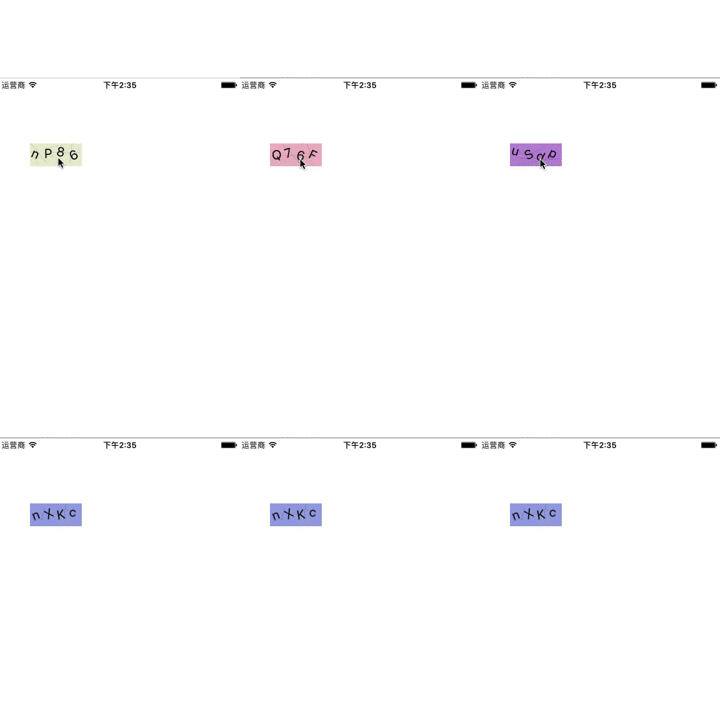
6.效果圖
7.源碼地址
以上所述是小編給大家介紹的IOS 生成圖片驗證碼(實用功能),希望對大家有所幫助,如果大家有任何疑問請給我留言,小編會及時回復大家的。在此也非常感謝大家對本站網站的支持!
[db:作者簡介][db:原文翻譯及解析]【iOS 生成圖片驗證碼(實用功能)】的相關資料介紹到這裡,希望對您有所幫助! 提示:不會對讀者因本文所帶來的任何損失負責。如果您支持就請把本站添加至收藏夾哦!

相關文章
+