自定義輪播圖 自定義集合控件的實現
首先聲明本篇博客是個人原創,絕非抄襲。
自定義實現輪播圖
輪播圖一般實現在一款App的首頁的最上部分,能夠來回滾動的圖片,通常這些圖片都對應一個網絡Url ,用戶點擊的時候,能夠跳轉到對應的UIwebView頁面。輪播圖也可以使用在用戶引導頁面,只不過這時候輪播圖的大小是全屏的,用戶可以在輪播圖上放一些控件,用來收集用戶的信息,當用戶進入程序的時候,可以根據這些信息,加載相應的版塊內容,或者推薦相應的推送。輪播圖也可以在相框的程序中用到,也可以在新聞類App中對應一個專題的整頁的滑動,總之輪播圖增添了App的用戶體驗效果,是必不可少的一個技術實現。
本文的輪播圖采用工具:
UIScrollView(用於實現輪播效果)、UILabel(用於顯示當前是第幾張)、NSTimer(用於實現自動輪播)采用封裝的思想,降低耦合度,將該功能組件化。
目前實現的功能相對來說比較簡單,功能如下:
能夠設置輪播圖的位置大小、設置錄播的一組圖片用數組實現、是否自動輪播、自動輪播間隔時間。
使用:
首先引入ScrollerImage.h 和 ScrollerImage.m文件到工程中
調用接口:
-(id)initWithFrame:(CGRect)frame
Arrary:(NSArray *)imageArr
isAutomLunBo:(BOOL)isYes
setLunBoTime:(NSInteger)intervalTime;
例如:
在一個視圖控制器中
#import 'ScrollerImage.h'//引入自定義輪播圖
@property(nonatomic,strong)ScrollerImage * myImageViewScroller;
//輪播圖的圖片數組
NSArray * arrImg = @[@'1.png',@'2.png',@'3.png',@'4.png',@'5.png',@'6.png',@'7.png',@'8.png',@'9.png'];
self.myImageViewScroller = [[ScrollerImage alloc]initWithFrame:view.frame Arrary:arrImg isAutomLunBo:NO setLunBoTime:2.3];
[view addSubview:self.myImageViewScroller];
代碼:

#import <UIKit/UIKit.h>

@interface ScrollerImage : UIView<UIScrollViewDelegate>
@property(assign)NSInteger count;

-(id)initWithFrame:(CGRect)frame
              Arrary:(NSArray *)imageArr
        isAutomLunBo:(BOOL)isYes
        setLunBoTime:(NSInteger)intervalTime;

-(void)dealloc;
@end
ScrollerImage.h
#import 'ScrollerImage.h'

@interface ScrollerImage ()

@property (strong, nonatomic)  UIScrollView *scroll;
@property (strong, nonatomic)  UILabel *toKonwCurrentPageLabel;
@property(strong,nonatomic)NSTimer * timer;

@property(assign)int n;

@end

@implementation ScrollerImage

//自定義輪播圖
-(id)initWithFrame:(CGRect)frame Arrary:(NSArray *)imageArr isAutomLunBo:(BOOL)isYes setLunBoTime:(NSInteger)intervalTime;{

    if ([super init]) {
        self.frame = frame;
    }
    self.count = imageArr.count;
    CGFloat kWidth = self.frame.size.width;
    CGFloat kHeight = self.frame.size.height;
    //滑塊
    self.scroll = [[UIScrollView alloc]initWithFrame:CGRectMake(0, 0, kWidth, kHeight)];
    self.scroll.contentSize = CGSizeMake(kWidth * imageArr.count, kHeight);
    self.scroll.pagingEnabled = YES;
    self.scroll.delegate = self;
    self.scroll.scrollEnabled = YES;
    [self addSubview:self.scroll];
    //顯示圖片張數
    self.toKonwCurrentPageLabel = [[UILabel alloc]initWithFrame:CGRectMake(kWidth - 90, kHeight - 30, 60, 20)];
    self.toKonwCurrentPageLabel.layer.masksToBounds = YES;
    self.toKonwCurrentPageLabel.layer.cornerRadius = 11;
    self.toKonwCurrentPageLabel.backgroundColor = [UIColor blackColor];
    self.toKonwCurrentPageLabel.textColor = [UIColor whiteColor];
    self.toKonwCurrentPageLabel.textAlignment = NSTextAlignmentCenter;
    self.toKonwCurrentPageLabel.font = [UIFont systemFontOfSize:12];
    self.toKonwCurrentPageLabel.alpha = 0.3;
    self.toKonwCurrentPageLabel.text = [NSString stringWithFormat:@'1/共%lu張',self.count];
    for (int i = 0; i < imageArr.count; i++) {
        UIImageView * viewImage = [[UIImageView alloc]initWithFrame:CGRectMake(i*kWidth, 0, kWidth, kHeight)];
        viewImage.image = [UIImage imageNamed:imageArr[i]];
        [self.scroll addSubview:viewImage];
    }
    [self.scroll addSubview:self.toKonwCurrentPageLabel];
    [self.scroll bringSubviewToFront:self.toKonwCurrentPageLabel];
    //輪播效果
    if (isYes == YES) {
        self.timer = [NSTimer timerWithTimeInterval:intervalTime target:self selector:@selector(LunBoAction:) userInfo:nil repeats:YES];
        [[NSRunLoop currentRunLoop]addTimer:self.timer forMode:NSRunLoopCommonModes];
    }
    self.n = 0;//初始化輪播位置
    return self;
}

//LunBo
-(void)LunBoAction:(NSTimer *)sender{
    self.n +=1;
    self.scroll.contentOffset = CGPointMake(self.scroll.frame.size.width * (self.n % (int)self.count), 0);
    int i = self.n %(int)self.count;
    [self setLabelWith:i contentOffset:self.scroll.frame.size.width andHeight:self.scroll.frame.size.height];
    if (self.n == self.count) {
        self.n = 0;
    }
}
//人為滑動圖片
-(void)scrollViewDidEndDecelerating:(UIScrollView *)scrollView{
    CGFloat width = scrollView.frame.size.width;
    CGFloat height = scrollView.frame.size.height;
   self.n  =  scrollView.contentOffset.x/width;
    [self setLabelWith:self.n contentOffset:width andHeight:height];
}
-(void)setLabelWith:(int)i contentOffset:(CGFloat)width andHeight:(CGFloat)height{
    self.toKonwCurrentPageLabel.text = [NSString stringWithFormat:@'%d/共%lu張',i+1,self.count];
    self.toKonwCurrentPageLabel.frame = CGRectMake(width*(i + 1) - 90, height - 30 , 60, 20);
}

-(void)dealloc{
    self.timer = nil;
    [self.timer invalidate];

}
@end
ScrollerImage.m
效果截圖:

自定義集合控件的實現
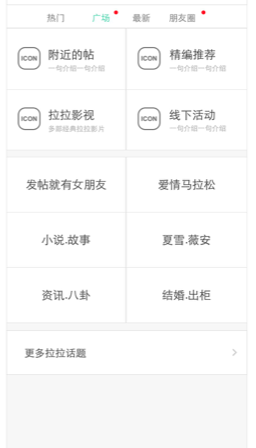
集合視圖也能夠實現輪播圖,我覺得有時間再次研究輪播圖的實現,下面使用到集合視圖是解決這類問題,看下面的兩幅圖片,左邊的是在請求數據後解析的結果沒有錄播圖,並且上面四個主題“附近的貼”“精編推薦”。。是不固定的主題,有可能某一天主題變化為兩個,下面6個主題的板塊主題個數也是有可能變化的。右邊的圖片中,有輪播圖,上下兩個板塊的功能與圖片一中的是一樣的。
技術點分析:
首先因為主題有可能要變化,根據界面的設計需求,所以最好是使用集合視圖UICollectionView 實現。而是否有輪播圖可以使用一個布爾值判斷,如果有輪播圖就開啟集合視圖的頁眉,如果沒有就關閉集合視圖的頁眉,並動態的改變位置。比較難以實現的是,如何在一個 UIViewController 中實現有兩個 UICollectionView
,對於這個問題,可以在 UICollectionViewDelegate 的協議方法中,根據可重用ID做一下判斷即可。

實現功能的全部源代碼:
需要源代碼的園友可以在左側QQ我哦,如有轉載請說明出處,謝謝。
#import <UIKit/UIKit.h>

@interface ViewController : UIViewController


@end
ViewController.m
#import 'ViewController.h'
#import 'Cell.h'
#import 'HeaderView.h'
#import 'FooterView.h'
#import 'ScrollerImage.h'//引入自定義輪播圖

@interface ViewController ()<UICollectionViewDataSource,UICollectionViewDelegate,UICollectionViewDelegateFlowLayout>
{
    BOOL isHaveLunBo;//判斷是否有輪播圖
}
@property(nonatomic,strong)UIScrollView * scroll;
@property(nonatomic,strong)ScrollerImage * myImageViewScroller;

@property(nonatomic,strong)UICollectionView * collectionView1;
@property(nonatomic,strong)UICollectionView * collectionView2;

//測試數據
@property(nonatomic,strong)NSMutableArray * arrayOfTestDataSouce1;
@property(nonatomic,strong)NSMutableArray * arrayOfTestDataSouce2;


@end

@implementation ViewController

//-lazy
-(NSMutableArray *)arrayOfTestDataSouce1{
    if (_arrayOfTestDataSouce1 == nil) {
        //我在這裡給數據添加數據,可以在請求到數據後再添加數據
        NSArray * testArr = @[@'A',@'B',@'C',@'D'];
        self.arrayOfTestDataSouce1 = [NSMutableArray arrayWithArray:testArr];
        NSLog(@'%@',self.arrayOfTestDataSouce1);
    }
    return _arrayOfTestDataSouce1;
}


-(NSMutableArray *)arrayOfTestDataSouce2{
    if (_arrayOfTestDataSouce2 == nil) {
        //我在這裡給數據添加數據,可以在請求到數據後再添加數據
        NSArray * testArr = @[@'AA',@'BB',@'CC',@'DD',@'EE',@'FF'];
        self.arrayOfTestDataSouce2 = [NSMutableArray arrayWithArray:testArr];
        NSLog(@'%@',self.arrayOfTestDataSouce2);
    }
    return _arrayOfTestDataSouce2;
}

- (void)viewDidLoad {
    [super viewDidLoad];

    //關閉毛玻璃效果
    self.navigationController.navigationBar.translucent = NO;

    //添加 集合視圖1
    UIView * vi = [[UIView alloc] init];
    vi.frame = CGRectMake(0, 0, [UIScreen mainScreen].bounds.size.width, 125);
    vi.backgroundColor = [UIColor redColor];

    UICollectionViewFlowLayout *layout = [[UICollectionViewFlowLayout alloc] init];
    //配置屬性
    //1.設置每個item的大小
    layout.itemSize = CGSizeMake(self.view.bounds.size.width / 2 - 10, 50);
    //2.設置縮進量 (上,左,下,右)
    layout.sectionInset = UIEdgeInsetsMake(0, 5, 0, 5);
    //3.設置行的最小間距
    layout.minimumLineSpacing = 2.5;
    //4.設置item的最小間距
    layout.minimumInteritemSpacing = 10;


    self.collectionView1 = [[UICollectionView alloc] initWithFrame:vi.frame collectionViewLayout:layout];
    //這裡巨坑啊,設定代理一定要寫到初始化集合視圖的下面
    self.collectionView1.delegate = self;
    self.collectionView1.dataSource = self;
    self.collectionView1.backgroundColor = [UIColor brownColor];

    [vi addSubview:self.collectionView1];
    [self.view addSubview:vi];

    //判斷是否有輪播圖(默認有-YES)
    isHaveLunBo = YES;


    //添加 集合視圖2
    UICollectionViewFlowLayout *layout2 = [[UICollectionViewFlowLayout alloc] init];
    //配置屬性
    //1.設置每個item的大小
    layout2.itemSize = CGSizeMake(50, 50);
    //2.設置縮進量 (上,左,下,右)
    layout2.sectionInset = UIEdgeInsetsMake(0, 5, 0, 5);
    //3.設置行的最小間距
    layout2.minimumLineSpacing = 10;
    //4.設置item的最小間距
    layout2.minimumInteritemSpacing = 10;


    //設置大小
    if (isHaveLunBo) {
            self.collectionView2 = [[UICollectionView alloc] initWithFrame:CGRectMake(0, 125, self.collectionView1.frame.size.width, 180 + 125) collectionViewLayout:layout2];
    }else{
           self.collectionView2 = [[UICollectionView alloc] initWithFrame:CGRectMake(0, 125, self.collectionView1.frame.size.width, 180) collectionViewLayout:layout2];
    }

    self.collectionView2.delegate = self;
    self.collectionView2.dataSource = self;
    [self.view addSubview:self.collectionView2];


    //注冊cell
    [self.collectionView1 registerClass:[Cell class] forCellWithReuseIdentifier:@'item1'];
    [self.collectionView2 registerClass:[Cell class] forCellWithReuseIdentifier:@'item2'];

    //注冊頁眉
    [self.collectionView1 registerClass:[HeaderView class] forSupplementaryViewOfKind:UICollectionElementKindSectionHeader withReuseIdentifier:@'header'];
    [self.collectionView2 registerClass:[FooterView class] forSupplementaryViewOfKind:UICollectionElementKindSectionFooter withReuseIdentifier:@'footer'];
    //注冊頁腳
    [self.collectionView2 registerClass:[HeaderView class] forSupplementaryViewOfKind:UICollectionElementKindSectionHeader withReuseIdentifier:@'header'];
    [self.collectionView2 registerClass:[FooterView class] forSupplementaryViewOfKind:UICollectionElementKindSectionFooter withReuseIdentifier:@'footer'];

}


#pragma mark - UICollectionViewDataSource -
//設置分區的item數目
- (NSInteger)collectionView:(UICollectionView *)collectionView numberOfItemsInSection:(NSInteger)section {
    if (collectionView == self.collectionView1) {
        return self.arrayOfTestDataSouce1.count;
    }
    else {
        return self.arrayOfTestDataSouce2.count;
    }

}

//設置分區數目
- (NSInteger)numberOfSectionsInCollectionView:(UICollectionView *)collectionView
{
    if (collectionView == self.collectionView1) {
        return 1;
    }
    else {
        return 1;
    }

}

#pragma Mark======設置自定義的cell
- (UICollectionViewCell *)collectionView:(UICollectionView *)collectionView cellForItemAtIndexPath:(NSIndexPath *)indexPath{

    if (collectionView == self.collectionView1) {
              Cell *cell = [collectionView dequeueReusableCellWithReuseIdentifier:@'item1' forIndexPath:indexPath];
    cell.lab.text = self.arrayOfTestDataSouce1[indexPath.item];
    cell.lab.frame = cell.bounds;

    return cell;
    }
    else {
        Cell *cell = [collectionView dequeueReusableCellWithReuseIdentifier:@'item2' forIndexPath:indexPath];
        cell.lab.text = self.arrayOfTestDataSouce2[indexPath.item];
        return cell;
    }
}

#pragma Mark======設置頁眉與頁腳的視圖
-(UICollectionReusableView *)collectionView:(UICollectionView *)collectionView viewForSupplementaryElementOfKind:(NSString *)kind atIndexPath:(NSIndexPath *)indexPath{
    if ([kind isEqualToString:UICollectionElementKindSectionHeader]) {

        if (collectionView == self.collectionView2) {
            //返回頁眉
            HeaderView * view = [collectionView dequeueReusableSupplementaryViewOfKind:kind withReuseIdentifier:@'header' forIndexPath:indexPath];
            //view.titleLabel.text = @'頁眉,可以在黃色區域放輪播圖';

            if (isHaveLunBo == YES) {
                //輪播圖的圖片數組
                NSArray * arrImg = @[@'1.png',@'2.png',@'3.png',@'4.png',@'5.png',@'6.png',@'7.png',@'8.png',@'9.png'];
                self.myImageViewScroller = [[ScrollerImage alloc]initWithFrame:view.frame Arrary:arrImg isAutomLunBo:NO setLunBoTime:2.3];
                [view addSubview:self.myImageViewScroller];
                return view;
            }else{
                return nil;
            }
        }else{
            return nil;
        }

    } else {
        //返回頁腳
//        FooterView *footer = [collectionView dequeueReusableSupplementaryViewOfKind:kind withReuseIdentifier:@'footer' forIndexPath:indexPath];
//        footer.footerLabel.text = @'頁腳';
//        return footer;
        return nil;
    }

}


#pragma mark - UICollectionViewDelegateFlowLayout -
//動態配置每個分區的item的size大小
- (CGSize)collectionView:(UICollectionView *)collectionView layout:(UICollectionViewLayout *)collectionViewLayout sizeForItemAtIndexPath:(NSIndexPath *)indexPath {
    if (indexPath.section == 0) {
        return CGSizeMake((self.view.frame.size.width - 15)/2, 50);
    }
    return CGSizeMake((self.view.frame.size.width - 60)/3, 50);
}
//動態配置item的縮進量
- (UIEdgeInsets)collectionView:(UICollectionView *)collectionView layout:(UICollectionViewLayout *)collectionViewLayout insetForSectionAtIndex:(NSInteger)section {
    if (section == 0) {
        //上、左、下、右
        return UIEdgeInsetsMake(10, 5, 10, 5);
    }
    return UIEdgeInsetsMake(10, 5, 10, 5);
}
//動態配置item 左右最小間距
- (CGFloat)collectionView:(UICollectionView *)collectionView layout:(UICollectionViewLayout *)collectionViewLayout minimumInteritemSpacingForSectionAtIndex:(NSInteger)section {
    return 5;
}
//動態配置行的最小間距
- (CGFloat)collectionView:(UICollectionView *)collectionView layout:(UICollectionViewLayout *)collectionViewLayout minimumLineSpacingForSectionAtIndex:(NSInteger)section {
    return 5;
}
//動態的設置頁眉
-(CGSize)collectionView:(UICollectionView *)collectionView layout:(UICollectionViewLayout *)collectionViewLayout referenceSizeForHeaderInSection:(NSInteger)section{

    if (collectionView == self.collectionView1) {
        //這裡也可以仿照下面寫法,為 collectionView1 設定是否添加頁眉
        return CGSizeMake(0, 0);
    }else{
        if (isHaveLunBo) {
            return CGSizeMake(20, 100);
        }else{
            return CGSizeMake(0, 0);
        }

    }

}

//動態的設置頁腳
-(CGSize)collectionView:(UICollectionView *)collectionView layout:(UICollectionViewLayout *)collectionViewLayout referenceSizeForFooterInSection:(NSInteger)section{
    return CGSizeMake(0, 0);
}

#pragma mark - UICollectionViewDelegate -
- (void)collectionView:(UICollectionView *)collectionView didSelectItemAtIndexPath:(NSIndexPath *)indexPath {
//選中某一行的點擊事件寫這裡
    NSLog(@'選擇了');
}

- (void)didReceiveMemoryWarning {
    [super didReceiveMemoryWarning];
    // Dispose of any resources that can be recreated.
}

@end
ViewController.m
#import <UIKit/UIKit.h>

@interface ScrollerImage : UIView<UIScrollViewDelegate>
@property(assign)NSInteger count;

-(id)initWithFrame:(CGRect)frame
              Arrary:(NSArray *)imageArr
        isAutomLunBo:(BOOL)isYes
        setLunBoTime:(NSInteger)intervalTime;

-(void)dealloc;
@end
ScrollerImage.h
#import 'ScrollerImage.h'

@interface ScrollerImage ()

@property (strong, nonatomic)  UIScrollView *scroll;
@property (strong, nonatomic)  UILabel *toKonwCurrentPageLabel;
@property(strong,nonatomic)NSTimer * timer;

@property(assign)int n;

@end

@implementation ScrollerImage

//自定義輪播圖
-(id)initWithFrame:(CGRect)frame Arrary:(NSArray *)imageArr isAutomLunBo:(BOOL)isYes setLunBoTime:(NSInteger)intervalTime;{

    if ([super init]) {
        self.frame = frame;
    }
    self.count = imageArr.count;
    CGFloat kWidth = self.frame.size.width;
    CGFloat kHeight = self.frame.size.height;
    //滑塊
    self.scroll = [[UIScrollView alloc]initWithFrame:CGRectMake(0, 0, kWidth, kHeight)];
    self.scroll.contentSize = CGSizeMake(kWidth * imageArr.count, kHeight);
    self.scroll.pagingEnabled = YES;
    self.scroll.delegate = self;
    self.scroll.scrollEnabled = YES;
    [self addSubview:self.scroll];
    //顯示圖片張數
    self.toKonwCurrentPageLabel = [[UILabel alloc]initWithFrame:CGRectMake(kWidth - 90, kHeight - 30, 60, 20)];
    self.toKonwCurrentPageLabel.layer.masksToBounds = YES;
    self.toKonwCurrentPageLabel.layer.cornerRadius = 11;
    self.toKonwCurrentPageLabel.backgroundColor = [UIColor blackColor];
    self.toKonwCurrentPageLabel.textColor = [UIColor whiteColor];
    self.toKonwCurrentPageLabel.textAlignment = NSTextAlignmentCenter;
    self.toKonwCurrentPageLabel.font = [UIFont systemFontOfSize:12];
    self.toKonwCurrentPageLabel.alpha = 0.3;
    self.toKonwCurrentPageLabel.text = [NSString stringWithFormat:@'1/共%lu張',self.count];
    for (int i = 0; i < imageArr.count; i++) {
        UIImageView * viewImage = [[UIImageView alloc]initWithFrame:CGRectMake(i*kWidth, 0, kWidth, kHeight)];
        viewImage.image = [UIImage imageNamed:imageArr[i]];
        [self.scroll addSubview:viewImage];
    }
    [self.scroll addSubview:self.toKonwCurrentPageLabel];
    [self.scroll bringSubviewToFront:self.toKonwCurrentPageLabel];
    //輪播效果
    if (isYes == YES) {
        self.timer = [NSTimer timerWithTimeInterval:intervalTime target:self selector:@selector(LunBoAction:) userInfo:nil repeats:YES];
        [[NSRunLoop currentRunLoop]addTimer:self.timer forMode:NSRunLoopCommonModes];
    }
    self.n = 0;//初始化輪播位置
    return self;
}

//LunBo
-(void)LunBoAction:(NSTimer *)sender{
    self.n +=1;
    self.scroll.contentOffset = CGPointMake(self.scroll.frame.size.width * (self.n % (int)self.count), 0);
    int i = self.n %(int)self.count;
    [self setLabelWith:i contentOffset:self.scroll.frame.size.width andHeight:self.scroll.frame.size.height];
    if (self.n == self.count) {
        self.n = 0;
    }
}
//人為滑動圖片
-(void)scrollViewDidEndDecelerating:(UIScrollView *)scrollView{
    CGFloat width = scrollView.frame.size.width;
    CGFloat height = scrollView.frame.size.height;
   self.n  =  scrollView.contentOffset.x/width;
    [self setLabelWith:self.n contentOffset:width andHeight:height];
}
-(void)setLabelWith:(int)i contentOffset:(CGFloat)width andHeight:(CGFloat)height{
    self.toKonwCurrentPageLabel.text = [NSString stringWithFormat:@'%d/共%lu張',i+1,self.count];
    self.toKonwCurrentPageLabel.frame = CGRectMake(width*(i + 1) - 90, height - 30 , 60, 20);
}

-(void)dealloc{
    self.timer = nil;
    [self.timer invalidate];

}
@end
ScrollerImage.m 
#import <UIKit/UIKit.h>

@interface FooterView : UICollectionReusableView
@property (nonatomic, retain) UILabel *footerLabel;

@end
FooterView.h
#import 'FooterView.h'

@implementation FooterView
- (instancetype)initWithFrame:(CGRect)frame {
    self = [super initWithFrame:frame];
    if (self) {
        [self addSubview:self.footerLabel];
    }
    return self;
}

- (UILabel *)footerLabel {
    if (!_footerLabel) {
        self.footerLabel = [[UILabel alloc] initWithFrame:self.bounds];
        _footerLabel.backgroundColor = [UIColor greenColor];
    }
    return _footerLabel;
}

@end
FooterView.m
#import <UIKit/UIKit.h>


@interface HeaderView : UICollectionReusableView
@property (nonatomic, retain) UILabel *titleLabel;

@end
HeaderView.h
#import 'HeaderView.h'

@implementation HeaderView


- (instancetype)initWithFrame:(CGRect)frame {
    self = [super initWithFrame:frame];
    if (self) {
        [self addSubview:self.titleLabel];
    }
    return self;
}

- (UILabel *)titleLabel {
    if (!_titleLabel) {
        self.titleLabel = [[UILabel alloc] initWithFrame:self.bounds];
        _titleLabel.backgroundColor = [UIColor yellowColor];
    }
    return _titleLabel;
}

@end
HeaderView.m
#import <UIKit/UIKit.h>

@interface Cell : UICollectionViewCell

@property(nonatomic,strong)UILabel * lab;

@end
Cell.h
#import 'Cell.h'

@implementation Cell

- (instancetype)initWithFrame:(CGRect)frame {
    self = [super initWithFrame:frame];
    if (self) {
        //按照此格式,添加一些其他控件
        [self.contentView addSubview:self.lab];
    }
    return self;
}


- (UILabel *)lab {
    if (!_lab) {
        self.lab = [[UILabel alloc] initWithFrame:CGRectMake(0, 0, self.frame.size.width, self.frame.size.height)];
        //測試顏色
        _lab.backgroundColor = [UIColor greenColor];

        _lab.textAlignment = NSTextAlignmentCenter;
        _lab.font = [UIFont systemFontOfSize:15];
    }
    return _lab;
}

@end
Cell.m
源代碼實現效果:
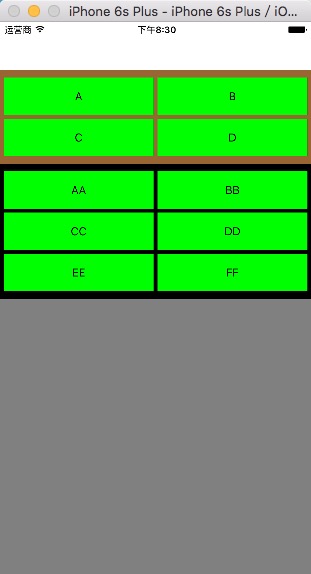
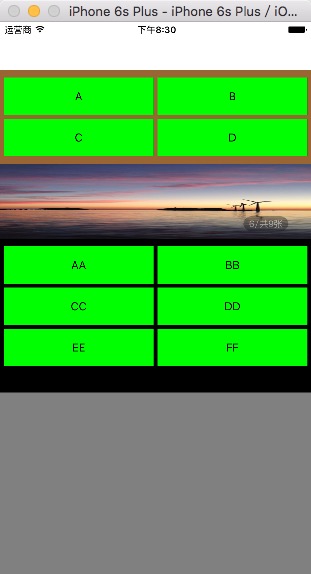
左邊圖片假設沒有請求到輪播圖,右邊圖片假設請求到輪播圖,關鍵代碼
isHaveLunBo = YES;如果為NO,不顯示錄播圖,具體情況根據網絡請求結果處理,這裡僅僅模擬效果。
- 上一頁:iOS建子工程
- 下一頁:常見ios問題(實時更新)


- iOS手勢辨認的詳細運用辦法(拖動,縮放,旋轉,點擊,手勢依賴,自定義手勢)
- iOS自定義UICollectionViewFlowLayout完成圖片閱讀效果
- iOS自定義控件要留意的問題
- iOS開發之代碼調用自定義tableView
- iOS在自定義控件中怎樣獲取以後的navigationController停止push頁面
- [iOS]零碎UITabBarController步驟及自定義
- IOS 運用XIB制造Storyboard運用的自定義控件
- IOS 開發之自定義按鈕完成文字圖片地位隨意定制
- iOS 為自定義前往按鈕leftBarButtonItem的頁面添加右滑前往功用
- iOS開發UI篇—CAlayer(自定義layer)
- IOS 自定義UICollectionView的頭視圖或許尾視圖UICollectionReusableView
- iOS中自定義進度條設置半通明背景(Swift 3)
- iOS10自定義tabBar出錯
- iOS導入自定義字體,藝術字體
- 【iOS】自定義textField的clearButton