從零開始學Swift學習筆記(Day57)注釋規范
前面說到Swift注釋的語法有兩種:單行注釋(//)和多行注釋(/*...*/)。這裡來介紹一下他們的使用規范。
文件注釋
文件注釋就在每一個文件開頭添加注釋,文件注釋通常包括如下信息:版權信息、文件名、所在模塊、作者信息、歷史版本信息、文件內容和作用等。
下面看一個文件注釋的示例:
/*

Copyright (C) 2015 Eorient Inc. All Rights Reserved.

See LICENSE.txt for this sample’s licensing information


Description:

This file contains the foundational subclass of NSOperation.


History:

15/7/22: Created by Tony Guan.

15/8/20: Add socket library

15/8/22: Add math library

*/
這個注釋只是提供了版權信息、文件內容和歷史版本信息等,文件注釋要根據自己實際情況包括內容。
文檔注釋
文檔注釋就是這種注釋內容能夠生成API幫助文檔。文檔注釋主要對類型、屬性、方法或函數等功能。
文檔注釋是稍微將單行注釋(//)和多行注釋(/*...*/)做一點“手腳”後,就成為了文檔注釋,單行文檔注釋(///)和多行文檔注釋(/**...*/)。
下面代碼示例:
import Foundation


/**

    The protocol that types may implement if they wish to be

       notified of significant operation lifecycle events.

*/

protocol OperationObserver {


    /// Invoked immediately prior to the `Operation`'s `execute()` method.

    func operationDidStart(operation: Operation)

}
代碼中使用了文檔注釋。
可以使用一些工具將這些文檔注釋生成API文件
代碼注釋
程序代碼中處理文檔注釋還需要在一些關鍵的地方添加代碼注釋,文檔注釋一般是給一些看不到源代碼的人看的幫助文檔,而代碼注釋是給閱讀源代碼人參考的。代碼注釋一般是采用單行注釋(//)和多行注釋(/*...*/)。
有的時候也會在代碼的尾端進行注釋,這要求注釋內容極短,應該在有足夠的空白來分開代碼和注釋。尾端注釋示例代碼如下:
init(timeout: NSTimeInterval) {

     self.timeout = timeout  //初始化

}
使用地標注釋
隨著編碼過程深入,工程代碼量會增加,任何在這大量的代碼中能快速找到需要方法或者是剛才修改過代碼呢?
在Swift代碼中使用地標注釋,然後就可以使用Xcode工具在代碼中快速查找了。地標注釋有三個:
-
MARK,用於方法或函數的注釋。
-
TODO,表示這裡代碼有沒有完成,還要處理。
-
FIXME,表示這裡修改了代碼。
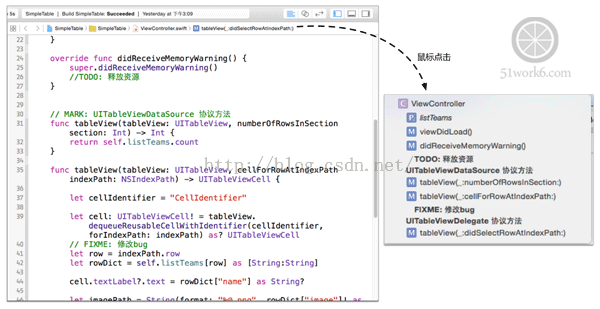
這些注釋會出現在Xcode的 Jump Bar中。來看一個示例:
class ViewController: UIViewController,

      ÊUITableViewDataSource, UITableViewDelegate {


    var listTeams: [[String:String]]!


    override func viewDidLoad() {

        super.viewDidLoad()

        ...

    }


    override func didReceiveMemoryWarning() {

        super.didReceiveMemoryWarning()

        //TODO: 釋放資源                                 //使用TODO注釋

    }


    // MARK: UITableViewDataSource 協議方法             //使用MARK注釋

    func tableView(tableView: UITableView,

        ÊnumberOfRowsInSection section: Int) -> Int {

        return self.listTeams.count

    }


    func tableView(tableView: UITableView,

        ÊcellForRowAtIndexPath indexPath: NSIndexPath) -> UITableViewCell {


        let cellIdentifier = "CellIdentifier"


        let cell: UITableViewCell! = tableView

          Ê.dequeueReusableCellWithIdentifier(cellIdentifier,

              ÊforIndexPath: indexPath) as? UITableViewCell

        // FIXME: 修改bug                               //使用了FIXME注釋

        let row = indexPath.row

        let rowDict = self.listTeams[row] as [String:String]

        ...

        return cell

    }


    // MARK: UITableViewDelegate 協議方法                   //使用MARK注釋

    func tableView(tableView: UITableView,

          ÊdidSelectRowAtIndexPath indexPath: NSIndexPath) {

        ...

    }

}
上述代碼中使用三種地標注釋,在使用時候後面要跟有一個冒號(:)。
注釋之後如果使用呢?打開Xcode的 Jump Bar,如下圖,這些地標注釋會在下拉列表中粗體顯示,點擊列表項就會跳轉到注釋行。
歡迎關注關東升新浪微博@tony_關東升。


- iOS從零開端學習直播之2.采集
- iOS從零開端學習直播之3.美顏
- 蘋果iOS10公測版首個版本開始推送
- iOS10更易遭暴力破解,蘋果稱已開始修復
- WWDC2015場內橫幅開始布置:iOS9呢?
- 蘋果開始審核iOS9/El Capitan/watchOS 2應用
- 更好體驗:支持蘋果iOS9/watchOS 2正式版應用開始上架
- 蘋果iOS9.2開始內測,正式版或隨iPad Pro一同到來
- itunes無法備份 未能與iphone開始會話解決方法
- 蘋果iPhone6電信版開始預約
- 9.12可以開始預定iPhone 6和iPhone 6 Plus
- 國行iPhone6今日開始預售地址
- 國行iPhone6/iPhone6 Plus預訂用戶開始收貨
- 盤古越獄ios8.1越獄超時請重新點擊開始越獄怎麼辦?
- iOS9正式發布 將於7月份開始推送