
iOS開發網絡篇—實現大文件的多線程斷點下載
編輯:IOS開發綜合
說明:本文介紹多線程斷點下載。項目中使用了蘋果自帶的類,實現了同時開啟多條線程下載一個較大的文件。因為實現過程較為復雜,所以下面貼出完整的代碼。
實現思路:下載開始,創建一個和要下載的文件大小相同的文件(如果要下載的文件為100M,那麼就在沙盒中創建一個100M的文件,然後計算每一段的下載量,開啟多條線程下載各段的數據,分別寫入對應的文件部分)。
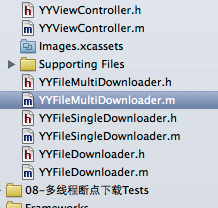
項目中用到的主要類如下:
完成的實現代碼如下:
主控制器中的代碼:
#import "YYViewController.h"
#import "YYFileMultiDownloader.h"

@interface YYViewController ()
@property (nonatomic, strong) YYFileMultiDownloader *fileMultiDownloader;
@end

@implementation YYViewController
- (YYFileMultiDownloader *)fileMultiDownloader
{
  if (!_fileMultiDownloader) {
    _fileMultiDownloader = [[YYFileMultiDownloader alloc] init];
    // 需要下載的文件遠程URL
    _fileMultiDownloader.url = @"http://192.168.1.200:8080/MJServer/resources/jre.zip";
    // 文件保存到什麼地方
    NSString *caches = [NSSearchPathForDirectoriesInDomains(NSCachesDirectory, NSUserDomainMask, YES) lastObject];
    NSString *filepath = [caches stringByAppendingPathComponent:@"jre.zip"];
    _fileMultiDownloader.destPath = filepath;
  }
  return _fileMultiDownloader;
}

- (void)viewDidLoad
{
  [super viewDidLoad];

}

- (void)touchesBegan:(NSSet *)touches withEvent:(UIEvent *)event
{
  [self.fileMultiDownloader start];
}

@end
自定義一個基類
YYFileDownloader.h文件
#import <Foundation/Foundation.h>

@interface YYFileDownloader : NSObject
{
  BOOL _downloading;
}
/**
 * 所需要下載文件的遠程URL(連接服務器的路徑)
 */
@property (nonatomic, copy) NSString *url;
/**
 * 文件的存儲路徑(文件下載到什麼地方)
 */
@property (nonatomic, copy) NSString *destPath;

/**
 * 是否正在下載(有沒有在下載, 只有下載器內部才知道)
 */
@property (nonatomic, readonly, getter = isDownloading) BOOL downloading;

/**
 * 用來監聽下載進度
 */
@property (nonatomic, copy) void (^progressHandler)(double progress);

/**
 * 開始(恢復)下載
 */
- (void)start;

/**
 * 暫停下載
 */
- (void)pause;
@end
YYFileDownloader.m文件
#import "YYFileDownloader.h"

@implementation YYFileDownloader
@end
下載器類繼承自YYFileDownloader這個類

YYFileSingDownloader.h文件
#import "YYFileDownloader.h"

@interface YYFileSingleDownloader : YYFileDownloader
/**
 * 開始的位置
 */
@property (nonatomic, assign) long long begin;
/**
 * 結束的位置
 */
@property (nonatomic, assign) long long end;
@end
YYFileSingDownloader.m文件
#import "YYFileSingleDownloader.h"
@interface YYFileSingleDownloader() <NSURLConnectionDataDelegate>
/**
 * 連接對象
 */
@property (nonatomic, strong) NSURLConnection *conn;

/**
 * 寫數據的文件句柄
 */
@property (nonatomic, strong) NSFileHandle *writeHandle;
/**
 * 當前已下載數據的長度
 */
@property (nonatomic, assign) long long currentLength;
@end

@implementation YYFileSingleDownloader

- (NSFileHandle *)writeHandle
{
  if (!_writeHandle) {
    _writeHandle = [NSFileHandle fileHandleForWritingAtPath:self.destPath];
  }
  return _writeHandle;
}

/**
 * 開始(恢復)下載
 */
- (void)start
{
  NSURL *url = [NSURL URLWithString:self.url];
  // 默認就是GET請求
  NSMutableURLRequest *request = [NSMutableURLRequest requestWithURL:url];
  // 設置請求頭信息
  NSString *value = [NSString stringWithFormat:@"bytes=%lld-%lld", self.begin + self.currentLength, self.end];
  [request setValue:value forHTTPHeaderField:@"Range"];
  self.conn = [NSURLConnection connectionWithRequest:request delegate:self];

  _downloading = YES;
}

/**
 * 暫停下載
 */
- (void)pause
{
  [self.conn cancel];
  self.conn = nil;

  _downloading = NO;
}


#pragma mark - NSURLConnectionDataDelegate 代理方法
/**
 * 1. 當接受到服務器的響應(連通了服務器)就會調用
 */
- (void)connection:(NSURLConnection *)connection didReceiveResponse:(NSURLResponse *)response
{

}

/**
 * 2. 當接受到服務器的數據就會調用(可能會被調用多次, 每次調用只會傳遞部分數據)
 */
- (void)connection:(NSURLConnection *)connection didReceiveData:(NSData *)data
{
  // 移動到文件的尾部
  [self.writeHandle seekToFileOffset:self.begin + self.currentLength];
  // 從當前移動的位置(文件尾部)開始寫入數據
  [self.writeHandle writeData:data];

  // 累加長度
  self.currentLength += data.length;

  // 打印下載進度
  double progress = (double)self.currentLength / (self.end - self.begin);
  if (self.progressHandler) {
    self.progressHandler(progress);
  }
}

/**
 * 3. 當服務器的數據接受完畢後就會調用
 */
- (void)connectionDidFinishLoading:(NSURLConnection *)connection
{
  // 清空屬性值
  self.currentLength = 0;

  // 關閉連接(不再輸入數據到文件中)
  [self.writeHandle closeFile];
  self.writeHandle = nil;
}

/**
 * 請求錯誤(失敗)的時候調用(請求超時\斷網\沒有網, 一般指客戶端錯誤)
 */
- (void)connection:(NSURLConnection *)connection didFailWithError:(NSError *)error
{

}

@end
設計多線程下載器(利用HMFileMultiDownloader能開啟多個線程同時下載一個文件)
一個多線程下載器只下載一個文件
YYFileMultiDownloader.h文件
#import "YYFileDownloader.h"
@interface YYFileMultiDownloader : YYFileDownloader
@end
YYFileMultiDownloader.m文件
#import "YYFileMultiDownloader.h"
#import "YYFileSingleDownloader.h"

#define YYMaxDownloadCount 4

@interface YYFileMultiDownloader()
@property (nonatomic, strong) NSMutableArray *singleDownloaders;
@property (nonatomic, assign) long long totalLength;
@end

@implementation YYFileMultiDownloader

- (void)getFilesize
{
  NSMutableURLRequest *request = [NSMutableURLRequest requestWithURL:[NSURL URLWithString:self.url]];
  request.HTTPMethod = @"HEAD";

  NSURLResponse *response = nil;
#warning 這裡要用異步請求
  [NSURLConnection sendSynchronousRequest:request returningResponse:&response error:nil];
  self.totalLength = response.expectedContentLength;
}

- (NSMutableArray *)singleDownloaders
{
  if (!_singleDownloaders) {
    _singleDownloaders = [NSMutableArray array];

    // 獲得文件大小
    [self getFilesize];

    // 每條路徑的下載量
    long long size = 0;
    if (self.totalLength % YYMaxDownloadCount == 0) {
      size = self.totalLength / YYMaxDownloadCount;
    } else {
      size = self.totalLength / YYMaxDownloadCount + 1;
    }

    // 創建N個下載器
    for (int i = 0; i<YYMaxDownloadCount; i++) {
      YYFileSingleDownloader *singleDownloader = [[YYFileSingleDownloader alloc] init];
      singleDownloader.url = self.url;
      singleDownloader.destPath = self.destPath;
      singleDownloader.begin = i * size;
      singleDownloader.end = singleDownloader.begin + size - 1;
      singleDownloader.progressHandler = ^(double progress){
        NSLog(@"%d --- %f", i, progress);
      };
      [_singleDownloaders addObject:singleDownloader];
    }

    // 創建一個跟服務器文件等大小的臨時文件
    [[NSFileManager defaultManager] createFileAtPath:self.destPath contents:nil attributes:nil];

    // 讓self.destPath文件的長度是self.totalLengt
    NSFileHandle *handle = [NSFileHandle fileHandleForWritingAtPath:self.destPath];
    [handle truncateFileAtOffset:self.totalLength];
  }
  return _singleDownloaders;
}

/**
 * 開始(恢復)下載
 */
- (void)start
{
  [self.singleDownloaders makeObjectsPerformSelector:@selector(start)];

  _downloading = YES;
}

/**
 * 暫停下載
 */
- (void)pause
{
  [self.singleDownloaders makeObjectsPerformSelector:@selector(pause)];
  _downloading = NO;
}

@end
補充說明:如何獲得將要下載的文件的大小?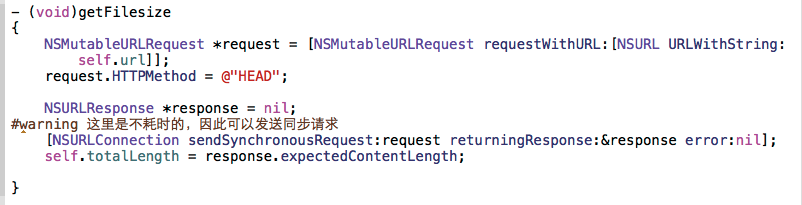
以上就是本文的全部內容,希望對大家的學習有所幫助,也希望大家多多支持本站。

相關文章
+